
1. Производ је готовview
The JENSEN J1CA9 is a single DIN digital multimedia receiver featuring an extra-large 9-inch LCD high-resolution adjustable touchscreen display. It offers seamless integration with Apple CarPlay and Android Auto, providing a smart and safe way to use your smartphone's features while driving. Key functionalities include Bluetooth hands-free calling and music streaming, backup camera input, and USB playback with fast charging capabilities.

Image: JENSEN J1CA9 9-inch Touchscreen Car Stereo Receiver. This image displays the main unit with its large 9-inch screen.
2. Кључне карактеристике
- 9-inch Touch Screen LCD (1024 x 600): High-resolution, responsive, and adjustable display.
- Аппле ЦарПлаи: Smarter, safer in-vehicle interface for iPhone, with Siri voice control for navigation, calls, texts, and music.
- Андроид Ауто: Designed for safety, minimizing distractions with intuitive voice-controlled interface for navigation and media.
- Уграђени Блуетоотх: Hands-free calling with phonebook support and music streaming.
- Улаз за камеру за вожњу уназад: RCA input for compatible backup cameras (BUCAM100J recommended, sold separately).
- УСБ улази: Фронт 2.1 Amp and Rear 1.5 Amp for fast charging and playback.
- Прилагођавање звука: 3 Pairs of 4V RCA preamp outputs (Front/Rear/Subwoofer), 8 EQ presets (Default, Custom, Classic, Rock, Jazz, Electric, Pop, Soft), and Time Alignment capabilities.
- Излазна снага: 240 Watts (60 W x 4) MOSFET.

Слика: Прекоview of JENSEN J1CA9 features including 240 Watts power, 9-inch touchscreen, USB, Rear Camera Input, 4 Volt Preamp Outputs, and no CD/DVD player.
3. Подешавање и инсталација
3.1 Физичка инсталација
The J1CA9 is designed for single DIN installation. Ensure your vehicle's dash opening is compatible. The adjustable touchscreen allows for flexible positioning to optimize viewинг и приступ.

Слика: Позади view of the JENSEN J1CA9 showing connections for CarPlay & Android Auto Input, Power Harness, Radio Antenna, Input/Output Harness, and External Microphone.
3.2 Подешавање екрана
The 9-inch screen offers multiple adjustment options to suit your vehicle's dashboard and your viewing preference:
- Screen angle can pivot side to side.
- Screen height adjusts up to 1.5 inches down.
- Screen depth can be adjusted from 0 to 0.5 to 1 inch forward.
- Screen tilts forward and back.

Image: Diagrams illustrating the various screen adjustment options for the JENSEN J1CA9, including pivot, height, depth, and tilt.
3.3 Повезивање периферних уређаја
Connect your power harness, radio antenna, and any input/output harnesses as per your vehicle's wiring diagram. An external microphone is included for optimal hands-free calling.
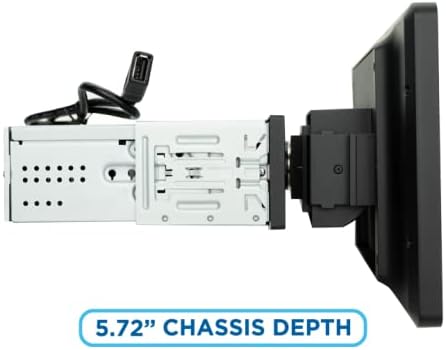
Image: Close-up of a USB port located on the side of the JENSEN J1CA9 screen, labeled 'USB'.
4. Упутство за употребу
4.1 Apple CarPlay и Android Auto
Connect your iPhone or Android smartphone via USB to activate Apple CarPlay or Android Auto. The system will mirror your phone's compatible apps onto the 9-inch display, allowing for safe and intuitive control of navigation, music, messaging, and calls.

Image: Graphic indicating 'Certified' status and 'Works with Apple CarPlay' and 'androidauto' logos, emphasizing official compatibility.
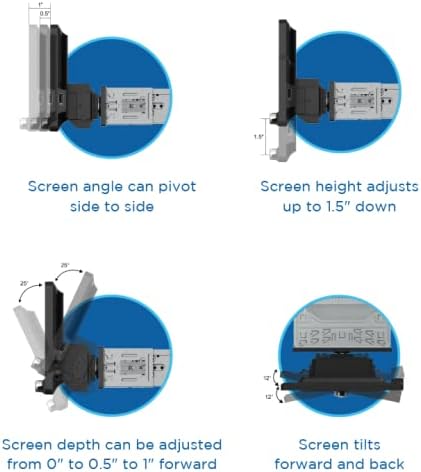
Image: The JENSEN J1CA9 display showing a split screen with Apple CarPlay navigation on one side and music playback on the other.
4.2 Bluetooth повезивање
Pair your Bluetooth-enabled device with the J1CA9 for hands-free calling and wireless audio streaming. Access your phonebook and manage calls directly from the touchscreen or via voice commands.
4.3 USB Playback and Charging
Utilize the front (2.1 Amp) and rear (1.5 Amp) USB inputs for playing media files from USB drives or for fast charging your compatible devices.
4.4 Аудио подешавања
Adjust your audio experience using the built-in 8-band graphic equalizer with various presets. The Time Alignment feature allows you to digitally delay audio from specific speakers to ensure sound reaches your ears simultaneously, optimizing the soundstage.
5. Одржавање
To ensure optimal performance and longevity of your JENSEN J1CA9, follow these maintenance guidelines:
- Чишћење екрана: Користите меку крпу која не оставља влакна да нежно обришете екран осетљив на додир. За тврдокорне мрље, благо обришитеampОбришите крпу водом или средством за чишћење екрана. Избегавајте јаке хемикалије или абразивне материјале.
- Ажурирања софтвера: Periodically check the Jensenmobile.com webсајт за сва доступна ажурирања фирмвера како бисте били сигурни да ваш уређај има најновије функције и исправке грешака.
- Провере везе: Ensure all cables (power, USB, camera, etc.) are securely connected to prevent intermittent issues.
- Контрола температуре: Avoid exposing the unit to extreme temperatures for extended periods, as this can affect performance and lifespan.
КСНУМКС. Решавање проблема
If you encounter issues with your JENSEN J1CA9, refer to the following common troubleshooting steps:
- Нема напајања: Check the vehicle's fuse box and ensure the power harness is correctly connected. Verify the vehicle's ignition is on.
- Нема звука: Check speaker connections, volume levels, and mute settings. Ensure the correct audio source is selected. If using Apple CarPlay/Android Auto, verify phone volume and app settings.
- Проблеми са Блуетоотх упаривањем: Ensure Bluetooth is enabled on both the J1CA9 and your smartphone. Delete previous pairings on both devices and attempt to re-pair.
- Apple CarPlay/Android Auto Not Launching: Ensure your phone is connected via a quality USB cable. Check your phone's settings for CarPlay/Android Auto permissions. Restart both the stereo and your phone.
- Екран осетљив на додир не реагује: Perform a soft reset of the unit (refer to the full user manual for specific instructions). Ensure the screen is clean and free of debris.
For more detailed troubleshooting or persistent issues, please contact Jensen customer support or visit Jensenmobile.com.
7. Спецификације
| Феатуре | Спецификација |
|---|---|
| Димензије производа | 9 x 12 x 9 инча (9"Д x 12"Ш x 9"В) |
| Тежина артикла | 5.99 фунти |
| Број модела ставке | Ј1ЦА9 |
| Дисплаи Типе | 9-inch Touchscreen LCD (1024 x 600) |
| Цоннецтивити Тецхнологиес | Блуетоотх, УСБ |
| Тип контролера | Android, Apple CarPlay |
| Режим аудио излаза | Стерео (конфигурација канала за 2.1 сурроунд звук) |
| Излазна снага | 240 Watts (60 W x 4) MOSFET |
| УСБ пуњење | Фронт 2.1 Amp / Rear 1.5 Amp Брзо пуњење |
| Преamp Излази | 3 Pairs of 4V RCA (Front/Rear/Subwoofer) |
| ЕК Пресетс | 8 (Default, Custom, Classic, Rock, Jazz, Electric, Pop, Soft) |
8. Гаранција и подршка
The JENSEN J1CA9 comes with a 3 година гаранције when you register your product on Jensenmobile.com. A 2-year standard warranty applies if not registered. For technical support, product registration, or warranty claims, please visit the official Jensen webсајту или контактирајте њихову корисничку службу.
9. Видео снимци производа
Jensen J1CA9 Product Overview
Video: This official product video provides a detailed overview of the JENSEN J1CA9 9-inch Touchscreen Media Receiver, highlighting its key features and functionalities.
8-inch Certified Apple CarPlay Android Auto Wired Stereo
Video: This video demonstrates features of a Jensen 8-inch certified Apple CarPlay and Android Auto wired stereo. While the screen size differs, many operational aspects are similar to the J1CA9.