
1. Увод
Thank you for choosing the Caliber HPG318DAB Portable DAB+/FM Radio. This device offers high-quality digital and analog radio reception, a compact design for portability, and convenient alarm functions. This manual provides essential information for the safe and efficient use of your radio.
2. Безбедносне информације
- Пажљиво прочитајте сва упутства пре употребе и сачувајте их за будуће потребе.
- Не излажите уређај киши, влази или екстремним температурама.
- Избегавајте постављање уређаја у близини извора топлоте или на директном сунцу.
- Не растављајте и не покушавајте сами да поправите уређај. Све сервисирање препустите квалификованом особљу.
- Користите само приложени кабл за пуњење и адаптер.
- Чувати ван домашаја деце.
3. Садржај пакета
Уверите се да су све ставке присутне у пакету:
- Caliber HPG318DAB Portable DAB+/FM Radio Unit
- Упутство за употребу
- УСБ кабл за пуњење
- Повер Адаптер
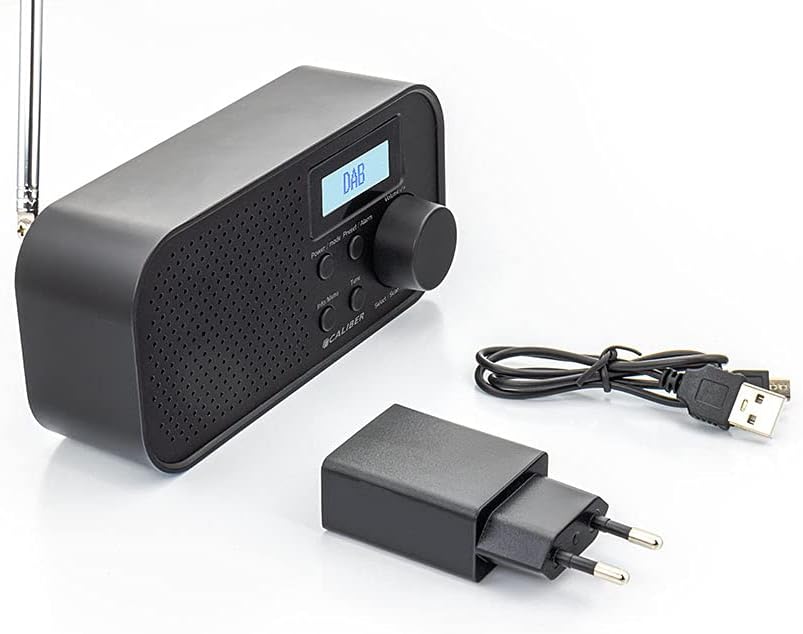
Image: Caliber HPG318DAB radio unit, USB charging cable, and power adapter.
4. Производ је готовview
4.1 Контроле на предњој плочи
Слика: Фронт view of the Caliber HPG318DAB radio, highlighting the LCD screen, speaker grille, and control buttons.
- ЛЦД екран: Displays station information, time, and menu options.
- Дугме за напајање / режим рада: Turns the radio on/off and switches between DAB+ and FM modes.
- Menu/Info Button: Accesses menu settings and displays additional information.
- Preset/Alarm Button: Saves/recalls preset stations and sets alarm functions.
- Select/Scan Button: Confirms selections and initiates station scans.
- Дугме за одлагање: Привремено утишава аларм.
- Дугме за јачину звука: Подешава јачину звука.
- Решетка звучника: Аудио излаз.
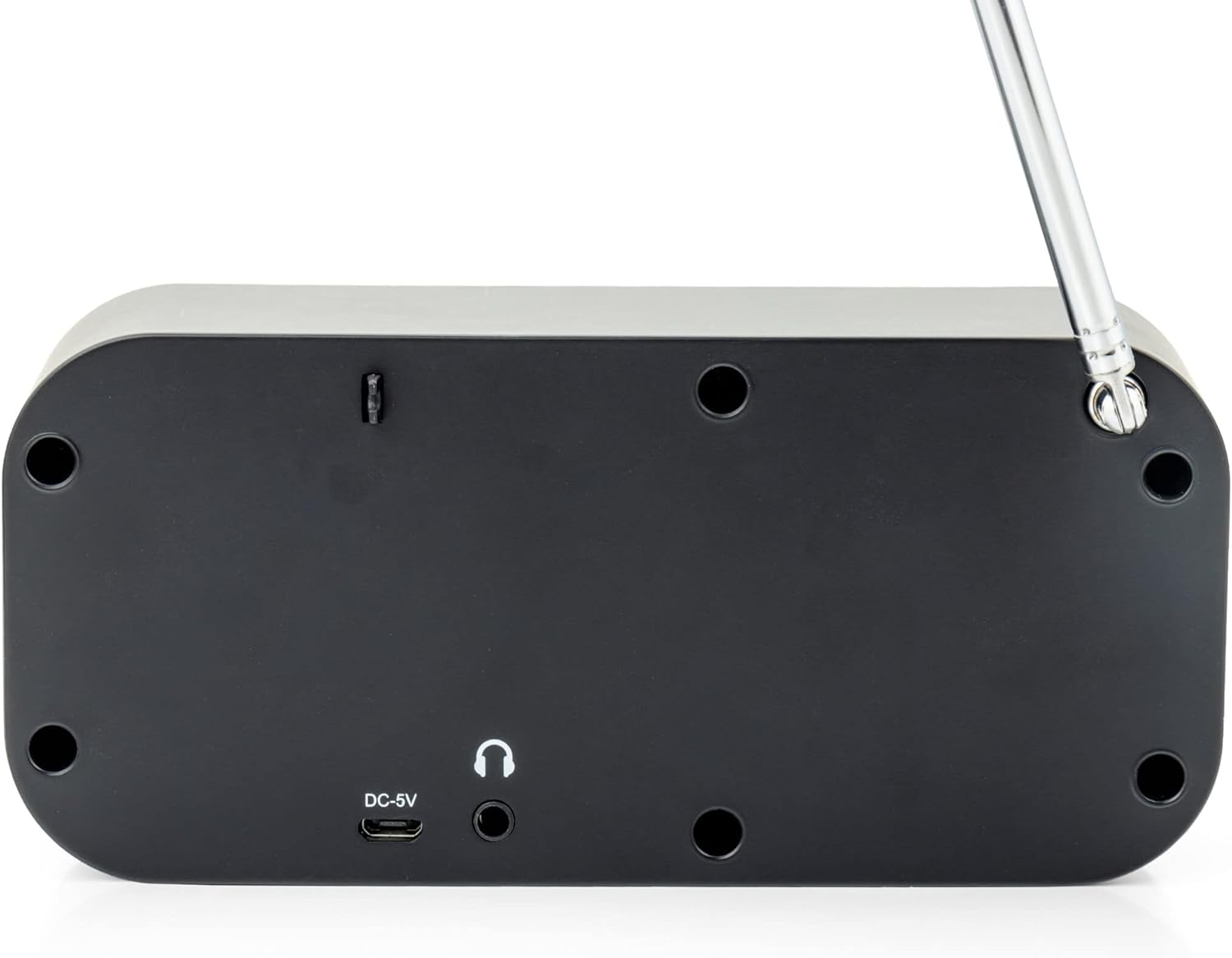
4.2 Прикључци задње плоче

Слика: Позади view of the Caliber HPG318DAB radio, showing the DC-5V charging port, 3.5mm headphone jack, and telescopic antenna.
- DC-5V Input: Connect the USB charging cable here.
- 3.5 мм прикључак за слушалице: For connecting headphones or earphones.
- Телескопска антена: Продужите за оптималан радио пријем.
5. Подешавање
5.1 Пуњење батерије
The Caliber HPG318DAB features a built-in rechargeable battery, providing up to 8 hours of playback on a full charge.
- Connect the small end of the provided USB charging cable to the ДЦ-5В улаз порт на задњој страни радија.
- Connect the larger end of the USB cable to the provided power adapter.
- Укључите адаптер за напајање у стандардну зидну утичницу.
- The charging indicator on the LCD screen will show the charging status. Once fully charged, the indicator will change.
Note: It is recommended to fully charge the battery before first use.
5.2 Подешавање антене
For optimal radio reception, fully extend the telescopic antenna located on the rear of the device. Adjust its position to improve signal strength if reception is poor.
6. Упутство за употребу
6.1 Укључивање/искључивање и избор режима
- Да укључим радио ON, притисните и држите Повер/Моде дугме.
- Да укључим радио ОФФ, притисните и држите Повер/Моде дугме поново.
- За пребацивање између ДАБ+ и FM modes, short press the Повер/Моде button while the radio is on. The current mode will be displayed on the LCD screen.
6.2 Рад са DAB+ радиом
- Switch to DAB+ mode using the Повер/Моде дугме.
- The radio will automatically perform a full scan for available DAB+ stations upon first use or if no stations are found. To initiate a manual scan, press the Мени/Информације button, navigate to 'Full Scan', and press Изаберите/Скенирајте.
- Користите Волуме Квачица to scroll through the list of available stations. Press Изаберите/Скенирајте да бисте изабрали станицу.
- To save a station as a preset (up to 10 presets): While listening to a station, press and hold the Preset/Alarm дугме. Користите Волуме Квачица да бисте изабрали број предефинисане поставке (1-10), а затим притисните Изаберите/Скенирајте потврдити.
- To recall a preset station: Short press the Preset/Alarm дугме, користите Волуме Квачица to select the desired preset number, then press Изаберите/Скенирајте.
- Притисните тастер Мени/Информације дугме за view additional information (e.g., program type, signal strength, time) provided by Radio Data System (RDS).
Рад са 6.3 FM радиом
- Пребаците се на FM режим помоћу Повер/Моде дугме.
- To automatically scan for stations: Press and hold the Изаберите/Скенирајте button. The radio will scan and stop at the next strong station.
- To manually tune: Rotate the Волуме Квачица to adjust the frequency in small increments.
- To save a station as a preset (up to 10 presets): While listening to a station, press and hold the Preset/Alarm дугме. Користите Волуме Квачица да бисте изабрали број предефинисане поставке (1-10), а затим притисните Изаберите/Скенирајте потврдити.
- To recall a preset station: Short press the Preset/Alarm дугме, користите Волуме Квачица to select the desired preset number, then press Изаберите/Скенирајте.
- Притисните тастер Мени/Информације дугме за view additional information (e.g., station name, program type) provided by Radio Data System (RDS).
6.4 Контрола јачине звука
Окрените велики Волуме Квачица у смеру казаљке на сату да бисте повећали јачину звука и у смеру супротном од казаљке на сату да бисте је смањили.
6.5 Употреба слушалица
Connect any standard 3.5mm headphones or earphones to the 3.5 мм прикључак за слушалице on the rear of the radio for private listening. The internal speaker will automatically mute when headphones are connected.
6.6 функција аларма
The radio includes alarm clock and sleep timer functions.
Подешавање будилника:
- Притисните и држите Preset/Alarm button until the alarm setup menu appears.
- Користите Волуме Квачица to navigate through options like Alarm 1, Alarm 2, Time, Source (Buzzer/DAB/FM), and Volume. Press Изаберите/Скенирајте да бисте потврдили свако подешавање.
- Set the desired alarm time, choose your preferred alarm source (buzzer, DAB+ station, or FM station), and set the alarm volume.
- Ensure the alarm is set to 'On' in the menu.
Коришћење функције одлагања:
Када се огласи аларм, притисните Одложи button to temporarily pause the alarm for a short period (e.g., 9 minutes). The alarm will sound again after the snooze period.
Подешавање тајмера за спавање:
- Притисните тастер Мени/Информације дугме.
- Navigate to the 'Sleep' option using the Волуме Квачица и притисните Изаберите/Скенирајте.
- Select the desired sleep timer duration (e.g., 15, 30, 45, 60, 90 minutes, or Off). The radio will automatically turn off after the selected time.
7. Одржавање
7.1 Чишћење
To clean the radio, use a soft, dry cloth. Do not use abrasive cleaners, waxes, or solvents as they may damage the finish.
7.2 Складиштење
When not in use for extended periods, store the radio in a cool, dry place away from direct sunlight and extreme temperatures. Ensure the battery is partially charged before storage to maintain its lifespan.
7.3 Одржавање батерије
To prolong the life of the built-in Lithium-ion battery, avoid fully discharging it frequently. Charge the radio regularly, even if not in constant use.
КСНУМКС. Решавање проблема
| Проблем | Могући узрок | Решење |
|---|---|---|
| Радио се не укључује. | Батерија је празна. | Connect the radio to power using the USB cable and adapter to charge the battery. |
| Слаб радио пријем (DAB+/FM). | Антена није издужена или је сигнал лош. | Fully extend the telescopic antenna and adjust its position. Try moving the radio to a different location. |
| Нема звука. | Јачина звука је прениска или су повезане слушалице. | Повећајте јачину звука помоћу Волуме Квачица. Disconnect headphones if you want sound from the speaker. |
| Аларм се не оглашава. | Аларм није правилно подешен или је искључен. | Check alarm settings (time, source, volume, 'On' status) in the menu. |
9. Спецификације
| Феатуре | Спецификација |
|---|---|
| Број модела | HPG318DAB |
| Димензије (Д к Ш к В) | 15 к 4 к 6.5 цм |
| Тежина | 255 г |
| Извор напајања | Battery-Powered (1 Lithium-ion battery required) |
| Трајање батерије | До 8 сати |
| Подржани радио опсези | ДАБ+, ФМ |
| Технологија повезивања | AUX (for headphones), USB (for charging) |
| Maximum Speaker Output | 25 Ватт |
| Материјал | Пластика |
| Боја | Црно |
| Посебне карактеристике | Portable, Alarm Function, RDS, LCD Screen |
10. Гаранција и подршка
For warranty information and customer support, please refer to the documentation provided with your purchase or visit the official Caliber webсајт. Сачувајте доказ о куповини за евентуалне рекламације по гаранцији.