
1. Увод
This manual provides detailed instructions for the installation, configuration, and operation of your TONTON Wireless 3MP Outdoor Security Camera, model C2019AN3M-W. Please read this manual thoroughly before using the product to ensure proper functionality and safety.
2. Карактеристике производа
- 2K (3MP) резолуција: Снима јасан и детаљан видео записtage.
- 2.4GHz WiFi повезивање: Operates independently on 2.4GHz WiFi networks.
- Ноћни вид у боји: Features three IR lights and three spotlights for enhanced night vision, including full-color mode.
- PIR & Motion Dual Detection: Reduces false alarms with combined Passive Infrared and motion detection.
- Spotlight and Siren: Activates a smart floodlight and siren upon detecting suspicious activity.
- Двосмерни аудио: Уграђени микрофон и звучник за комуникацију у реалном времену.
- Издржљив дизајн: IP66 weatherproof metal casing for outdoor use.
- Флексибилна инсталација: 360-degree adjustable bracket and 110-degree viewугао уласка.
- Локално и складиштење у облаку: Supports C10 Micro SD card (8-128GB, FAT32) and secured cloud storage.
- Компатибилност: Works as a standalone camera or integrates with Tonton Wireless NVR Systems.
- Интеграција паметне куће: Compatible with Amazon Alexa.
3. Садржај пакета
Молимо вас да проверите садржај пакета по пријему. Ако неке ставке недостају или су оштећене, контактирајте корисничку подршку.
- TONTON Wireless 3MP Outdoor Security Camera (Model C2019AN3M-W)
- Адаптер за напајање (12В 1А)
- Монтажни завртњи и анкери
- Кориснички приручник (овај документ)
4. Водич за подешавање
4.1 Физичка инсталација
The camera features a 360-degree adjustable bracket for flexible positioning. Ensure the camera is mounted in a location that provides optimal viewing coverage and a stable Wi-Fi signal.
- Choose a suitable mounting location, either indoors or outdoors, ensuring it is within range of your 2.4GHz Wi-Fi router.
- Use the provided mounting screws and anchors to securely attach the camera bracket to the desired surface (wall or ceiling).
- Adjust the camera's angle using the 360-degree rotatable bracket to achieve the desired viewing area. The camera offers a 110-degree viewугао уласка.
- Connect the camera to the power adapter (12V 1A) and plug it into a power outlet.

Figure 1: Camera Components and Features. This image illustrates the various parts of the camera, including its antenna, weatherproof rating, lighting, lens, sensors, audio components, storage slot, network port, reset button, and power input.
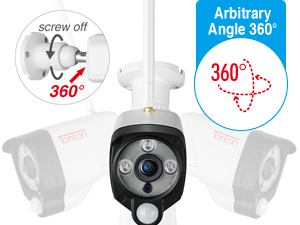

Figure 2: Adjustable Bracket and Wide Viewing Angle. The camera's bracket allows for 360-degree rotation, and it captures a 110-degree field of view.
4.2 Инсталација апликације и упаривање камере
The camera operates with the EseeCloud app, available for smartphones and tablets.
- Download the "EseeCloud" app from the App Store (iOS) or Google Play Store (Android).
- Региструјте се за налог и пријавите се.
- Follow the in-app instructions to add your camera. Ensure your smartphone is connected to a 2.4GHz Wi-Fi network during the pairing process.
- The camera can be used standalone with a Micro SD card or integrated with a Tonton Wireless NVR System.

Figure 3: Easy Setup Guide. This image illustrates the three main steps for setting up the camera: connecting to power and Wi-Fi, downloading the EseeCloud app, and viewпренос уживо.

Figure 4: Wi-Fi Connection. The camera connects wirelessly to your 2.4GHz Wi-Fi network.
5. Упутство за употребу
5.1 Уживо View и двосмерни аудио
- Open the EseeCloud app to access the live video feed from your camera.
- Use the microphone icon in the app to enable two-way audio. You can speak through your phone, and the sound will be projected from the camera's speaker. Similarly, you can hear audio from the camera's built-in microphone.

Figure 5: Real-Time Two-Way Audio. This image demonstrates using the EseeCloud app for live viewing and communicating through the camera.
5.2 Режими ноћног вида
Камера нуди више опција за ноћно гледање:
- Инфрацрвени (ИЦ) ноћни вид: Provides clear black and white video up to 30 meters (100 feet) using three IR lights.
- Режим пуне боје: Activates three spotlights to provide full-color video footagе ноћу.
- Смарт Режим: The camera automatically switches to color night vision when motion is detected, otherwise it uses IR night vision.

Figure 6: Enhanced Color Night Vision. This image highlights the camera's ability to provide clear, colorful video even in low-light conditions using its spotlights and IR LEDs.

Figure 7: Smart Night Vision. This image demonstrates the camera's smart night vision capabilities, providing clear visibility in dark environments.
5.3 Детекција покрета и упозорења
The camera utilizes both PIR (Passive Infrared) and motion detection to minimize false alarms. When suspicious activity is detected:
- The smart floodlight will illuminate the area.
- A siren can be activated to deter intruders.
- You will receive push notifications via the EseeCloud app.
- Email warnings with snapshots can be sent to your registered email address.

Figure 8: AI Human Intelligent Detection. This image illustrates how the camera detects human motion and sends an alert to your phone.

Figure 9: Effective Warning System. The camera's spotlight and siren can be activated to deter unwanted visitors.

Figure 10: AI Human Motion Detection. The camera intelligently detects human shapes to reduce false alarms.
5.4 Снимање и складиштење видеа
The camera supports continuous recording or motion-activated recording. Video footagе се може чувати на два начина:
- Мицро СД картица: Insert a C10 Micro SD card (8-128GB, FAT32 format) into the camera's built-in slot for local storage.
- Цлоуд Стораге: Secure cloud storage options are available through the EseeCloud app (subscription may be required).

Figure 11: Local Storage and Multi-Device Viewing. The camera supports up to 128GB Micro SD card for continuous recording and can be viewed on multiple devices.

Figure 12: H.265+ Video Compression. This image highlights the efficiency of H.265+ compression, which optimizes storage and bandwidth.
5.5 Интеграција паметног дома
The camera is compatible with Amazon Alexa. You can use voice commands to view са камере на компатибилним уређајима са омогућеном Алексом.

Figure 13: Alexa Integration. The camera can be controlled and viewed through Amazon Alexa devices.
6. Одржавање
- Чишћење: Нежно обришите објектив и тело камере меком крпомamp тканина. Избегавајте употребу јаких хемикалија или абразивних средстава за чишћење.
- Ажурирања фирмвера: Regularly check the EseeCloud app for available firmware updates to ensure optimal performance and security.
- Напајање: Ensure the camera is connected to the specified 12V 1A power adapter.
- Управљање СД картицама: Ако користите Micro SD картицу, периодично је поновноview и направите резервну копију важних ствариtage. Format the card as needed to maintain performance.
КСНУМКС. Решавање проблема
| Проблем | Могуће решење |
|---|---|
| Камера се не повезује на Ви-Фи |
|
| Чести лажни аларми |
|
| No video recording to SD card |
|
| Лош квалитет ноћног вида |
|
8. Спецификације
| Феатуре | Детаљ |
|---|---|
| Број модела | C2019AN3M-W |
| Резолуција | 3МП (2К) |
| Повезивање | 2.4 GHz Wi-Fi (IEEE 802.11b/g/n) |
| Ноћни вид | До 30 метара (100 стопе) |
| Тип ноћног вида | IR, Full Color, Smart Mode |
| Детекција покрета | PIR & Motion Dual Detection |
| Аудио | Двосмерни аудио (уграђени микрофон и звучник) |
| Опције складиштења | Micro SD Card (8-128GB, FAT32, Class 10), Cloud Storage |
| Оцена отпорности на временске услове | ИП66 |
| Viewинг Англе | 110 степени |
| Извор напајања | Corded Electric 12V 1A Power Adapter |
| Радна температура | -20°Ц до 60°Ц (-4°Ф до 140°Ф) |
| Димензије | 22.2 к 11.99 к 9.88 цм |
| Тежина | 730 г |
| Видео Цомпрессион | Х.265 + |
| Компатибилни уређаји | Smartphone, Tablet, NVR Recorder |
| Тип контролера | APP/ NVR Recorder |

Figure 14: All-Weather Durability. The camera's IP66 rating ensures reliable operation in diverse weather conditions.
9. Гаранција и подршка
гаранција: The product comes with a 1-year manufacturer's warranty. This warranty typically covers defects in materials and workmanship under normal use. Please refer to the warranty card included with your product for full terms and conditions.
Корисничка подршка: For technical assistance, troubleshooting, or warranty claims, please contact TONTON customer support. You can find contact information on the official TONTON website or through the EseeCloud app.
Такође можете посетити TONTON Store on Amazon за више информација и ресурса за подршку.

Слика 15: Гаранција и подршка прекоview. This image summarizes key support benefits including warranty, online support, and money-back guarantee.

Figure 16: Scan for Support. A QR code is provided for quick access to support resources.