
Bluesound N330BLKUNV
Bluesound Powernode Wireless Multi-Room High Resolution Music Streaming Ampлифиер
Model: N330BLKUNV | Brand: Bluesound
Увод
The Bluesound Powernode is a high-fidelity amplifier designed for the streaming era, integrating powerful amplification with multi-room music streaming capabilities. This manual provides essential information for setting up, operating, maintaining, and troubleshooting your Powernode to ensure optimal performance and enjoyment of your audio system.
Сетуп
Follow these steps to set up your Bluesound Powernode:
- Распакивање и постављање: Carefully remove the Powernode from its packaging. Place the unit on a stable, flat surface with adequate ventilation. Ensure it is away from direct sunlight, heat sources, and moisture.

Фронт view of the Bluesound Powernode, showcasing its compact design and top panel controls.
- Повезивање звучника: Connect your passive speakers to the speaker terminals on the rear of the Powernode. Ensure correct polarity (+ to + and - to -) for both left and right channels. The Powernode features 2 x 80 watts of HybridDigital ampосвешћење.

The Powernode positioned next to a bookshelf speaker in a home environment, demonstrating its integration into a sound system.
- Повезивање на напајање: Plug the provided power cable into the Powernode's AC input and then into a wall outlet.
- Мрежна конекција:
- For a wired connection, connect an Ethernet cable from your router to the LAN port on the Powernode.
- For a wireless connection, the Powernode supports dual-band Wi-Fi. You will configure this using the BluOS Controller app.
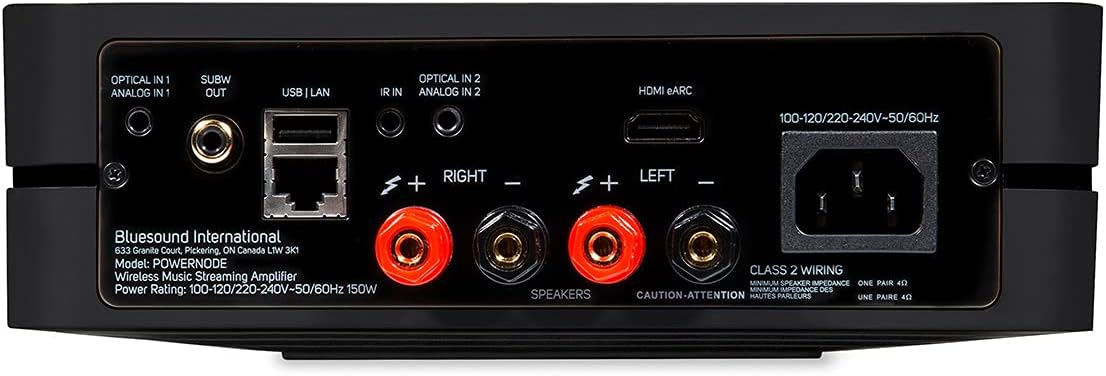
Детаљно view of the Powernode's rear panel, highlighting the speaker terminals, HDMI eARC, optical, analog, USB, and Ethernet ports.
- BluOS Controller App Installation: Download the BluOS Controller app from your device's app store (iOS, Android, Windows, macOS). This app is essential for controlling your Powernode and accessing streaming services.
- Почетно подешавање путем апликације: Open the BluOS Controller app and follow the on-screen instructions to connect to your Powernode. The app will guide you through network configuration and initial settings.

Screenshots of the BluOS Controller app on a smartphone, illustrating the setup and music playback interface.
Производ је завршенview Видео
An official product video from Bluesound, providing a visual overview of the Powernode's features and capabilities.
Упутство за употребу
Апликација за контролу БлуОС-а
The BluOS Controller app is the primary interface for operating your Powernode. It allows you to:
- Browse and play music from various streaming services (e.g., Tidal, Spotify, Qobuz).
- Access your personal local music library.
- Control volume and playback.
- Manage multi-room audio playback with other BluOS-enabled devices.
- Configure settings and updates for your Powernode.
Пхисицал Цонтролс
The Powernode features a top-panel touch control interface with built-in proximity sensing for basic playback control:
- Пусти/паузирај: Додирните централно дугме.
- Контрола јачине звука: Swipe along the touch bar or use the dedicated volume buttons.
- Трацк Скип: Use the left/right arrow buttons.
- Пресетс: Access saved presets for quick access to favorite stations or playlists.

Top panel of the Powernode with illuminated touch controls for playback and volume adjustment.
Опције повезивања
- HDMI (ARC & eARC): Connect your TV to the HDMI eARC port for high-quality audio from your television.
- Bluetooth aptX HD: Stream audio wirelessly from your Bluetooth-enabled devices with high-resolution support.
- Излаз за слушалице: Connect wired headphones to the front 3.5mm jack for private listening.
- Излаз субвоофера: Connect an external powered subwoofer for enhanced bass performance.
- АирПлаи 2: Stream audio from Apple devices and integrate the Powernode into an Apple HomeKit ecosystem for synchronized multi-room playback.
- Контрола гласом: The Powernode is compatible with Amazon Alexa. Enable the BluVoice skill in the Alexa app for hands-free control.
Одржавање
To ensure the longevity and optimal performance of your Bluesound Powernode, follow these maintenance guidelines:
- Чишћење: Use a soft, dry cloth to clean the exterior of the unit. Avoid using abrasive cleaners, waxes, or solvents as they may damage the finish.
- вентилација: Уверите се да вентилациони отвори на уређају нису блокирани. Правилан проток ваздуха је кључан за спречавање прегревања.
- Ажурирања софтвера: Regularly check for and install software updates via the BluOS Controller app. These updates often include performance improvements, new features, and bug fixes.
- Циклус напајања: If the unit becomes unresponsive, disconnect the power cable from the wall outlet, wait for 30 seconds, and then reconnect it.
Решавање проблема
If you encounter issues with your Powernode, refer to the following common troubleshooting steps:
| Проблем | Могуће решење |
|---|---|
| Нема звука из звучника. |
|
| Powernode not connecting to network. |
|
| BluOS app cannot find Powernode. |
|
| Poor audio quality or distortion. |
|
For more detailed troubleshooting or persistent issues, please refer to the official Bluesound support webсајту или контактирајте њихову корисничку службу.
Спецификације
- Модел: Н330БЛКУНВ
- Ampослобођење: 2 x 80 Watts HybridDigital™
- процесор: Четворојезгарни 1.8 GHz ARM Cortex A53
- ДАЦ: 32-bit/384kHz Premium DAC Design
- Повезивање: Dual-band Wi-Fi, Gigabit Ethernet, 2-way Bluetooth aptX HD, HDMI (ARC & eARC), Optical, Analog, USB
- Димензије (Ш к В к Д): 8.66 к 2.76 к 7.48 инча (220 к 70 к 190 мм)
- Тежина: 6.98 фунте (3.17 кг)
- Подржане Интернет услуге: Access to internet radio stations, cloud music services, and personal local music library.
- Метод контроле: BluOS Controller App (iOS, Android, desktop), Top-panel touch controls, IR input, Voice (Amazon Alexa).
Гаранција и подршка
Your Bluesound Powernode comes with a manufacturer's warranty. Please refer to the included Quick Start Guide or visit the official Bluesound webсајт за детаљне информације о гаранцији и услове.
For technical support, product registration, or to access frequently asked questions, please visit the Bluesound support portal:
The original packaging includes a Quick Start Guide to assist with initial setup.
Ask a question about this manual
Ask about setup, troubleshooting, compatibility, parts, safety, or missing instructions. Manuals+ will review the question and use this page’s manual context to help answer it.