
Apevia ATX-PM850W
Apevia Premier 850W Semi-Modular Gaming Power Supply User Manual
Model: ATX-PM850W
Увод
This manual provides comprehensive instructions for the installation, operation, and maintenance of your Apevia Premier 850W Semi-Modular Gaming Power Supply. Designed for high performance and reliability, this 80+ Gold certified power supply features active PFC, a semi-modular cable design, and customizable RGB lighting modes. Please read this manual thoroughly before installation to ensure proper setup and safe operation.
Безбедносне информације
Увек се придржавајте следећих мера предострожности како бисте спречили повреде или оштећење опреме:
- Пре инсталације или одржавања уверите се да је напајање искључено из главне утичнице.
- Не отварајте напајање цasinг. Висока запреминаtagсу присутни унутра, чак и када су искључени.
- Инсталирајте напајање у добро проветреном простору како бисте спречили прегревање.
- Користите само каблове који су испоручени уз напајање.
- Избегавајте излагање напајања влази или екстремним температурама.
- This power supply automatically switches between 110V and 230V; no manual toggle switch is required.
Садржај пакета
Проверите да ли су све ставке присутне у пакету:
- Apevia Premier 850W Semi-Modular Power Supply (ATX-PM850W)
- Кабл за напајање наизменичном струјом
- Modular Cables (PCI-E, SATA, Peripheral, Floppy)
- Монтажни завртњи
- Кориснички приручник (овај документ)

Image: Apevia Premier 850W Power Supply, packaging, and included modular cables and power cord.
Карактеристике
- 850W континуиране снаге: Provides stable and reliable power output for high-performance gaming systems.
- 80 ПЛУС Голд Цертифиед: Achieves 90%+ efficiency at 20%, 50%, and 100% load levels, reducing heat generation and electricity consumption.
- Полумодуларни дизајн: Allows for improved cable management by connecting only the necessary cables, reducing clutter and improving airflow within the PC case.
- Active PFC (Power Factor Correction): Boasts a 99% factor correction, enhancing performance and energy efficiency.
- 135mm RGB Fan: Features an auto-thermally controlled fan with 366 selectable RGB lighting modes, adding aesthetic appeal and efficient cooling. The fan speed adjusts based on the power supply's temperature.
- Заштита од тешког терета: Includes Short-Circuit Protection (SCP), Over-Voltage Protection (OVP), Over-Power Protection (OPP), and Under-Voltage Protection (UVP) to safeguard your components.
- Double Forward Converter Design: Enhances stability and efficiency.
- Широка компатибилност: Supports ATX 12V 2.3 Version, Dual/Quad Core CPUs, SLI/Crossfire configurations, and Haswell processors.
- Japanese Capacitor: Utilizes a large Japanese capacitor for enhanced reliability and lifespan.

Image: Visual representation of the power supply's 80+ Gold efficiency and semi-modular cable benefits.
Подешавање и инсталација
Follow these steps to properly install your Apevia Premier Power Supply:
- Припремите свој систем: Ensure your computer is completely powered off and unplugged from the wall outlet. Open your PC case.
- Уклоните стари напајач (ако је применљиво): Искључите све каблове из старог напајања и извадите га из кућишта.
- Монтирајте нови PSU: Carefully place the Apevia Premier 850W PSU into the power supply bay of your PC case. Secure it with the provided mounting screws.
- Повежите основне каблове:
- 20/24-pin Main Power Connector: Connect the main power cable to your motherboard. This connector can be split into 20+4 pins for motherboards requiring a 20-pin connector.
- P8 (4+4P) ESP 12V CPU Connector: Connect this to your motherboard's CPU power input. This 8-pin connector can be split into two 4-pin connectors for motherboards requiring a 4-pin power connector.
- Повежите модуларне каблове: Identify the necessary cables for your components (graphics card, SSDs/HDDs, optical drives) and plug them into the corresponding modular ports on the power supply.
- PCI-E (6+2 pin) Connectors: Use these for your graphics card(s). The 8-pin PCI-E GPU connector can be split into a 6+2 pin configuration for graphics cards requiring a 6-pin power connector.
- САТА конектори: For SATA hard drives, SSDs, and optical drives.
- Периферни (Molex) конектори: For older components or case fans.
- Floppy Connector: For legacy floppy drives or certain fan controllers.
- Управљање кабловима: Route cables neatly to improve airflow and aesthetics. Utilize the semi-modular design to only use cables you need.
- Затворите кућиште и укључите напајање: Once all connections are secure, close your PC case. Connect the AC power cord to the power supply and then to a wall outlet. Flip the power switch on the PSU to the 'ON' position.
Важна напомена:
The power supply will not power on simply by connecting the power cord to both the power supply and wall outlet. Ensure that all the power supply cables are properly connected to the PC components for it to power on.

Image: Detailed diagram illustrating the types and lengths of connectors included with the power supply, such as ATX Main, EPS 12V, PCI Express, SATA, Peripheral, and Floppy connectors.

Слика: Са стране view of the power supply unit, highlighting the modular ports for PCI-E and SATA/Peripheral cables, allowing for flexible cable management.
Упутство за употребу
Once installed and connected, the power supply operates automatically. The 135mm fan will adjust its speed based on the internal temperature to maintain optimal cooling.
РГБ контрола осветљења
The Apevia Premier Power Supply features 366 selectable RGB lighting modes for its fan. To change the lighting mode, locate the dedicated button on the back of the PSU (near the power switch). Press this button to cycle through various modes, including:
- РГБ циклус
- Breathe Cycle
- Режим дисања
- РГБ режим
- Solid Colors (Red, Blue, Green, Pink, Orange, White)
- Искључени режим
- И још много тога.
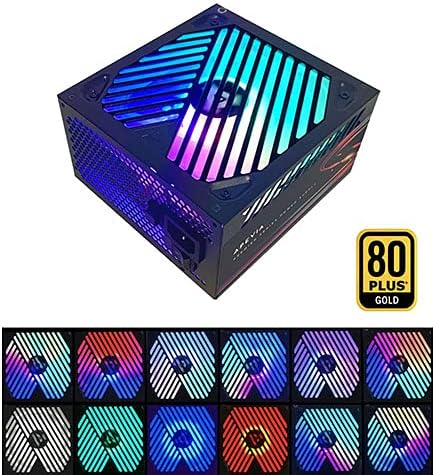
Image: The power supply unit showcasing its RGB fan with multiple color options, demonstrating the customizable lighting effects.
Одржавање
Да бисте осигурали дуготрајност и оптималне перформансе вашег напајања, размотрите следеће савете за одржавање:
- Држите отворе за вентилацију чистима: Periodically check that the power supply's intake and exhaust vents are free from dust and obstructions.
- Уклањање прашине: Use compressed air to gently clean dust from the fan and internal components of the power supply (only when the unit is unplugged and outside the PC case, if possible).
- Интегритет кабла: Ensure all connected cables are securely seated and not pinched or damaged.
Решавање проблема
If you encounter issues with your Apevia Premier Power Supply, refer to the following common problems and solutions:
| Проблем | Могући узрок | Решење |
|---|---|---|
| Power Supply does not turn on. | Not all cables are properly connected to PC components. | Ensure the 20/24-pin main power, 4+4-pin CPU, and any necessary PCI-E cables are fully seated in their respective ports on the motherboard and graphics card. The PSU requires a load to power on. |
| Систем се укључује, али се одмах искључује. | Overload, short circuit, or component malfunction. | Check for any loose connections or short circuits. Ensure your system's power requirements do not exceed the PSU's capacity. Test components individually if possible. |
| RGB fan not lighting up or cycling modes. | RGB control button not pressed or internal issue. | Press the RGB control button on the back of the PSU to cycle through modes. If still unresponsive, ensure the PSU is receiving power. |
| Unusual noise from the PSU fan. | Dust accumulation or fan bearing issue. | Clean the fan and vents. If the noise persists and is excessive, contact customer support. |
Спецификације
| Феатуре | Детаљ |
|---|---|
| Број модела | ATX-PM850W |
| Ватtage | 850 Ваттс |
| Сертификација ефикасности | 80 ПЛУС злато |
| Форм Фацтор | АТКС |
| Дизајн напајања | Семи-модулар |
| Метод хлађења | Air (135mm RGB Fan) |
| Димензије производа (Д к Ш к В) | 6.2 к 5.9 к 3.4 инча |
| Тежина артикла | 4.31 фунти |
| Улазни волtage | Auto-switching (110V/230V) |
| Output (Max) | +3.3V@20A, +5V@20A, +12V@83.3A, -12V@0.3A, +5Vsb@3A |
| Заштите | SCP, OVP, OPP, UVP |
Гаранција и подршка
For warranty information or technical support, please refer to the official Apevia webсајт или директно контактирајте њихову корисничку службу. Сачувајте рачун као доказ о куповини за потребе гаранције.
Можете посетити Apevia Store on Amazon за више информација о производу и ресурсе за подршку.
Ask a question about this manual
Ask about setup, troubleshooting, compatibility, parts, safety, or missing instructions. Manuals+ will review the question and use this page’s manual context to help answer it.