
Увод
Thank you for choosing the Newskill Manticore Gaming PC Case. This manual provides essential information for the proper installation, operation, and maintenance of your new PC chassis. Please read these instructions carefully before beginning the assembly process to ensure optimal performance and longevity of your components.
Производ је завршенview
The Newskill Manticore is an ATX mid-tower gaming PC case designed for high-performance builds. It features a mesh front panel for superior airflow, a tempered glass side panel to showcase your components, and four pre-installed 120mm ARGB fans for effective cooling and customizable aesthetics.
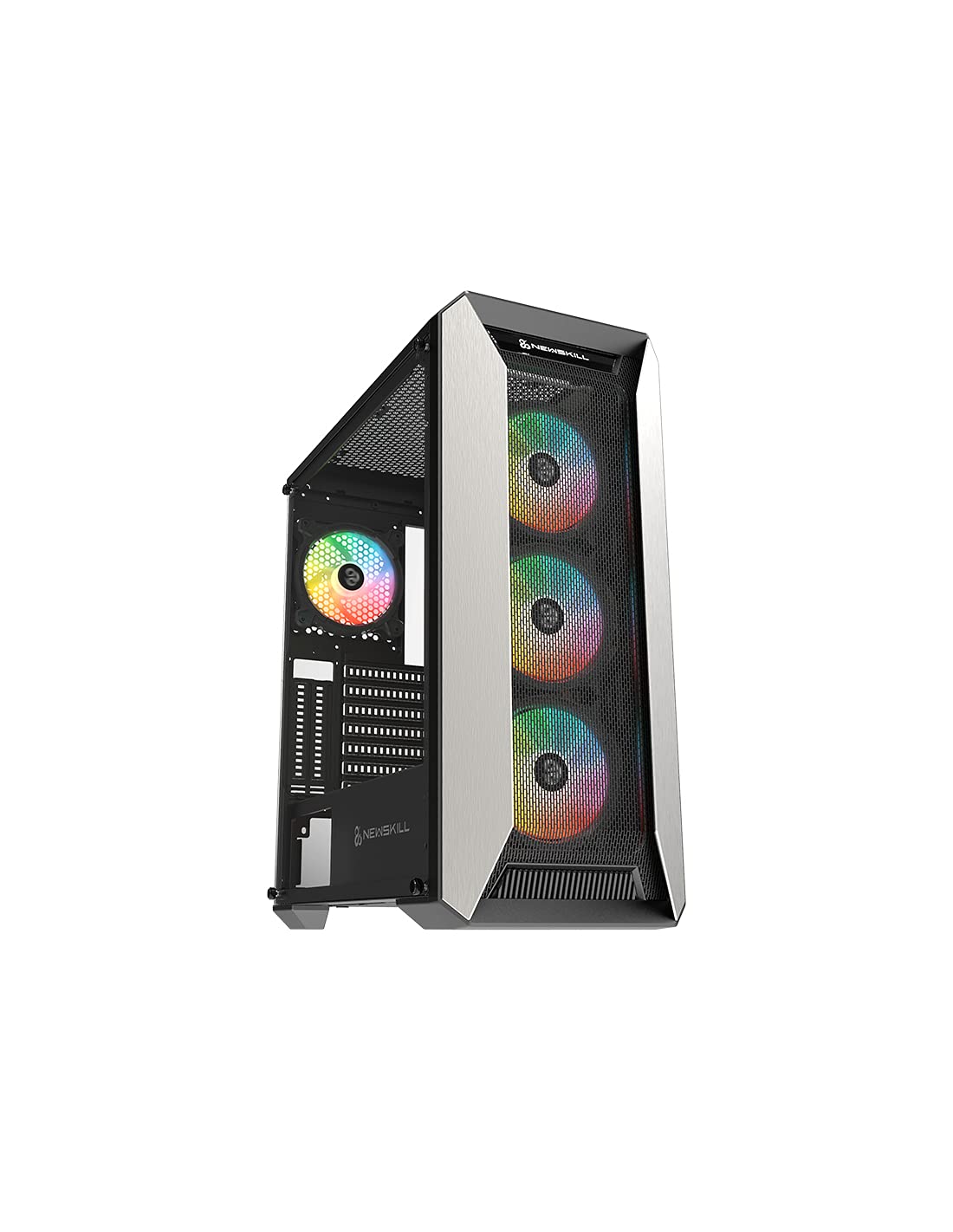
Слика 1: Предња страна view of the Newskill Manticore Gaming PC Case, highlighting the mesh front and tempered glass side panel.
Кључне карактеристике:
- ATX Mid-Tower compatibility
- Mesh front panel for optimized airflow
- Бочна плоча од каљеног стакла
- Four pre-installed 120mm ARGB fans
- Two removable dust filters
- USB 3.0 connectivity on the front panel
Подешавање и инсталација
1. Распакивање
Carefully remove the PC case from its packaging. Inspect for any damage that may have occurred during shipping. Retain the packaging for future transport or warranty claims.
2. Идентификација компоненте
Before installation, familiarize yourself with the case components and included accessories:
- Newskill Manticore PC Case
- Accessory box (screws, cable ties, standoffs)
- Кориснички приручник (овај документ)
3. Инсталација матичне плоче
- Remove the tempered glass side panel by unscrewing the thumb screws.
- Install the necessary motherboard standoffs into the motherboard tray.
- Carefully place your ATX motherboard onto the standoffs, aligning the screw holes.
- Причврстите матичну плочу приложеним вијацима.
4. Инсталација јединице за напајање (PSU)
- Locate the PSU mounting area at the bottom rear of the case.
- Slide your PSU into position from the rear of the case.
- Secure the PSU with screws from the exterior rear of the case.
5. Инсталација уређаја за складиштење података
The case supports various storage configurations. Refer to your specific drive type for mounting instructions (e.g., 2.5" SSDs, 3.5" HDDs).
6. Инсталација графичке картице и картице за проширење
Remove the necessary PCIe slot covers and install your graphics card or other expansion cards, securing them with screws.
7. Прикључци на предњој плочи
Connect the front panel cables (USB 3.0, HD Audio, Power Switch, Reset Switch, Power LED, HDD LED) to the corresponding headers on your motherboard. Consult your motherboard manual for exact pin layouts.
8. Менаџмент каблова
Користите изрезе за усмеравање каблова и тачке за везивање иза лежишта матичне плоче да бисте управљали кабловима. Ово побољшава проток ваздуха и естетику.
Упутство за употребу
Укључивање/искључивање
Press the power button located on the top panel of the case to turn on your system. To shut down, use the operating system's power-off function or press and hold the power button for several seconds for a forced shutdown (not recommended for regular use).
ARGB контрола осветљења
The pre-installed ARGB fans can be controlled via your motherboard's ARGB software (if compatible) or a dedicated ARGB controller (if included or purchased separately). Refer to your motherboard or controller manual for specific instructions on changing lighting effects and colors.
Одржавање
Чишћење филтера за прашину
The Newskill Manticore includes two removable dust filters (typically located on the top and bottom/front). Regularly clean these filters to maintain optimal airflow and prevent dust buildup inside your PC. Gently slide them out, clean with water and mild soap, or use a vacuum cleaner, and ensure they are completely dry before re-inserting.
Ектериор Цлеанинг
Обришите спољашње површине меком, дamp крпом. Избегавајте абразивна средства за чишћење или раствараче који би могли оштетити завршну обраду или каљено стакло.
Решавање проблема
Но Повер
- Ensure the PSU is properly connected to the wall outlet and switched on.
- Проверите да ли су сви каблови за напајање из ПСУ-а правилно повезани са матичном плочом и компонентама.
- Check front panel power switch connections to the motherboard.
Вентилатори се не окрећу / ARGB се не пали
- Проверите да ли су каблови за напајање вентилатора безбедно повезани са матичном плочом или контролером вентилатора.
- Check ARGB connections to the motherboard's ARGB header or dedicated controller.
- Ensure ARGB software or controller settings are correctly configured.
Poor Airflow / Overheating
- Редовно чистите филтере за прашину.
- Ensure no obstructions are blocking air intake or exhaust vents.
- Verify all fans are spinning correctly and oriented for optimal airflow.
For further assistance, please contact Newskill support.
Спецификације
| Феатуре | Детаљ |
|---|---|
| Назив модела | Мантицоре |
| Број модела | 1102 |
| Тип случаја | Мид Товер |
| Компатибилност матичне плоче | АТКС |
| Димензије (Д к Ш к В) | 60 к 60 к 85 цм |
| Тежина | 1 кг |
| Материјал | Каљено стакло, метал |
| Метод хлађења | Air (4x 120mm ARGB fans included) |
| Предњи И / О портови | USB 3.0, Audio Jacks, Power, Reset |
| Филтери за прашину | 2 (уклоњивих) |
| Препоручена употреба | Гаминг |
Информације о гаранцији
The Newskill Manticore PC Case comes with a Двогодишња гаранција произвођача. This warranty covers defects in materials and workmanship under normal use. It does not cover damage caused by misuse, accident, modification, or unauthorized repair. Please retain your proof of purchase for warranty claims.
Подршка и контакт
For technical support, troubleshooting assistance, or warranty inquiries, please visit the official Newskill website or contact their customer service department. You can find contact information on the Newskill webсајт: ввв.невскиллгаминг.цом