
Увод
This manual provides detailed instructions for the setup, operation, maintenance, and troubleshooting of your Logilink UA0384 Full HD USB Webcam. Please read this manual thoroughly before using the device to ensure proper functionality and to maximize your user experience.
Карактеристике производа
- Full HD 1080p resolution at 30 frames per second.
- 76° wide-angle lens for broader coverage.
- Integrated ring light with 3 adjustable brightness levels for optimal illumination.
- Automatic autofocus for clear image quality.
- Dual microphone with noise cancellation for clear audio.
- Automatic Low Light Correction, Exposure (AE), and White Balance (AWB).
- Plug and Play functionality, no driver installation required.
- Versatile mounting options: LCD screens, laptops, tabletops, or tripod.
- Compatible with Windows, Mac OS, Linux, Chrome OS, Xbox One, and Android.
Садржај пакета
- Logilink UA0384 Full HD USB Webцам
Сетуп
1. Распакивање и постављање
Пажљиво уклоните webcam from its packaging. The webcam can be placed on a flat surface, clipped onto an LCD monitor or laptop screen, or mounted on a tripod using the integrated thread.
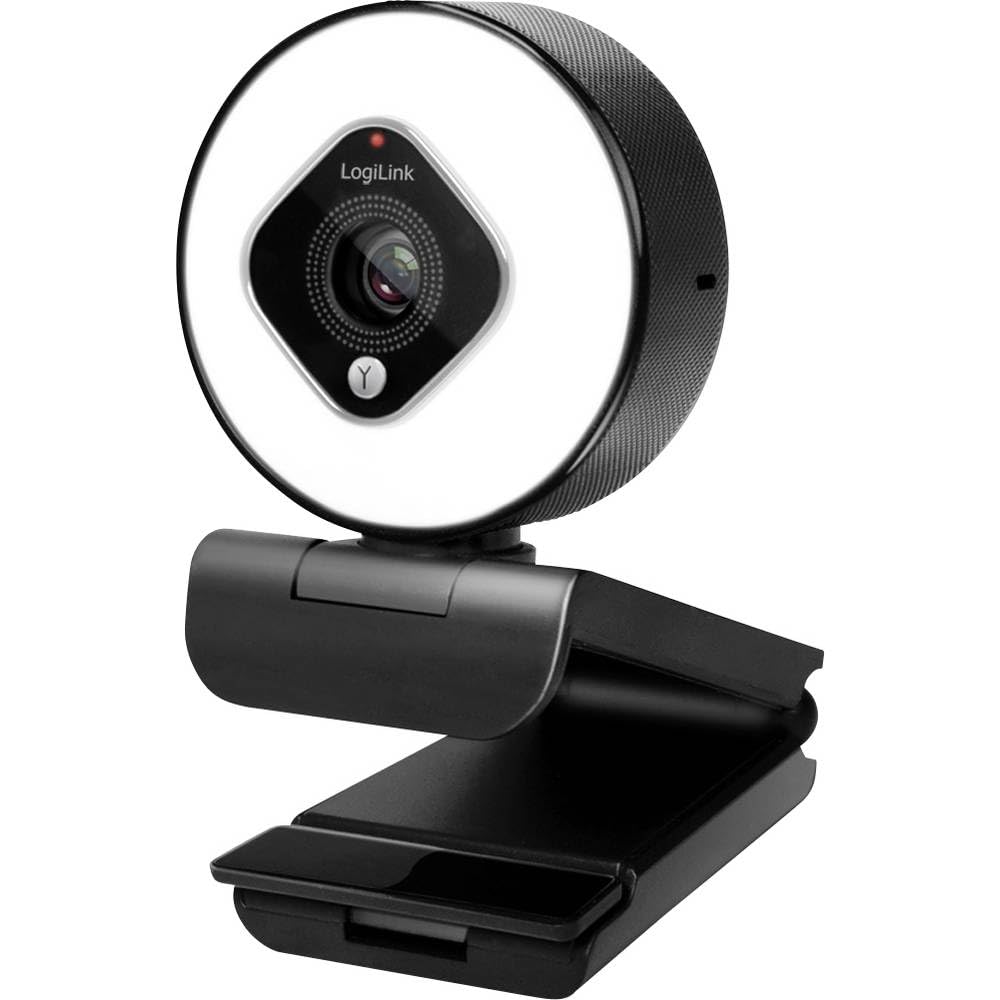
Image showing the Logilink UA0384 webcam, highlighting its compact design, integrated ring light, and flexible mounting options.
2. Повезивање Webцам
- Пронађите слободан УСБ порт на рачунару или уређају.
- Plug the USB cable of the Logilink UA0384 webcam into the USB port.
- Тхе webcam is plug-and-play, meaning no additional drivers are typically required. Your operating system should automatically detect and install the necessary software.
- Wait for your system to confirm that the device is ready for use. This may be indicated by a notification or a light on the webцам.
Упутство за употребу
1. Основна употреба
Једном повезан, webcam is ready for use with video conferencing applications (e.g., Skype, Zoom, Google Meet, FaceTime) or streaming software (e.g., OBS, XSplit, Twitch). Select the Logilink UA0384 as your preferred camera and microphone device within your application's settings.
2. Ring Light Operation
The integrated ring light provides additional illumination. To activate or adjust the brightness:
- Locate the touch-sensitive control on the webcam, typically around the ring light itself.
- Tap the control to cycle through the 3 brightness levels or to turn the light off.
3. Autofocus and Automatic Adjustments
The UA0384 features automatic autofocus, ensuring your image remains sharp even if you move. It also includes automatic low light correction, auto exposure, and auto white balance to adapt to various lighting conditions without manual intervention.
4. Двоструки микрофон
The built-in dual microphones with noise cancellation are designed to capture clear audio. Ensure the webcam is selected as the audio input device in your application settings for optimal sound quality.
Одржавање
Чишћење сочива и тела
- Осигурајте webcam is disconnected from your computer before cleaning.
- Use a soft, lint-free cloth to gently wipe the lens. For stubborn smudges, a small amount of lens cleaning solution can be applied to the cloth (not directly to the lens).
- Обришите тело webcam with a dry or slightly damp soft cloth. Avoid using harsh chemicals or abrasive materials.
Складиштење
Када није у употреби, чувајте webкамеру на чистом и сувом месту, даље од екстремних температура и директне сунчеве светлости.
Решавање проблема
1. Webcam Not Detected
- Проверите УСБ везу: Уверите се да је USB кабл безбедно прикључен у оба webcam and the computer. Try a different USB port.
- Поново покрените рачунар: Понекад једноставно поновно покретање може решити проблеме са детекцијом.
- Тестирајте на другом уређају: If possible, try connecting the webcam to another computer to determine if the issue is with the webcam or your primary device.
2. No Video or Poor Video Quality
- Подешавања апликације: Verify that the Logilink UA0384 is selected as the camera device in your video conferencing or streaming application.
- Услови осветљења: Ensure adequate lighting. Use the integrated ring light if necessary.
- Чистоћа сочива: Очистите webобјектив камере као што је описано у одељку Одржавање.
- Системски ресурси: Close other demanding applications that might be consuming system resources.
3. No Audio or Poor Audio Quality
- Подешавања апликације: Confirm that the Logilink UA0384 is selected as the microphone device in your application settings.
- Системска јачина: Check your computer's microphone input volume settings.
- Препреке: Ensure the microphones are not covered or obstructed.
Спецификације
| Феатуре | Спецификација |
|---|---|
| Број модела | УА0384 |
| Бранд | Логилинк |
| Резолуција снимања видео записа | 1080п Фулл ХД |
| Фрамес Пер Сецонд | 30 фпс |
| Поље оф View | 76° |
| Тип микрофона | Dual Microphone with Noise Cancellation |
| Ленс Типе | 6 tempered glass and plastic elements |
| Отвор бленде | ф/2.1 |
| Фоцал Ленгтх | 7 цм |
| Посебне карактеристике | Autofocus, Ring Light (3 levels), Low Light Correction |
| Повезивање | УСБ |
| Цабле Ленгтх | 1.6 м |
| Димензије производа | 2.44 к 1.81 к 2.91 инча |
| Тежина артикла | 5 унци |
Гаранција и подршка
For warranty information and technical support, please refer to the documentation provided with your purchase or visit the official Logilink webсајт. Конкретни гарантни услови могу се разликовати у зависности од региона и продавца.