
Увод
Thank you for choosing the Renkforce RF-SBS-500 2D Wired Barcode Scanner. This device is designed for efficient and reliable scanning of both 1D and 2D barcodes from various surfaces, including paper and smartphone screens. Its omnidirectional scanning capability and hands-free operation make it suitable for a wide range of applications. This manual provides essential information for the proper setup, operation, and maintenance of your scanner.
Безбедносна упутства
- Не излажите скенер екстремним температурама, влажности или директној сунчевој светлости.
- Избегавајте испуштање скенера или његово излагање јаким ударцима.
- Не покушавајте да растављате или модификујете скенер. То ће поништити гаранцију.
- Keep the scanning window clean to ensure optimal performance. Use a soft, dry cloth.
- Ensure the USB cable is connected securely to prevent accidental disconnection.
Садржај пакета
- Renkforce RF-SBS-500 2D Wired Barcode Scanner
- Integrated USB-A Cable
- Кориснички приручник (овај документ)
Сетуп
Follow these steps to set up your Renkforce RF-SBS-500 barcode scanner:
- Распакујте скенер: Пажљиво извадите скенер из паковања.
- Повежите се са рачунаром: Plug the integrated USB-A cable from the scanner into an available USB port on your desktop or laptop computer.
- Инсталација драјвера: The scanner is typically plug-and-play. Your operating system (Windows, macOS, Linux) should automatically detect and install the necessary drivers. Wait for the installation to complete.
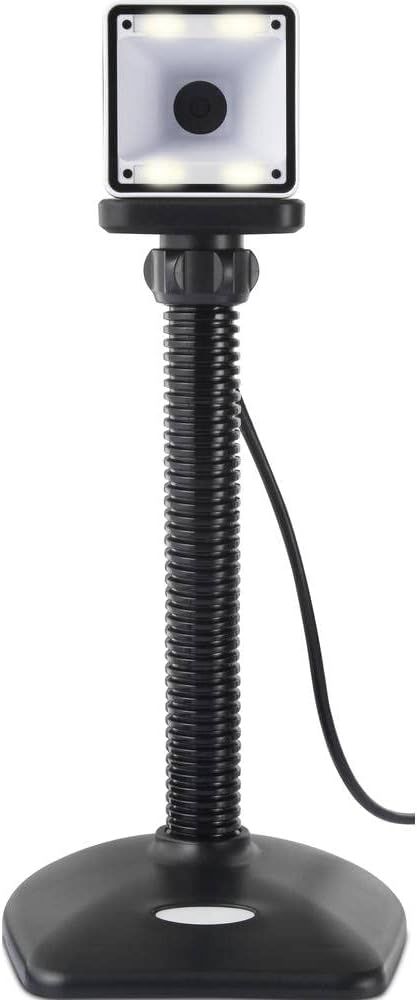
- Пласман: Place the scanner on a stable, flat surface. The flexible neck allows for adjustment of the scanning head angle for optimal positioning.

Руковање скенером
The Renkforce RF-SBS-500 is designed for ease of use with its omnidirectional and hands-free capabilities.
- Укључено: Once connected via USB, the scanner will power on automatically. The LED indicators on the scanner head may illuminate briefly.
- Скенирање баркода: Position the barcode within the scanning area of the scanner head. The scanner will automatically detect and read the barcode.
- Визуелна и звучна повратна информација: Upon successful scanning, the integrated buzzer will emit a short beep, and the LED display on the scanner will flash or change color, indicating a successful read.
- Omnidirectional Reading: The scanner can read barcodes regardless of their orientation, eliminating the need to align the barcode precisely.
- Hands-Free Mode (Presentation Mode): The scanner operates continuously in a presentation mode, allowing you to simply pass items with barcodes in front of the scanning window without pressing any buttons. This saves time and improves workflow efficiency.
- Подржани бар кодови: The scanner supports both 1D (e.g., EAN, UPC, Code 39) and 2D (e.g., QR Code, Data Matrix, PDF417) barcode types.
Одржавање
Правилно одржавање осигурава дуготрајност и оптималне перформансе вашег скенера.
- Чишћење прозора за скенирање: Regularly clean the scanning window with a soft, lint-free cloth. For stubborn dirt, slightly dampen the cloth with water or a mild, non-abrasive cleaner. Do not spray cleaner directly onto the scanner.
- Генерално чишћење: Wipe the exterior of the scanner with a dry or slightly damp тканина. Избегавајте употребу јаких хемикалија или абразивних материјала.
- Складиштење: Када се не користи, чувајте скенер на чистом и сувом месту, даље од директне сунчеве светлости и екстремних температура.
Решавање проблема
Ако наиђете на проблеме са скенером, погледајте следеће уобичајене проблеме и решења:
| Проблем | Могући узрок | Решење |
|---|---|---|
| Скенер се не укључује. | USB cable not connected properly or faulty USB port. | Ensure the USB cable is firmly connected to both the scanner and the computer. Try a different USB port. |
| Скенер не чита баркодове. | Barcode damaged, scanning window dirty, or incorrect barcode type. | Check the barcode for damage. Clean the scanning window. Ensure the barcode type is supported (1D/2D). Adjust the distance and angle of the barcode to the scanner. |
| No beep or LED feedback after scanning. | Barcode not read successfully. | Refer to the "Scanner does not read barcodes" solution. If the issue persists, contact support. |
| Скенирани подаци се приказују погрешно. | Keyboard layout mismatch or software issue. | Ensure your computer's keyboard layout matches the expected output. Test with a simple text editor. |
If the problem persists after trying these solutions, please contact Renkforce customer support.
Спецификације
| Феатуре | Спецификација |
|---|---|
| Број модела | РФ-4679568 |
| Могућност скенирања | 1D и 2D баркодови |
| Технологија повезивања | USB-A (жичани) |
| Сцан Рате | 60 слика у секунди |
| Режим скенирања | Omnidirectional, Hands-free (Presentation Mode) |
| Повратне информације | Integrated Buzzer, LED Display |
| Компатибилни уређаји | Desktop Computer, Laptop, Smartphone (via appropriate adapter if needed) |
| Димензије (Д к Ш к В) | 150 к 5.2 к 5.2 цм |
| Тежина артикла | 102 грама |
| Извор напајања | УСБ Поверед |
| Земља порекла | Немачка |
Гаранција и подршка
Renkforce products are manufactured to high-quality standards and come with a standard warranty. Please refer to your purchase documentation or the Renkforce official webсајт за специфичне гарантне одредбе и услове који важе за ваш регион.
For technical support, troubleshooting assistance, or warranty claims, please contact Renkforce customer service. Contact details can typically be found on the Renkforce webсајту или на паковању вашег производа.