
1. Увод
The FOREO Bear is an at-home microcurrent facial device designed to stimulate and tone the skin for an improved appearance. It utilizes 5 intensities of microcurrent technology and T-Sonic pulsations to help lift, tone, and re-contour age-sensitive areas of the face and neck. This non-invasive tool contributes to the reduction of wrinkles and targets areas such as the jawline, cheeks, neck, and forehead.
Кључне карактеристике:
- Non-Invasive Face Lift: Firms and contours by toning facial and neck muscles.
- 3-Minute Treatment: Provides quick and simple treatments for lasting results.
- Т-соничне пулсације: Helps relax facial muscle tension, smooth fine lines, improve blood flow, and enhance skincare product absorption.
- Anti-Shock System: Measures skin's resistance to electricity and automatically adjusts microcurrent intensity for safety and comfort.
2. Шта је у кутији
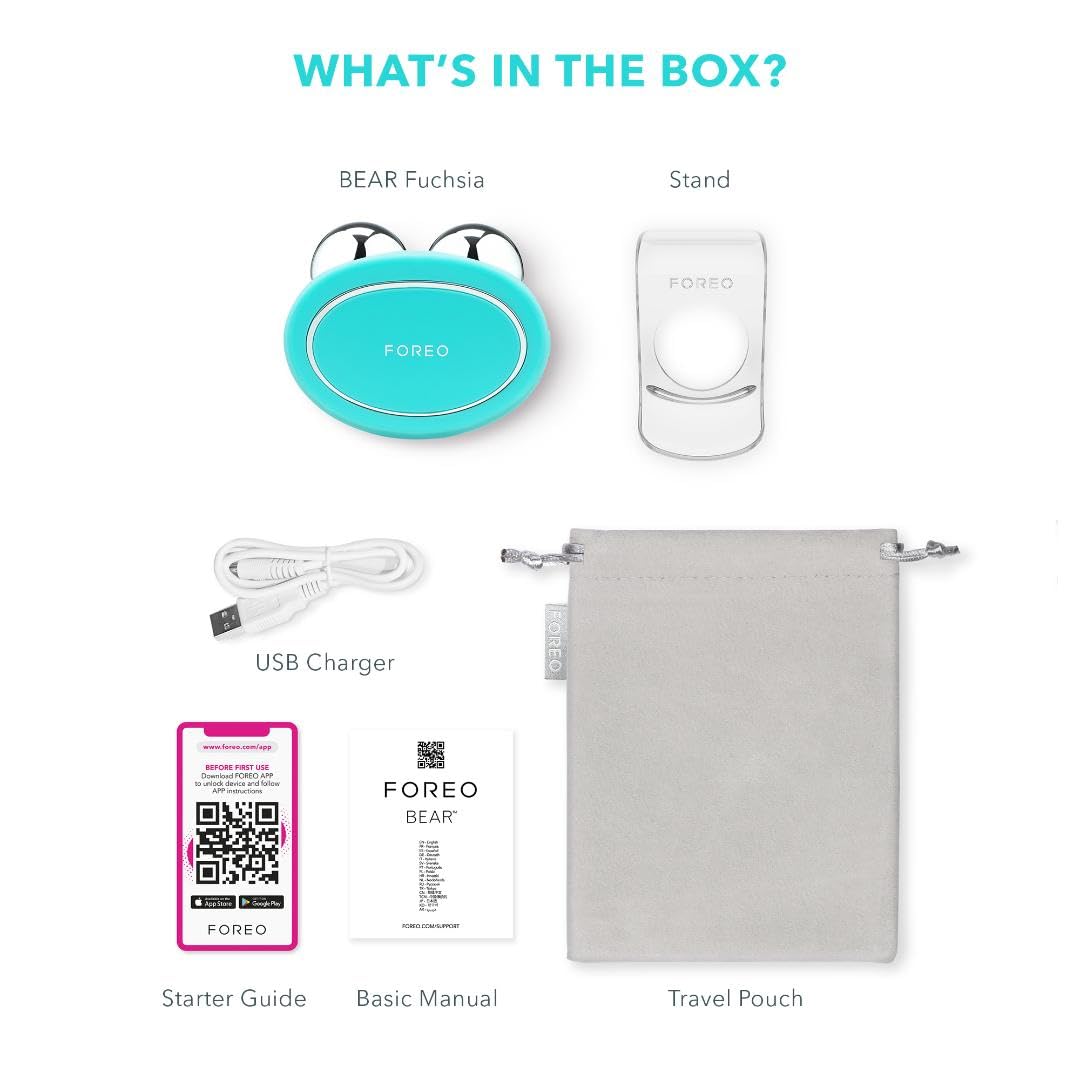
Figure 1: Contents of the FOREO Bear package, including the device, charging cable, and documentation.
- FOREO Bear Microcurrent Facial Device
- Постоље за уређај
- УСБ кабл за пуњење
- Водич за почетнике
- Основни приручник
- Травел Поуцх
3. Подешавање и пуњење
3.1 Почетна наплата
Before first use, fully charge your FOREO Bear device. Connect the provided USB charging cable to the charging port on the device and plug the other end into a USB power adapter. The indicator lights on the device will show charging progress.
3.2 Повезивање апликације
The FOREO Bear is designed to be used with the FOREO For You app for full functionality and personalized routines. Download the app from your device's app store. Follow the in-app instructions to pair your device via Bluetooth. Device registration is required to unlock the 2-year warranty.
4. Упутство за употребу
4.1 Preparing Your Skin
It is essential to use the FOREO Bear with a conductive serum. Apply a thin layer of FOREO's conductive SERUM SERUM SERUM or another water-based conductive serum to clean, dry skin before each treatment. Ensure your skin is adequately covered to allow the microcurrent to glide smoothly and prevent discomfort.

Figure 2: Apply a conductive serum before using the device.
4.2 Powering On and Selecting Intensity
Press the universal button on the device to turn it on. The indicator lights will illuminate. Press the button repeatedly to cycle through the 5 microcurrent intensity levels. The device's Anti-Shock System will automatically adjust the microcurrent within your chosen intensity for maximum safety and comfort.

Figure 3: Key technologies of the FOREO Bear device.
4.3 Performing a Treatment
Gently press both metallic spheres of the FOREO Bear to your face and glide them across your face and neck in upward and outward motions. The device is designed for a 3-minute routine. Refer to the FOREO For You app for guided routines and targeted treatments for specific areas like the jawline, cheeks, and forehead.

Figure 4: Demonstrating the use of the FOREO Bear for facial toning.
4.4 Званични видео снимци производа
Видео 1: Искрено питањеview of the FOREO Bear Microcurrent Facial Device, demonstrating its features and benefits. This video highlights the device's ability to lift, contour, and firm the face, and its non-invasive nature. It also mentions the app connectivity and FDA clearance.
Video 2: A demonstration of the FOREO Bear Microcurrent Facial Device for skincare. The user applies serum and then uses the device on various parts of the face, emphasizing its role in skin rejuvenation and muscle stimulation.
5. Одржавање
5.1 Чишћење
After each use, clean your FOREO Bear device. Rinse off any residual serum or gel with water and dry the device thoroughly with a clean, lint-free cloth. Do not use cleaning products containing alcohol, petrol, or acetone, as these may damage the silicone material.
5.2 Складиштење
Store the device in a cool, dry place, away from direct sunlight and extreme temperatures. Use the provided travel pouch for protection when traveling.
КСНУМКС. Решавање проблема
6.1 Уређај се не укључује
Ensure the device is fully charged. If the device does not turn on after charging, try connecting it to the FOREO For You app. Some users have reported issues with offline mode requiring app interaction.
6.2 Experiencing Zapping Sensation
A mild tingling sensation is normal. However, if you experience a strong zapping sensation, it may indicate insufficient conductive serum on your skin. Apply more serum to the treatment area. Also, ensure the microcurrent intensity is set to a comfortable level. The Anti-Shock System should prevent excessive discomfort.
6.3 Проблеми са повезивањем апликација
If you experience problems connecting the device to the app, try the following:
- Уверите се да је Блуетоотх омогућен на вашем паметном телефону.
- Restart both your device and the FOREO Bear.
- Delete and reinstall the FOREO For You app.
- Check for app updates and ensure your phone's operating system is up to date.
7. Спецификације
| Феатуре | Детаљ |
|---|---|
| Димензије производа | 4.92 к 2.64 к 2.2 инча |
| Број модела ставке | Ф0118 |
| Батерије | Потребна је 1 батерија (укључена) |
| Произвођач | ФОРЕО |
| Боја | Минт |
| Материјал | Silicone, ABS, PC, Chrome-Plated Zinc Alloy |
| Routine Duration | КСНУМКС минута |
| Microcurrent Intensities | 5 |
| Uses Per Charge | До 90 |
8. Гаранција и подршка
8.1 Информације о гаранцији
FOREO warrants this device for a period of TWO (2) YEARS after the original date of purchase against defects due to faulty workmanship or materials arising from normal use of the device. Device registration via the FOREO For You app is required to activate the warranty.
8.2 Корисничка подршка
For further assistance, troubleshooting, or warranty claims, please visit the official FOREO website or contact their customer support directly. You can find additional resources and FAQs within the FOREO For You app.