
Увод
This manual provides instructions for the proper use and maintenance of your Bousnic Replacement USB Charging Cable. This cable is specifically designed to charge both the remote transmitter and the receiver collar simultaneously for Bousnic P-Collar 650 and P-Collar 680 dog training systems.
Производ је завршенview
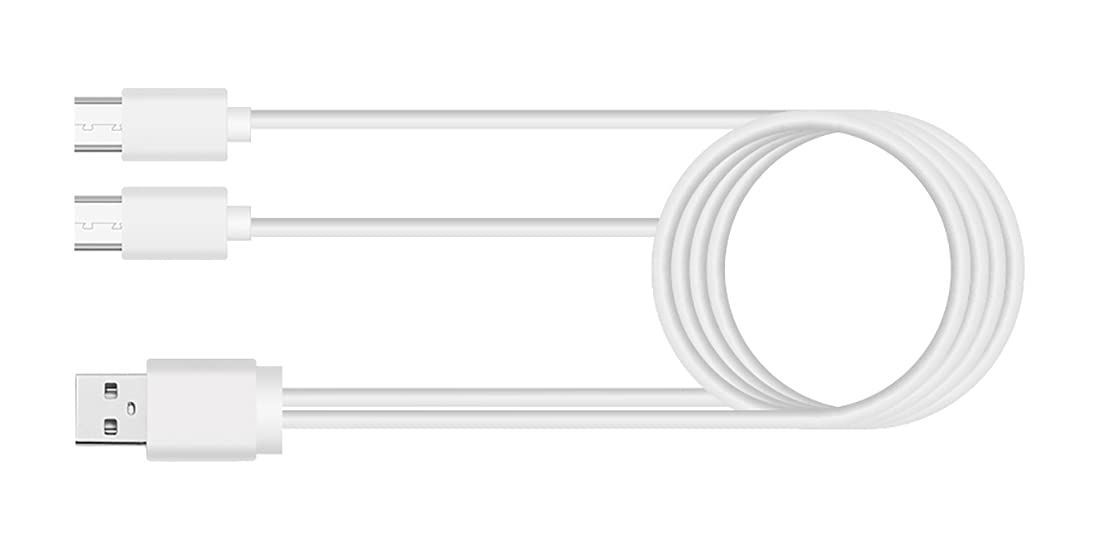
The Bousnic Replacement USB Charging Cable features a standard USB-A connector on one end and two Micro-USB connectors on the other. This dual-port design allows for convenient charging of two devices at once, such as your Bousnic training collar's remote and receiver.
Упутства за подешавање
- Повежите се на извор напајања: Insert the standard USB-A end of the charging cable into a compatible USB power adapter (not included) or a USB port on a computer. Ensure the power source provides 5V output.
- Повежите се са уређајима: Carefully insert each of the two Micro-USB ends into the charging ports of your Bousnic P-Collar 650 or P-Collar 680 remote transmitter and receiver collar.
- Потврдите везу: Once connected, the charging indicator lights on your remote and receiver should illuminate, typically red or orange, to indicate that charging has begun. Refer to your specific P-Collar model's manual for exact indicator light behavior.
Operating Instructions (Charging)
The charging cable facilitates the power transfer from a USB source to your Bousnic P-Collar devices. No operational steps are required for the cable itself beyond proper connection.
- Време пуњења: Charging times may vary depending on the battery level of your devices and the power output of your USB adapter. Typically, a full charge takes approximately 2-3 hours.
- Индикација потпуног пуњења: The charging indicator lights on your remote and receiver will usually change color (e.g., from red to green) or turn off when the devices are fully charged. Consult your P-Collar manual for specific details.
- безбедност: Always ensure the charging cable is not bent sharply or placed under heavy objects during use. Disconnect the cable from the power source and devices once charging is complete.
Одржавање
- Чишћење: Use a soft, dry cloth to wipe the cable clean. Avoid using liquid cleaners or abrasive materials.
- Складиштење: Чувајте кабл на хладном и сувом месту, даље од директне сунчеве светлости и екстремних температура. Избегавајте чврсто намотавање кабла како бисте спречили унутрашње оштећење жице.
- инспекција: Периодично проверавајте кабл да ли има знакова хабања, истрошености или оштећења конектора. Прекините употребу ако приметите било каква оштећења.
Решавање проблема
- Уређаји који се не пуне:
- Ensure both the USB-A end and the Micro-USB ends are securely connected.
- Try a different USB power adapter or computer USB port to rule out a faulty power source.
- Verify that your Bousnic P-Collar remote and receiver are powered off or in a charging-compatible state (refer to their respective manuals).
- Споро пуњење:
- Ensure your USB power adapter provides sufficient output (e.g., 5V/2A). Lower power output may result in slower charging.
- Оштећење кабла: If the cable shows any signs of physical damage, such as cuts, fraying, or bent connectors, discontinue use immediately to prevent potential hazards.
Спецификације
| Бранд | БОУСНИЦ |
| Компатибилни уређаји | Bousnic P-Collar 650, Bousnic P-Collar 680 |
| Тип конектора | USB-A to Dual Micro-USB |
| Оутпут Волtage | 5 Волтс |
| Излазна струја | 2 Amps |
| Ватtage | 10 Ваттс |
| Извор напајања | DC |
| Боја | Black (Note: Product image may show white cable for illustration) |
| Тежина артикла | 0.634 унци (0.02 килограма) |
| Димензије пакета | 4.06 к 3.07 к 0.59 инча |
Информације о гаранцији
Specific warranty details for this replacement charging cable may be included with your original product packaging or available on the official Bousnic website. Please retain your proof of purchase for any warranty claims. Generally, Bousnic products come with a limited warranty against manufacturing defects.
Корисничка подршка
For further assistance, technical support, or inquiries regarding your Bousnic Replacement USB Charging Cable, please contact Bousnic customer service. You can typically find contact information on the Bousnic official webсајту или преко продавца где сте купили производ.