
Увод
This manual provides essential instructions for the safe and efficient operation of your Miroir M600 1080p Battery-Powered Projector. Please read this manual thoroughly before using the device and retain it for future reference.
Шта је у кутији
Проверите да ли су све ставке наведене у наставку укључене у ваш пакет:
- Miroir M600 Projector
- ХДМИ кабл
- АЦ адаптер и пуњач

Image: Contents of the Miroir M600 Projector package.
Производ је завршенview
The Miroir M600 is a compact, portable 1080p projector designed for various projection needs. Familiarize yourself with its components:
Фронт View

Слика: Фронт view of the Miroir M600 Projector, showing the projection lens and ventilation grille.
Позади View и луке

Слика: Позади view of the Miroir M600 Projector, highlighting the various input/output ports.
- 3.5 мм аудио излаз: За повезивање екстерних звучника или слушалица.
- USB-C Video Port: For video input from compatible USB-C devices.
- ХДМИ порт: For video input from HDMI-enabled devices.
- УСБ прикључак за пуњење: За пуњење екстерних уређаја.
- Улаз за једносмерну струју: For connecting the AC adapter to power and charge the projector.
Сетуп
1. Укључивање и пуњење
- Connect the AC adapter to the DC Power Input port on the projector and then to a power outlet. The projector can operate while charging.
- Press and hold the power button (location not specified in data, assume standard placement) for a few seconds until the projector powers on.
- The internal battery provides portable operation. Ensure it is sufficiently charged for use without the AC adapter.
2. Постављање и пројекција
Position the projector on a stable, flat surface or mount it on a compatible stand. Ensure the lens is unobstructed and pointed towards your desired projection surface (wall or screen).

Image: Miroir M600 Projector positioned on a stand for optimal projection.
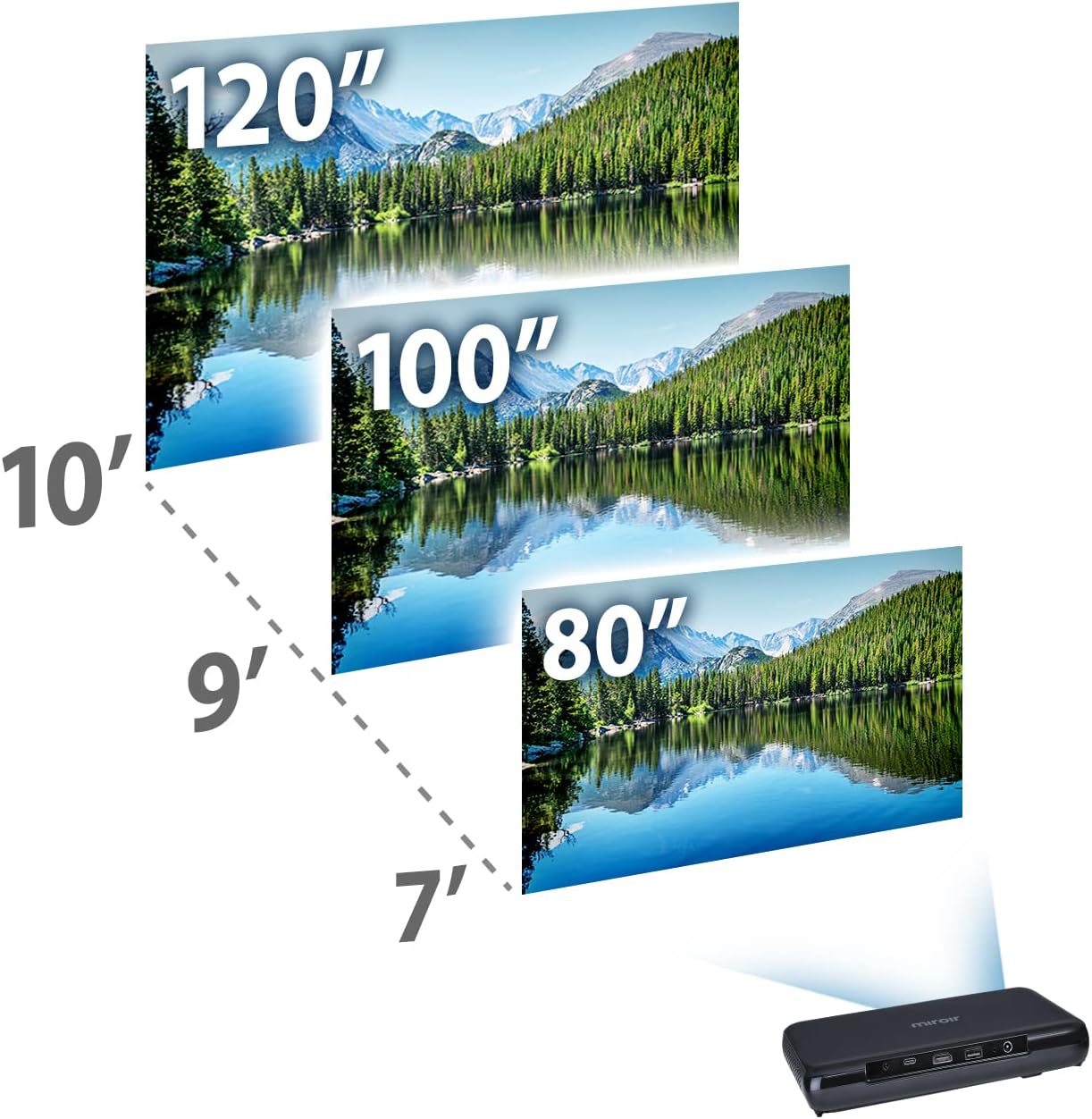
Image: Guide for projection distances to achieve various screen sizes (e.g., 7 feet for 80 inches, 10 feet for 120 inches).
Оперативни
1. Повезивање улазних уређаја
- ДВИ: Connect an HDMI cable from your source device (laptop, streaming stick, game console) to the HDMI port on the projector.
- USB-C Video: For compatible devices, connect a USB-C cable from your source to the USB-C Video port on the projector.
2. Adjusting Image and Focus
The Miroir M600 features automatic keystone correction to adjust the image shape. For focus, manual adjustment may be required via a focus wheel (location not specified in data, assume standard placement near lens).
3. Аудио излаз
The projector includes a built-in 5-watt speaker. For enhanced audio, connect external speakers or headphones to the 3.5mm Audio Out jack.
4. Лamp Режими
ЛЕД лamp offers two modes:
- нормалан режим: До 20,000 сати радаamp живот.
- ЕКО режим: До 30,000 сати радаamp life, providing extended usage and reduced power consumption.
Одржавање
1. Чишћење пројектора
- Објектив: Користите меку крпу без влакана, посебно дизајнирану за оптичка сочива. Не користите абразивна средства за чишћење или прекомерну силу.
- Екстеријер: Обришите спољашњост пројектора меком, сувом крпом. Избегавајте употребу течних средстава за чишћење директно на уређају.
- вентилација: Ensure the ventilation grilles are clear of dust and debris to prevent overheating.
2. Брига о батерији
- За оптималан век трајања батерије, избегавајте често потпуно пражњење батерије.
- Store the projector in a cool, dry place when not in use for extended periods.
Решавање проблема
If you encounter issues with your Miroir M600 projector, refer to the following common solutions:
- Нема слике: Ensure the input source is correctly connected and selected. Check all cable connections.
- Замућена слика: Adjust the focus manually. Ensure the projection surface is flat and the projector is stable.
- Нема звука: Verify that the volume is not muted on both the projector and the source device. If using external speakers, ensure they are properly connected and powered.
- прегревање: Обезбедите одговарајућу вентилацију око пројектора. Не блокирајте отворе за вентилацију.
For more detailed troubleshooting steps, please consult the full user manual available for download (see Support section).
Спецификације
| Феатуре | Детаљ |
|---|---|
| Димензије производа | 9 к 5 к 1 инча |
| Тежина артикла | 1.6 фунти |
| Број модела ставке | М600 |
| Батерије | 1 литијум-полимерска батерија (укључена) |
| Произвођач | Мироир |
| Бранд | Мироир |
| Препоручена употреба | Посао |
| Посебна карактеристика | Pico, Speakers |
| Технологија повезивања | УСБ, ХДМИ |
| Резолуција екрана | 1920 к 1080 (1080п) |
| Lamp Life (Normal Mode) | До 20,000 сати |
| Lamp Life (ECO Mode) | До 30,000 сати |
| Уграђени звучник | 5-ватт |
| Видљива дијагонала екрана | 120" / 305 цм |
Информације о гаранцији
Specific warranty details are not provided in this document. Please refer to the official Miroir website or the warranty card included with your product for comprehensive warranty terms and conditions.
Подршка и контакт
For further assistance, detailed instructions, or to contact customer support:
- Комплетно упутство за употребу: A comprehensive PDF user manual is available for download овде.
- Произвођач Webсајт: Visit the official Miroir website for product registration, FAQs, and support resources.