
1. Увод
This manual provides detailed instructions for the EVICIV Portable Touchscreen Monitor, Model MDS-156B03. Please read this manual thoroughly before using the product to ensure proper operation and to maximize its performance and lifespan. This monitor is designed to extend your visual workspace and enhance productivity with its portable design and touchscreen capabilities.

Image 1.1: The EVICIV Portable Touchscreen Monitor.
2. Садржај пакета
Молимо вас да проверите садржај пакета након распакивања. Ако неке ставке недостају или су оштећене, контактирајте корисничку подршку.
- EVICIV Portable Touchscreen Monitor (MDS-156B03)
- ХДМИ кабл
- USB-A to USB-C Cable (for touch functionality)
- USB-C to USB-C Cables (x2, for power, display, and touch)
- УСБ-Ц адаптер за напајање
- Кориснички приручник (овај документ)
3. Карактеристике производа
The EVICIV Portable Touchscreen Monitor offers a range of features designed for versatility and high performance:
- 15.6-inch Full HD (1080p) Display: Enjoy crisp and clear visuals.
- Функционалност додира у 5 тачака: Interact directly with your content for intuitive control.
- 100% sRGB тачност боја: Experience vibrant and true-to-life colors.
- Built-in Kick-Stand: Обезбеђује подесиво viewing angles and supports both portrait and landscape orientations.
- Управљање кабловима: Integrated design helps keep cables organized behind the monitor.
- ЛЕД позадинско осветљење: Features RGB light effects for an enhanced aesthetic.
- Свестрано повезивање: Equipped with USB-C and HDMI ports for broad compatibility.
3.1. Adjustable Stand and Orientation
The integrated kick-stand allows for flexible positioning, enabling you to pivot the monitor 90 degrees for portrait mode, which can significantly increase viewability for certain tasks like coding or document review.

Image 3.1: Monitor pivoted 90 degrees for increased viewability in portrait mode.

Image 3.2: The monitor's rounded bezel and built-in kick-stand supporting both portrait and landscape orientations.
3.2. Менаџмент каблова
The monitor features a design that helps manage cables, keeping your workspace tidy and organized.

Image 3.3: The monitor's cable management system keeps connections neat.
3.3. Color Accuracy
With 100% sRGB coverage, the monitor delivers outstanding color accuracy and resolution, making it suitable for tasks requiring precise color representation.

Image 3.4: Visual representation of 100% sRGB color accuracy.
3.4. ЛЕД позадинско осветљење
The monitor includes an LED backlight with customizable RGB light effects, allowing you to personalize your setup.
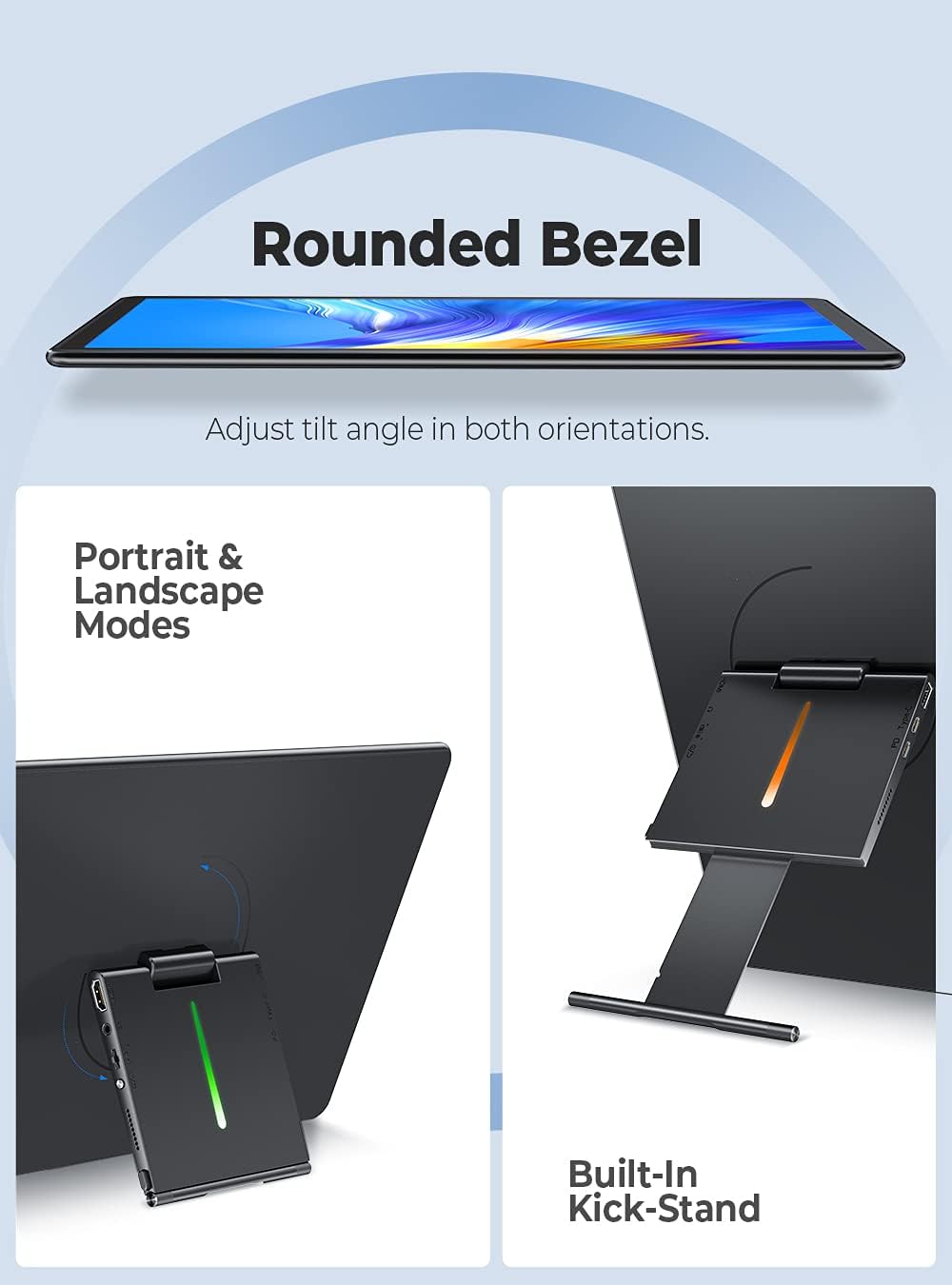
Image 3.5: The monitor's LED backlight feature.
4. Упутства за подешавање
Follow these steps to set up your EVICIV Portable Touchscreen Monitor:
- Прикључак за напајање: Connect the USB-C power adapter to the monitor's USB-C PD port. Ensure the monitor receives adequate power.
- Повезивање са уређајем:
- Using USB-C (Full Function): If your device (laptop, smartphone) has a full-featured USB-C port that supports DisplayPort Alternate Mode and power delivery, connect one of the provided USB-C to USB-C cables directly from your device to the monitor's USB-C port. This single cable can provide power, video, and touch functionality.
- Using HDMI and USB-A: If your device does not have a full-featured USB-C port, connect the HDMI cable from your device to the monitor's HDMI port for video output. For touch functionality, connect the USB-A end of the USB-A to USB-C cable to your device and the USB-C end to the monitor's USB-C data port. Ensure the monitor is also powered via its USB-C PD port.
- Почетни приказ: Once connected, your device should automatically detect the monitor. If not, you may need to adjust display settings on your device (e.g., extend display, duplicate display).
- Touch Driver Installation: For Windows 10/11, the touch driver should install automatically when connected via USB. For other operating systems, specific drivers may be required.

Image 4.1: Connecting the monitor using USB and HDMI cables.
4.1. Видео водич за подешавање
For a visual guide on setting up your EVICIV Portable Touchscreen Monitor, please refer to the official product video below:
Video 4.1: Official EVICIV video demonstrating the 15.6-inch USB Type-C Portable Monitor's features and connectivity.
5. Упутство за употребу
5.1. Укључивање/искључивање
Locate the power button on the side or back of the monitor. Press and hold for a few seconds to power on or off. A short press may activate or deactivate the display.
5.2. Он-Сцреен Дисплаи (ОСД) мени
The OSD menu allows you to adjust various display settings. Typically, buttons on the side or back of the monitor are used to navigate and select options within the OSD. Common settings include:
- Осветљеност/контраст: Подесите нивое осветљености и контраста екрана.
- Подешавања боја: Промените температуру боје, нијансу и засићеност.
- Извор уноса: Manually select between USB-C and HDMI inputs.
- Волумен: Control the volume of the built-in speakers.
5.3. Touch Functionality
The monitor supports 5-point multi-touch. Basic touch gestures include tapping to select, swiping to scroll, and pinch-to-zoom. Ensure the USB connection for touch is properly established for this feature to work.
5.4. Оријентација екрана
The monitor can be used in both landscape and portrait modes. To switch orientation, physically rotate the monitor. Your operating system may automatically adjust the display orientation. If not, you can manually change it in your device's display settings.
6. Одржавање
Правилно одржавање осигурава дуготрајност и оптималне перформансе вашег монитора.
- Чишћење екрана: Користите меку крпу која не оставља влакна, посебно дизајнирану за електронику. Лагано обришитеampen the cloth with water or a screen-cleaning solution. Avoid harsh chemicals, alcohol, or abrasive materials.
- Чишћење тела: Обришите кућиште монитора меком, сувом крпом.
- Складиштење: When not in use, store the monitor in a clean, dry place away from direct sunlight and extreme temperatures. Consider using a protective sleeve or case for transport to prevent scratches and damage.
- Избегавајте течности: Не прскајте течности директно на монитор.
КСНУМКС. Решавање проблема
Ако наиђете на проблеме са монитором, погледајте следећа уобичајена решења:
- Нема приказа/црни екран:
- Ensure the monitor is properly powered and the power adapter is connected.
- Check all video cables (USB-C, HDMI) are securely connected to both the monitor and your device.
- Verify the correct input source is selected in the monitor's OSD menu.
- Test with a different cable or device if possible.
- Touch Functionality Not Working:
- Ensure the USB connection for touch (USB-C to USB-C or USB-A to USB-C) is firmly connected.
- For Windows, check Device Manager to see if the touch screen driver is installed correctly. Reconnect the USB cable to trigger driver reinstallation.
- Some operating systems may require specific drivers or may not fully support multi-touch.
- Poor Image Quality/Incorrect Colors:
- Access the OSD menu and adjust brightness, contrast, and color settings.
- For optimal color, navigate to the OSD's color options, select 'User Settings', and adjust the RGB sliders. A common adjustment for better balance is setting Green to 70-80% while Red and Blue remain at 100%.
- Ensure your device's graphics settings are configured for the monitor's native resolution (1920x1080).
- Нема звука или слаба јачина:
- Check the volume settings in the monitor's OSD menu.
- Verify the audio output settings on your connected device.
- The built-in speakers are designed for basic audio; for higher quality sound, external speakers are recommended.
8. Спецификације
| Феатуре | Детаљ |
|---|---|
| Бранд | ЕВИЦИВ |
| Број модела | МДС-156Б03 |
| Величина екрана | 15.6 инча |
| Резолуција | FHD 1080p (1920 x 1080) |
| Аспецт Ратио | 16:10 |
| Опис површине екрана | Глосси |
| Однос контраста | 2000:1 |
| Рефресх Рате | 60 Хз |
| Viewинг Англе | 178 степени |
| Време одговора | 1 милисекунди |
| Технологија повезивања | USB, HDMI, USB Type C |
| Специфичне употребе за производ | Gaming, Productivity |
| Тип монтаже | Desk Mount (Built-in Kick-Stand) |
| Total Number of HDMI Ports | 1 |
9. Гаранција и подршка
EVICIV products are manufactured to high-quality standards. For specific warranty information, please refer to the warranty card included in your product packaging or visit the official EVICIV website. For technical support, troubleshooting assistance, or to inquire about replacement parts, please contact EVICIV customer service through the contact information provided on the official webсајт или вашу платформу за куповину.