
1. Производ је готовview
The Lexmark MX611DHE is a monochrome laser multifunction device designed for office environments, offering comprehensive capabilities including printing, copying, scanning, and faxing. This robust unit is engineered for high-volume output and efficient document handling.
- Мултифункционалност: Integrates print, copy, fax, and scan functions into a single device.
- Перформансе велике брзине: Capable of printing and copying at speeds up to 50 pages per minute (ppm).
- Двострано штампање: Supports automatic two-sided printing to conserve paper.
- Улазни капацитет: Features a standard input capacity of 650 sheets, expandable for larger tasks.
- Повезивање: Equipped with USB and Ethernet interfaces for versatile network integration.
- Интуитивна контрола: Features a touchscreen display for easy navigation and operation.
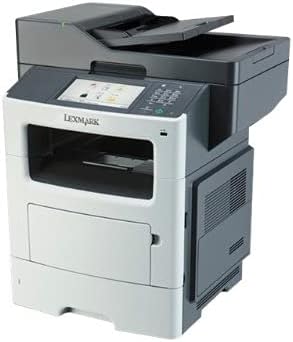
Слика 1: Предња страна view of the Lexmark MX611DHE multifunction printer, showcasing its compact design and front-facing paper tray.
2. Водич за подешавање
Follow these steps to set up your Lexmark MX611DHE printer for initial use.
- Распакивање: Carefully remove the printer from its packaging. Remove all protective tapes and packing materials from the exterior and interior of the device.
- Пласман: Place the printer on a stable, level surface with adequate ventilation. Ensure there is enough space around the printer for proper operation and maintenance.
- Прикључак за напајање: Connect the power cord to the printer's power input and then to a grounded electrical outlet. Do not connect to a surge protector or extension cord initially.
- Учитавање папира: Open the paper tray and load the appropriate paper size (up to 8.5 x 14 inches). Adjust the paper guides to fit the paper stack snugly.
- Мрежна/УСБ веза:
- For Network (Ethernet): Повежите Етернет кабл са Етернет порта штампача на мрежни рутер или прекидач.
- За УСБ: Повежите USB кабл са USB порта штампача на рачунар.
- Почетно укључивање: Press the power button to turn on the printer. Follow the on-screen prompts on the touchscreen display to select language, region, and perform initial setup configurations.
- Инсталација драјвера: Install the necessary printer drivers on your computer. Drivers can typically be found on the Lexmark support website or on an included installation CD (if applicable).
3. Упутство за употребу
This section provides basic instructions for using the Lexmark MX611DHE's primary functions.
3.1. Штампање
- Уверите се да је штампач укључен и повезан са рачунаром или мрежом.
- Отворите документ који желите да одштампате на рачунару.
- Изаберите File > Штампај (или еквивалентну команду у вашој апликацији).
- Choose "Lexmark MX611DHE" from the list of available printers.
- Adjust print settings such as number of copies, paper size, and duplex options as needed.
- Кликните Принт.
3.2. Копирање
- Поставите документ лицем надоле на стакло скенера или лицем нагоре у аутоматски улагач докумената (ADF).
- На додирном екрану штампача изаберите Копирај функција.
- Подесите подешавања као што су број копија, осветљеност/тамноћа и величина папира.
- Притисните тастер Почни дугме за почетак копирања.
3.3. Скенирање

Figure 2: The Lexmark MX611DHE with its scanner lid open, revealing the flatbed scanner glass and the automatic document feeder mechanism.
- Поставите документ на стакло скенера или у ADF.
- На додирном екрану штампача изаберите Скенирај функција.
- Choose your desired scan destination (e.g., Scan to Computer, Scan to Email, Scan to Network Folder).
- Конфигуришите подешавања скенирања као што су резолуција, режим боје и file формату.
- Притисните тастер Почни дугме да бисте покренули скенирање.
3.4. Факсирање
- Ensure the printer is connected to a telephone line.
- Поставите документ на стакло скенера или у ADF.
- На додирном екрану штампача изаберите факс функција.
- Enter the recipient's fax number using the keypad on the control panel.
- Прилагодите сва потребна подешавања факса.
- Притисните тастер Почни дугме за слање факса.
4. Одржавање
Regular maintenance ensures optimal performance and extends the lifespan of your Lexmark MX611DHE.
- Чишћење екстеријера: Користите меку, дamp, lint-free cloth to wipe the exterior surfaces of the printer. Avoid abrasive cleaners.
- Чишћење стакла скенера: For clear scans, regularly clean the scanner glass with a soft, lint-free cloth and a mild glass cleaner.
- Замена кертриџа са тонером: When the toner low message appears, order a new Lexmark toner cartridge. Follow the instructions provided with the new cartridge for proper installation.
- Чишћење путање папира: If paper jams become frequent, consult the printer's internal guides or the Lexmark support website for instructions on cleaning the paper path rollers.
КСНУМКС. Решавање проблема
This section addresses common issues you might encounter with your Lexmark MX611DHE.
| Проблем | Могући узрок | Решење |
|---|---|---|
| Штампач не реагује | Power cable disconnected, network issue, driver problem. | Check power connections. Verify network cable or USB connection. Reinstall printer drivers. |
| Застој папира | Incorrectly loaded paper, foreign object in paper path. | Open access covers and carefully remove jammed paper. Ensure paper is loaded correctly. |
| Лош квалитет штампе | Low toner, dirty print head/rollers, incorrect print settings. | Replace toner cartridge. Clean internal components as per maintenance guide. Adjust print quality settings in driver. |
| Скенер не ради | Scanner glass dirty, software issue, connectivity problem. | Clean scanner glass. Restart computer and printer. Check USB/network connection. |
6. Спецификације
Detailed technical specifications for the Lexmark MX611DHE.
| Феатуре | Детаљ |
|---|---|
| Бранд | Лекмарк |
| Назив модела | MX611DHE |
| Дисплаи Типе | LCD (Touchscreen) |
| Технологија штампе | Ласер (монохроматски) |
| Максимална брзина штампања (монохроматско) | 50 ппм |
| Максимална брзина копирања (црно-бело) | 50 ппм |
| Резолуција | 1200 к 1200 дпи |
| Капацитет меморије | 1024 МБ |
| Подршка за величину листа | Up to 8.5 x 14 Inches |
| Хардверски интерфејс | УСБ, Етхернет |
| Димензије производа | 22.6 к 23.5 к 26.5 инча |
| Боја | Сива/бела |
| УПЦ | 656942073611 |
7. Гаранција и подршка
Your Lexmark MX611DHE (Renewed) product is covered by a limited warranty and support resources.
- гаранција: Овај производ долази са а 90 дана ограничене гаранције. Please refer to your purchase documentation for specific terms and conditions of the Amazon Renewed Guarantee.
- техничка подршка: For technical assistance, driver downloads, or further troubleshooting, please visit the official Lexmark support webсајту или контактирајте њихову корисничку службу.
- Онлине ресурси: Additional user guides, FAQs, and firmware updates may be available on the Lexmark support portal.