
1. Увод
Хвала вам на куповиниasing the Rapoo N300 Optical Wired Gaming Mouse. This manual provides detailed instructions for setting up, operating, and maintaining your new mouse. Please read this manual thoroughly before use to ensure optimal performance and longevity of the product.
2. Производ је готовview
2.1 Кључне карактеристике
- Високопрецизно оптичко праћење: Equipped with a 2000 DPI tracking engine for accurate and responsive cursor control.
- 6 Дугмад: Includes left, right, scroll wheel, DPI switch, and two side buttons for enhanced functionality.
- 2D Anti-Slip Scroll Wheel: Provides precise scrolling and tactile feedback.
- Амбидекстрални дизајн: Ergonomically designed for comfortable use by both left and right-handed users.
- Жична USB веза: Ensures a stable and lag-free connection.
2.2 Садржај пакета
- Rapoo N300 Optical Wired Gaming Mouse
- Кориснички приручник (овај документ)
2.3 Дијаграм производа

Слика 1: Врх view of the Rapoo N300 mouse, showing the left and right click buttons, scroll wheel, and DPI switch button. The Rapoo logo is visible at the base.

Слика 2: Сиде view of the Rapoo N300 mouse, highlighting the two side buttons and the textured grip area for improved handling.
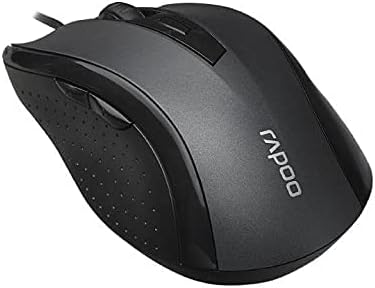
Слика 3: Англед view of the Rapoo N300 mouse, showcasing its ergonomic contour and the placement of the scroll wheel and side buttons.

Слика 4: Дно view of the Rapoo N300 mouse, displaying the optical sensor, product model number (N300), interface type (USB), and regulatory compliance markings.
3. Упутства за подешавање
- Повежите миш: Locate an available USB port on your computer (desktop or laptop). Insert the USB connector of the Rapoo N300 mouse firmly into the USB port.
- Инсталација драјвера: The Rapoo N300 mouse is a plug-and-play device. Your operating system (Windows XP, Windows 7, Linux, or newer versions) will automatically detect and install the necessary drivers. This process may take a few moments.
- Верификација: Once the drivers are installed, the mouse cursor should become responsive. Move the mouse to confirm functionality.
No additional software installation is typically required for basic functionality.
4. Упутство за употребу
4.1 Основне функције
- Леви клик: Primary action, selection, opening items.
- Десни клик: Отвара контекстуалне меније.
- Точак за померање: Скролује документе и web pages vertically. Can also be pressed for middle-click functionality (application-dependent).
4.2 ДПИ подешавање
The Rapoo N300 features a dedicated DPI switch button, usually located behind the scroll wheel. Press this button to cycle through different DPI (Dots Per Inch) sensitivity settings. Each press will change the cursor speed, allowing you to adjust it to your preference for various tasks, from precise editing to fast-paced gaming.
4.3 бочна дугмад
The two side buttons typically function as "Forward" and "Backward" in web претраживачи и file explorers. Their functionality may be customizable through operating system settings or third-party software, if available.
5. Одржавање
- Чишћење: Користите меку, суву крпу да обришете површину миша. За тврдокорну прљавштину, благо обришитеampОбришите крпу водом или благим раствором за чишћење. Избегавајте употребу јаких хемикалија или абразивних материјала.
- Оптички сензор: Ensure the optical sensor on the bottom of the mouse remains clean and free of dust or debris for optimal tracking performance. Do not attempt to disassemble the mouse.
- Нега каблова: Избегавајте оштра савијања или прекомерно повлачење USB кабла како бисте спречили оштећења.
КСНУМКС. Решавање проблема
| Проблем | Могуће решење |
|---|---|
| Миш не реагује |
|
| Покрет курсора је неправилан или скачкав |
|
| Дугме за DPI не мења осетљивост |
|
7. Спецификације
| Феатуре | Детаљ |
|---|---|
| Модел | Н300 |
| Tracking Engine | Оптицал |
| ДПИ | До 2000 ДПИ |
| Број дугмади | 6 (Left, Right, Scroll Wheel, DPI, Side Button 1, Side Button 2) |
| Точак за померање | 2D Anti-Slip |
| Оријентација руке | Амбидектроус |
| Тип интерфејса | Жичани УСБ |
| Компатибилност оперативног система | Windows XP, Windows 7, Linux, and newer versions |
| Боја | Црно |
| Тежина артикла | Отприлике 100 г |
| Димензије (пакет) | 15.4 к 8.4 к 4.2 цм |
8. Гаранција и подршка
Rapoo products are designed for reliability and performance. For specific warranty information and support details, please refer to the warranty card included with your product or visit the official Rapoo webсајт. Сачувајте рачун као доказ о куповини за потребе гаранције.
For technical assistance or further inquiries, please contact Rapoo customer support through their official channels.


