
Увод
Welcome to the instruction manual for your T-DAGGER TGK312-BL Mechanical Gaming Keyboard. This guide provides essential information on how to set up, operate, maintain, and troubleshoot your new keyboard. Please read this manual carefully to ensure optimal performance and longevity of your device.
Сетуп
Follow these steps to connect your T-DAGGER TGK312-BL keyboard to your computer.
- Распакујте тастатуру: Пажљиво извадите тастатуру из паковања. Уверите се да су све компоненте присутне.
- Повежите се преко УСБ-а: Locate an available USB port on your PC or laptop. Insert the keyboard's USB connector firmly into the port.
- Инсталација драјвера: The keyboard is plug-and-play. Your operating system (Windows, macOS, Linux) should automatically detect and install the necessary drivers. This process may take a few moments.
- Потврдите везу: Once drivers are installed, the keyboard's backlight should illuminate, indicating a successful connection. Test by typing in a text editor.
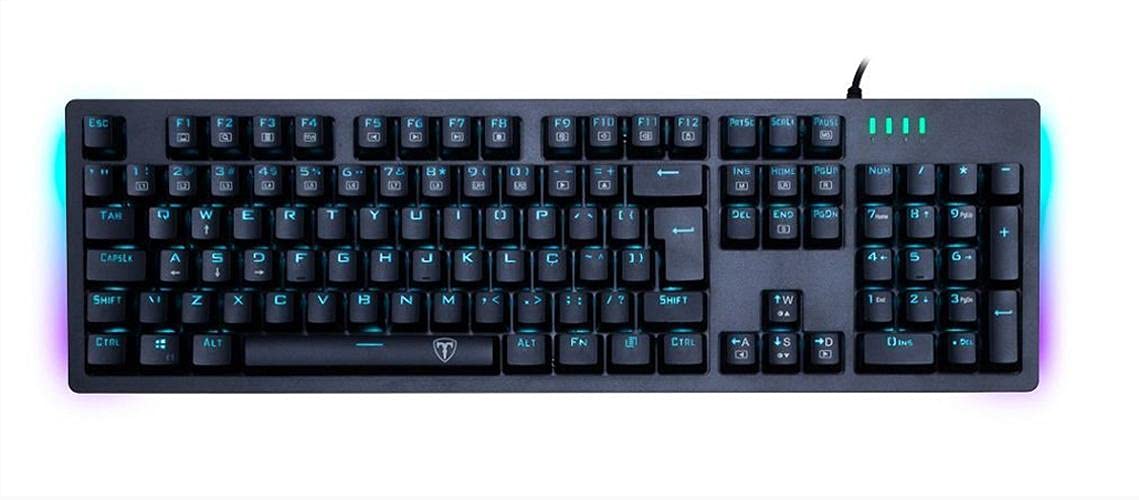
Image: The T-DAGGER TGK312-BL Mechanical Gaming Keyboard, showcasing its full layout and blue backlighting.
Упутство за употребу
Your T-DAGGER TGK312-BL keyboard is designed for responsive and comfortable typing, especially for gaming. Here are some basic operating guidelines:
Standard Key Functions
- All standard alphanumeric keys, function keys (F1-F12), and navigation keys operate as expected.
- The keyboard features both English and Arabic characters on the keycaps for versatile use.
Контрола позадинског осветљења
The keyboard features a blue backlight. Specific key combinations, often involving the 'Fn' key (Function key), are typically used to control backlight brightness, modes, or to turn it on/off. Refer to the keyboard's specific keycap legends for backlight control symbols (e.g., Fn + Arrow keys, Fn + Scroll Lock, or dedicated backlight keys).

Image: A detailed top view of the T-DAGGER TGK312-BL keyboard, highlighting the key layout and illuminated English and Arabic characters.
Одржавање
Правилно одржавање осигурава дуготрајност и перформансе ваше механичке тастатуре.
- Чишћење: Regularly clean the keyboard to prevent dust and debris buildup. Use a soft brush or compressed air to remove particles between keys. For keycap surfaces, use a slightly damp, крпа која не оставља влакна. Избегавајте прекомерну влагу.
- Избегавајте изливање: Liquids can severely damage mechanical keyboards. Keep beverages away from the keyboard. In case of a spill, immediately unplug the keyboard and allow it to dry completely before reconnecting.
- Складиштење: When not in use for extended periods, store the keyboard in a clean, dry environment, preferably covered to prevent dust accumulation.
- Нега каблова: Do not bend or crimp the USB cable excessively. This can damage the internal wires and affect connectivity.
Решавање проблема
If you encounter issues with your T-DAGGER TGK312-BL keyboard, try these basic troubleshooting steps:
- Тастатура не реагује:
- Уверите се да је УСБ кабл безбедно прикључен и на тастатуру и на рачунар.
- Покушајте да прикључите тастатуру на други УСБ порт на рачунару.
- Поново покрените рачунар.
- Тестирајте тастатуру на другом рачунару да бисте утврдили да ли је проблем са тастатуром или вашим системом.
- Одређени тастери не раде:
- Проверите да ли има физичких препрека испод тастера.
- Clean the area around the affected key.
- If the keyboard has a gaming mode, ensure it is not accidentally activated and causing key conflicts.
- Позадинско осветљење не ради:
- Уверите се да је тастатура правилно повезана и да је укључена.
- Use the designated backlight control keys (e.g., Fn combinations) to adjust brightness or cycle through modes.
- Check if any software settings are overriding the keyboard's backlight controls.
Ако ови кораци не реше проблем, погледајте одељак Гаранција и подршка за додатну помоћ.
Спецификације
Detailed technical specifications for the T-DAGGER TGK312-BL Mechanical Gaming Keyboard.
| Феатуре | Опис |
|---|---|
| Бранд | Т-ДАГГЕР |
| Број модела | TGK312-BL |
| Технологија повезивања | УСБ |
| Опис тастатуре | Механички |
| Тип прекидача | Mechanical (Blue Switches) |
| Позадинско осветљење | Плава ЛЕД |
| Језик тастера | енглески и арапски |
| Компатибилни уређаји | ПЦ, Лаптоп |
| Препоручена употреба | Гаминг |
| Материјал | Пластика |
| Боја | Црно |
| Извор напајања | УСБ Поверед |
| External Product ID | 6950376776662 (GTIN) |

Слика: Крупни план view revealing the blue mechanical switches beneath the keycaps of the T-DAGGER TGK312-BL keyboard.
Гаранција и подршка
For warranty information and technical support, please refer to the documentation provided with your product at the time of purchase or visit the official T-DAGGER webсајт. Услови гаранције могу се разликовати у зависности од региона и продавца.
If you require further assistance or have questions not covered in this manual, please contact the manufacturer's customer support or your retailer.