
1. Увод
Thank you for choosing the T-DAGGER Verde T-TGK317 RGB Wireless Bluetooth 5.0 60% Gaming Mechanical Keyboard. This manual provides detailed instructions for setting up, operating, maintaining, and troubleshooting your new keyboard. Please read this manual thoroughly before use to ensure optimal performance and longevity of your device.
2. Садржај пакета
Уверите се да су све ставке присутне у пакету:
- T-DAGGER Verde T-TGK317 RGB Mechanical Keyboard
- УСБ-Ц на УСБ-А кабл
- Упутство за употребу
3. Кључне карактеристике
- 60% компактан распоред: Space-saving design without a numeric keypad.
- RGB позадинско осветљење: Customizable per-key RGB lighting with multiple effects.
- Плави механички прекидачи: Tactile and clicky feedback for typing and gaming.
- Double Shot Inject Keycaps: Durable keycaps with legends that will not fade.
- Wireless Bluetooth 5.0 Connectivity: Повезује се са до три уређаја истовремено.
- Wired USB-C Connectivity: Detachable USB-C cable for reliable wired connection and charging.
4. Подешавање
4.1 Жична веза
- Пронађите USB-C порт на левој страни тастатуре.
- Connect the provided USB-C cable to the keyboard.
- Повежите USB-A крај кабла са доступним USB портом на рачунару.
- Тастатура ће бити аутоматски препозната и спремна за употребу.

Image: Connecting the USB-C cable for wired mode.
4.2 Бежична Bluetooth веза
- Locate the power/mode switch on the left side of the keyboard. Slide it to the 'BT' position for Bluetooth mode.
- Да бисте упарили са уређајем, притисните и држите FN + BT1 (or BT2, BT3) for 3-5 seconds until the corresponding key (1, 2, or 3) flashes rapidly. This indicates the keyboard is in pairing mode.
- На свом уређају (рачунару, таблету, паметном телефону) отворите подешавања за Блутут и потражите нове уређаје.
- Select "T-DAGGER T-TGK317" from the list of available devices.
- Ако се то од вас затражи, унесите код за упаривање приказан на екрану помоћу тастатуре и притисните Ентер.
- Once paired, the corresponding BT key (1, 2, or 3) will stop flashing and remain steadily lit.
- Да бисте пребацивали између упарених Bluetooth уређаја, притисните FN + BT1/BT2/BT3 укратко.

Слика: Са стране view showing the power/mode switch for wired/Bluetooth selection.
5. Операција
5.1 Function Key Combinations (FN)
The T-TGK317 keyboard utilizes the FN key to access secondary functions printed on the keycaps. Press and hold the FN тастер, а затим притисните жељени функцијски тастер.
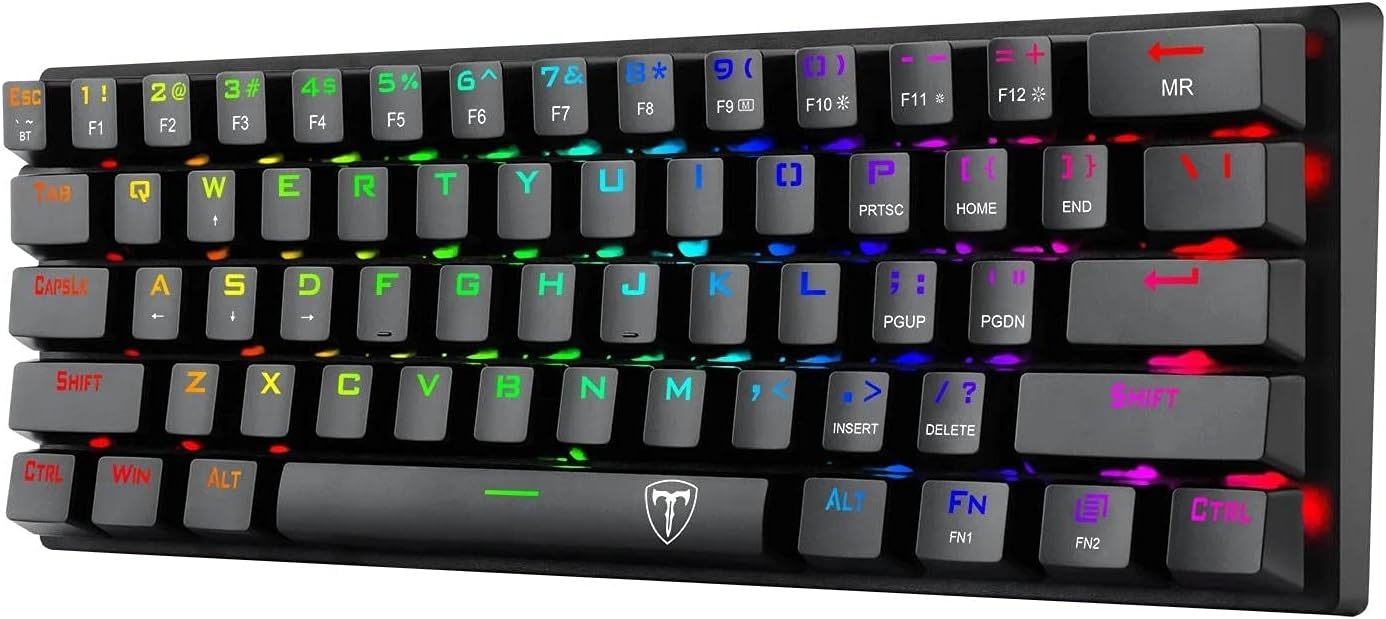
Слика: Врх view of the keyboard showing FN key and secondary functions.
| Комбинација | Функција |
|---|---|
| ФН + 1/2/3 | Switch between Bluetooth devices (short press) / Enter pairing mode (long press) |
| FN + F1-F12 | Multimedia controls (e.g., Play/Pause, Volume Up/Down, Mute) |
| ФН + десни Схифт | Toggle arrow key functionality (if applicable) |
| ФН + \| | Change RGB lighting mode |
| ФН + [{ | Смањите осветљеност позадинског осветљења |
| ФН + ]} | Повећајте осветљеност позадинског осветљења |
| ФН + ;: | Смањите брзину позадинског осветљења |
| FN + '" | Повећајте брзину позадинског осветљења |
| FN + размакница | Change backlight color (in certain modes) |
5.2 RGB контрола осветљења
The T-TGK317 offers extensive RGB lighting customization:
- Промените режим осветљења: Притисните ФН + \| to cycle through various pre-programmed lighting effects.
- Подесите осветљеност: Користите ФН + [{ to decrease brightness and ФН + ]} за повећање осветљености.
- Подесите брзину: Користите ФН + ;: to decrease animation speed and FN + '" да повећате брзину анимације.
- Промени боју: In certain static or reactive modes, press FN + размакница to cycle through different colors.
6. Одржавање
Правилно одржавање осигурава дуготрајност и перформансе ваше тастатуре:
- Чишћење: Use a soft, dry cloth to wipe the keyboard surface. For deeper cleaning, you may use a can of compressed air to remove dust and debris from between the keycaps. Avoid using harsh chemicals or abrasive materials.
- Уклањање капице тастера: If necessary, keycaps can be carefully removed using a keycap puller (not included) for thorough cleaning. Be gentle to avoid damaging the switches.
- Battery Care (Wireless Mode): To preserve battery life, turn off the keyboard using the power switch when not in use for extended periods. Recharge the keyboard when the battery indicator (if available) shows low power or when performance degrades.
- Складиштење: Чувајте тастатуру на хладном и сувом месту, даље од директне сунчеве светлости и екстремних температура.
КСНУМКС. Решавање проблема
If you encounter issues with your T-DAGGER T-TGK317 keyboard, refer to the following solutions:
| Проблем | Решење |
|---|---|
| Keyboard not responding in wired mode. | Ensure the USB-C cable is securely connected to both the keyboard and the computer. Try a different USB port or cable. Ensure the keyboard is switched to wired mode (if applicable, check the side switch). |
| Тастатура се не повезује преко Блутут-а. | Ensure the keyboard is in Bluetooth mode ('BT' on the side switch). Make sure the keyboard is charged. Put the keyboard into pairing mode (long press FN + BT1/BT2/BT3). Delete previous pairings on your device and try pairing again. Ensure your device's Bluetooth is enabled. |
| Keys are not registering or double-typing. | Clean under the keycaps with compressed air. Ensure the keyboard firmware is up to date (check T-DAGGER website for updates). If the issue persists, contact support. |
| RGB осветљење не ради или је заглављено. | Try cycling through lighting modes (FN + \|). Adjust brightness (FN + [{ / ]}). Ensure the keyboard is not in a low-power state if using Bluetooth. |
| Блуетоотх веза је нестабилна. | Ensure the keyboard is within range of your device. Minimize interference from other wireless devices. Ensure the keyboard battery is sufficiently charged. |
8. Спецификације
| Феатуре | Детаљ |
|---|---|
| Бранд | Т-ДАГГЕР |
| Модел | Т-ТГК317 |
| Повезивање | Wireless (Bluetooth 5.0), Wired (USB-C) |
| Тип прекидача | Плави механички прекидачи |
| Кеицапс | Double Shot Inject Keycaps |
| Позадинско осветљење | РГБ |
| Лаиоут | 60% (61 кључа) |
| Оперативни систем | Windows 10 (Compatible with PC & Laptop) |
| Тежина артикла | 630 г |
| Боја | Црно |
9. Гаранција и подршка
T-DAGGER products are designed for reliability and performance. For information regarding warranty coverage, technical support, or service inquiries, please refer to the warranty card included with your product or visit the official T-DAGGER webсајт. Сачувајте рачун као доказ о куповини за потребе гаранције.