
Увод
This manual provides detailed instructions for the operation and maintenance of your CHENFEC C50 16GB MP3 Player. Please read this guide thoroughly to ensure proper use and to maximize your device's functionality.
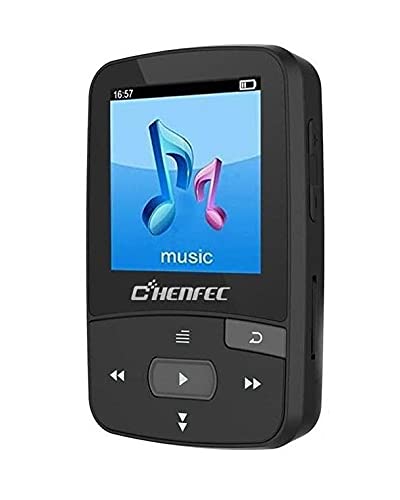
Image: The CHENFEC C50 MP3 Player, showcasing its compact design and rear clip.
Производ је завршенview
Familiarize yourself with the various components and controls of your CHENFEC C50 MP3 Player.

Image: A detailed diagram of the CHENFEC C50 MP3 Player, indicating the display, volume controls, Micro SD card slot, return button, navigation buttons (last, play/pause, next, next song, last song).
- Приказ: Shows menus, track information, images, and e-book content.
- Појачавање/утишавање: Подешава ниво аудио излаза.
- Утор за микро СД картицу: За проширење меморије до 64 ГБ.
- Дугме за повратак: Navigates back to the previous menu or screen.
- Navigation Buttons (Last Song, Next Song, Play/Pause): Controls media playback and menu navigation.
Сетуп
Садржај пакета
Пре него што почнете, уверите се да су све ставке присутне у пакету:

Image: The CHENFEC C50 MP3 Player and its accessories, including wired earphones, a USB charging/data cable, and a user manual.
- CHENFEC C50 MP3 Player
- УСБ кабл за пуњење/дата
- Кабловске слушалице
- Кориснички приручник (овај документ)
Пуњење уређаја
Connect the MP3 player to a computer's USB port or a compatible USB wall adapter using the provided USB cable. The battery indicator on the screen will show charging status. A full charge typically takes 2-3 hours.
Укључивање/искључивање
- To power on, press and hold the Power button (usually located on the side or top) until the screen illuminates.
- To power off, press and hold the Power button until the "Power Off" option appears, then select it.
Loading Music and Files
- Интерна меморија: Connect the MP3 player to your computer using the USB cable. The device will appear as a removable disk. Drag and drop your music (MP3, WAV) and other supported files (TXT for e-books, images) into the appropriate folders on the device.
- Екстерна меморија: Insert a Micro SD card (up to 64GB, not included) into the Micro SD card slot. You can then transfer files directly to the card via the player or by inserting the card into a computer's card reader.
Упутство за употребу
Основна навигација
- Користите Горе/Доле navigation buttons to scroll through menu options.
- Притисните тастер Пусти/Паузирај дугме за избор опције или потврду радње.
- Притисните тастер Повратак дугме за повратак на претходни мени.
Репродукција музике
- У главном менију изаберите „Музика“.
- Browse your music library by artist, album, or all songs.
- Select a song and press Пусти/Паузирај да бисте започели репродукцију.
- Користите Последња песма и Нект Сонг дугмад за прескакање нумера.
- Подесите јачину звука помоћу Појачавање/утишавање јачине звука дугмад.
Блуетоотх повезивање
The CHENFEC C50 supports Bluetooth for wireless audio output to compatible headphones or speakers.
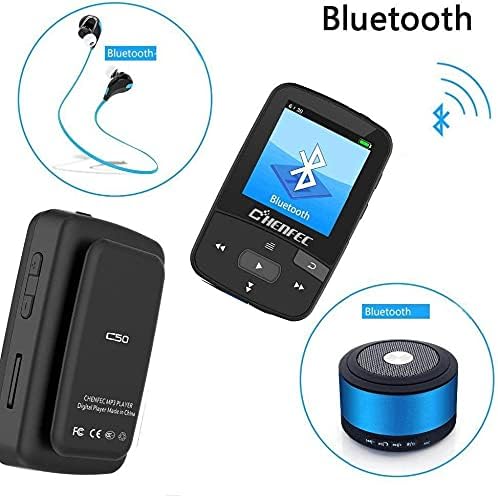
Image: The CHENFEC C50 MP3 Player demonstrating its Bluetooth connectivity with wireless headphones and a portable Bluetooth speaker.
- У главном менију изаберите „Блутут“.
- Уверите се да су ваше Bluetooth слушалице или звучник у режиму упаривања.
- The player will scan for available devices. Select your device from the list.
- Once paired, audio will be routed wirelessly.
ФМ Радио
- Plug in wired earphones (they act as the antenna).
- У главном менију изаберите „ФМ радио“.
- Use the navigation buttons to scan for stations or manually tune to a frequency (87.5MHz - 108MHz).
Диктафон
- From the main menu, select "Voice Recorder".
- Choose "Start Recording" to begin.
- Притисните Пусти/Паузирај да бисте зауставили и сачували снимак.
- Recordings are saved in WAV or MP3 format.
Читач е-књига
- Transfer TXT format e-books to the device's storage.
- From the main menu, select "E-book".
- Select the desired book to open and read.
Слика Viewer
- Transfer image files to the device's storage.
- From the main menu, select "Image Viewer".
- Browse and select images to view them on the display.
Подешавања
Access the "Settings" menu to customize various options:
- Језик: Select from 24 supported languages, including English, German, French, Italian, Dutch, Portuguese, Spanish, and Russian.
- Звучни ефекти: Choose from 7 different equalizer presets.
- Подешавања екрана: Adjust brightness and backlight timeout.
- Датум и време: Подесите тренутни датум и време.
Одржавање
- Држите уређај сувим. Избегавајте излагање влази или течностима.
- Очистите уређај меком, сувом крпом. Не користите абразивна средства за чишћење или раствараче.
- Избегавајте испуштање уређаја или излагање јаким ударима.
- Чувајте уређај на хладном и сувом месту када се не користи.
- Не покушавајте сами да растављате или поправљате уређај. То ће поништити гаранцију.
Решавање проблема
| Проблем | Могуће решење |
|---|---|
| Уређај се не укључује. | Ensure the device is fully charged. Connect it to a power source and try again. |
| Нема звука из слушалица. | Check if earphones are properly plugged in. Verify volume level. Test with different earphones. |
| Не могу се повезати преко Bluetooth-а. | Ensure Bluetooth is enabled on both the player and the receiving device. Make sure the receiving device is in pairing mode and within range. |
| Files not appearing on the device. | Осигурати files are in supported formats (MP3, WAV for audio; TXT for e-books). Verify files were transferred to the correct folder. Check if the Micro SD card is properly inserted and recognized. |
| Уређај се замрзава или престаје да реагује. | Press and hold the Power button for 10-15 seconds to force a restart. If the issue persists, try resetting the device (refer to the settings menu for a reset option, if available). |
Спецификације
| Феатуре | Детаљ |
|---|---|
| Бранд Наме | CHENFEC |
| Назив модела | Ц50 |
| Капацитет меморије | 16 GB (интерна) |
| Подршка за екстерно складиштење | Мицро СД картица до 64 ГБ |
| Материјал тела | Пластика |
| Посебне карактеристике | FM Radio, Voice Recorder, Image Viewer, E-book Reader, Pedometer, Bluetooth |
| Технологија повезивања | Блуетоотх |
| Боја | Црно |
| Величина екрана | 2 инча |
| Компатибилни уређаји | Лаптоп, лични рачунар |
| Supported Audio Standards | MP3, WAV (for recording) |
| Подржани формат е-књиге | ТКСТ |
| ФМ радио фреквенција | КСНУМКСМХз ~ КСНУМКСМХз |
| Звучни ефекти | 7 врсте |
| Подржани језици | 24 languages (e.g., English, German, French, Italian, Dutch, Portuguese, Spanish, Russian) |
Гаранција и подршка
For warranty information and technical support, please refer to the documentation provided with your purchase or contact CHENFEC customer service. Keep your proof of purchase for warranty claims.
Важно: Any unauthorized attempts to repair or modify the device will void the product warranty.