
1. Увод
This manual provides detailed instructions for the assembly, operation, and maintenance of your CaDA Remote Control Pickup Truck Building Block Kit, model C51005W. This kit allows you to construct a detailed pickup truck model that can be controlled remotely. It is designed for users aged 6 and above.

Image 1: The CaDA C51005W Remote Control Pickup Truck Building Block Kit, including the assembled truck, remote control, and packaging.
2. Производ је готовview
The CaDA C51005W is a 549-piece building block kit that assembles into a remote-controlled pickup truck. The finished model measures approximately 32cm x 16cm x 12cm. It features realistic details and functional elements for an engaging building and play experience.
Кључне карактеристике:
- Функционалност даљинског управљача: Allows forward, backward, and steering control.
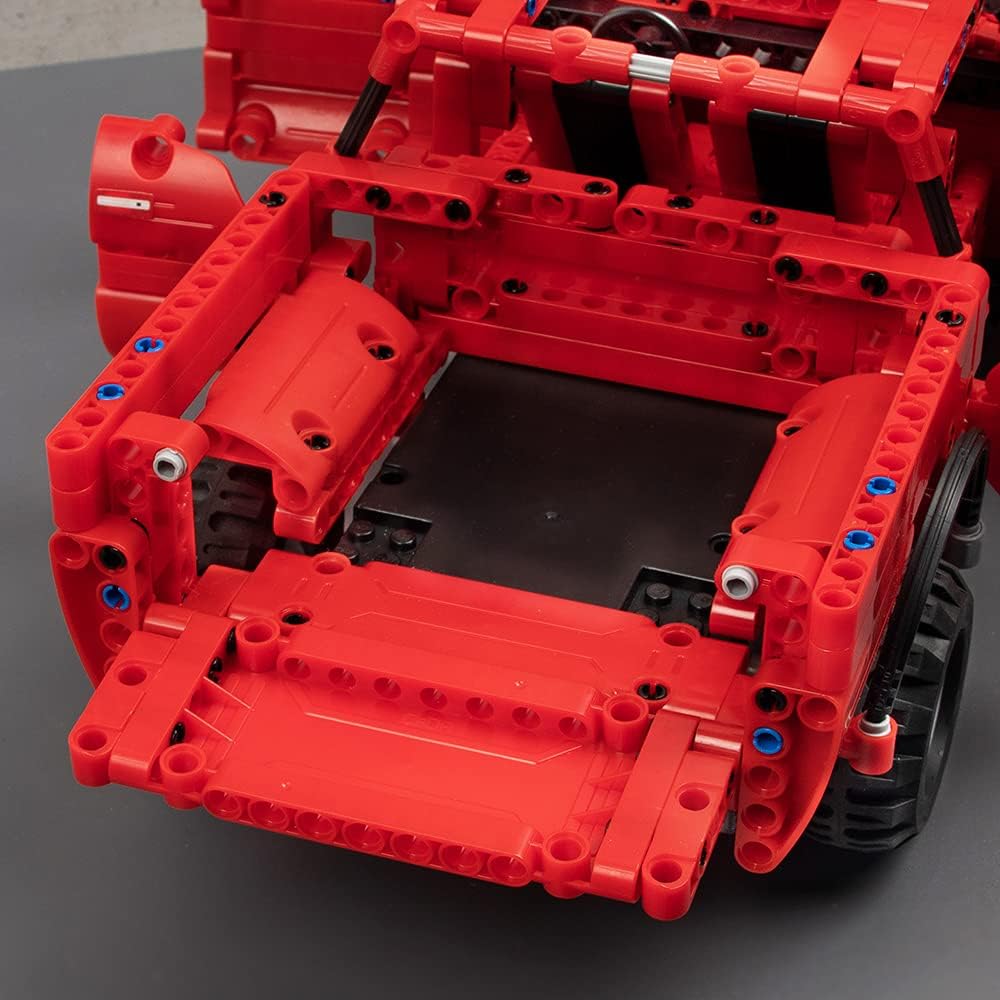
- Детаљан дизајн: Includes rubber tires, openable doors, a movable steering wheel, seats, and an openable hood and trunk.
- Chassis Adjustment: Fine-tuning for driving direction is possible via the chassis.
- Компатибилност: CaDA blocks are compatible with LEGO brand blocks, allowing for customization and expansion.




3. Садржај пакета
Молимо вас да проверите да ли су све компоненте присутне пре почетка монтаже:
- Градивни блокови (549 делова)
- Ремоте Цонтрол
- Пуњива батерија (3.6В 400мАх)
- УСБ кабл за пуњење
- Motors (x2)
- Илустровано упутство за употребу
Items Not Included (Required for Operation):
- AA Batteries (x2) for the Remote Control

Image 8: The included rechargeable battery and USB charging cable.
4. Подешавање и монтажа
Follow the step-by-step illustrated instructions provided in the manual included with your kit. The manual uses clear diagrams to guide you through the assembly process.
Савети за склапање:
- Organize your blocks by type or color before starting to make the process smoother.
- Pay close attention to the illustrations for correct part placement.
- Уверите се да су сви спојеви чврсти како бисте спречили одвајање делова током игре.

Слика 9: Бивши/аample page from the illustrated instruction manual, showing clear assembly steps.
Инсталација и пуњење батерије:
- Батерија главне јединице: Connect the included 3.6V 400mAh rechargeable battery to the main unit's power port as indicated in the assembly manual.
- Пуњење: Use the provided USB charging cable to charge the main unit's battery. Connect the USB end to a compatible power adapter (not included) and the other end to the battery. The first charge requires 4-5 hours. Subsequent charges typically take 2-3 hours.
- Батерије за даљински управљач: Open the battery compartment on the remote control and insert 2 AA batteries (not included), ensuring correct polarity.
5. Упутство за употребу
Once assembled and powered, your CaDA Remote Control Pickup Truck is ready for operation.
Функције даљинског управљача:
- Користите леви џојстик за кретање напред и назад.
- Use the right joystick to steer the vehicle left and right.
- The remote control operates on a 2.4GHz frequency, providing a stable connection up to 25 meters.

Image 10: The assembled pickup truck in action, controlled by the remote.

Image 11: Illustration of the 2.4G remote control technology for stable operation.
Direction Fine-Tuning:
If the vehicle does not drive straight, you can fine-tune the steering direction using the adjustment mechanism located on the chassis. Refer to the manual for the exact location and method of adjustment.

Image 12: Close-up of the chassis showing the direction fine-tuning mechanism.
6. Одржавање
Proper maintenance will ensure the longevity and optimal performance of your CaDA building block kit.
Чишћење:
- Wipe the blocks and remote control with a dry, soft cloth.
- Avoid using water or cleaning solutions, as the product is not waterproof.
Нега и складиштење батерије:
- Do not leave batteries in high-temperature environments.
- Avoid overcharging the rechargeable battery.
- When not in use for extended periods, remove the rechargeable battery from the main unit and the AA batteries from the remote control.
- Store batteries and the product in a cool, dry place.
КСНУМКС. Решавање проблема
If you encounter issues with your CaDA Remote Control Pickup Truck, please refer to the following common problems and solutions:
| Проблем | Могући узрок | Решење |
|---|---|---|
| Возило се не помера. | Low battery in main unit or remote control. Incorrect battery installation. Loose connections. | Charge the main unit battery. Replace AA batteries in the remote control. Ensure batteries are installed with correct polarity. Check all block connections for firmness. |
| Vehicle does not steer correctly. | Steering mechanism obstruction. Need for fine-tuning. | Check for any blocks obstructing the steering. Use the direction fine-tuning function on the chassis. |
| Даљински управљач не реагује. | Out of range. Remote control batteries low. Interference. | Move closer to the vehicle (within 25m). Replace remote control batteries. Avoid operating near other 2.4GHz devices. |
| Недостајући или оштећени делови. | Manufacturing defect or loss during assembly. | Refer to the 'Warranty and Support' section for contact information to request replacement parts. |
8. Спецификације
| Феатуре | Детаљ |
|---|---|
| Број модела | Ц51005В |
| Број комада | 549 |
| Assembled Product Size | 32.8 к 16.7 к 12.9 цм |
| Тежина | 1.38 кг |
| Главни материјал | акрилонитрил бутадиен стирен (АБС) |
| Препоручена старост | 6 година и више |
| Батерија главне јединице | 3.6V 400mAh (Rechargeable, included) |
| Батерија за даљински управљач | AA batteries x 2 (Not included) |
| Време пуњења | First charge: 4-5 hours; Subsequent charges: 2-3 hours |
| Оперативно време | 15-20 минута по пуњењу |
| Мак Спеед | 5 км/х |
| Домет даљинског управљача | До 25 метара |
| Водоотпоран | бр |
9. Безбедносна упозорења
- Опасност од гушења: Small parts. Not suitable for children under 4 years due to potential choking hazards. Adult supervision is recommended for all children.
- Безбедност батерије: Do not leave batteries in high-temperature locations. Avoid overcharging the rechargeable battery. Remove batteries from the product and remote control when not in use for extended periods. Store batteries in a cool, dry place.
- Није водоотпоран: Овај производ није водоотпоран. Избегавајте контакт са водом или влагом како бисте спречили оштећење електронских компоненти.
- Компатибилност: While CaDA blocks are compatible with LEGO brand blocks, this product is not manufactured by LEGO.
10. Гаранција и подршка
If you find that parts are missing or defective, please contact CaDA customer support. You will need to provide the part number(s) from the back of the assembly manual, the quantity needed, and your shipping address.
For further assistance or inquiries, please visit the official CaDA store or contact their customer service department. Contact details are typically found on the product packaging or the brand's official webсајту.