
1. Производ је готовview
The i-aplus LED Nightstand is a modern bedside table designed to enhance your bedroom with both functionality and aesthetic appeal. It features two spacious drawers for storage, an open shelf, and an integrated RGB LED light system that can be controlled via an app or remote. Constructed from high-quality particle board, it offers excellent loading capacity and a sturdy structure.

Figure 1: i-aplus LED Nightstand (Black)
2. Компоненте и садржај пакета
Before assembly, please ensure all parts and accessories are present. Refer to the assembly guide included in your package for a detailed list and identification of each component. The nightstand is primarily constructed from engineered wood panels and includes necessary hardware and an LED light strip system.
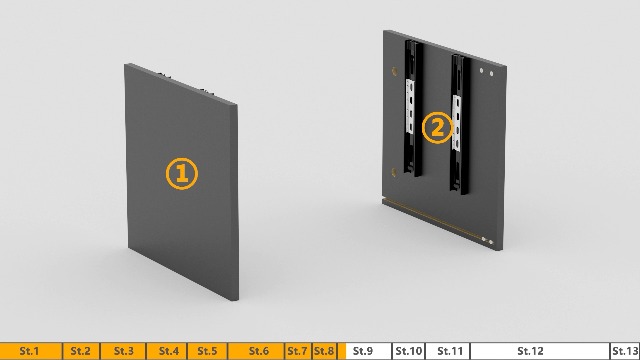
Слика 2: Експлодирао view of nightstand components
3. Упутство за монтажу
Follow the step-by-step instructions provided in the included assembly guide. All parts are labeled with figures and letters for easy identification. A screwdriver is recommended for assembly.
За визуелни водич, погледајте званични видео монтаже:
Video 1: i-aplus Night Stand Assembly Guide (Seller: AP HOME & FURNITURE)
Key assembly steps include attaching slide rails, connecting panels with screws and bolts, and inserting the back panel. Ensure proper alignment of all components for a stable structure.

Слика 3: Димензије производа

Figure 4: Panel assembly detail

Figure 5: Drawer slide mechanism
4. Operating Instructions (LED Light System)
The built-in RGB LED strip light system offers multi-color lights and 29 dynamic light modes (static, flashing, jump, and fade). It also features a music sync mode and a timer. The light brightness can be adjusted.
Control the LED lights using the provided remote control or via the dedicated APP (scan the QR code in your manual for quick access).

Слика 6: Карактеристике ЛЕД светла
For a demonstration of the LED light features, please watch these videos:
Video 2: i-aplus Nightstand LED Nightstand with 2 Drawers - How it Works (Creator: Jon's Real Reviews)
Video 3: i-aplus Nightstand LED Nightstand with 2 Drawers - My Honest Review (Creator: Jon's Real Reviews)
5. Одржавање и њега
To maintain the quality and appearance of your nightstand, wipe it with a damp cloth as needed. Avoid excessive moisture and do not submerge it in water or expose it to excessive liquids.

Figure 7: Cleaning the nightstand surface
КСНУМКС. Решавање проблема
If you encounter issues with the LED lights, first ensure the power cord is securely connected to both the nightstand and a working wall outlet. Check the remote control for battery life and ensure the transparent film (if any) has been removed. If issues persist, refer to the detailed troubleshooting section in your physical manual or contact customer support.
7. Спецификације производа
| Спецификација | Детаљ |
|---|---|
| Бранд | i-aplus |
| Димензије производа | 19"Д к 14.5"Ш к 20.5"В |
| Препорука за максималну тежину | 40 фунти |
| Боја | Црно |
| Упутства за одржавање производа | Обришите са Дamp Цлотх |
| Назив модела | LED Night Stand |
| Укључене компоненте | Assembly Tools, Assembly Guide |
| Врста материјала | Енгинееред Воод |
| Број фиока | 2 |
| Број ставки | 2 |
8. Гаранција и подршка
This product is sold by AP HOME & FURNITURE. For specific warranty details or further support, please contact the seller directly through your purchase platform. Keep your proof of purchase for any warranty claims.