
Увод
Thank you for choosing the PHEANOO D6 Sound Bar System. This 2.1 channel soundbar with a dedicated wired subwoofer is designed to enhance your audio experience, providing clear dialogue, powerful bass, and immersive sound for your home entertainment. This manual provides detailed instructions for setup, operation, maintenance, and troubleshooting to ensure optimal performance and longevity of your device.
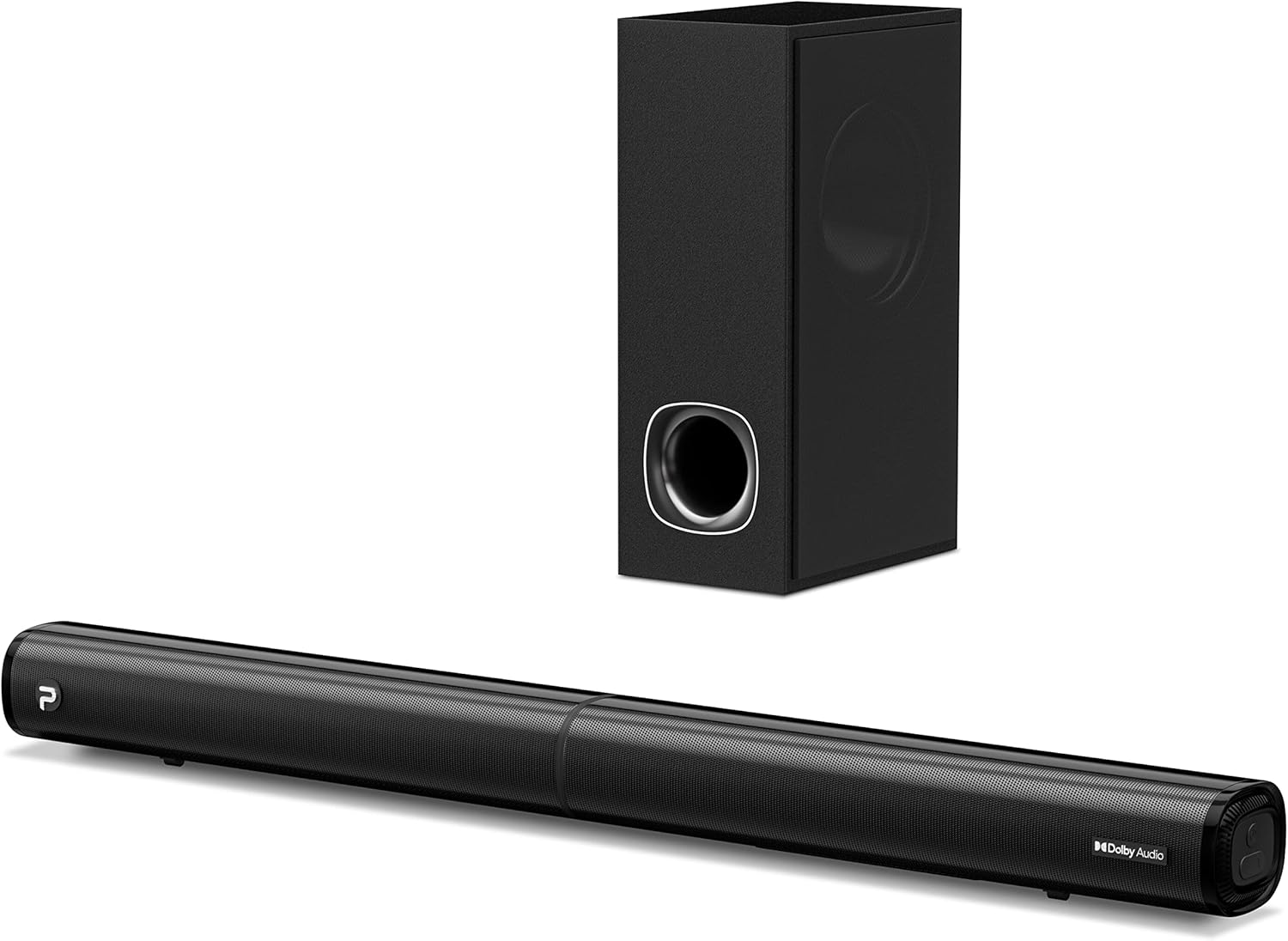
Image: The PHEANOO D6 Sound Bar and its accompanying wired subwoofer, showcasinг њихов елегантни црни дизајн.
Шта је у кутији
Пажљиво проверите садржај пакета. Ако неке ставке недостају или су оштећене, контактирајте корисничку подршку.
- Soundbar and Wired Subwoofer
- ХДМИ кабл
- РЦА аудио кабл
- Wall Mount Kit (screws and anchors)
- Даљински управљач (батерије нису укључене)
- Повер Адаптер

Image: All components included in the PHEANOO D6 Sound Bar package, laid out for clear identification, including the soundbar, subwoofer, cables, remote, and wall mount kit.
Сетуп
1. Assembling the Soundbar (Detachable Design)
The PHEANOO D6 soundbar features a unique detachable design for flexible placement. Follow these steps to assemble it:
- Align the audio connector from one half of the soundbar with the corresponding port on the other half.
- Gently push the two halves together until they click into place.
- Twist the two halves to secure the connection, ensuring the soundbar is firmly assembled.

Image: A three-step visual guide demonstrating how to connect the two halves of the detachable soundbar, ensuring proper alignment and secure locking.
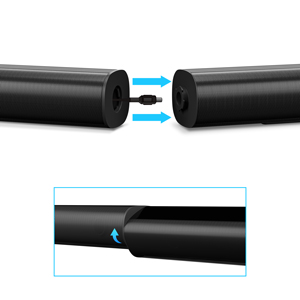
Слика: Крупни план view of the soundbar's detachable connection point, showing the male and female connectors.
2. Повезивање субвоофера
Повежите жичани сабвуфер са саундбаром помоћу наменског кабла за сабвуфер. Уверите се да је веза безбедна.
3. Опције пласмана
You can place the soundbar on a tabletop or mount it on a wall.
- Положај стола: Place the soundbar directly in front of your TV, ensuring it does not obstruct the TV's remote sensor.
- Монтажа на зид: Use the included wall mount kit. It is recommended to measure and mark the drilling points accurately, rather than relying solely on the paper stencil, to ensure a level installation.
4. Аудио везе
The PHEANOO D6 offers multiple connectivity options. Choose the best one for your device:
- ХДМИ (АРЦ): For the best audio quality and control, connect an HDMI cable from the soundbar's HDMI (ARC) port to your TV's HDMI (ARC) port. This allows your TV remote to control the soundbar's volume.
- Оптички: Connect an optical cable from the soundbar's Optical port to your TV's Optical Digital Audio Out port.
- АУКС: Use the 3.5mm AUX cable to connect to devices with a 3.5mm audio output.
- Блуетоотх КСНУМКС: For wireless connection, pair your device via Bluetooth.

Image: The rear panel of the PHEANOO D6 Sound Bar, highlighting the HDMI (ARC), Bluetooth, Optical, and AUX input ports with corresponding icons.

Слика: Детаљна view of the soundbar's input panel, showing the AUX, Optical, and HDMI (ARC) ports clearly labeled.
5. Прикључак за напајање
Повежите адаптер за напајање са звучном траком, а затим га укључите у зидну утичницу.
Упутство за употребу
Ремоте Цонтрол
The included remote control allows you to manage all functions of the soundbar. Insert two AAA batteries (not included) into the remote before use.

Image: The remote control for the PHEANOO D6 Sound Bar, showing its buttons and an indicator light.
Укључивање/искључивање
Press the power button on the remote or the soundbar to turn the unit on or off.
Избор улаза
Press the "Input" button on the remote to cycle through available input sources: HDMI (ARC), Optical, AUX, and Bluetooth.
Блуетоотх упаривање
Да бисте упарили Блуетоотх уређај:
- Select Bluetooth input on the soundbar. The indicator light will flash.
- Enable Bluetooth on your device (smartphone, tablet, etc.) and search for "PHEANOO D6".
- Select the soundbar from the list to pair. Once connected, the indicator light will be solid.

Image: A smartphone displaying a music app, wirelessly connected to the PHEANOO D6 Sound Bar via Bluetooth, indicated by a Wi-Fi like symbol.
Режими звука
Звучна трака нуди различите режиме звука како би оптимизовала ваше искуство слушања:
- Режим дијалога: Enhances vocal clarity, making speech easier to understand.
- Музички режим: Optimized for music playback, providing balanced audio.
- Режим филма: Delivers an immersive cinematic experience with enhanced effects.
- 3Д режим: Creates a wider, more enveloping soundstage.

Image: Icons representing different sound modes: Dialogue, Music, Movie, and 3D, indicating the soundbar's versatility.
Басс Адјустмент
Use the dedicated bass control buttons on the remote to increase or decrease the subwoofer's output level to your preference.

Image: A close-up of the subwoofer, with a visual effect suggesting powerful bass emanating from it.
Dolby Digital Support
The PHEANOO D6 Sound Bar supports Dolby Digital decoding, providing a rich and dynamic audio experience for compatible content.

Image: A living room setup with the soundbar and TV, overlaid with a grid pattern indicating premium 3D surround sound powered by Dolby Audio.

Image: The Dolby Audio logo accompanied by visual representations of sound waves, emphasizing the enhanced audio quality.
Року ТВ спреман
This soundbar is certified to work seamlessly with your Roku TV. Enjoy smooth setup, easy access to sound settings, and compatibility with any Roku TV remote.

Image: A television screen displaying the "Roku TV Ready" setup interface, with the PHEANOO Soundbar and subwoofer positioned below it, illustrating seamless integration.
Одржавање
- Чишћење: Користите меку, суву крпу за чишћење површина саундбара и сабвуфера. Не користите течна средства за чишћење или аеросоле.
- вентилација: Обезбедите одговарајућу вентилацију око саундбара и сабвуфера како бисте спречили прегревање. Не блокирајте вентилационе отворе.
- Складиштење: Ако складиштите уређај дуже време, искључите га из струје и чувајте га на хладном и сувом месту.
Решавање проблема
| Проблем | Могући узрок | Решење |
|---|---|---|
| Нема струје | Кабл за напајање није повезан; утичница не ради. | Уверите се да је кабл за напајање безбедно повезан. Покушајте са другом утичницом. |
| Нема звука | Изабран је погрешан улаз; Јачина звука је прениска; Каблови нису правилно повезани. | Select the correct input source. Increase volume. Check all audio cable connections. |
| Блуетоотх упаривање није успело | Звучна табла није у режиму упаривања; Уређај је предалеко; Сметње. | Ensure soundbar is in Bluetooth input and indicator is flashing. Move device closer. Turn off other Bluetooth devices. |
| Лош квалитет звука | Incorrect sound mode; Source audio quality is low. | Try different sound modes (Music, Movie, Dialogue). Ensure the audio source is high quality. |
| Даљински управљач не ради | Batteries dead or incorrectly inserted; Obstruction between remote and soundbar. | Замените батерије, водећи рачуна о исправном поларитету. Уклоните све препреке. |
For more detailed troubleshooting, refer to the official Troubleshooting Guide PDF available on the product page or contact PHEANOO customer support.
Спецификације
| Феатуре | Детаљ |
|---|---|
| Модел | D6 |
| Бранд | ПХЕАНОО |
| Спеакер Типе | Соундбар са жичаним сабвуфером |
| Конфигурација канала | 2.1 ЦХ |
| Технологија повезивања | HDMI (ARC), Bluetooth 5.0, Optical, AUX |
| Блуетоотх домет | Up to 100 Meters (approx. 328 feet) |
| Максимална излазна снага звучника | 240 Ваттс |
| Димензије производа (саундбар) | 29.5 cm Š x 2.4 cm V x 2.8 cm D |
| Тежина артикла | 11.57 фунти |
| Тип контролера | Ремоте Цонтрол |
| Посебне карактеристике | Dolby Digital Decoding, Dialogue Enhancement, Bass Adjustable, Detachable Design, Roku TV Ready |
Гаранција и подршка
The PHEANOO D6 Sound Bar System comes with a Ограничена гаранција. Please refer to the warranty card included in your package for specific terms and conditions.
For technical support, warranty claims, or further assistance, please visit the official PHEANOO website or contact their customer service department. You can also find additional resources like the Упутство за употребу (ПДФ) и Водич за решавање проблема (PDF) онлајн.