
Увод
Thank you for choosing the seenda MMO Gaming Mouse Vanguard S. This high-performance gaming mouse is designed to enhance your gaming experience with its customizable features and ergonomic design. It offers a smooth and precise gaming experience with up to 10000 DPI, programmable macros, and interchangeable side plates to suit various gaming styles.
Please read this manual carefully to ensure proper setup, operation, and maintenance of your new gaming mouse.
Садржај пакета
- РГБ миш за игре к 1
- Side Plates Packet x 1 (includes various side plates)
- Упутство за употребу к 1
- Кутија за паковање к 1

Figure 1: Package Contents of the seenda Vanguard S Gaming Mouse.
Сетуп
1. Повезивање миша
- Unpack the seenda MMO Gaming Mouse Vanguard S from its packaging.
- Connect the USB cable of the mouse to an available USB port on your computer.
- The mouse should be automatically recognized by your operating system (Windows 7, XP, Vista, or newer).
2. Инсталација софтвера
To unlock the full customization potential of your Vanguard S mouse, including programmable macros, DPI settings, and RGB lighting, you need to install the official seenda software.
- Visit the official seenda website to download the latest software for the Vanguard S gaming mouse.
- Пратите упутства на екрану да бисте довршили инсталацију.
- Након инсталације, покрените софтвер да бисте конфигурисали подешавања миша.
Упутство за употребу
1. Основне функције миша
- Леви клик: Примарна акција.
- Десни клик: Секундарни радни/контекстни мени.
- Точак за померање: Scroll up/down, Middle click.
- DPI +/- Buttons: Adjust DPI sensitivity on the fly.
2. Interchangeable Side Plates
The Vanguard S mouse comes with multiple interchangeable side plates, allowing you to customize the mouse's grip and button layout for different game types (MMO, MOBA, FPS) or personal preference. The side plates attach magnetically for easy swapping.
- Gently pull the currently attached side plate away from the mouse body to detach it.
- Select your desired side plate from the packet.
- Align the new side plate with the magnetic connectors on the mouse body and gently push until it snaps into place.

Figure 2: Swapping Interchangeable Side Plates.
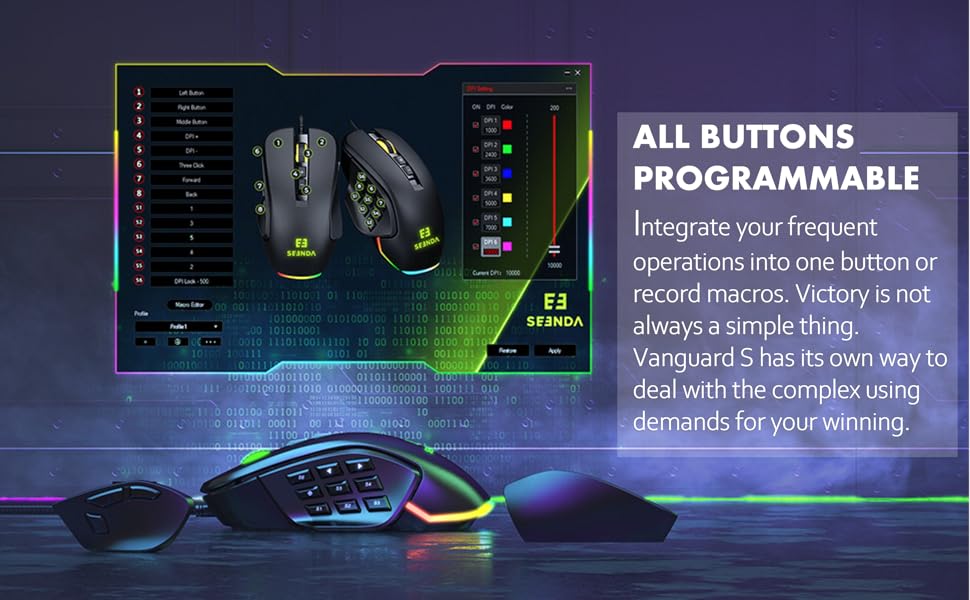
Figure 3: Different Side Plate Configurations.
3. Подешавање DPI-ја
The mouse features a high-precision optical sensor with up to 10000 DPI. You can adjust the DPI sensitivity using the dedicated DPI +/- buttons located on the top of the mouse. Each DPI level can be associated with a specific RGB lighting color for quick visual identification.
- Притисните тастер ДПИ+ button to increase sensitivity.
- Притисните тастер ДПИ- button to decrease sensitivity.
- Default DPI steps and their corresponding colors are typically: 1000 (Red), 2400 (Green), 3600 (Blue), 5000 (Yellow), 7000 (Cyan), 10000 (Pink). These can be customized via software.
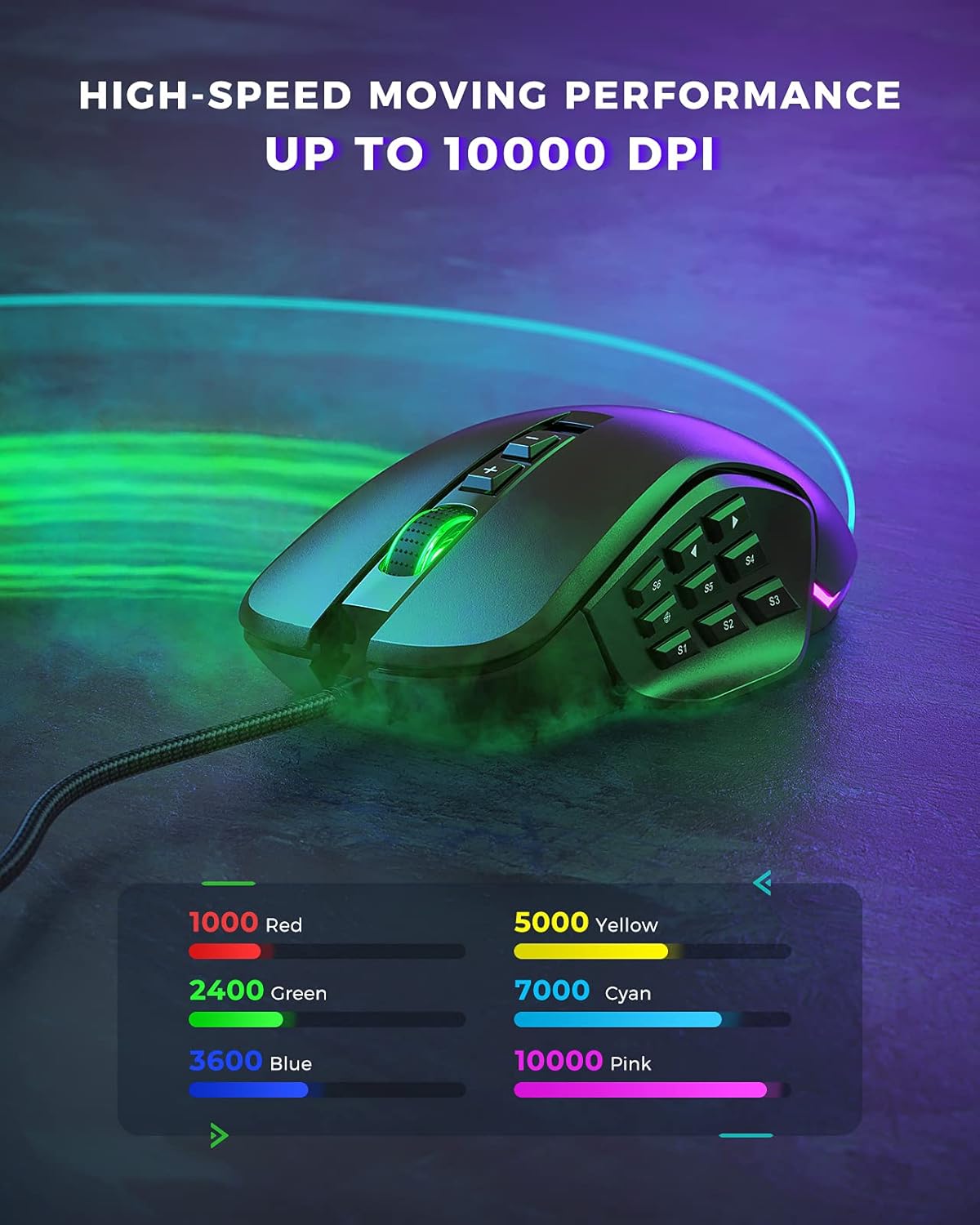
Figure 4: DPI Levels and Corresponding RGB Colors.
Прилагођавање
The seenda Vanguard S offers extensive customization options through its dedicated software. This allows you to tailor the mouse to your specific gaming and productivity needs.
1. Програмабилна дугмад и макрои
The mouse features multiple programmable buttons, including side buttons, which can be assigned to various functions, key presses, or complex macros. This is particularly useful for MMO and MOBA games.
- Launch the seenda gaming software.
- Navigate to the "Button Settings" or "Macro Editor" section.
- Select the button you wish to program.
- Choose from predefined functions, assign a single key, or record a macro sequence.
- Save your changes to the mouse profile.

Figure 5: Software Interface for Button Programming.
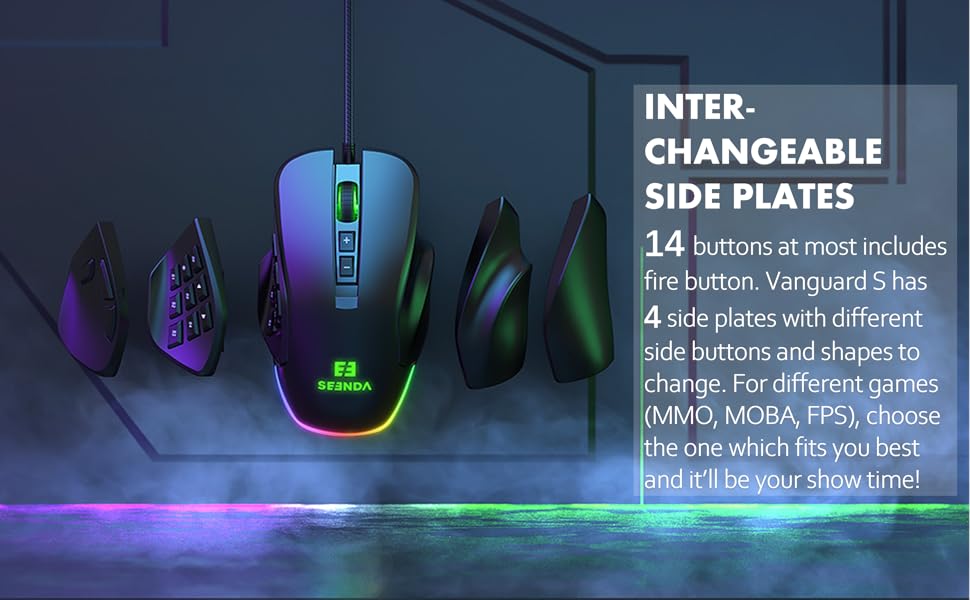
Figure 6: Macro and Button Assignment in Software.
2. Прилагођавање RGB позадинског осветљења
Personalize your gaming setup with customizable RGB backlighting. The software allows you to choose from various lighting effects, colors, and brightness levels for different DPI steps.
- In the seenda gaming software, navigate to the "RGB Settings" or "Lighting" section.
- Select your preferred lighting mode (e.g., Colorful Streaming, Steady, Breathing, Neon).
- Adjust colors for each DPI level or choose a dynamic effect.
- Apply the settings to your mouse.

Figure 7: RGB Lighting Customization Options.

Figure 8: Various RGB Backlight Styles.
Одржавање
1. Чишћење миша
- Искључите миш из рачунара пре чишћења.
- Користите меку крпу која не оставља длачицеampводом или благим раствором за чишћење обришите површину миша.
- Избегавајте употребу јаких хемикалија, абразивних средстава за чишћење или растварача.
- Use a soft brush or compressed air to clean dust and debris from around the buttons and scroll wheel.
- Ensure the mouse is completely dry before reconnecting it to your computer.
2. Општа нега
- Avoid dropping the mouse, especially when side plates are attached, as they may detach.
- Не излажите миш екстремним температурама или влажности.
- Keep the mouse away from liquids.
Решавање проблема
| Проблем | Могући узрок | Решење |
|---|---|---|
| Миш не реагује | Лабава УСБ веза, неисправан УСБ порт, проблем са драјвером. |
|
| Buttons not working/incorrectly mapped | Software configuration error, software not installed. |
|
| DPI се не мења | Software conflict, button malfunction. |
|
| РГБ осветљење не ради | Подешавање софтвера, проблем са напајањем. |
|
Спецификације
| Феатуре | Детаљ |
|---|---|
| Број модела | YC-YJ101 |
| ДПИ | До 10000 ДПИ |
| Програмабилна дугмад | Up to 5 programmable buttons (customizable via software) |
| Бочне плоче | Interchangeable (3 included) |
| Дизајн | Ergonomic, Ambidextrous (with appropriate side plates) |
| Повезивање | УСБ Виред |
| Откривање покрета | Оптицал |
| Компатибилан ОС | Windows 7, Windows XP, Windows Vista, and newer USB-compatible systems |
| Тежина артикла | 3.97 унци |
| Димензије пакета | 5.59 к 4.57 к 2.13 инча |
Гаранција и подршка
Информације о гаранцији
seenda products undergo rigorous testing. If you encounter any issues with your Vanguard S gaming mouse, please do not hesitate to contact seenda customer support. We are committed to ensuring a positive experience with our products.
Корисничка подршка
For technical assistance, troubleshooting, or warranty claims, please visit the official seenda website for contact information or support resources. You can also find the latest software and firmware updates there.