
1. Увод
Thank you for choosing the Truman TM 1000 HD Receiver. This manual provides detailed instructions for the proper installation, operation, and maintenance of your new satellite receiver. Please read this manual thoroughly before using the device to ensure optimal performance and safety.
2. Безбедносне информације
- Ensure the receiver is placed on a stable, flat surface to prevent falls.
- Не излажите уређај киши, влази или екстремним температурама.
- Избегавајте блокирање вентилационих отвора да бисте спречили прегревање.
- Искључите кабл за напајање током грмљавине или када се не користи дуже време.
- Do not attempt to open or repair the receiver yourself. Refer all servicing to qualified personnel.
- The device features automatic low current protection for the signal input.
3. Садржај пакета
Молимо вас да проверите пакет за следеће ставке:
- Truman TM 1000 HD Receiver
- Ремоте Цонтрол
- Повер Адаптер
- Кориснички приручник (овај документ)
- Note: A Wi-Fi adapter is not included and must be purchased separately if wireless connectivity is desired.
4. Производ је готовview
The Truman TM 1000 HD Receiver is a high-definition satellite receiver designed to provide a rich viewing experience. It supports various resolutions and offers multiple features for channel management and media playback.
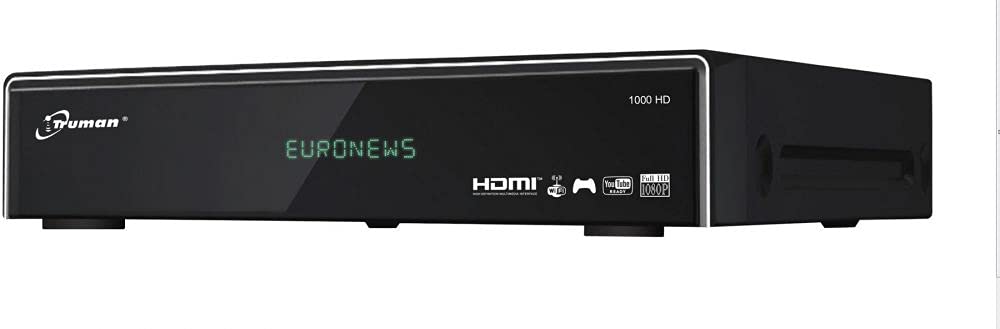
Слика 4.1: Фронт view of the Truman TM 1000 HD Receiver. This image shows the compact design of the receiver, featuring a front panel display and control buttons, indicating its readiness for integration into a home entertainment system.
Кључне карактеристике:
- Full HD support: 1080p, 1080i, 720p, 576p, 480p, 576i, 480i.
- Supports up to 6000 channels.
- УСБ порт за viewing and recording media.
- Simultaneous recording of one channel and viewing of another.
- Picture-in-picture (PIP) functionality for up to 16 channels.
- Automatic search for frequencies and satellites.
- Multi-language and user-friendly menu interface.
- Ethernet (LAN) port for network connectivity.
- Wi-Fi support (requires external Wi-Fi adapter).
- Electronic Program Guide (EPG).
5. Подешавање
5.1 Повезивање пријемника
- Веза са сателитском антеном: Connect the coaxial cable from your satellite dish LNB to the "LNB IN" port on the back of the receiver.
- ТВ веза: Повежите HDMI кабл из „HDMI OUT“ порта на пријемнику са доступним HDMI улазом на вашем телевизору.
- Прикључак за напајање: Прикључите адаптер за напајање на порт „DC IN“ на пријемнику, а затим укључите адаптер у зидну утичницу.
- Мрежна веза (опционо):
- Етхернет: Connect an Ethernet cable from your router to the "LAN" port on the receiver.
- Ви-Фи: If using a Wi-Fi adapter (not included), plug it into an available USB port on the receiver.
- УСБ уређај (опционо): For recording or media playback, insert a USB storage device into an available USB port.
5.2 Прво укључивање
- Укључите телевизор и изаберите одговарајући HDMI улазни извор.
- Power on the Truman TM 1000 HD Receiver.
- Follow the on-screen instructions for initial setup, which typically includes language selection, time zone, and satellite/channel scanning.
- Perform an automatic satellite search to find available frequencies and channels.
6. Упутство за употребу
6.1 Basic Channel Operations
- Избор канала: Користите ЦХ+ / ЦХ- buttons on the remote control to change channels, or enter the channel number directly.
- Контрола јачине звука: Користите ВОЛ + / ВОЛ- дугмад за подешавање јачине звука.
- Приступ менију: Притисните тастер МЕНУ дугме за приступ главном менију за подешавања и функције.
- Електронски програмски водич (ЕПГ): Притисните тастер ЕПГ дугме за view the program schedule.
6.2 Снимање и репродукција
To record programs, ensure a USB storage device is connected to the receiver.
- Тренутно снимање: While watching a channel, press the РЕЦ button on the remote control to start recording. Press СТОП да завршите снимање.
- Планирано снимање: Use the EPG to select a program and schedule a recording.
- Репродукција: Access the media player through the main menu or a dedicated button (if available) to browse and play recorded content or other media fileса вашег УСБ уређаја.
- Simultaneous Operations: The receiver supports recording one channel while watching another channel from the same transponder.
6.3 Network Features (LAN/Wi-Fi)
If connected to a network, the receiver may offer additional features such as firmware updates, internet applications, or media streaming.
- Подешавање мреже: Go to the "Network Settings" in the main menu.
- Етхернет: If using a wired connection, ensure the cable is connected. The receiver should obtain an IP address automatically.
- Ви-Фи: If using a Wi-Fi adapter, select your network from the list, enter the password, and connect.
7. Одржавање
- Чишћење: Користите меку, суву крпу за чишћење спољашњости пријемника. Не користите течна средства за чишћење или абразивне материјале.
- вентилација: Ensure the ventilation slots are clear of dust and obstructions to prevent overheating.
- Ажурирања фирмвера: Periodically check for firmware updates through the receiver's menu (if available) to ensure optimal performance and access to new features.
КСНУМКС. Решавање проблема
| Проблем | Могући узрок | Решење |
|---|---|---|
| Нема струје | Кабл за напајање је искључен; проблем са утичницом. | Проверите везу кабла за напајање; покушајте са другом утичницом. |
| Нема сигнала / порука „Нема сигнала“ | LNB cable disconnected; satellite dish misalignment; incorrect satellite settings. | Check LNB cable connection; ensure dish is correctly aligned; verify satellite settings in the menu. |
| Нема слике на ТВ-у | На телевизору је изабран погрешан HDMI улаз; неисправан HDMI кабл. | Select the correct HDMI input on your TV; try a different HDMI cable. |
| Даљински управљач не ради | Dead batteries; obstruction between remote and receiver. | Replace batteries; ensure clear line of sight to the receiver's IR sensor. |
| Повезивање на Ви-Фи није могуће | No Wi-Fi adapter; incorrect password; network issue. | Ensure a compatible Wi-Fi adapter is connected; re-enter Wi-Fi password; check router. |
9. Спецификације
| Феатуре | Опис |
|---|---|
| Бранд | Труман |
| Модел | TM 1000 HD |
| Подршка за видео резолуцију | 1080p, 1080i, 720p, 576p, 480p, 576i, 480i |
| Капацитет канала | До 6000 канала |
| Повезивање | USB, Ethernet (LAN), Wi-Fi (external adapter required) |
| Снимање | PVR function via USB (record one, watch another on same transponder) |
| више-view | Picture-in-picture up to 16 channels |
| Функција претраге | Automatic frequency and satellite search |
| Језик менија | Подршка за више језика |
| Заштита | Automatic low current protection for signal input |
| ЕПГ | Електронски водич кроз програме |
10. Гаранција и подршка
For warranty information, please refer to the warranty card included with your product or contact your local dealer. For technical support or service inquiries, please visit the official Truman webсајту или се обратите њиховом одељењу за корисничку подршку.
Напомена: Конкретни услови гаранције и контакт подаци за подршку могу се разликовати у зависности од региона.