
Увод
Thank you for choosing the T-Dagger T-TGK317 Mechanical Gaming Keyboard. This compact 60% keyboard offers a versatile experience with its dual-mode connectivity (Bluetooth and wired USB-C) and vibrant RGB backlighting. This manual provides detailed instructions for setup, operation, maintenance, and troubleshooting to ensure optimal performance and longevity of your device.
Производ је завршенview
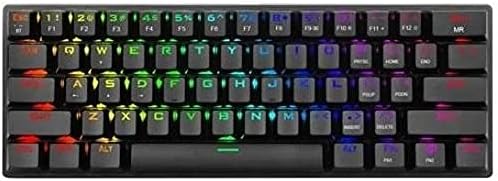
The T-Dagger T-TGK317 is a high-performance mechanical keyboard designed for gaming and everyday use. It features a 60% compact layout, saving desk space while retaining essential functionality through FN key combinations. The keyboard is equipped with durable mechanical switches and customizable RGB lighting.

Слика: Одозго надоле view of the T-Dagger T-TGK317 Mechanical Gaming Keyboard, highlighting its compact 60% layout and illuminated keys.
Кључне карактеристике укључују:
- 60% компактан дизајн: Maximizes desk space.
- Двоструко повезивање: Seamlessly switch between wired USB-C and wireless Bluetooth.
- RGB позадинско осветљење: Customizable lighting effects for an immersive experience.
- Механички прекидачи: Provides tactile feedback and durability.
- Ергономски дизајн: Comfortable for extended use.
Сетуп
1. Жична веза
- Пронађите USB-C порт на левој страни тастатуре.
- Connect the provided USB-C cable to the keyboard.
- Повежите други крај USB-A кабла са доступним USB портом на рачунару.
- Тастатура ће бити аутоматски детектована и спремна за употребу.
Слика: Крупни план view of the T-Dagger T-TGK317 keyboard's USB-C port and the detachable cable, illustrating wired connection.
2. Бежична Bluetooth веза
- Уверите се да је тастатура напуњена.
- Пронађите прекидач за напајање са стране тастатуре и померите га у положај „УКЉУЧЕНО“.
- Притисните и држите FN + BT keys to enter Bluetooth pairing mode. The indicator light will flash rapidly.
- На свом уређају (рачунару, таблету, паметном телефону) омогућите Блутут и потражите нове уређаје.
- Select "T-TGK317" from the list of available devices.
- Ако се то од вас затражи, унесите код за упаривање приказан на екрану.
- Када се упари, индикаторска лампица ће престати да трепери и остати упаљена.

Слика: Са стране view of the T-Dagger T-TGK317 keyboard, showing the 'ON/OFF' switch and dedicated Bluetooth pairing buttons (B1, B2, B3, BT).
3. Пуњење тастатуре
When the battery is low, the indicator light will flash slowly. Connect the keyboard to your computer or a USB power adapter using the provided USB-C cable. The indicator light will turn solid while charging and turn off when fully charged.
Упутство за употребу
1. Function Key Combinations (FN Key)
Due to its compact 60% layout, many functions are accessed by pressing the FN key in combination with other keys. Refer to the keycaps for secondary functions, typically indicated by a different color or symbol.
- FN + [1-0]: Access F1-F10 functions (e.g., F1, F2, etc.).
- FN + [Q, W, E, R, T, Y, U, I, O, P]: Multimedia controls (e.g., Play/Pause, Volume Up/Down, Mute).
- FN + [A, S, D, F, G, H, J, K, L]: Navigation keys (e.g., Home, End, Page Up, Page Down).
- FN + [Z, X, C, V, B, N, M]: Special functions (e.g., Calculator, My Computer).
- FN + [WIN]: Locks/unlocks the Windows key.

Слика: Под углом view of the T-Dagger T-TGK317 keyboard, illustrating the keycap legends for both primary and FN-accessed secondary functions.
2. RGB контрола осветљења
The T-TGK317 offers various RGB lighting modes and customization options:
- FN + [\|]: Промените различите светлосне ефекте.
- FN + [UP/DOWN Arrow]: Подесите нивое осветљености.
- FN + [LEFT/RIGHT Arrow]: Adjust lighting effect speed.
- FN + [Spacebar]: Промените боју позадинског осветљења у одређеним режимима.
3. Промена режима везе
To switch between wired and Bluetooth modes:
- Жични режим: Connect the USB-C cable. The keyboard will automatically switch to wired mode.
- Блуетоотх режим: Disconnect the USB-C cable and ensure the power switch is 'ON'. The keyboard will automatically connect to the last paired Bluetooth device. If not, press FN + BT to reconnect or pair.
Одржавање
Правилно одржавање осигурава дуготрајност и перформансе ваше тастатуре:
- Чишћење: Use a soft, dry cloth to wipe the keyboard surface. For deeper cleaning, use compressed air to remove dust and debris from between the keycaps. You may carefully remove keycaps with a keycap puller (if included) to clean underneath.
- Складиштење: Чувајте тастатуру на хладном и сувом месту, даље од директне сунчеве светлости и екстремних температура.
- Избегавајте течности: Не излажите тастатуру течностима. У случају просипања, одмах искључите тастатуру и оставите је да се потпуно осуши пре него што је поново повежете.
Решавање проблема
If you encounter issues with your T-Dagger T-TGK317 keyboard, try the following solutions:
- Тастатура не реагује (жичана):
- Уверите се да је USB-C кабл безбедно повезан и са тастатуром и са рачунаром.
- Покушајте са другим УСБ портом на рачунару.
- Тестирајте тастатуру на другом рачунару да бисте искључили проблеме специфичне за систем.
- Keyboard not responding (Bluetooth):
- Ensure the keyboard is charged and the power switch is 'ON'.
- Проверите да ли је Bluetooth омогућен на вашем уређају.
- Re-pair the keyboard with your device (see Bluetooth Wireless Connection section).
- Уверите се да је тастатура унутар ефективног домета вашег Bluetooth уређаја.
- Keys not working or double-typing:
- Очистите погођено подручје прекидача компримованим ваздухом.
- Уверите се да нема остатака испод капице тастера.
- RGB осветљење не ради:
- Уверите се да је тастатура укључена.
- Покушајте да мењате режиме осветљења користећи FN + [\|].
- Подесите осветљеност помоћу FN + [UP/DOWN Arrow].
Спецификације
| Феатуре | Спецификација |
|---|---|
| Бранд | T-Dagger |
| Број модела | Т-ТГК317 |
| Тип тастатуре | Механичка тастатура за игре |
| Лаиоут | 60% компактно |
| Број кључева | 61 |
| Повезивање | Dual-mode (Bluetooth & Wired USB-C) |
| Позадинско осветљење | РГБ |
| Прекидачи | Mechanical (Blue Switches) |
| Боја | Црно |
| Посебне карактеристике | Backlit, Ergonomic Design |
| Компатибилни уређаји | All (PC, Mac, Mobile Devices with Bluetooth) |
Гаранција и подршка
T-Dagger products are designed for reliability and performance. For warranty information and technical support, please refer to the warranty card included with your product or visit the official T-Dagger website. If you experience any issues not covered in this manual, please contact T-Dagger customer service for assistance.