
1. Увод
This manual provides detailed instructions for the setup, operation, and maintenance of your WISE TIGER LED Digital Alarm Clock (Model CK-LED1302). Please read this manual thoroughly before use to ensure proper functionality and to maximize your product experience.

Image 1.1: WISE TIGER LED Digital Alarm Clock and its remote control.
2. Садржај пакета
Молимо вас да проверите да ли су све ставке присутне у вашем пакету:
- WISE TIGER LED Digital Alarm Clock (Model CK-LED1302)
- Ремоте Цонтрол
- УСБ кабл за напајање
- Кориснички приручник (овај документ)
- Fixed Bracket (for desk placement)
3. Производ је готовview
The WISE TIGER LED Digital Alarm Clock features a modern 3D design, offering clear time display and multiple functions for various environments.
3.1 Кључне карактеристике
- Приказ времена: 12-hour or 24-hour format.
- Приказ календара: Shows date.
- Будилник: With snooze function.
- Приказ температуре: Приказује температуру околине.
- Подесива осветљеност: Automatic brightness sensor and manual adjustment via remote control.
- Функција ноћног светла: Provides soft illumination.
- Функција меморије: Built-in battery retains time settings for 4-8 hours during power disconnection.
- Разноврстан пласман: Suitable for desk or wall mounting.

Image 3.1: Visual representation of the clock's main functions.
3.2 Компоненте
Погледајте дијаграм испод за прегледview of the clock's components and connection points.
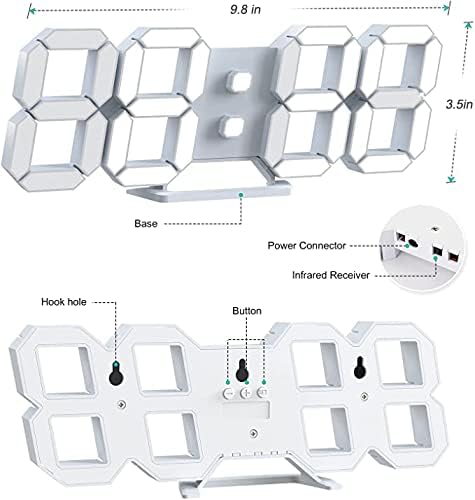
Слика 3.2: Позади view and dimensions of the clock, highlighting the power connector, infrared receiver, and mounting options.
- Приказ: Large 3D LED digits for time, date, and temperature.
- база: Removable stand for desk placement.
- Конектор за напајање: USB port for power input.
- Инфрацрвени пријемник: За сигнале даљинског управљања.
- Hook Holes: За зидну монтажу.
- Контролна дугмад: Located on the back for basic settings (Power, Up, Down, Set).
4. Подешавање
4.1 Прикључак за напајање
- Connect the provided USB power cable to the power connector on the back of the clock.
- Укључите други крај USB кабла у стандардни USB адаптер за напајање (није укључен) или USB порт рачунара.
- The clock will power on and display the time.
The clock is powered by the USB cable only. A built-in battery serves to record time settings when power is disconnected, ensuring settings are retained for 4-8 hours.

Image 4.1: Explanation of the clock's power and memory function.
4.2 Опције пласмана
The clock can be used as a desk clock or a wall clock.
- Положај стола: Attach the fixed bracket to the bottom of the clock. The angle of the bracket can be adjusted for optimal viewинг.
- Монтажа на зид: Remove the fixed bracket if attached. Use the installation slots (hook holes) on the back of the clock to hang it securely on a wall using appropriate fasteners (not included).

Image 4.2: The clock configured for wall mounting and desk placement.
5. Упутство за употребу
The clock's functions are primarily controlled using the included remote control. Basic settings can also be adjusted via the buttons on the back of the clock.
5.1 Подешавање времена и датума
- Притисните тастер ВРЕМЕ button on the remote control to enter time setting mode.
- Користите UP и ДОВН arrows to adjust the hour.
- Притисните ВРЕМЕ again to move to minute setting, then use UP и ДОВН прилагодити.
- Наставите да притискате ВРЕМЕ да бисте се кретали кроз подешавања године, месеца и дана, подешавајући свако помоћу UP и ДОВН.
- Притисните ВРЕМЕ још једном или сачекајте неколико секунди да се подешавања аутоматски сачувају.
5.2 Формат 12/24 сата
To switch between 12-hour and 24-hour time formats, press the 12/24Х дугме на даљинском управљачу.

Слика 5.1: Примерample of 12-hour and 24-hour time display.
5.3 Подешавање аларма
- Притисните тастер АЛАРМ button on the remote control to enter alarm setting mode.
- Користите UP и ДОВН arrows to set the desired alarm hour.
- Притисните АЛАРМ again to move to minute setting, then use UP и ДОВН прилагодити.
- Притисните АЛАРМ one last time or wait for the settings to save.
- Да бисте активирали/деактивирали аларм, притисните дугме АЛАРМ button briefly outside of setting mode. An alarm icon will appear/disappear on the display.
5.4 Функција одлагања
Када се огласи аларм, притисните СНООЗЕ button on the remote control to temporarily silence the alarm. The alarm will sound again after a set interval (typically 5-10 minutes).

Image 5.2: The snooze alarm function in use.
5.5 Подешавање осветљености
The clock features both automatic and manual brightness control.
- Аутоматска осветљеност: The built-in sensor automatically adjusts the display brightness based on ambient light conditions.
- Ручно подешавање осветљености: Притисните тастер БРИГХТ button on the remote control to cycle through different brightness levels (e.g., high, medium, low).

Image 5.3: Automatic brightness adjustment based on ambient light.

Image 5.4: Manual adjustment through three brightness levels.
5.6 Приказ температуре
The clock automatically displays the ambient temperature. No manual adjustment is typically required for this function.
6. Одржавање
To ensure the longevity and optimal performance of your WISE TIGER LED Digital Alarm Clock, follow these maintenance guidelines:
- Чишћење: Use a soft, dry cloth to wipe the display and casing. Avoid abrasive cleaners, solvents, or spray cleaners directly on the clock.
- Снага: Always use the provided USB cable for power. Ensure the power source is stable.
- Окружење: Држите сат даље од екстремних температура, директне сунчеве светлости и високе влажности.
- даљински управљач: Store the remote control in a safe place to prevent loss or damage. Ensure batteries are replaced when needed (typically 2 Lithium Ion batteries, included).
КСНУМКС. Решавање проблема
If you encounter issues with your clock, refer to the following common problems and solutions:
| Проблем | Могући узрок | Решење |
|---|---|---|
| Сат се не укључује | Нема напајања или лабава веза | Ensure USB cable is securely connected and power source is active. Try a different USB port or adapter. |
| Даљински управљач не ради | Remote batteries are dead or remote is out of range/blocked | Replace remote control batteries. Ensure remote is pointed at the clock's infrared receiver (refer to Image 3.2) and within 8 meters. Remove any obstructions. |
| Време је нетачно | Time was not set precisely | Reset the time carefully, ensuring you set it at the exact second of the desired time. |
| Екран је превише таман или превише светао | Brightness setting needs adjustment | Притисните тастер БРИГХТ button on the remote to cycle through manual brightness levels. Check if automatic brightness is functioning correctly in different light conditions. |
| Аларм се не оглашава | Alarm is not activated or set incorrectly | Ensure the alarm is set and activated (alarm icon visible). Verify the alarm time is correct. |
8. Спецификације
| Феатуре | Детаљ |
|---|---|
| Бранд | ВИСЕ ТИГЕР |
| Број модела | ЦК-ЛЕД1302 |
| Дисплаи Типе | Дигитал |
| Боја | Бела |
| Димензије производа | 9.7" Ш x 3.5" В |
| Извор напајања | Електрични са каблом (УСБ) |
| Меморијска батерија | 2 Lithium Ion batteries (included), retains settings for 4-8 hours |
| Тип монтаже | Wall Mount, Desk Mount |
| Посебне карактеристике | Adjustable Brightness, Alarm Clock, Temperature Display, Date Display, 12/24 Hour Format |
| Материјал | Акрилонитрил бутадиен стирен |
| Тежина артикла | 0.317 унце (приближно 9 грама) |
| УПЦ | 728990655931 |
9. Гаранција и подршка
For warranty information or technical support, please refer to the product packaging or contact the retailer where the product was purchased. Keep your purchase receipt as proof of purchase.