
Увод
The Poly DA75 is a versatile USB-A/USB-C digital adapter designed to connect Poly Quick Disconnect (QD) headsets to computers. It ensures clear audio quality for call center environments, supporting both USB-A and USB-C connections for compatibility with various systems. This adapter is engineered to work seamlessly with platforms such as Avaya, Genesys, and Cisco, providing a reliable audio solution for professionals.
Кључне карактеристике укључују:
- Универзална повезаност: Equipped with both USB-A and USB-C connectors on the cable for broad compatibility with new and legacy equipment.
- Intelligent Headset Recognition: Automatically adjusts audio performance to the specific Poly Quick Disconnect headset for optimized call quality.
- Acoustic Protection: Incorporates features to manage safe volume levels, protecting user hearing.
- Интеграција платформе: Fully compatible with leading call center platforms including Avaya, Genesys, and Cisco.
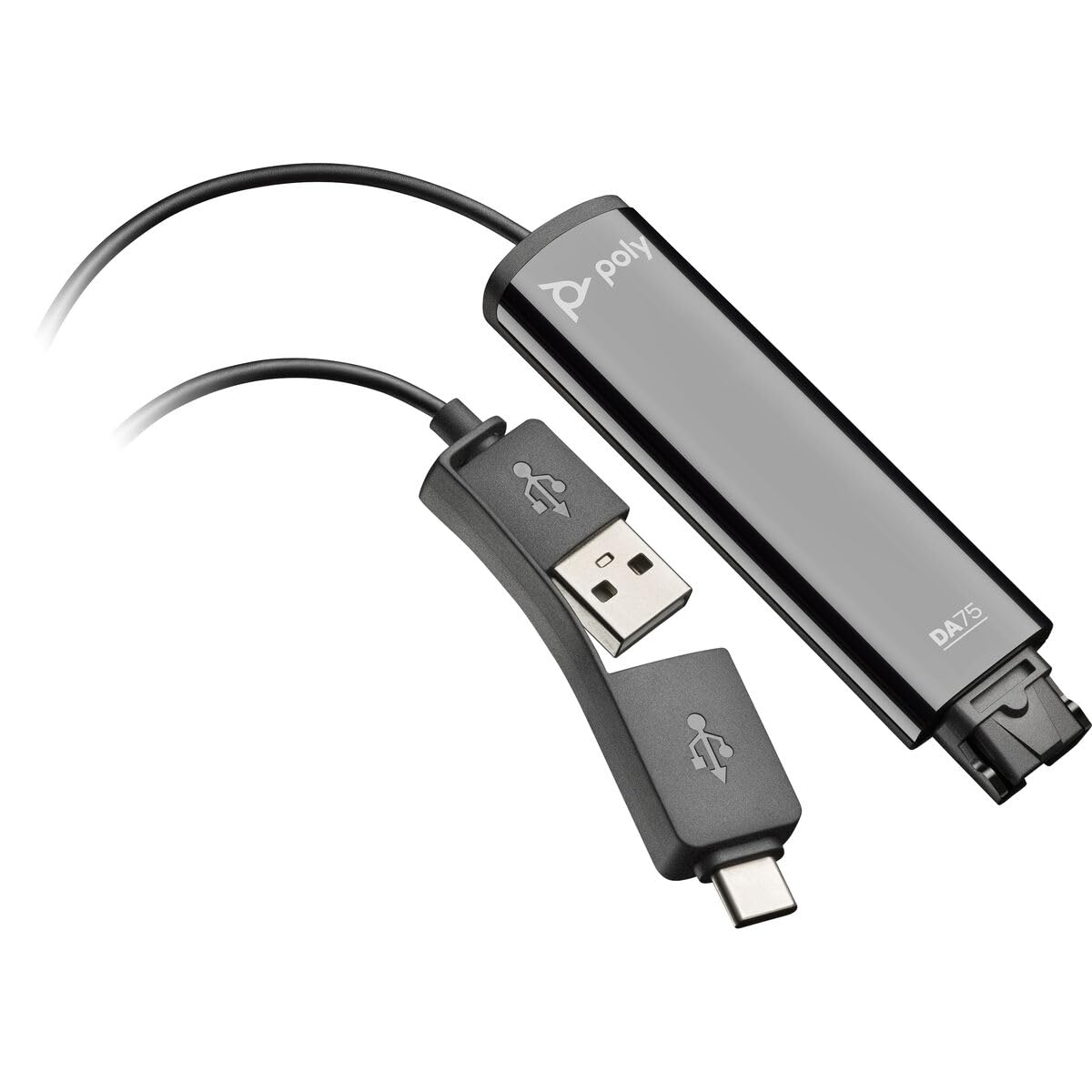
Image: The Poly DA75 USB-A/USB-C Digital Adapter, showing its dual USB-A and USB-C connectors and the Quick Disconnect port for headsets.
Шта је у кутији
The Poly DA75 package typically includes the following items:
- Poly DA75 USB-A/USB-C Digital Adapter
- Документација (Кратки водич, Безбедносне информације)
Note: Headsets are sold separately and are not included with the DA75 adapter.
Сетуп
Follow these steps to set up your Poly DA75 Digital Adapter:
- Повежите слушалице: Connect your Poly Quick Disconnect (QD) headset to the QD port on the Poly DA75 adapter. Ensure the connection is secure.
- Повежите се са рачунаром:
- If your computer has a USB-A port, use the USB-A connector on the DA75 cable.
- If your computer has a USB-C port, use the USB-C connector on the DA75 cable.
Plug the appropriate USB connector into an available USB port on your computer.
- Инсталација драјвера: The DA75 is a plug-and-play device. Your operating system (Windows, macOS) should automatically detect the device and install the necessary drivers. This process may take a few moments.
- Провера препознавања уређаја:
- Виндовс: Иди на Подешавања > Систем > Звук or Контролна табла > Звук. The Poly DA75 should appear as an audio input and output device.
- мацОС: Иди на System Settings > Sound. The Poly DA75 should appear as an input and output device.
Select the Poly DA75 as your default communication device for both playback and recording.
- Конфигурација софтвера: If you are using communication software (e.g., Avaya, Genesys, Cisco, Microsoft Teams, Zoom), ensure that the Poly DA75 is selected as the audio device within the application's settings.
Упутство за употребу
The Poly DA75 adapter facilitates audio communication through your connected Poly QD headset. Its operation is primarily managed through your computer's operating system and communication software.
- Упућивање/примање позива: Use your communication software to initiate or answer calls. The audio will be routed through your connected Poly QD headset via the DA75 adapter.
- Контрола јачине звука: Adjust the listening volume using your computer's system volume controls or the volume controls within your communication application.
- Искључивање микрофона: Mute and unmute your microphone using the controls provided by your communication software.
- Audio Optimization: The DA75 automatically optimizes audio for your specific Poly QD headset. No manual adjustments are typically required for audio profiles.
Одржавање
To ensure the longevity and optimal performance of your Poly DA75 Digital Adapter, follow these maintenance guidelines:
- Чишћење: Gently wipe the adapter with a soft, dry, anti-static cloth. Do not use liquid cleaners or abrasive materials.
- Складиштење: Адаптер чувајте на хладном и сувом месту, даље од директне сунчеве светлости и екстремних температура.
- Руковање: Avoid bending or twisting the cable excessively, especially near the connectors, to prevent internal damage.
- Повезивање: Ensure the Quick Disconnect (QD) connection and USB connections are clean and free of debris before connecting.
Решавање проблема
If you encounter issues with your Poly DA75 Digital Adapter, refer to the following troubleshooting steps:
| Проблем | Могући узрок | Решење |
|---|---|---|
| Нема звука са слушалица |
|
|
| Микрофон не ради |
|
|
| Adapter not recognized by computer |
|
|
Спецификације
| Феатуре | Детаљ |
|---|---|
| Број модела | 218266-01 |
| Бранд | ПОЛИ |
| Тип конектора | USB-A, USB-C (dual connector) |
| Компатибилни уређаји | Poly Quick Disconnect (QD) Headsets |
| Специфичне употребе | PC, Call Center Platforms (Avaya, Genesys, Cisco) |
| Боја | Црно |
| Димензије артикла (Д к Ш к В) | 0.98 к 0.39 к 2.95 инча |
| Тежина артикла | 30 грама |
| Број портова | 2 (USB-A/USB-C to QD) |
| УПЦ | 197029650054, 017229175112 |
Гаранција и подршка
Информације о гаранцији: The Poly DA75 Digital Adapter comes with a Двогодишња ограничена гаранција произвођачаОва гаранција покрива недостатке у материјалу и изради при нормалној употреби. Молимо вас да сачувате доказ о куповини за потребе подношења захтева за гаранцију.
техничка подршка: For technical assistance, product inquiries, or warranty service, please contact Poly customer support. Visit the official Poly website for the most up-to-date support contact information, FAQs, and additional resources.
Онлине ресурси: Поли Суппорт Webсајту