
JBSYSTEMS PPC-081 (Model 011/8612)
JB Systems PPC-081 Adjustable Height Column Sound System
Упутство за употребу
1. Увод
Welcome to the user manual for the JB Systems PPC-081 Adjustable Height Column Sound System. This versatile PA system is designed for various audio applications, featuring an 8-inch woofer for deep bass, a built-in media player, and Bluetooth connectivity. Its modular design allows for three different height configurations, making it adaptable to your specific needs. Please read this manual thoroughly before operating the device to ensure proper use and to prevent damage.
2. Безбедносне информације
Always observe the following basic safety precautions when using this product:
- Пажљиво прочитајте сва упутства пре употребе.
- Сачувајте ово упутство за будућу употребу.
- Не излажите уређај киши или влази како бисте спречили пожар или струјни удар.
- Уверите се да напајање одговара запреминиtagзахтеве наведене на јединици.
- Не отварајте цasinг. Унутра нема делова које корисник може сам да поправи. Сво сервисирање препустите квалификованом особљу.
- Поставите уређај на стабилну, равну површину како бисте спречили превртање.
- Avoid blocking ventilation openings. Ensure adequate airflow around the unit.
- Искључите кабл за напајање током грмљавине или када се не користи дуже време.
- Не стављајте предмете напуњене течношћу, као што су вазе, на апарат.
- Држите уређај даље од извора топлоте као што су радијатори, грејни уређаји, шпорети или други уређаји (укључујући ampлифиерс) који производе топлоту.
3. Садржај пакета
The JB Systems PPC-081 package includes the following components:
- 1 x Main Subwoofer Unit (with integrated amplifier and media player)
- 2 x Modular Column Speaker Segments
- 1 x Top Column Speaker Segment
- 1 x Power Cable (IEC)
- Microphone Cables (if included in specific bundle)
- 1 x Stereo Mini Jack Cable
- Упутство за употребу
4. Производ је готовview
The PPC-081 system is comprised of a main subwoofer unit and modular column speaker segments, designed for flexible setup and powerful sound delivery.
4.1 Main Unit (Subwoofer)

The main unit houses the 8-inch woofer, amplifier, and control panel, forming the base of the system.
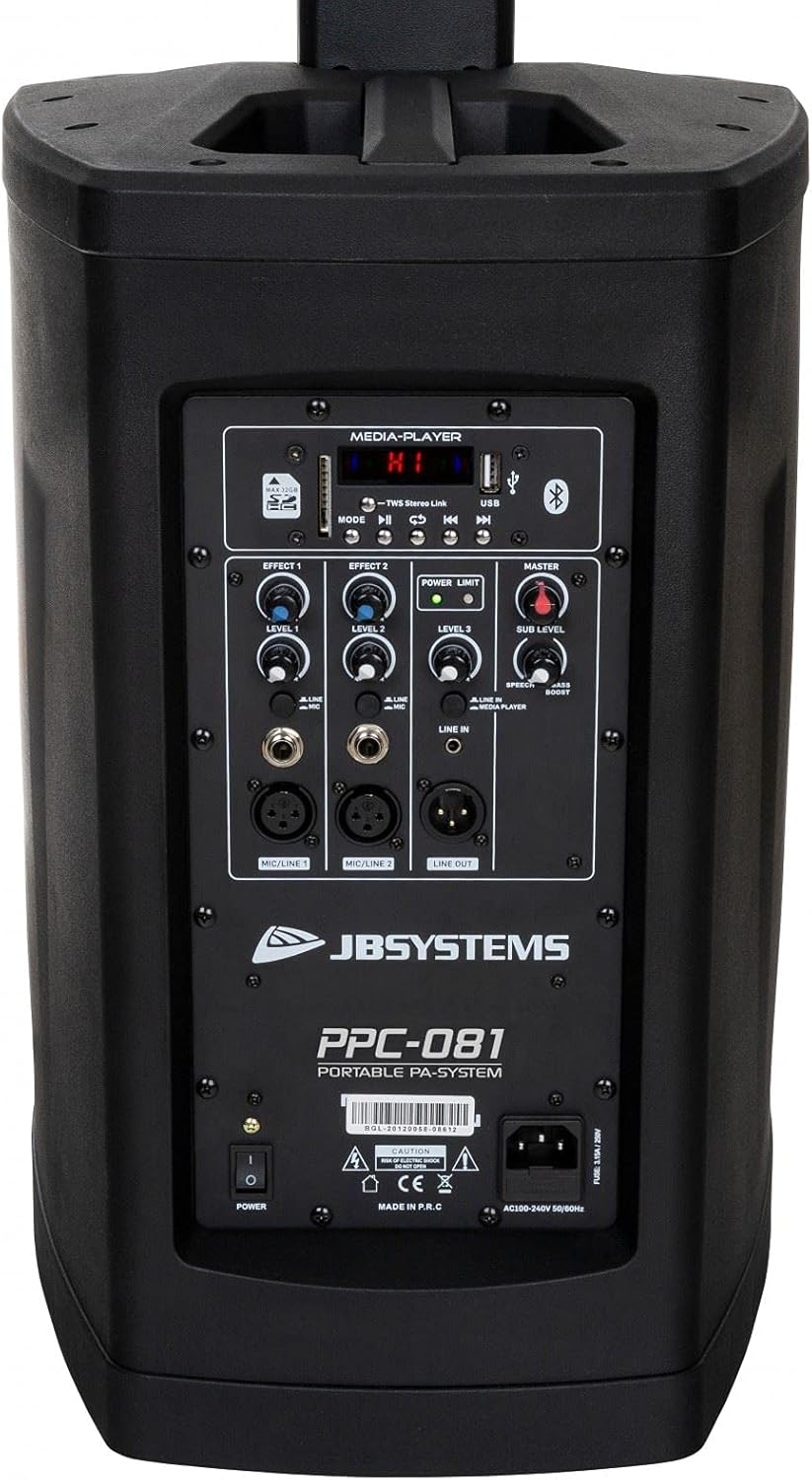
Позади view of the main unit, showing the control panel and power input.
4.2 Column Speaker Segments
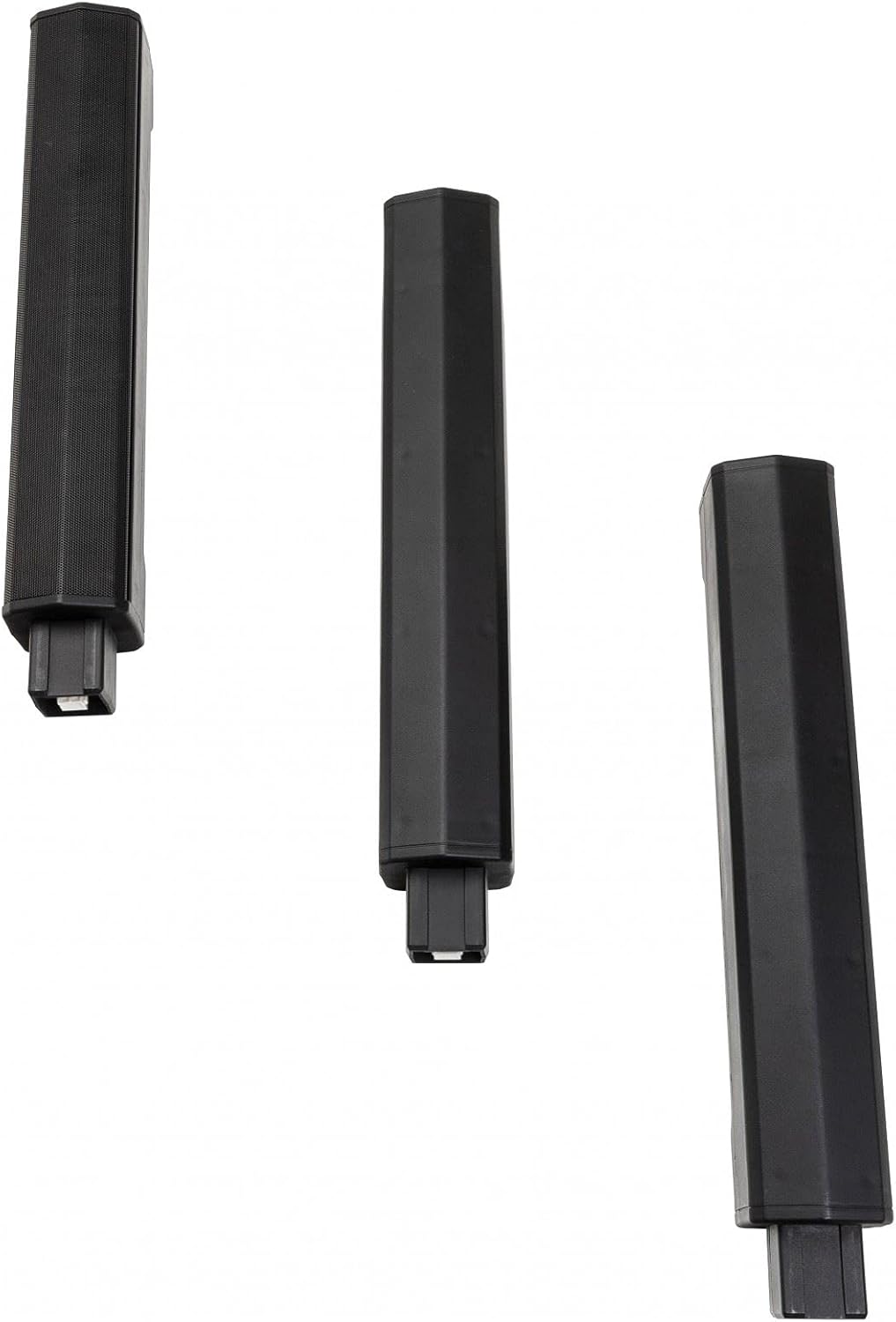
The system includes multiple modular column speaker segments that can be stacked to achieve different heights.
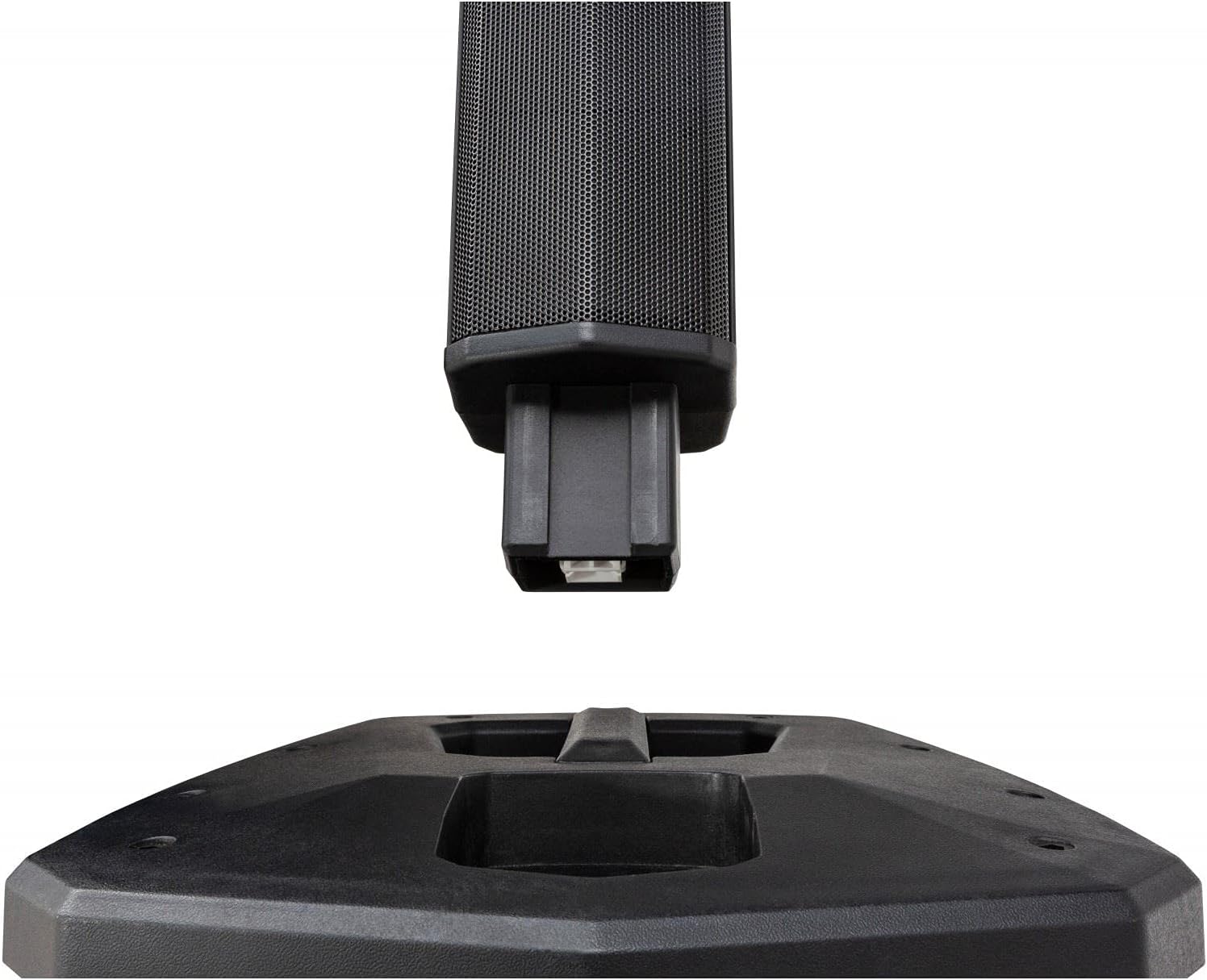
Detail of the connection point for the column speaker segments, ensuring secure assembly.
4.3 Контролна табла

Close-up of the control panel, featuring inputs, level controls, and media player interface.
The control panel provides access to all system functions:
- Медиа Плаиер: Supports USB and SD-HC cards (up to 32GB) for MP3, WAV, WMA, APE, and FLAC playback. Includes Bluetooth connectivity for wireless audio streaming.
- Мастер јачина звука: Overall volume control for the system.
- Подниво: Independent bass level control for the 8-inch woofer.
- Microphone Inputs (MIC/LINE 1 & 2): Two combo XLR/Jack inputs with individual level controls and built-in sound effects. Can also be used as mono line inputs.
- Line Input (LINE IN): Stereo mini jack input for connecting external audio players.
- Line Out (LINE OUT): Balanced XLR output for connecting additional speakers or audio devices.
- Effect Controls: Adjustments for built-in audio effects.
- Power Limit Indicator: LED indicator for system power status.
5. Подешавање
5.1 Скупштина
The PPC-081 system offers modular assembly for adjustable height:
Step 1: Position the Main Unit
Place the main subwoofer unit on a stable, flat surface where you intend to use the system.
Step 2: Assemble Column Speakers
Choose your desired height configuration by stacking the modular column speaker segments:
- Low Height (920mm): Attach only the top column speaker segment directly to the main unit.
- Medium Height (1390mm): Attach one modular column segment, then the top column speaker segment.
- Maximum Height (1860mm): Attach both modular column segments, then the top column speaker segment.
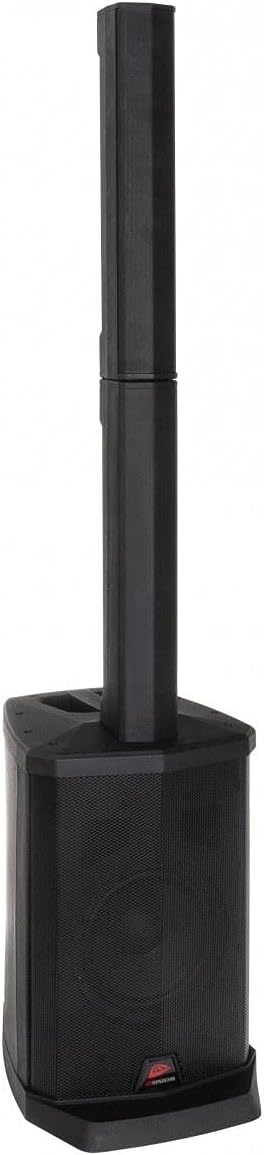
The system assembled with one column segment for a compact setup.

The system assembled with two column segments for medium height.
The system fully assembled with all column segments for maximum height.
Корак 3: Повежите напајање
Connect the supplied power cable to the IEC power inlet on the rear of the main unit, then plug it into a suitable AC outlet (100-240V, 50/60Hz).
5.2 Везе
Прикључци за микрофон
Connect microphones to the MIC/LINE 1 or MIC/LINE 2 combo inputs using XLR or 1/4" Jack cables. Adjust individual level controls as needed.
Line Input Connections
For external audio sources like smartphones or laptops, use the stereo mini jack input (LINE IN). For other line-level devices, use the RCA inputs.
External Speaker Connection (Line Out)
To connect additional powered speakers or audio equipment, use the balanced XLR Line Out.
6. Упутство за употребу
6.1 Укључивање/искључивање
Press the POWER switch on the rear panel to turn the unit ON or OFF. The Power Limit indicator will illuminate when the unit is on.
6.2 Media Player Operation
USB/SD-HC Playback
Insert a USB drive or SD-HC card (up to 32GB) containing MP3, WAV, WMA, APE, or FLAC files into the respective slot. The media player will automatically detect and begin playback. Use the media player controls (Play/Pause, Next, Previous, Mode) to navigate.
Блуетоотх упаривање
- Press the MODE button on the media player until 'Bluetooth' mode is selected.
- На уређају са омогућеним Bluetooth-ом (паметни телефон, таблет) потражите доступне уређаје.
- Select 'PPC-081' from the list to pair. Once paired, you can stream audio wirelessly.
Bluetooth TWS (True Wireless Stereo): If you have two PPC-081 units, you can link them wirelessly for stereo sound. Refer to the specific TWS pairing instructions in the full manual (if available) or on the manufacturer's webсајту.
6.3 Adjusting Levels
- Мастер ниво: Use the MASTER knob to control the overall output volume of the system.
- Подниво: Adjust the SUB LEVEL knob to control the bass intensity from the 8-inch woofer.
- MIC/LINE Levels: Use the individual LEVEL knobs for MIC/LINE 1 and MIC/LINE 2 to adjust the volume of connected microphones or line-level devices.
6.4 Using Microphone Inputs
After connecting your microphone, adjust its individual level knob. Experiment with the built-in effect controls (EFFECT 1, EFFECT 2, EFFECT 3) to add reverb or other enhancements to the microphone signal.
7. Одржавање
- Чишћење: Обришите уређај меком, сувом крпом. Не користите абразивна средства за чишћење или раствараче.
- Складиштење: When not in use, store the system in a cool, dry place, away from direct sunlight and extreme temperatures. If disassembling, ensure all components are stored safely.
- вентилација: Уверите се да су вентилациони отвори чисти од прашине и остатака како бисте спречили прегревање.
КСНУМКС. Решавање проблема
If you encounter issues with your PPC-081 system, refer to the table below for common problems and solutions:
| Проблем | Могући узрок | Решење |
|---|---|---|
| Нема струје | Power cable not connected; Power switch off; Outlet not working. | Check power cable connection; Ensure power switch is ON; Test outlet with another device. |
| Нема излаза звука | Master volume too low; Input level too low; Incorrect input selected; Speaker segments not properly connected. | Increase Master and input levels; Ensure correct input mode is selected; Re-check connections of column speakers to main unit. |
| Блуетоотх се не упарује | Unit not in Bluetooth mode; Device too far; Bluetooth already connected to another device. | Ensure unit is in Bluetooth mode; Move device closer; Disconnect from other devices and try again. |
| Изобличен звук | Input signal too high (clipping); Master volume too high; Damaged cable. | Reduce input level; Lower Master volume; Try a different cable. |
| Микрофон не ради | Microphone not connected; Microphone level too low; Faulty microphone. | Ensure microphone is securely connected; Increase MIC/LINE level; Test with a different microphone. |
If the problem persists after trying these solutions, please contact JB Systems customer support or your local dealer for assistance.
9. Спецификације
Detailed technical specifications for the JB Systems PPC-081:
| Феатуре | Спецификација |
|---|---|
| Број модела | 011/8612 |
| Пречник вуфера | 8 инча |
| RMS Power per Channel | 100 Watts (8 Ohm) |
| Фреквенцијски опсег | 45 Hz - 18000 Hz |
| Подржани аудио формати | МП3, ВАВ, ВМА, АПЕ, ФЛАЦ |
| Улазне везе | XLR, RCA, 1/4" Jack, USB, Bluetooth, IEC (Power) |
| Излазне везе | XLR (Line Out) |
| Потрошња енергије | 100В |
| Повер Суппли | AC 100 - 240V, 50/60Hz |
| Димензије (максимална висина) | 310 к 400 к 1860 мм (Ш к Д к В) |
| Dimensions (Medium Height) | 310 к 400 к 1390 мм (Ш к Д к В) |
| Dimensions (Low Height) | 310 к 400 к 920 мм (Ш к Д к В) |
| Тежина | 13.8 кг |
| Бежична технологија | Блуетоотх |
| Контролни метод | Тактилно |
| Боја | Црно |
10. Гаранција и подршка
This JB Systems PPC-081 product comes with a limited warranty. For detailed warranty terms and conditions, please refer to the documentation provided with your purchase or visit the official JB Systems webсајту.
For technical support, service inquiries, or to find authorized service centers, please visit the official JB Systems website or contact your local dealer. Please have your product model number (PPC-081 / 011/8612) and purchase information ready when seeking support.
Ask a question about this manual
Ask about setup, troubleshooting, compatibility, parts, safety, or missing instructions. Manuals+ will review the question and use this page’s manual context to help answer it.