
1. Увод
Thank you for choosing the Gaiam Smart Weight Scale. This manual provides essential information for setting up, operating, maintaining, and troubleshooting your device. Please read these instructions carefully before use to ensure proper functionality and accurate measurements.
2. Садржај пакета
- Gaiam Smart Weight Scale
- 3 x AAA батерије (унапред инсталиране или укључене)
- Упутство за употребу
3. Подешавање
3.1 Инсталација батерије
If batteries are not pre-installed, open the battery compartment on the underside of the scale. Insert 3 AAA batteries, ensuring correct polarity (+/-). Close the compartment securely.
3.2 Почетно смештање
Place the scale on a hard, flat, and stable surface. Uneven or soft surfaces, such as carpet, can affect measurement accuracy. Avoid placing it near heat sources or in direct sunlight.

Image: The Gaiam Smart Weight Scale, showcasing its sleek design and four metallic sensor pads.
3.3 Преузимање и упаривање апликације
To utilize the smart features and track comprehensive body composition metrics, download the official Gaiam Smart Scale app from your device's app store. Тражи "Gaiam Smart Scale" on the Apple App Store or Google Play Store.
Enable Bluetooth on your smartphone or tablet. Open the Gaiam Smart Scale app and follow the on-screen instructions to pair your scale. Step onto the scale to activate it and initiate the pairing process.

Image: The Gaiam Smart Weight Scale positioned alongside a tablet and smartphone, both showing the Gaiam app interface, illustrating the device's connectivity.
4. Руковање вагом
4.1 Мерење
- Уверите се да је вага на тврдој, равној површини.
- Step onto the scale barefoot with your feet evenly placed on the metallic sensor pads.
- Stand still until your weight is displayed on the scale's screen.
- If connected to the app, additional body composition data will be transmitted to your device.
4.2 Understanding App Metrics
The Gaiam Smart Scale app is designed to provide a comprehensive analysis of your body composition. When successfully paired, the app can display up to 13 different measurements, including:
- Тежина (лбс)
- Телесна масноћа (%)
- Вода у телу (%)
- Muscle Mass (lbs)
- Ниво гојазности
- Protein (%)
- BMR (Kcal)
- Висцерална маст
- Bone Mass (lbs)
- Lean Body Mass (lbs)
- Метаболичко доба
- БМИ (индекс телесне масе)
- Skeletal Muscle (%)
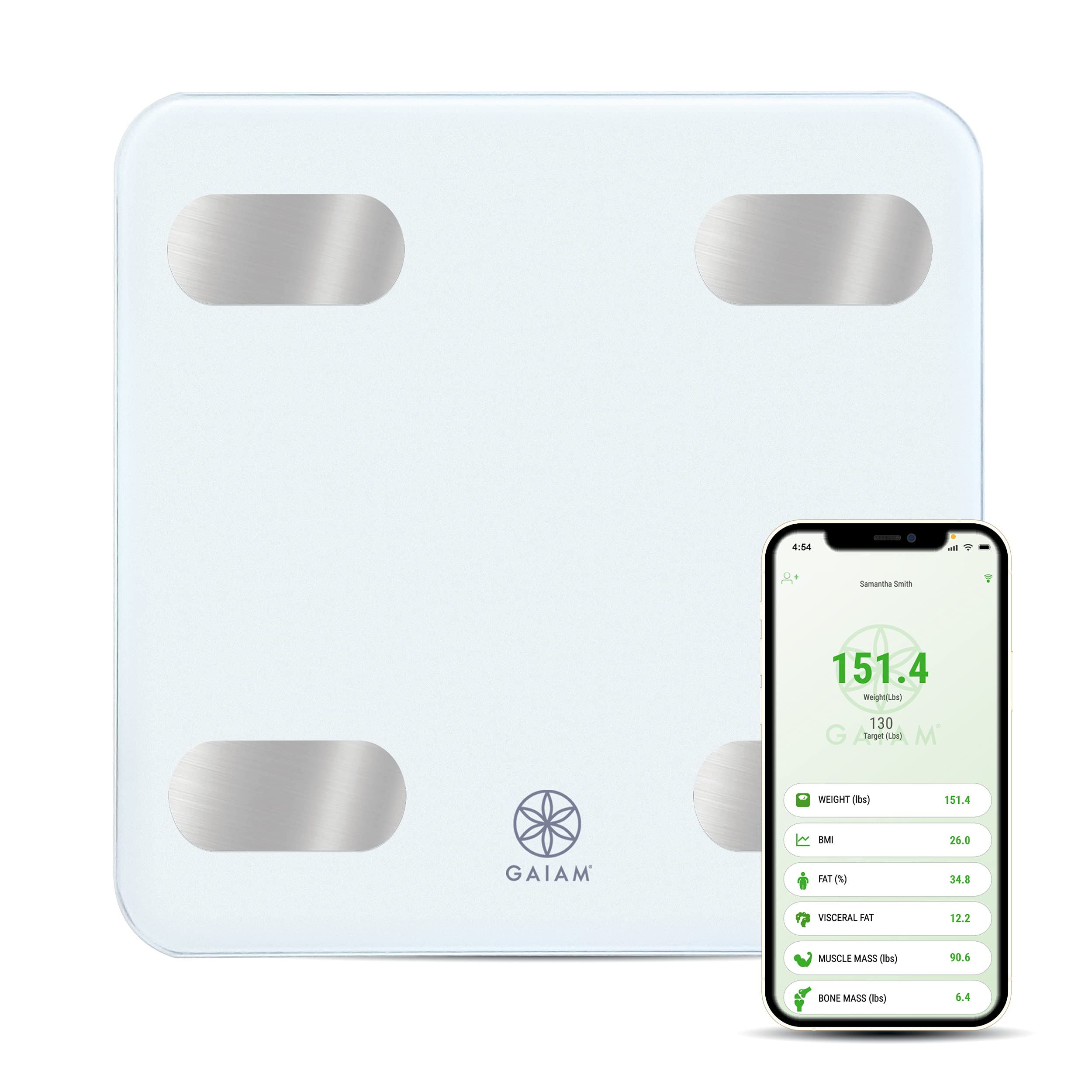
Image: An infographic detailing the 13 comprehensive body composition measurements, such as weight, fat percentage, muscle mass, and BMI, that the Gaiam Smart Scale app can track.

Image: A smartphone screen showing the Gaiam app interface, displaying a user's current weight, target weight, and a list of body metrics including BMI, fat percentagе, и мишићну масу.
4.3 Интеграција апликација
The Gaiam Smart Scale app may integrate with other popular health tracking platforms such as Google Fit, Samsung Health, and Apple Health, allowing you to synchronize your data across multiple applications. Refer to the app's settings for integration options.
5. Одржавање
5.1 Чишћење
Clean the scale's surface with a soft, damp cloth. Do not use abrasive cleaners or immerse the scale in water. Avoid harsh chemicals that could damage the surface or electronic components.
5.2 Замена батерије
When the battery indicator appears on the display or the scale fails to power on, replace all 3 AAA batteries simultaneously. Do not mix old and new batteries.
5.3 Складиштење
Store the scale in a cool, dry place away from extreme temperatures and humidity. Do not store objects on top of the scale for extended periods.
КСНУМКС. Решавање проблема
6.1 Нетачна очитавања
- Површина: Ensure the scale is placed on a hard, flat, and stable surface. Carpet or uneven floors can cause inaccuracies.
- Рекалибрација: If readings are inconsistent, step on the scale briefly to turn it on, then step off and wait for it to display "0.0" before stepping on again for a measurement.
- конзистентност: For best results, weigh yourself at the same time each day, preferably in the morning before eating or exercising.
6.2 Scale Not Turning On
- батерије: Check if the batteries are correctly installed and not depleted. Replace all 3 AAA batteries if necessary.
- Активација: Ensure you are stepping firmly onto the scale to activate it.
6.3 App Connectivity Issues / No Data Transfer
- Блуетоотх: Verify that Bluetooth is enabled on your smartphone or tablet.
- Статус апликације: Ensure the Gaiam Smart Scale app is open and running in the foreground during measurement.
- Ажурирања апликације: Check your device's app store for any available updates for the Gaiam Smart Scale app.
- Note on App Functionality: Some users have reported issues with the long-term functionality and support of the Gaiam Smart Scale app, including difficulties with updates and data synchronization. If you experience persistent app-related problems, the scale may still function as a basic digital weight scale.
6.4 "Lo" or "Err" Display
- "Lo": Indicates low battery. Replace batteries.
- "Err": May indicate an overload (weight exceeds maximum capacity) or a measurement error. Step off the scale, wait for it to clear, and try again.
7. Спецификације
| Феатуре | Детаљ |
|---|---|
| Бранд | Gaiam |
| Модел | Паметна вага за тежину |
| Боја | Бела |
| Посебна карактеристика | Smart (Bluetooth Connectivity) |
| Ограничење тежине | 400 фунти |
| Прецизност очитавања | ± 0.2 pounds |
| Димензије производа | 11 к 2 к 11 инча |
| Тежина артикла | 3.16 фунти |
| Батерије | 3 ААА батерија (укључено) |
| ASIN | B098PJRHHR |
| УПЦ / ГТИН | 627987692815 |
8. Гаранција и подршка
For warranty information or technical support, please refer to the official Gaiam webсајт или директно контактирајте њихову корисничку службу. Сачувајте рачун као доказ о куповини.