
1. Производ је готовview
The HeimVision CA01 is a 1080P (2.0MP) wireless IP security camera designed for outdoor surveillance. It features 65ft night vision, an IP66 waterproof rating, and motion alert capabilities, making it suitable for integration with the HeimVision 8CH WiFi Surveillance System. This camera provides clear video monitoring and enhances security for your property.

Слика 1: Готовоview of a typical wireless security camera system setup, illustrating how multiple cameras connect wirelessly to a central recording unit (NVR) to cover various areas of a property.
2. Подешавање
2.1 Шта је у кутији
- HeimVision CA01 Wireless Security Camera
- Power Adapter for Camera
- Монтажни вијци и зидни типлови
- Кориснички приручник (овај документ)
2.2 Инсталација
- Изаберите локацију: Изаберите локацију на отвореном која пружа жељене viewing angle and is within range of your HeimVision NVR's Wi-Fi signal. Ensure the camera is positioned to avoid direct sunlight into the lens for optimal image quality.
- Монтирајте камеру: Use the provided mounting screws and wall plugs to securely attach the camera to a wall or suitable surface. Ensure the camera is firmly fixed to prevent movement.
- Прикључите напајање: Connect the camera to the power adapter and plug it into a power outlet. The camera will power on and begin its startup sequence.
- Аутоматско упаривање: The CA01 camera is designed for automatic pairing with your HeimVision 8CH WiFi Surveillance System (NVR). Once powered on, it should automatically connect to the NVR if it's within range and the NVR is also powered on. Refer to your NVR's manual for specific pairing instructions if automatic connection does not occur.
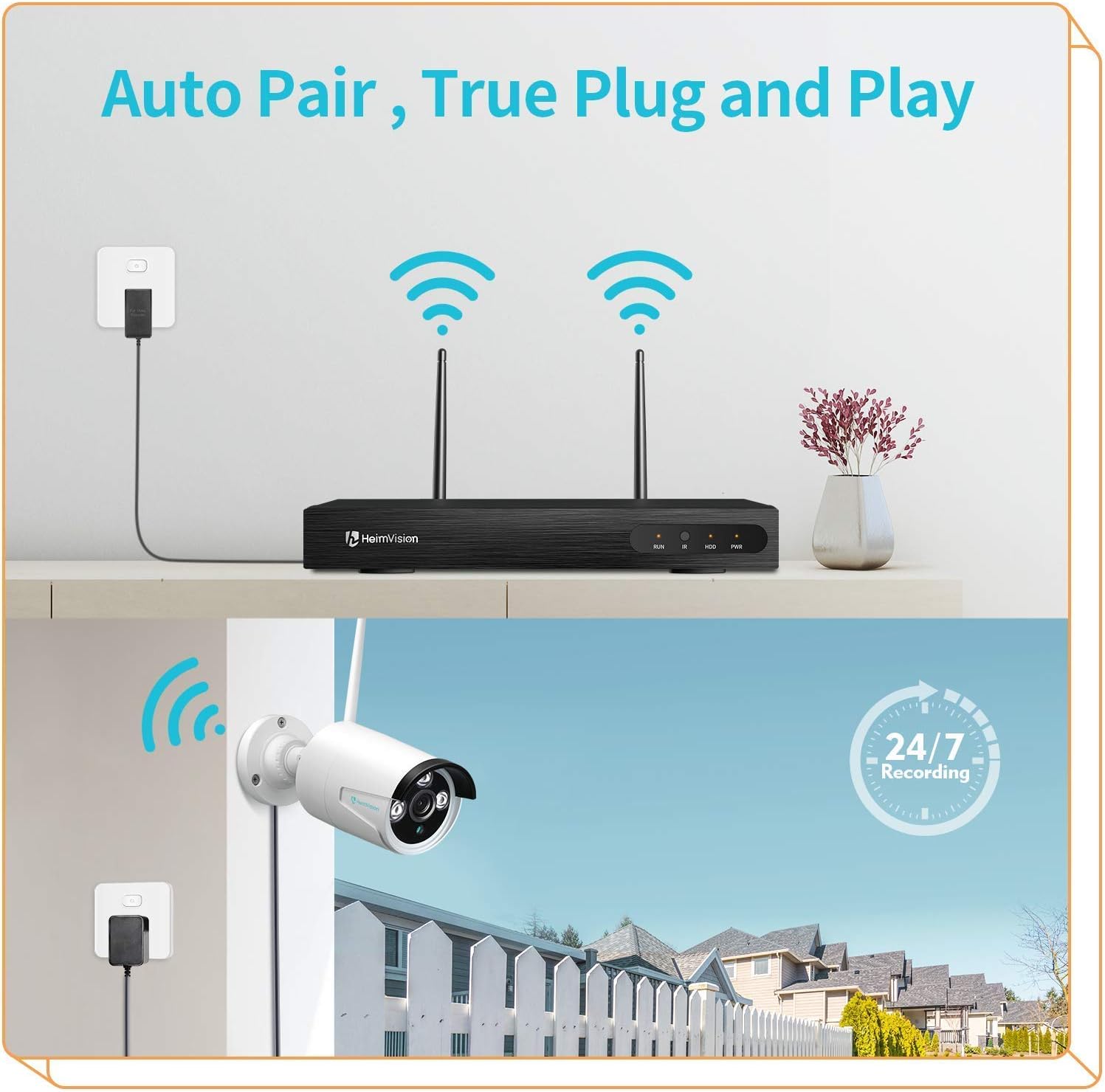
Слика 2: The 'Auto Pair, True Plug and Play' functionality, demonstrating the simple wireless connection between the camera and the NVR.

Слика 3: The camera's IP66 waterproof design, ensuring reliable operation in various outdoor weather conditions.
3. Упутство за употребу
3.1 Приступ уживо View и снимци
Once the camera is successfully paired with your HeimVision NVR, you can access the live video feed and recorded footage through the NVR's interface, a dedicated mobile application, or PC software.
- NVR Monitor: Connect a monitor to your NVR to view all camera feeds directly.
- Мобилна апликација: Download the official HeimVision mobile application from your device's app store. Follow the in-app instructions to add your NVR system and view камере на даљину.
- ПЦ софтвер: Install the HeimVision client software on your computer. Use the software to manage your NVR and view преноси са камере.

Слика 4: Систем подржава viewing on PC and mobile devices, allowing flexible access to your surveillance feeds.
3.2 Детекција покрета и упозорења
The CA01 camera features intelligent motion detection. When motion is detected within the camera's field of view, the system can trigger various alerts.
- Снимање: The NVR will automatically begin recording footage.
- Obaveštenja e-poštom: Configure email notifications in the NVR settings to receive alerts with snapshots when motion is detected.
- Обавештења апликације: Receive push notifications on your mobile device through the HeimVision app.
To customize motion detection zones and sensitivity, access the NVR's settings or the mobile application's camera settings.

Слика 5: Motion detection capabilities, showing an alert notification on a smartphone when suspicious activity is detected.
3.3 Ноћни вид
The camera is equipped with infrared (IR) LEDs to provide clear surveillance even in low-light or complete darkness, with a night vision range of up to 65 feet.
- Дневна визија: During daylight hours, the camera captures full-color video.
- Ноћни вид: In low light conditions, the camera automatically switches to infrared night vision, providing clear black and white images.

Слика 6: Comparison of colorful day vision and clear night vision, demonstrating the camera's ability to provide surveillance around the clock.
3.4 Непрекидно снимање
The HeimVision system supports 24/7 continuous recording, ensuring that all activity is captured. Storage capacity depends on the hard drive installed in your NVR. The system will typically overwrite the oldest footage once the storage is full.
4. Одржавање
- Чишћење сочива: Periodically clean the camera lens with a soft, dry cloth to ensure clear image quality. Avoid using harsh chemicals that could damage the lens coating.
- Прикључак за напајање: Regularly check the power adapter and cable for any signs of damage or wear. Ensure the connection remains secure.
- Ажурирања фирмвера: Check the HeimVision official website or mobile app for any available firmware updates for your NVR and cameras. Keeping your system updated ensures optimal performance and security.
- Провера животне средине: Ensure no obstructions are blocking the camera's view and that the mounting remains secure, especially after severe weather conditions.
КСНУМКС. Решавање проблема
| Проблем | Могући узрок | Решење |
|---|---|---|
| Камера се не укључује | No power to the adapter or faulty adapter/cable. | Check power outlet, ensure adapter is securely connected, and inspect cable for damage. Try a different power outlet. |
| No video feed from camera | Camera not paired with NVR, out of Wi-Fi range, or signal interference. | Ensure camera is powered on. Check NVR settings for camera status. Move camera closer to NVR or reduce interference. Re-pair the camera if necessary (refer to NVR manual). |
| Лош квалитет слике | Dirty lens, low light conditions, or poor Wi-Fi signal. | Clean the camera lens. Ensure adequate lighting for color vision or verify night vision is active. Improve Wi-Fi signal strength. |
| Детекција покрета не ради | Motion detection settings incorrect, sensitivity too low, or area not covered. | Check motion detection settings in NVR or app. Adjust sensitivity. Ensure camera covers the desired area. |
6. Спецификације
| Феатуре | Спецификација |
|---|---|
| Модел | ЦА01 |
| Резолуција снимања видео записа | 1080p (2.0MP) |
| Технологија повезивања | бежични (Ви-Фи) |
| Унутрашња/спољна употреба | Оутдоор |
| Водоотпорна оцена | ИП66 |
| Нигхт Висион | Up to 65ft, Night Color (IR) |
| Посебне карактеристике | Сензор покрета, ноћни вид |
| Тип упозорења | Мотион Онли |
| Компатибилни уређаји | Smartphone (via app), NVR |
| Моунт Типе | Валл Моунт |
| Форм Фацтор | Буллет |
7. Гаранција и подршка
Овај производ се нуди као обновљени производ из Амазона. Производи из Амазона су професионално прегледани и тестирани да би функционисали и изгледали као нови. Ако нисте задовољни куповином, обновљени производи испуњавају услове за замену или повраћај новца у складу са Амазон обновљена гаранција.
For further technical assistance or support, please refer to the official HeimVision support channels or the Amazon Renewed customer service.