
Увод
Thank you for choosing the CORN HB001 Bluetooth Wireless Headphones. This manual provides essential information for setting up, operating, and maintaining your headphones. Please read it carefully before use to ensure optimal performance and longevity of your device. Keep this manual for future reference.
Производ је завршенview
The CORN HB001 headphones offer a comfortable on-ear design with wireless Bluetooth connectivity, allowing you to enjoy high-quality audio without the constraints of cables. They also feature a 3.5mm audio jack for wired connection when wireless is not preferred or battery is low.
Компоненте слушалица
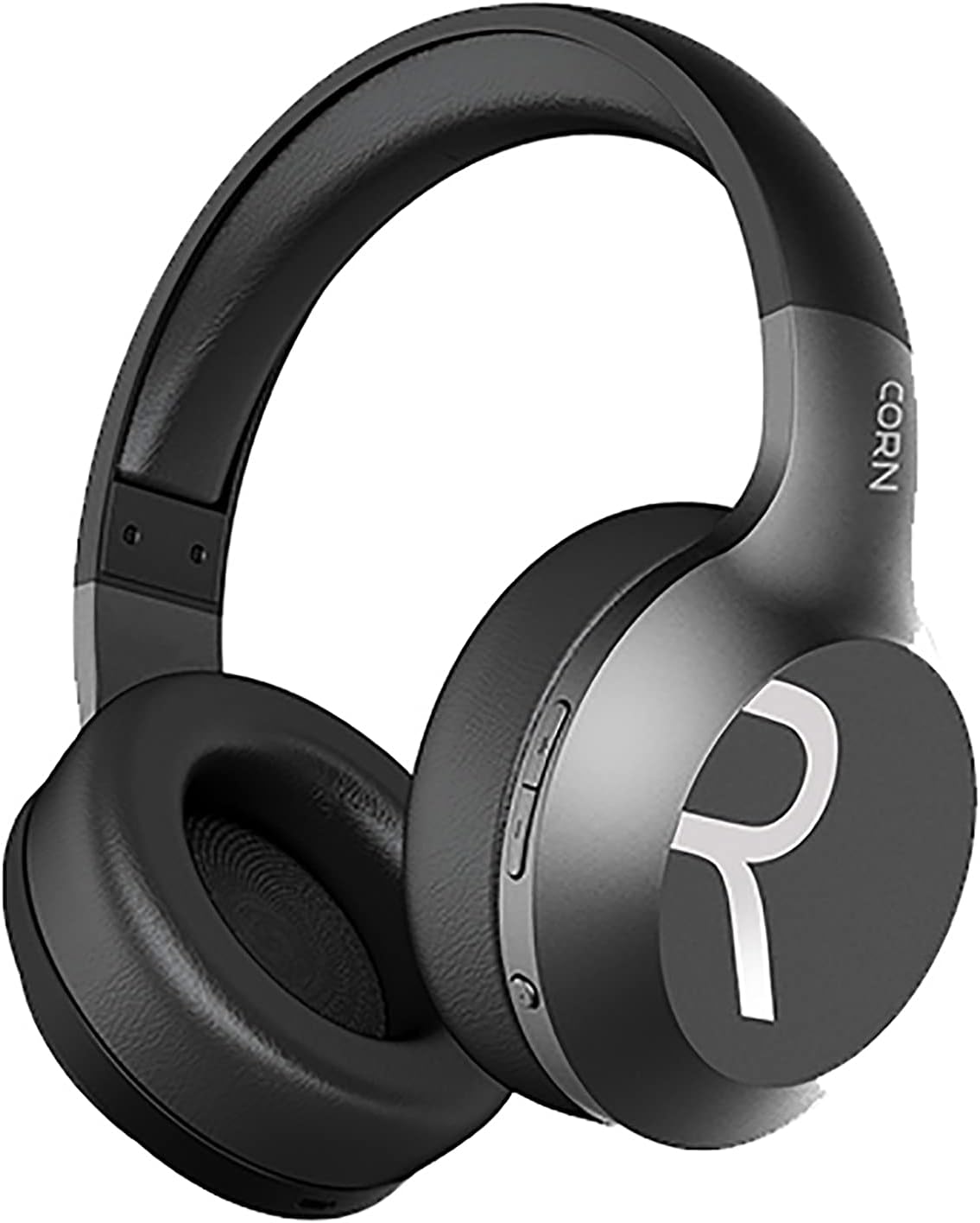
Слика 1: Свеукупно view of the CORN HB001 Bluetooth Wireless Headphones. The image displays the black on-ear headphones with adjustable headband and earcups, featuring the 'CORN' brand logo on the side.
Изглед контрола

Слика 2: Close-up of the control buttons located on the right earcup. These typically include volume up/down and a multi-function button for power, play/pause, and call management.
Familiarize yourself with the buttons and ports on your headphones. Typically, you will find a power/multi-function button, volume controls, a charging port (e.g., USB-C), and a 3.5mm audio jack.
Сетуп
1. Пуњење слушалица
Before first use, fully charge your headphones. Connect the charging cable (usually USB) to the charging port on the headphones and the other end to a USB power source (e.g., computer, wall adapter). The LED indicator will typically show red during charging and turn off or blue when fully charged.
- Време пуњења: Отприлике 2 сати.
- Капацитет батерије: 300 мАх.
2. Блуетоотх упаривање
Да бисте бежично повезали слушалице са уређајем:
- Уверите се да су слушалице напуњене и искључене.
- Press and hold the Power/Multi-function button for approximately 5-7 seconds until the LED indicator flashes blue and red alternately, indicating pairing mode.
- На свом уређају (паметном телефону, таблету, рачунару) омогућите Блутут и потражите нове уређаје.
- Select "CORN HB001" from the list of available devices.
- Once connected, the LED indicator will usually flash blue slowly or turn solid blue.
- Слушалице ће аутоматски покушати да се поново повежу са последњим упареним уређајем када се укључе.
Упутство за употребу
Укључивање/искључивање
- Укључено: Press and hold the Power/Multi-function button for about 3 seconds until the LED indicator lights up blue.
- Искључивање: Press and hold the Power/Multi-function button for about 3-5 seconds until the LED indicator turns red and then off.
Репродукција музике
- Пусти/паузирај: Притисните дугме за напајање/вишефункционално дугме једном.
- Појачавање звука: Притисните дугме „+“.
- Смањивање јачине звука: Притисните дугме '-'.
- Следећа нумера: Притисните и држите дугме „+“.
- Претходни запис: Притисните и држите дугме '-'.
Управљање позивима
- Одговори/заврши позив: Притисните дугме за напајање/вишефункционално дугме једном.
- Одбиј позив: Press and hold the Power/Multi-function button for about 2 seconds.
- Поновно бирање последњег броја: Double-press the Power/Multi-function button.
Wired Mode (3.5mm Audio Jack)
You can use the headphones in wired mode even if the battery is depleted. Simply connect one end of a 3.5mm audio cable (not always included) to the headphone's 3.5mm jack and the other end to your audio source. In wired mode, Bluetooth functions are disabled, and controls on the headphones may not function.
Одржавање
Proper maintenance ensures the longevity of your headphones.
- Чишћење: Use a soft, dry cloth to wipe the headphones. Do not use abrasive cleaners or solvents. For ear cushions, gently wipe with a damp крпом и оставите да се потпуно осуши на ваздуху.
- Складиштење: Store the headphones in a cool, dry place away from direct sunlight and extreme temperatures. If your headphones are foldable, fold them carefully to prevent damage.
- Изложеност води: Ове слушалице нису водоотпорне. Избегавајте излагање води, влази или киши.
Решавање проблема
Ако наиђете на проблеме, испробајте следећа решења:
| Проблем | Решење |
|---|---|
| Слушалице се не укључују | Ensure the headphones are fully charged. Press and hold the Power button for a few seconds. |
| Упаривање са уређајем није могуће | Ensure headphones are in pairing mode (flashing blue/red). Turn off and on Bluetooth on your device. Forget previous pairings and try again. Ensure headphones are within 10m range. |
| Нема звука | Check volume levels on both headphones and your device. Ensure headphones are properly paired. Try wired connection if available. |
| Лош квалитет звука | Move closer to your device to reduce interference. Ensure no physical obstructions between headphones and device. |
Спецификације
| Феатуре | Детаљ |
|---|---|
| Назив модела | ХБ001 |
| Бранд Наме | ЦОРН |
| Технологија повезивања | Бежични, Блуетоотх |
| Бежична верзија | В5.0 |
| Оперативна удаљеност | 10 метара |
| Величина драјвера звучника | Φ40мм |
| Импеданса звучника | 32Ω |
| Спеакер Повер | 15мВ |
| Капацитет батерије | 300 мАх |
| Време пуњења | Отприлике 2 сата |
| Радно време | Отприлике 8 сата |
| Фактор облика слушалица | Он-Еар |
| Прикључак за слушалице | 3.5mm Jack (for wired use) |
| Укључене компоненте | Јастучићи за уши |
| Опис старосне доби | Адулт |
| Материјал | Пластика |
| Боја | Црно |
Гаранција и подршка
For warranty information or technical support, please refer to the documentation included with your purchase or contact the manufacturer directly through their official webсајт или канале за корисничку подршку. Сачувајте доказ о куповини за потребе гаранције.