
TACK EMS01A
TACK Miter Saw User Manual
Model: EMS01A | Brand: TACK
1. Увод
Thank you for choosing the TACK EMS01A Miter Saw. This powerful and versatile tool is designed for precise cutting of various materials, including wood, soft metal, and plastic. Featuring a dual-speed motor, laser guide, and adjustable cutting capacities, it is suitable for both professional and DIY projects. Please read this manual thoroughly before operation to ensure safe and efficient use of your new miter saw.
2. Безбедносна упутства
Увек се придржавајте основних мера предострожности како бисте смањили ризик од пожара, струјног удара и повреда. Сачувајте ово упутство за будуће потребе.
- Прочитајте упутство: Familiarize yourself with all controls and operations before using the saw.
- Носите личну заштитну опрему (ЛЗО): Always wear safety glasses, hearing protection, and a dust mask. Use gloves when handling blades.
- Радна област: Keep your work area clean, well-lit, and free of clutter. Do not operate in explosive atmospheres, such as in the presence of flammable liquids, gases, or dust.
- електрична безбедност: Ensure the power supply matches the saw's requirements. Do not expose power tools to rain or wet conditions. Avoid body contact with earthed or grounded surfaces.
- Обезбедите радни комад: Увек клamp the workpiece firmly before cutting. Never hold it by hand.
- Заштита сечива: Ensure the blade guard is always in place and functioning correctly. Never bypass safety features.
- Искључите напајање: Always disconnect the saw from the power supply before making any adjustments, changing accessories, or performing maintenance.
- Двоструки сигурносни прекидач: The saw is equipped with a double safety switch to prevent accidental startup. Always engage both parts of the switch to operate.
3. Садржај пакета
Carefully unpack your TACK Miter Saw and check for the following components:
- 1x TACK EMS01A Miter Saw
- 1x Dust Bag
- 1x TCT Blade (40 teeth, 255mm diameter)
- 2x Hex Wrenches
- 2x Side Supports
- 1к Цлampинг Девице
- 2x Carbon Brushes
- 1к упутство за употребу
- 1к Гарантни лист
4. Производ је готовview
Familiarize yourself with the main parts of your miter saw:
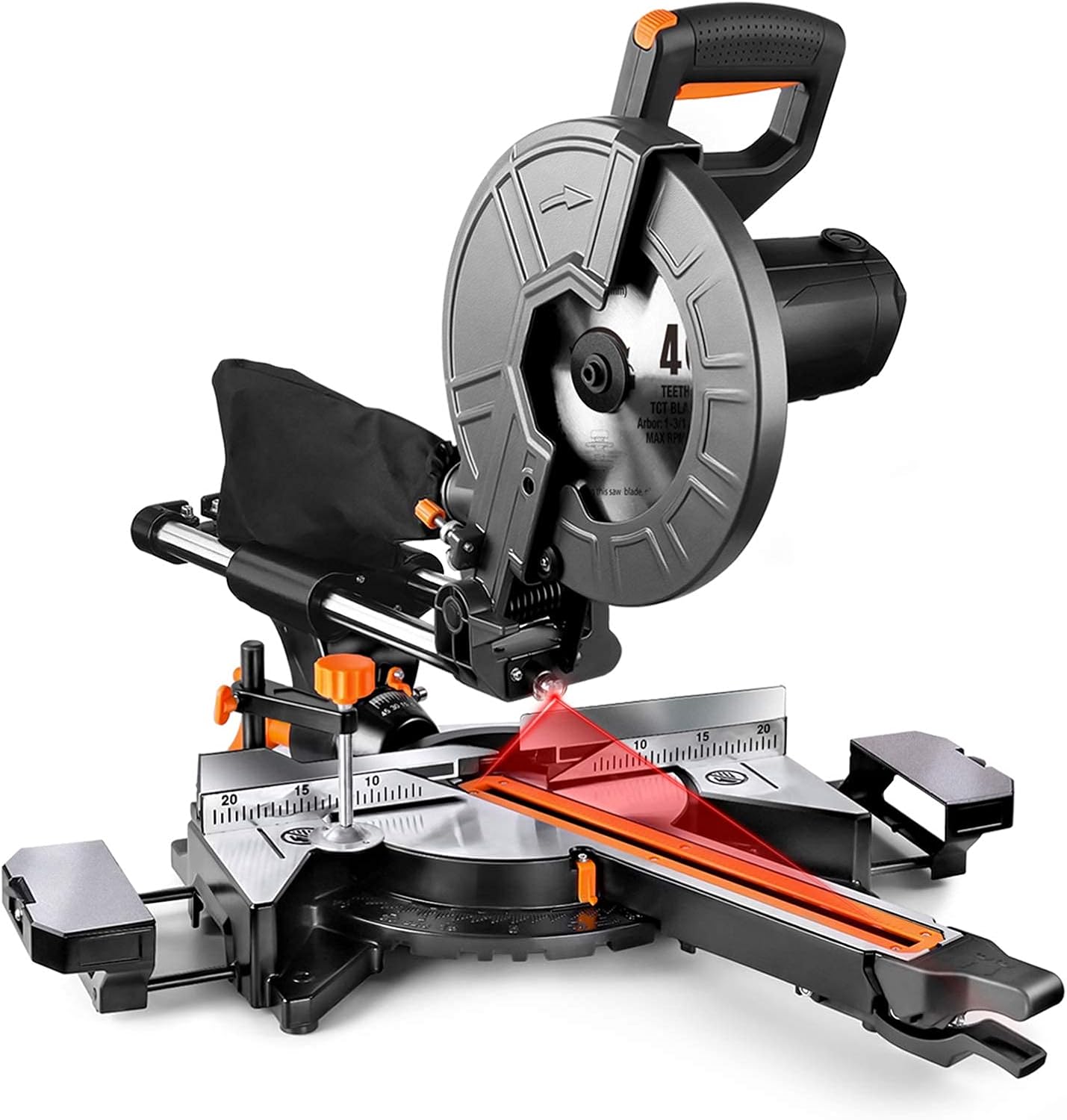
Слика 4.1: Свеукупно view of the TACK EMS01A Miter Saw.

Figure 4.2: Key components including the metal blade guard, ergonomic handle, dust collection bag, and double safety switch.
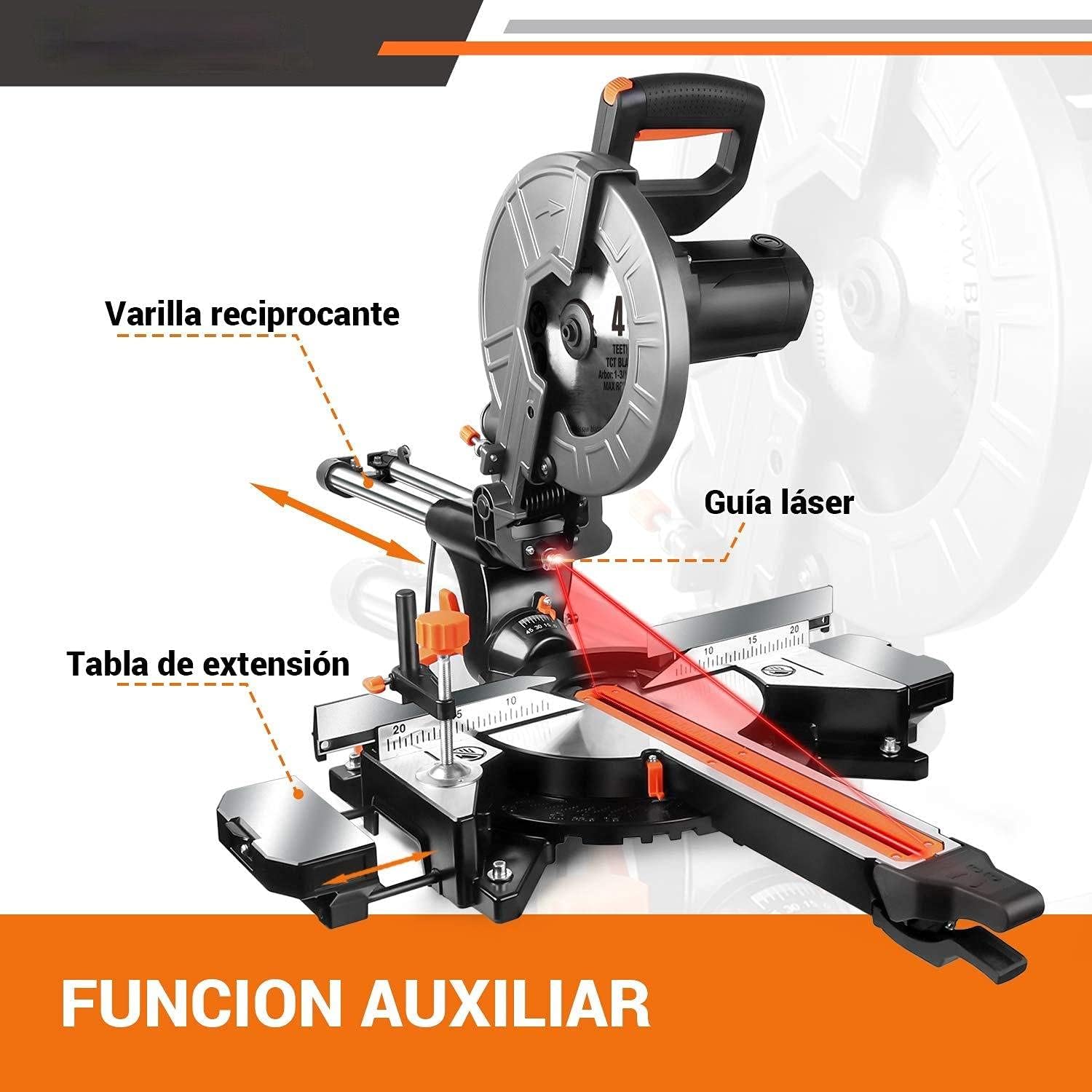
Figure 4.3: Auxiliary functions: reciprocating rod, laser guide, and extension table.

Слика 4.4: Цлamping device, rear fence, and key specifications.
5. Подешавање
5.1 Инсталација оштрице
- Уверите се да је тестера искључена из извора напајања.
- Lift the blade guard.
- Use the provided hex wrench to loosen the blade retaining bolt.
- Carefully remove the old blade (if applicable) and install the new 255mm blade, ensuring the teeth are pointing in the correct direction (indicated by an arrow on the blade and saw).
- Tighten the blade retaining bolt securely.
- Спустите штитник сечива.
5.2 Dust Bag Attachment
Attach the dust bag to the dust port located at the rear of the blade housing. Ensure it is securely fastened to effectively collect sawdust and debris.
5.3 Extension Table Adjustment
The saw features extended platforms on both sides. Adjust these tables as needed to support longer workpieces, ensuring stability during cuts.
6. Упутство за употребу
6.1 Укључивање/искључивање
To turn on the saw, press the double safety switch. To turn off, release the switch. The saw will stop automatically.
6.2 Подешавање брзине
The TACK EMS01A Miter Saw offers dual speed settings for optimal cutting performance on different materials:
- 3200 РПМ: Ideal for cutting soft metals and plastics.
- 4500 РПМ: Recommended for cutting wood.
Refer to the speed selector switch on the saw to choose the appropriate speed for your material.

Figure 6.1: Dual speed control for different materials.
6.3 Коришћење ласерског водича
The integrated red laser guide provides a precise cutting line, allowing for accurate alignment of your workpiece. Activate the laser guide before making a cut to ensure precision.
6.4 Miter and Bevel Cuts
The saw allows for versatile cutting angles:
- Miter Angle: Adjustable from 45° left to 45° right, with positive stops at 0°, 15°, 22.5°, 30°, and 45°.
- Угао нагиба: The saw head can tilt 45° to the left for bevel cuts.
Adjust the miter and bevel settings using the appropriate levers and scales on the saw base and head.

Figure 6.2: Demonstrating miter cutting capacity.
6.5 Капацитет сечења
The maximum cutting capacities are as follows:
| Угао Митре | Угао нагиба | Cutting Capacity (Height x Width) |
|---|---|---|
| 0° | 0° | В90мм к Ш340мм |
| 0° | 45° | В45мм к Ш340мм |
| 45° | 0° | В90мм к Ш240мм |
| 45° | 45° | В45мм к Ш240мм |
6.6 Сакупљање прашине
The saw is equipped with a dust collection port and includes a dust bag. For improved health and easier cleanup, ensure the dust bag is attached or connect the port to an external dust extraction system.

Figure 6.3: Dust collection port in use.
7. Одржавање
Редовно одржавање осигурава дуготрајност и оптималне перформансе ваше угаоне тестере.
- Чишћење: After each use, unplug the saw and clean off sawdust and debris from the motor vents, blade area, and table using a brush or compressed air.
- Инспекција сечива: Regularly inspect the blade for sharpness and damage. Replace dull or damaged blades promptly.
- Угљене четке: The saw comes with spare carbon brushes. If the motor performance decreases or sparks excessively, the carbon brushes may need replacement. Refer to the saw's specific instructions for accessing and replacing them.
- подмазивање: Periodically lubricate moving parts as indicated in the saw's design to ensure smooth operation.
- Инспекција кабла: Check the power cord for any signs of damage. Do not use the saw if the cord is damaged.
КСНУМКС. Решавање проблема
If you encounter issues with your TACK Miter Saw, refer to the following common problems and solutions:
- Тестера се не покреће:
- Check if the saw is properly plugged into a working power outlet.
- Ensure the double safety switch is fully engaged.
- Проверите да ли су се искључили осигурачи.
- Inspect carbon brushes for wear.
- Cuts are not accurate:
- Verify that the workpiece is securely clampед.
- Проверите да ли је сечиво оштро и правилно постављено.
- Ensure miter and bevel angle settings are locked in place.
- Calibrate the laser guide if necessary.
- Прекомерне вибрације или бука:
- Check if the blade is securely fastened and not warped.
- Ensure all mounting bolts are tight.
- Inspect for any loose components.
If the problem persists after troubleshooting, please contact customer support.
9. Техничке спецификације
| Спецификација | Валуе |
|---|---|
| Модел | ЕМС01А |
| Повер | 2000 В |
| Волtage | 230 В |
| Брзина | 3200 RPM / 4500 RPM (Dual Speed) |
| Бладе Диаметер | 255 мм (10 инча) |
| Дужина кабла за напајање | 2 метара |
| Димензије производа | 78 к 58 к 45 цм |
| Тежина производа | 15.8 кг |
| Материјал | Метал и пластика |
| Бладе Материал | нерђајући челик |
10. Гаранција и подршка
This TACK Miter Saw comes with a 24-месечна гаранција from the date of purchase. If you encounter any quality issues during the warranty period, please contact our customer service team. We are committed to responding to your inquiries within 24 hours.
For any questions regarding the product, setup, operation, or troubleshooting, please do not hesitate to reach out to us. Your satisfaction is our priority.
Ask a question about this manual
Ask about setup, troubleshooting, compatibility, parts, safety, or missing instructions. Manuals+ will review the question and use this page’s manual context to help answer it.