
Увод
This manual provides detailed instructions for setting up, operating, maintaining, and troubleshooting your ASUS TUF Gaming VG247Q1A 24-inch 1080P Monitor. Please read this manual thoroughly before using the monitor to ensure proper operation and to prevent damage.

Image: ASUS TUF Gaming VG247Q1A Monitor, front view.
Сетуп
Садржај пакета
Пре него што наставите са подешавањем, проверите да ли су све ставке присутне у пакету.
- VG247Q1A Monitor
- Кабл за напајање
- Гарантни лист
- Водич за брзи почетак (КСГ)
- ХДМИ кабл
- ДисплаиПорт кабл

Image: Illustration of the items included in the monitor package, including the monitor, cables, and documentation.
Монитор Ассембли
- Пажљиво извадите монитор и његове компоненте из паковања.
- Attach the stand base to the stand neck, then secure it to the monitor panel. Refer to the Quick Start Guide for specific instructions and diagrams.
- Поставите састављени монитор на стабилну, равну површину.
Повезивање монитора
Повежите монитор са рачунаром или другим уређајима помоћу одговарајућих каблова.
- Прикључак за напајање: Прикључите кабл за напајање на улаз за напајање монитора, а затим на утичницу.
- Видео веза:
- For optimal performance, use the included DisplayPort cable to connect the monitor to your graphics card's DisplayPort output.
- Alternatively, use an HDMI cable to connect to an HDMI port on your device. The monitor has two HDMI (v1.4) ports.
- Аудио веза: If desired, connect headphones or external speakers to the 3.5mm earphone jack on the monitor.

Слика: Позади view of the monitor highlighting the DisplayPort, HDMI (x2), and earphone jack connections.
The monitor also supports VESA mount (100x100mm) for alternative mounting solutions.
Упутство за употребу
Укључивање/искључивање
Притисните дугме за напајање које се налази на монитору да бисте га укључили или искључили. Индикаторска лампица напајања ће светлети када је монитор активан.
Он-Сцреен Дисплаи (ОСД) мени
Access the OSD menu using the joystick or buttons on the back/bottom of the monitor to adjust various settings.
- Навигација: Use the joystick to navigate through menu options.
- Избор: Press the joystick or corresponding button to select an option.
- Излаз: Use the designated button or move the joystick to exit the menu.
Кључне карактеристике и подешавања
- Брзина освежавања (165Hz): The monitor supports a high refresh rate of 165Hz for smoother motion. Ensure your graphics card settings are configured to utilize this refresh rate.
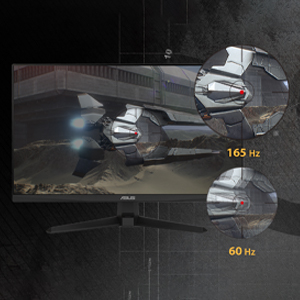
Слика: Визуелно поређење које приказује глаткоћу брзине освежавања од 165Hz у односу на 60Hz.
- ASUS екстремно ниско замућење у покрету (ELMB): This technology provides a 1ms Moving Picture Response Time (MPRT) to reduce motion blur. Activate it through the OSD menu for clearer fast-paced visuals.
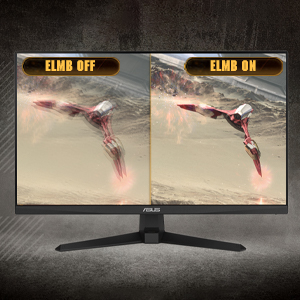
Image: Side-by-side comparison of ELMB off and ELMB on, showing reduced motion blur with ELMB active.
- AMD FreeSync™ Премиум: This technology synchronizes the monitor's refresh rate with your AMD graphics card's frame rate to eliminate screen tearing and stuttering. Ensure it is enabled in both the monitor OSD and your graphics card software.
Image: Comparison of screen tearing with FreeSync Premium off versus smooth gameplay with FreeSync Premium on.
- Појачавање сенке: Enhances image details in dark areas without over-exposing bright areas, providing better visibility in dimly lit game scenes.
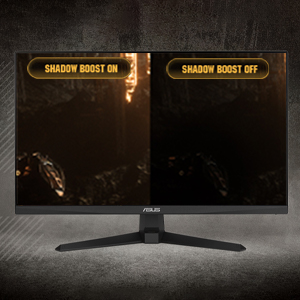
Image: Side-by-side comparison of a dark game scene with Shadow Boost off and Shadow Boost on, showing improved visibility in dark areas.
- Eye Care Features:
- Ultra-Low Blue Light: Reduces harmful blue light emissions to protect your eyes during long viewing sessions. Adjust the blue light filter level in the OSD menu.

Image: Graphic illustrating the effect of Ultra-Low Blue Light technology on screen output.
- Технологија без треперења: Eliminates screen flickering to minimize eye strain. This feature is always active.

Image: Side-by-side comparison of a screen with and without flicker-free technology, demonstrating reduced flickering.
- Ultra-Low Blue Light: Reduces harmful blue light emissions to protect your eyes during long viewing sessions. Adjust the blue light filter level in the OSD menu.
- ГамеПлус: Provides in-game enhancements such as crosshairs, timers, FPS counters, and display alignment tools. Access these features via the OSD menu.
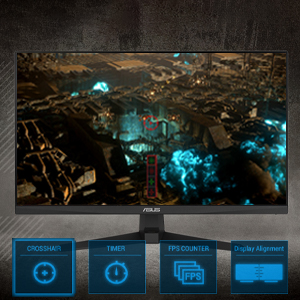
Image: Monitor screen displaying various GamePlus overlays like crosshair, timer, and FPS counter.
- ГамеВисуал: Offers several preset display modes optimized for different content types (e.g., Scenery, Racing, Cinema, RTS/RPG, FPS, sRGB, MOBA). Select the appropriate mode for your current activity.

Image: Side-by-side comparison of a game scene with GameVisual off and GameVisual on, showing optimized visual settings.
Одржавање
Правилно одржавање осигурава дуготрајност и оптималне перформансе вашег монитора.
- Чишћење екрана:
- Искључите монитор и извуците кабл за напајање.
- Лагано користите меку крпу која не оставља длачице дampиспрати водом или неабразивним средством за чишћење екрана.
- Wipe the screen gently. Avoid applying pressure or using harsh chemicals.
- Чишћење Цasing:
- Користите меку, суву крпу да обришете монитор casing.
- Избегавајте употребу абразивних средстава за чишћење или растварача који могу оштетити завршни слој.
- Складиштење:
- If storing the monitor for an extended period, unplug all cables and pack it in its original packaging if possible.
- Чувати на хладном и сувом месту далеко од директне сунчеве светлости и екстремних температура.
Решавање проблема
If you encounter issues with your monitor, refer to the following common solutions.
| Проблем | Могуће решење |
|---|---|
| Нема слике на екрану |
|
| Слика је мутна или искривљена |
|
| Нема звука из звучника/слушалица |
|
| Цепање или замуцкивање екрана током играња |
|
Ако проблем и даље постоји након што сте испробали ова решења, обратите се корисничкој подршци компаније ASUS.
Спецификације
| Феатуре | Детаљ |
|---|---|
| Бранд | АСУС |
| Број модела | ВГ247К1А |
| Величина екрана | 24 инча |
| Резолуција | FHD 1080p (1920 x 1080 пиксела) |
| Аспецт Ратио | 16:9 |
| Рефресх Рате | 165 Хз |
| Време одговора | 1 Milliseconds (MPRT) |
| Дисплаи Типе | ЛЦД |
| Панел Типе | VA (Note: Not explicitly stated, but common for these specifications) |
| Viewинг Англе | 170 степени |
| Осветљеност | 350 кандела по квадратном метру |
| Однос контраста | 1000:1 |
| Screen Finish | Глосси |
| Повезивање | 2x HDMI (v1.4), 1x DisplayPort (v1.2), 1x Earphone Jack |
| Адаптиве Синц Тецхнологи | ФрееСинц Премиум |
| Посебне карактеристике | ASUS Extreme Low Motion Blur (ELMB), Shadow Boost, Blue Light Filter, Built-In Speakers, Flicker-Free, GamePlus, GameVisual |
| Димензије артикла (Д к Ш к В) | 15.53"Д к 21.3"Ш к 6.85"В |
| Тежина артикла | 7.3 фунти |
| ВЕСА Монтажа | 100x100mm compatible (Mount not included) |
| Потрошња енергије | 14.52 Ваттс |
| Волtage | 240 Волтс |
Гаранција и подршка
Your ASUS TUF Gaming VG247Q1A monitor comes with a manufacturer's warranty.
- Врста гаранције: 3 године гаранције произвођача
- Опис гаранције: 3 Year Warranty with ARR (Advanced Replacement Service)
For technical support, warranty claims, or further assistance, please visit the official ASUS support website or contact their customer service. Refer to the warranty card included in your package for specific contact details and terms.