
Увод
This manual provides essential information for setting up, operating, and maintaining your NiPoGi Mini PC Stick T6 PRO 6-128. Please read it carefully before using the device to ensure optimal performance and longevity. The NiPoGi Mini PC Stick is a compact and powerful micro desktop computer designed for various tasks, including web browsing, media consumption, office work, and light gaming.
Садржај пакета
Проверите да ли су све ставке присутне у пакету:
- 1 x NiPoGi Mini PC Stick
- 1 к адаптер за напајање
- 1 x HDMI Extension Cable
- 1 к Упутство за употребу
- 1 x VESA Mount Bracket
Производ је завршенview
The NiPoGi Mini PC Stick T6 PRO 6-128 is a highly portable and efficient computing solution. Its compact design allows it to be easily carried for travel or business. It features a robust cooling system and a variety of connectivity options.

слика: Готовоview of the NiPoGi Mini PC Stick, highlighting its various ports including USB 3.0, HDMI, and Ethernet, along with the power button.
Кључне карактеристике:
- Оперативни систем: Pre-installed Windows 10 Pro (upgradeable to Windows 11).
- процесор: Intel Celeron J4125 Quad-Core (up to 2.7 GHz).
- Меморија: 6GB DDR4 RAM меморије.
- Складиштење: 128GB eMMC.
- Графика: Intel UHD Graphics 600 with 4K UHD @60Hz support via HDMI 2.0.
- Повезивање: Dual-Band Wi-Fi (2.4G/5G), Gigabit Ethernet, Bluetooth 4.2.
- Портови: 2x USB 3.0 ports, 1x HDMI port, 1x Gigabit Ethernet port.
- Посебне карактеристике: Supports Wake on LAN, PXE, Auto Power On, RTC Wake.

слика: The compact size of the Mini PC Stick, measuring approximately 4.7 x 1.9 x 0.7 inches (12 x 5 x 1.8 cm).
Систем за хлађење:
The device incorporates a built-in fan designed for rapid heat dissipation and low noise operation, ensuring stable performance during extended use.
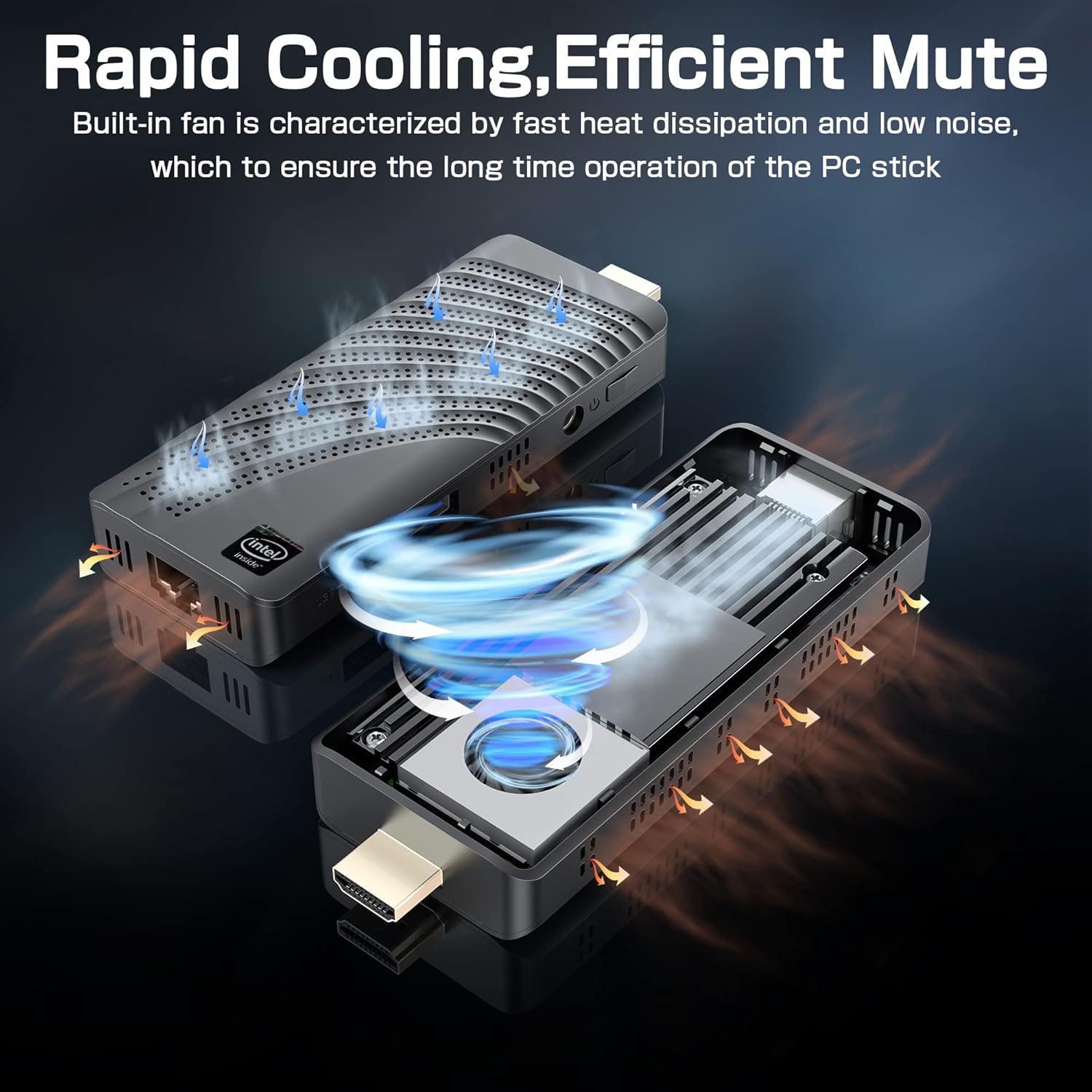
слика: An illustration showing the internal fan design and airflow for efficient cooling within the Mini PC Stick.
Водич за подешавање
Follow these steps to set up your NiPoGi Mini PC Stick:
- Повежи се са екраном: Plug the Mini PC Stick directly into an HDMI port on your monitor or TV. If space is limited, use the provided HDMI extension cable.

слика: A visual guide demonstrating how to connect the Mini PC Stick to a monitor using the HDMI port, with an option to use an extension cable.
- Прикључите напајање: Connect the power adapter to the DC-in port on the Mini PC Stick and then plug it into a power outlet.
- Повежите периферне уређаје: Connect your USB keyboard and mouse to the available USB 3.0 ports. Alternatively, pair Bluetooth devices (keyboard, mouse, speakers) after initial setup.
- Укључено: Press the power button on the side of the Mini PC Stick. The device will boot up, and the Windows 10 Pro operating system will load.
- Почетна инсталација Windows-а: Пратите упутства на екрану да бисте завршили подешавање система Windows 10 Pro, укључујући језик, регион, мрежну везу и креирање корисничког налога.
Упутство за употребу
Мрежна повезаност:
- Ви-Фи: The Mini PC Stick supports dual-band 2.4G/5G Wi-Fi. During Windows setup or via network settings, connect to your preferred wireless network.
- Етхернет: For a stable wired connection, plug an Ethernet cable into the Gigabit Ethernet port on the device.

слика: Icons representing Dual-band WiFi and Gigabit Ethernet connectivity options for the Mini PC Stick.
Блуетоотх уређаји:
The Mini PC Stick features Bluetooth 4.2, allowing connection to various peripherals such as keyboards, mice, and speakers. Access Bluetooth settings in Windows to pair new devices.

слика: The Mini PC Stick demonstrating its Bluetooth 4.2 compatibility with over 10 types of devices, including monitors, TVs, speakers, and various input devices.
4K UHD Output:
The device supports 4K UHD resolution at 60Hz via its HDMI 2.0 port, providing a clear and smooth visual experience for compatible displays.

слика: A visual representation of the advanced image decoding and processing techniques, showcasing smooth and natural 4K HD picture quality.
Напредне функције:
- Ваке он ЛАН: Allows the device to be powered on remotely over a network.
- ПКСЕ покретање: Enables booting from a network server.
- Аутоматско укључивање: Configures the device to automatically power on when connected to power.
- RTC Wake: Schedules the device to wake up at a specific time.
These features can typically be configured in the BIOS settings. Refer to the Windows documentation for specific instructions on accessing and modifying these settings.
Одржавање
- Чишћење: Use a soft, dry cloth to clean the exterior of the device. Avoid liquid cleaners. Ensure ventilation holes are free from dust to maintain optimal cooling.
- Ажурирања софтвера: Regularly check for and install Windows updates to ensure system stability, security, and performance.
- Услови животне средине: Operate the Mini PC Stick in a well-ventilated area, away from direct sunlight, heat sources, and excessive moisture.
Решавање проблема
Без приказа:
- Ensure the HDMI cable is securely connected to both the Mini PC Stick and the display.
- Verify that the display is set to the correct HDMI input source.
- Пробајте други HDMI кабл или екран ако је могуће.
Нема напајања:
- Check if the power adapter is correctly plugged into the device and a working power outlet.
- Ensure the power button has been pressed.
- Покушајте са другом утичницом.
Проблеми са мрежном повезивањем:
- Ви-Фи: Check if Wi-Fi is enabled in Windows settings. Restart your router. Ensure you are within range of your Wi-Fi network.
- Етхернет: Verify the Ethernet cable is properly connected. Check your router/modem status.
Споре перформансе:
- Затворите непотребне апликације које раде у позадини.
- Ensure the device has adequate ventilation and is not overheating.
- Run Windows updates and disk cleanup.
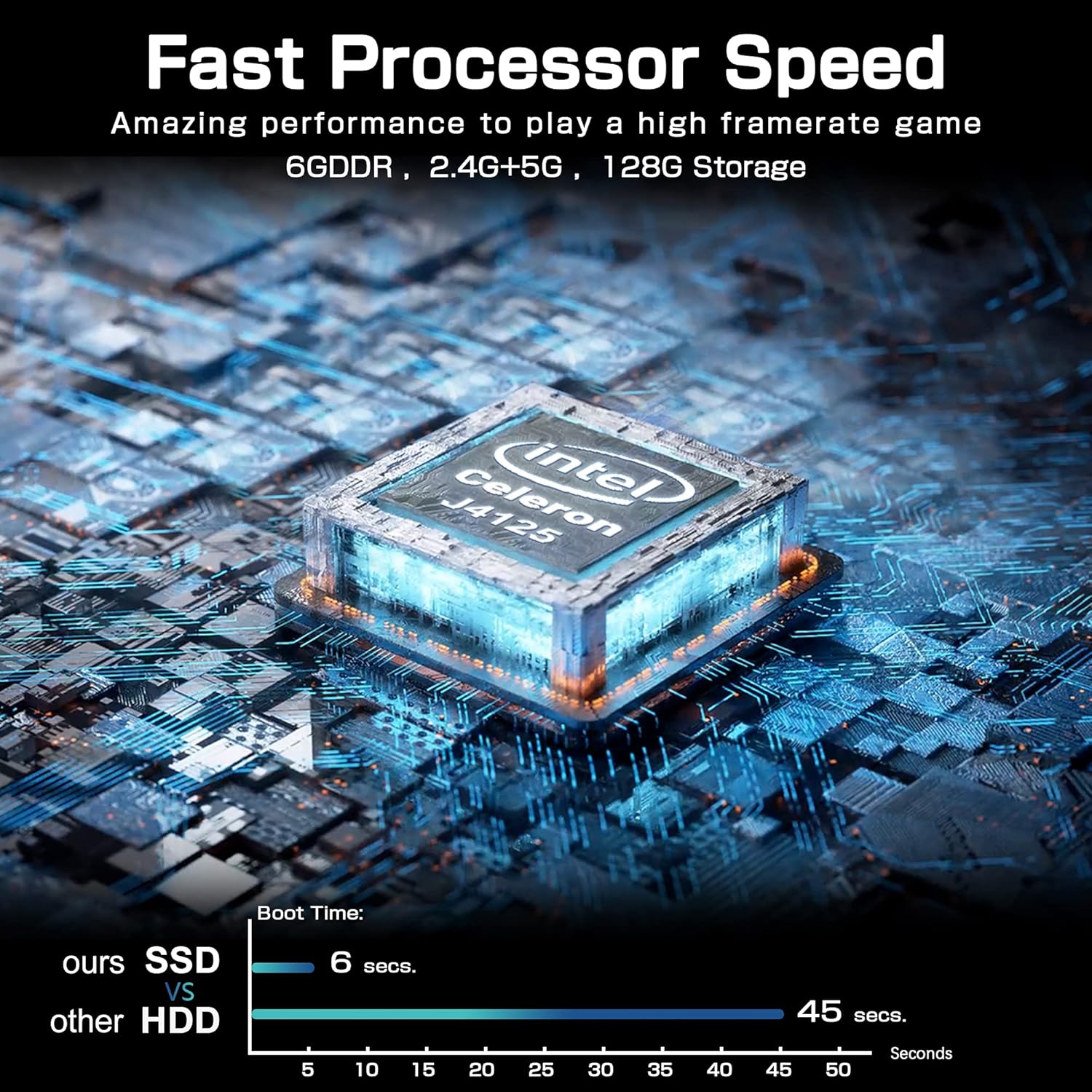
слика: A comparison chart illustrating the fast boot time of the Mini PC Stick (6 seconds) compared to traditional HDD systems (45 seconds).
Спецификације
Detailed technical specifications for the NiPoGi Mini PC Stick T6 PRO 6-128:
| Феатуре | Спецификација |
|---|---|
| Бранд | НиПоГи |
| Број модела | T6 PRO 6-128 |
| Оперативни систем | Виндовс 10 Про |
| ЦПУ модел | Интел Целерон Ј4125 |
| Брзина процесора | 2.7 GHz (Burst) |
| Број процесора | 4 |
| Грапхицс Цопроцессор | Интел УХД графика 600 |
| Величина инсталиране РАМ меморије | 6 ГБ |
| Технологија РАМ меморије | ДДР4 СДРАМ |
| Капацитет складиштења | 128 ГБ еММЦ |
| Интерфејс чврстог диска | УСБ 3.0 |
| Видео излазни интерфејс | ХДМИ |
| Укупни ХДМИ портови | 1 |
| Укупно УСБ портова | 2 |
| Технологија повезивања | Ethernet, WiFi Built-in, Bluetooth, USB |
| Вирелесс Типе | 802.11a/b/g/n/ac (Dual-Band Wi-Fi) |
| Блуетоотх | Блуетоотх 4.2 |
| Max Display Resolution | 3840 к 2160 (4К УХД) |
| Димензије производа (Д к Ш к В) | КСНУМКС к КСНУМКС к КСНУМКС цм (КСНУМКС к КСНУМКС к КСНУМКС инча) |
| Тежина артикла | 390 грама (0.86 фунте) |
| Посебне карактеристике | Auto Power On, Wake On LAN, PXE, RTC Wake |
Гаранција и подршка
For warranty information and technical support, please refer to the documentation included with your product or visit the official NiPoGi webсајт. Конкретни услови гаранције могу се разликовати у зависности од региона и продавца.