
Амазон Ецхо Дот (5. генерација)
Упутство за употребу за Amazon Echo Dot (5. генерација)
Model: Echo Dot (5th Generation) - Black
Увод
The Amazon Echo Dot (5th Generation) is a smart speaker with Alexa, designed to deliver enhanced audio quality, smart home control, and voice-activated assistance. This manual provides essential information for setting up, operating, maintaining, and troubleshooting your device.
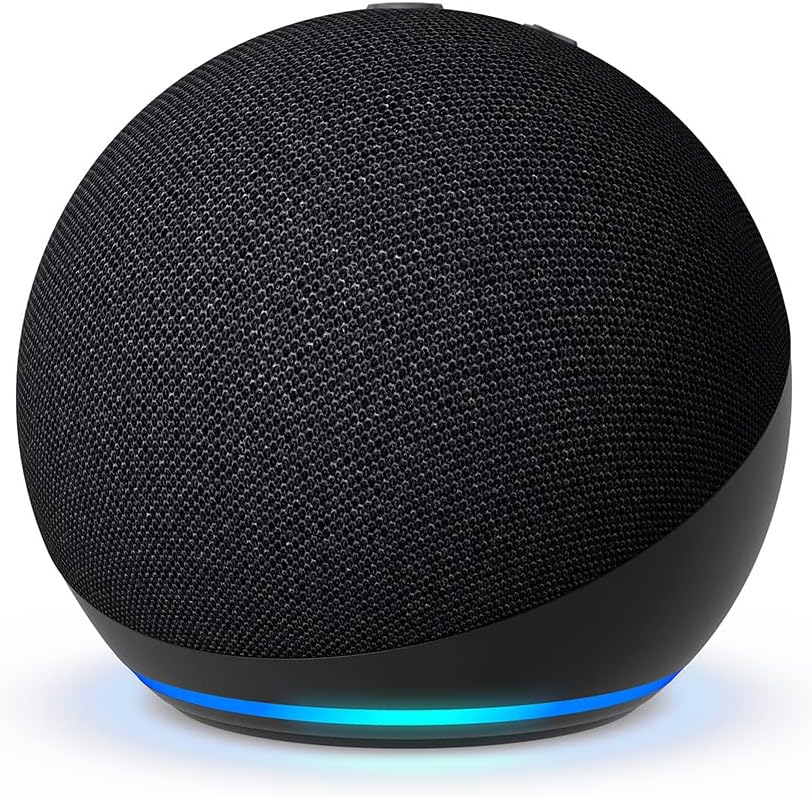
Image: The Amazon Echo Dot (5th Generation) in black, showcasing its spherical design and fabric finish.
Сетуп
Follow these steps to set up your Echo Dot and connect it to your home network:
- Распакујте уређај: Carefully remove the Echo Dot and its power adapter from the packaging.
- Прикључите напајање: Plug the power adapter into the Echo Dot and then into a wall outlet. The light ring on the Echo Dot will turn blue, then orange, indicating it's ready for setup.
- Преузмите апликацију Alexa: На свом паметном телефону или таблету преузмите апликацију Amazon Alexa из продавнице апликација на свом уређају (компатибилна са Fire OS, Android и iOS).
- Open the Alexa App: Launch the app and sign in with your Amazon account. If you don't have one, you'll be prompted to create one.
- Додајте свој уређај: In the Alexa app, go to Уређаји, додирните + icon, and select Додај уређај. Изабери Амазон Ецхо, онда Ецхо Дот, and follow the on-screen instructions to connect your device to your Wi-Fi network. The Echo Dot supports dual-band Wi-Fi (2.4 GHz and 5 GHz).
- Simple Wi-Fi Setup: If you have other Amazon smart devices, the Echo Dot may automatically connect to your Wi-Fi using Amazon's simple Wi-Fi setup technology.

Image: The Echo Dot (5th Generation) on a wooden surface, highlighting its compatibility with Amazon Music, Spotify, Apple Music, Bluetooth, and Deezer.
Управљање вашим Echo Dot-ом
The Echo Dot is designed for hands-free operation using voice commands with Alexa. Here are some common functionalities:
- Гласовне команде: Simply say "Alexa" followed by your command or question.

Image: An Echo Dot on a table with a speech bubble showing "Alexa, what's the weather forecast?", demonstrating voice interaction.
- Music and Audio Playback: Play music and podcasts from services like Amazon Music, Apple Music, Spotify, and more. You can also stream audio via Bluetooth from your mobile device.
The Echo Dot (5th Generation) features a 1.73-inch front-firing speaker, providing vibrant and powerful sound with high-definition lossless audio.

Слика: Интерна view of the Echo Dot, revealing its speaker component, illustrating its compact yet powerful audio design.
- Контрола паметне куће: Control compatible smart home devices by voice or through routines activated by internal temperature sensors. For example, set up a routine to turn on the air conditioning if the indoor temperature exceeds a certain level.

Image: An Echo Dot positioned in a home entryway, demonstrating its ability to control compatible smart home devices via voice or motion detection.
- Аларми и тајмери: Ask Alexa for weather forecasts, set timers, get answers to questions, and listen to jokes. To snooze an alarm, simply tap the top of your Echo Dot.

Image: A hand gently touching the top of an Echo Dot, illustrating the touch control feature for pausing music or snoozing alarms.
- Упаривање уређаја: Enjoy music throughout your home by pairing compatible Echo devices in different rooms or create a home theater system with Fire TV.
Одржавање
Да бисте осигурали дуговечност и оптималне перформансе вашег Echo Dot-а, пратите ова једноставна упутства за одржавање:
- Чишћење: Use a soft, dry, lint-free cloth to clean the exterior of your Echo Dot. Do not use abrasive cleaners, liquids, or aerosol sprays directly on the device.
- Пласман: Place your Echo Dot on a stable, flat surface away from direct sunlight, heat sources, and moisture. Ensure there is adequate ventilation around the device.
- Одржавање кабла за напајање: Handle the power cord carefully. Do not bend, twist, or pinch it. If the cord is damaged, discontinue use and contact customer support.
Решавање проблема
If you encounter issues with your Echo Dot, try the following troubleshooting steps:
| Иссуе | Могуће решење |
|---|---|
| Device Not Responding / Freezing (Blue Light) | Unplug the Echo Dot from the power outlet, wait for 10 seconds, and then plug it back in. This often resolves temporary software glitches. |
| Voice Recognition Issues |
|
| Нема звука или лош квалитет звука |
|
| Не могу да се повежем са Wi-Fi мрежом |
|
Спецификације
| Феатуре | Детаљ |
|---|---|
| Величина | 100 мм к 100 мм к 89 мм |
| Тежина | 304 grams (Actual size and weight may vary by manufacturing process.) |
| Аудио | 1 x 1.73-inch front-firing speaker, high-definition lossless audio |
| Ви-Фи повезивање | Dual-band Wi-Fi supports 802.11 a/b/g/n/ac networks (2.4 and 5 GHz). Incompatible with ad-hoc (or peer-to-peer) Wi-Fi networks. |
| Компатибилност паметног дома | Wi-Fi, Bluetooth Low Energy, and Matter. |
| Блуетоотх повезивање | Подржава напредну дистрибуцију звука Profile (A2DP) for audio streaming from your mobile device to Echo Dot or from Echo Dot to your Bluetooth speaker. Audio/Video Remote Control Profile (AVRCP) за гласовну контролу повезаних мобилних уређаја. Гласовна контрола без употребе руку није компатибилна са Mac OS X уређајима. Bluetooth звучници који захтевају PIN кодове нису подржани. |
| Системски захтеви | Echo Dot comes ready to connect to Wi-Fi. The Alexa app is compatible with Fire OS, Android, and iOS devices. Certain Skills and services may require subscription fees or other types of fees. |
| Технологија подешавања | Amazon's simple Wi-Fi setup allows customers to connect smart devices to Wi-Fi in a few easy steps. |
| Укључено у кутију | Echo Dot 5th Generation, bivolt power adapter (15W) in white, and Quick Start Guide. |
| Генератион | New Echo Dot 5th Generation (2022) |
| Језик | Alexa speaks Portuguese (Note: This manual is in English for broader accessibility). |
| Анател сертификација | 16864-22-01698 |
Функције приватности
The Echo Dot is designed with multiple layers of privacy controls:
- Технологија активационих речи: Alexa devices only begin recording and sending audio to the cloud after detecting the activation word ("Alexa").
- Индикатори стримовања: Visual indicators (light ring) show when Alexa is listening or processing your request.
- Дугме за искључивање микрофона: A physical button allows you to electronically disconnect the microphones, ensuring no audio can be recorded or streamed.

Image: An Echo Dot with a prominent microphone mute icon, indicating that the microphones can be physically turned off for privacy.
- Управљање снимањем гласа: Имате могућност да view and delete your voice recordings through the Alexa app or the Alexa privacy portal.
Amazon does not sell customers' personal information.
Функције приступачности
The Alexa app and Alexa-enabled products include various features to assist customers with accessibility needs related to vision, hearing, mobility, and speech. These features are designed to make the Echo Dot accessible to a wider range of users.
Гаранција и подршка
Your Echo Dot (5th Generation) comes with a 1-годишња ограничена гаранција. The use of the Echo device is subject to the terms found in the product documentation and Amazon's terms of service.
Безбедносна ажурирања софтвера: This device is guaranteed to receive software security updates for at least four years from its last availability as a new unit on Amazon's websites. For device-specific information regarding updates, access the "Manage your content and devices" page if you already own an Amazon Echo.
For further assistance, please refer to the Amazon support webсајту или контактирајте корисничку подршку.
Званични видео снимци производа
No official product videos from the seller were provided in the available data for this manual.
Ask a question about this manual
Ask about setup, troubleshooting, compatibility, parts, safety, or missing instructions. Manuals+ will review the question and use this page’s manual context to help answer it.