
FL ESPORTS FL F12
FL ESPORTS F12 65% тромодална бежична механичка тастатура - упутство за употребу
Model: FL F12
Увод
This manual provides comprehensive instructions for the setup, operation, and maintenance of your FL ESPORTS F12 65% Three-Mode Wireless Mechanical Keyboard. Please read this manual thoroughly before using the product to ensure optimal performance and longevity.
Шта је у кутији
- FL ESPORTS F12 Mechanical Keyboard
- УСБ кабл
- Кеицап Пуллер
- Кориснички приручник (овај документ)
Кључне карактеристике
- 65% Compact Form Factor: 68 keys layout for maximized desktop space utilization.
- Трорежимно повезивање: Supports Bluetooth 5.0, 2.4Ghz wireless, and USB-C wired connections.
- Kailh Box White Switches: Light tactile, clicky switches for precise and fast inputs.
- Издржљиве ПБТ капице за тастатуре: Oil-resistant, doubleshot PBT keycaps in mixed colors for longevity and aesthetic appeal.
- Дуготрајна батерија: Up to 100 hours without backlight, 20 hours with RGB backlight. Real-time battery monitoring available.
- RGB позадинско осветљење: 16.8 million colors with 10 different lighting modes.
- Advanced Customization Software: Allows for extensive customization of lighting and key assignments.
- Прекидачи који се могу брзо заменити: Supports 5-pin switches for easy DIY customization.
- Noise Absorber Foam: Innovative design for reduced noise and clear clicky sound.

Image: The FL ESPORTS F12 mechanical keyboard showcasinг његов компактан распоред од 65% и живо RGB позадинско осветљење.

Image: The FL ESPORTS F12 keyboard highlighting its 2.4 GHz wireless, Bluetooth, and detachable USB-C wired connectivity options.

Image: A visual comparison demonstrating the space-saving advantage of the 65% compact layout (68 keys) of the FL ESPORTS F12 keyboard compared to a full-size keyboard.

Слика: Детаљна view of a Kailh Box White Switch, illustrating its internal structure and providing specifications such as 55g operation force, 1.8mm actuation travel, and 80 million click lifespan.

Image: A close-up shot of the mixed-color, oil-resistant PBT keycaps on the FL ESPORTS F12 keyboard, highlighting their durable textured finish.

Image: Information regarding the 2000 mAh battery capacity of the FL ESPORTS F12 keyboard, showing up to 100 hours duration with RGB backlight off and 20 hours with RGB backlight on.
Подешавање и повезивање
Жична веза (USB-C)
To use the keyboard in wired mode, connect the provided USB-C cable to the keyboard's USB-C port and the other end to an available USB port on your computer. The keyboard will be automatically recognized and ready for use. The keyboard will also charge in this mode.
2.4Гхз бежична веза
- Locate the 2.4Ghz USB dongle, usually stored in a compartment on the keyboard.
- Plug the USB dongle into an available USB port on your device.
- Slide the switch at the back of the keyboard to the right (2.4Ghz mode).
- If the keyboard is not connected automatically, long-press ФН + Р to remap the connection.
Блуетоотх веза
Тастатура подржава повезивање са до три Bluetooth уређаја.
- Slide the switch at the back of the keyboard to the left (Bluetooth mode).
- Дуги притисак ФН + К, ФН + В, или ФН + Е (choose one for each device you want to save).
- The ESC key's white backlight will flash 3 times per second, indicating the keyboard is in pairing mode.
- On your device (laptop, tablet, phone), search for Bluetooth devices and select "BT5.0 KB" or "BT3.0 Keyboard" to connect.
- To switch between saved Bluetooth devices, short-press ФН + К, ФН + В, или ФН + Е corresponding to the desired device.

Image: Diagram illustrating how the FL ESPORTS F12 keyboard can store and switch between three Bluetooth devices using FN + Q/W/E combinations.
Упутство за употребу
Праћење батерије
To check the battery capacity in real-time, press ФН + Бацкспаце. The number row keys will illuminate to indicate the approximate battery percentage. In wireless mode, the Backspace key will flash blue once per second while charging and turn off when fully charged.

Image: Visual representation of the battery level indicator on the FL ESPORTS F12 keyboard, showing how the number row lights up to display charge status when FN + Backspace is pressed.
Комбинације функцијских тастера
The FL ESPORTS F12 keyboard utilizes the FN key for accessing secondary functions printed on the keycaps. Some common combinations include:
- ФН + И: Print Screen (PrtSc)
- ФН + О: Scroll Lock (ScrLk)
- ФН + П: Pause Break (Pause)
- ФН + Ј: Уметни (Ins)
- ФН + К: Хоме
- ФН + Л: Крај
- FN + Right Alt (APP key): Функционише као десни тастер миша.
- ФН + ЕСЦ: Restores keyboard to default settings.
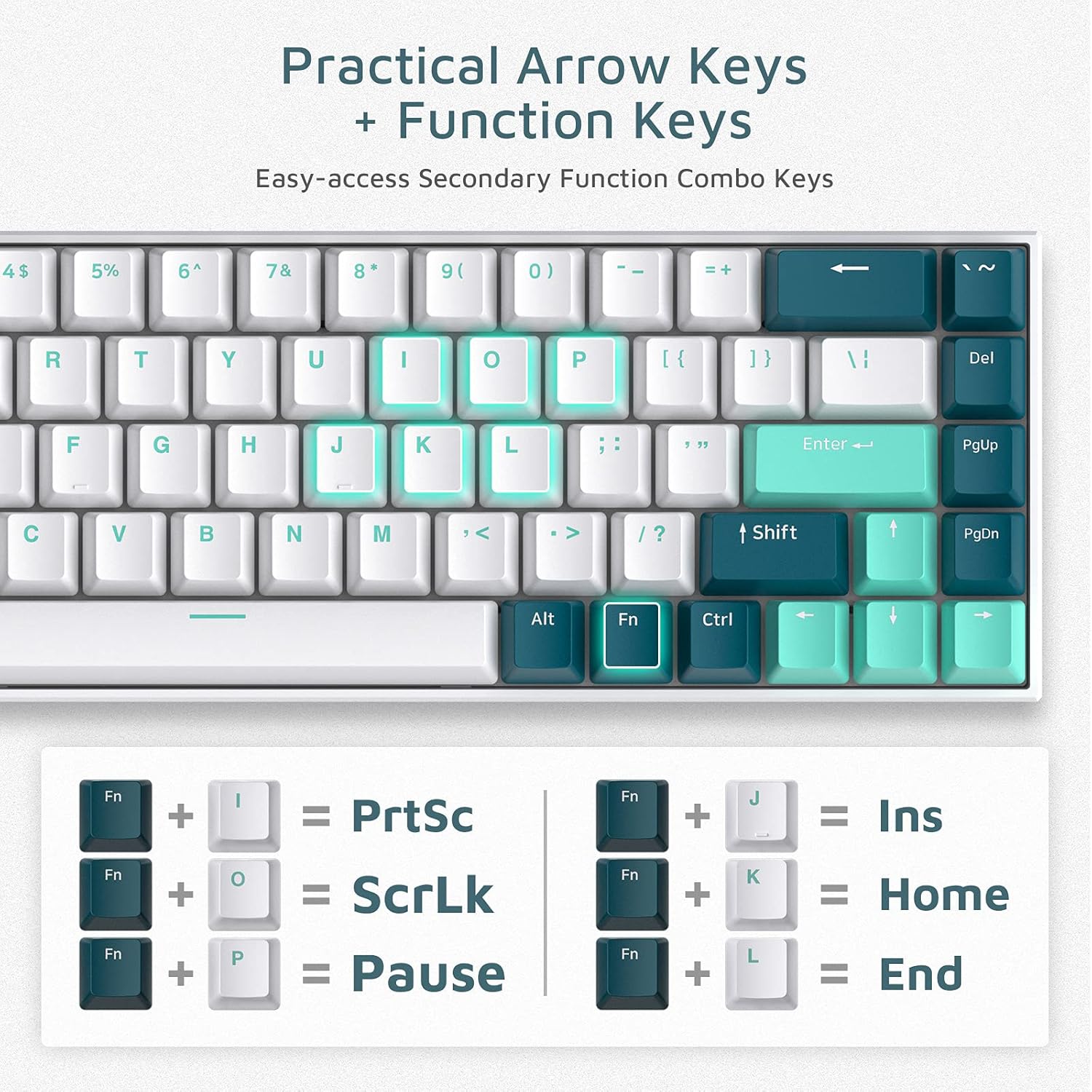
Image: A visual guide to practical arrow keys and function key combinations on the FL ESPORTS F12 keyboard, showing FN key pairings for various secondary functions.
Прилагођавање RGB позадинског осветљења
The keyboard features 16.8 million colors and 10 different styled modes. For advanced customization and key assignment, download the official software/driver from the manufacturer's website. The software allows for near-infinite personalization of lighting effects and macros.
Software/Driver download: bit.ly/FLSOFTWARE (F12 RGB Three mode keyboard Driver V1.0.5)

Image: Screenshot of the FL ESPORTS keyboard customization software interface, demonstrating options for lighting control and key remapping.
Одржавање и њега
- Чишћење: Користите меку, суву крпу да обришете површину тастатуре. За темељније чишћење, користите бочицу компримованог ваздуха да бисте уклонили прашину и прљавштину између тастера.
- Уклањање капице тастера: Use the provided keycap puller to carefully remove keycaps for cleaning or switch replacement. Pull straight up to avoid damaging the switch stem.
- Замена прекидача: The keyboard supports hot-swappable 5-pin switches. Use a switch puller (not included, but often comes with replacement switches) to remove switches. Align new switches carefully before pressing them into place.
- Складиштење: Чувајте тастатуру на хладном и сувом месту, даље од директне сунчеве светлости и екстремних температура.
- Изложеност течности: Avoid exposing the keyboard to liquids. In case of accidental spills, immediately disconnect the keyboard and allow it to dry completely before reconnecting.

Слика: Крупни план view of the keyboard's stabilizers, which help ensure consistent key presses, particularly for larger keys like the spacebar.

Слика: Детаљна view of the hot-swappable switch sockets on the keyboard, showing how switches can be easily removed and replaced without soldering.
Решавање проблема
Keyboard Not Responding / Connection Issues
- Жични режим: Уверите се да је USB-C кабл безбедно повезан и са тастатуром и са рачунаром. Покушајте са другим USB портом или каблом.
- 2.4Ghz Mode: Ensure the USB dongle is properly inserted and the keyboard switch is set to 2.4Ghz mode. Try re-pairing by long-pressing ФН + Р. Ensure the dongle is not too far from the keyboard.
- Блуетоотх режим: Ensure the keyboard switch is set to Bluetooth mode. Check your device's Bluetooth settings to ensure it's enabled and the keyboard is paired. If issues persist, unpair the keyboard from your device and re-pair it using FN + Q/W/E.
- батерија: Проверите ниво батерије (ФН + Бацкспаце) и напуните тастатуру ако је батерија празна.
Keys Not Registering or Malfunctioning
- Individual Keys: If a specific key is not working, carefully remove the keycap using the keycap puller. Inspect the switch for any visible damage or debris. If the switch is damaged, it may need to be replaced (hot-swappable design allows for this).
- Spacebar Wobble: Ensure the spacebar keycap is properly seated on both the switch and the stabilizers. If the issue persists, the stabilizer might be misaligned or damaged.
- CapsLock Key Function (macOS): Some users have reported issues with the CapsLock key on macOS. Ensure your keyboard firmware and software are up to date. If the issue persists, consider remapping the key using the customization software if possible.
RGB Backlight Issues
- Ensure the backlight is enabled.
- Use the customization software to check and adjust lighting modes and brightness.
- Perform a factory reset by pressing ФН + ЕСЦ.
Спецификације
| Феатуре | Детаљ |
|---|---|
| Број модела | ФЛ Ф12 |
| Димензије (Д к Ш к В) | 11.81" x 3.94" x 2.56" (30 x 10 x 6.5 цм) |
| Тежина артикла | 1.87 фунте (0.85 кг) |
| Повезивање | Bluetooth 5.0, 2.4Ghz Wireless, USB-C Wired |
| Тип прекидача | Kailh Box White (Light Tactile, Clicky) |
| Кеицап Материал | Даблшот ПБТ |
| Капацитет батерије | 2000 мАх литијум полимер |
| Трајање батерије | Up to 100 hours (backlight off), 20 hours (RGB backlight on) |
| Позадинско осветљење | RGB (16.8 милиона боја, 10 режима) |
| Компатибилни уређаји | Лаптоп, ПЦ, Таблет |
| Произвођач | FL ESPORTS |
| Први доступан датум | 2. августа 2021. године |
Гаранција и подршка
For detailed warranty information, please refer to the official FL ESPORTS webсајт или директно контактирајте њихову корисничку подршку.
Дигитална верзија овог корисничког упутства је доступна за преузимање: Упутство за употребу (ПДФ)
За додатну помоћ, посетите FL ESPORTS Store on Amazon или контактирајте њихову корисничку службу.
Ask a question about this manual
Ask about setup, troubleshooting, compatibility, parts, safety, or missing instructions. Manuals+ will review the question and use this page’s manual context to help answer it.