
1. Увод
This manual provides essential instructions for the proper setup, operation, and maintenance of your SGPRO SG-14 Dual Handheld Wireless Microphone Set. Please read this manual thoroughly before using the product to ensure optimal performance and longevity. Keep this manual for future reference.

Image 1.1: The SGPRO SG-14 Dual Handheld Wireless Microphone Set, featuring two handheld microphones and a compact receiver.
2. Садржај пакета
Проверите да ли се у вашем пакету налазе све ставке наведене у наставку:
- 2 x Handheld Microphones (Transmitters)
- 1 x Compact Wireless Receiver
- 1 к УСБ кабл за пуњење
- 2 x Anti-roll Rings
- 2 x Mic Foam Covers
- 1 x 6.35mm to 3.5mm Connector
- 1 x Упутство за употребу (овај документ)
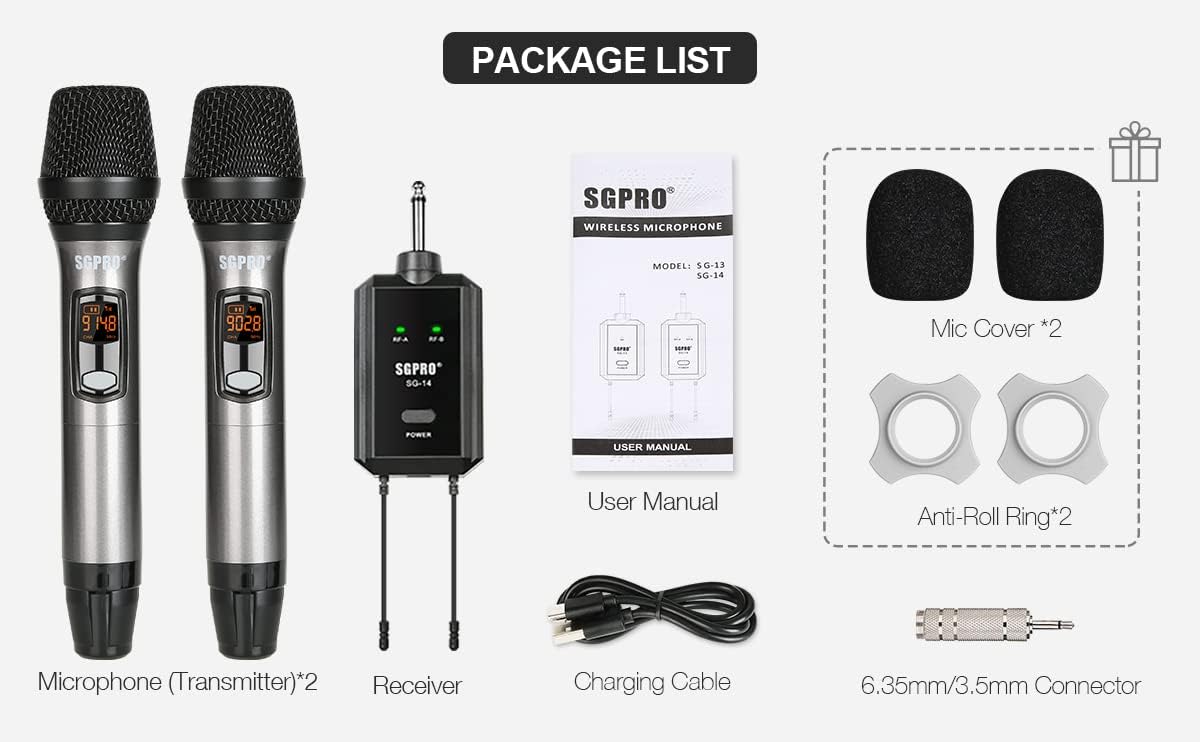
Image 2.1: Visual representation of all items included in the SGPRO SG-14 package.
3. Производ је готовview
3.1 Handheld Microphone (Transmitter)
- Durable Capsule Cover: Protects the microphone capsule.
- LCD Indicator: Displays battery level, channel, and frequency.
- Дугме за укључивање/искључивање звука: Turns the microphone on/off and mutes/unmutes the audio.
- Подесите дугме: Used for channel selection and pairing.
- Дугмад CH+/CH-: Adjusts the channel frequency.
- AA Batteries Compartment: Houses two AA batteries for power.
3.2 Compact Wireless Receiver
- 6.35 мм Јацк: Connects to audio input devices (e.g., ampпуњач, миксер).
- RF-A/RF-B Indicators: Lights up when a microphone signal is received for channel A or B.
- Дугме за напајање: Turns the receiver on/off and initiates pairing.
- Антене: Ensures stable signal transmission.
- USB порт типа C: For charging the receiver's internal battery.

Image 3.1: Detailed diagram illustrating the various parts and controls of the handheld microphone and the compact receiver.
4. Подешавање
- Napunite prijemnik: Connect the receiver to a USB power source using the provided Type-C charging cable. The power indicator will show charging status. Ensure it is fully charged before first use.
- Install Batteries in Microphones: Unscrew the bottom part of each handheld microphone to access the battery compartment. Insert two AA batteries into each microphone, observing the correct polarity (+/-).
- Повежите пријемник: Plug the 6.35mm jack of the receiver directly into the microphone input of your audio device (e.g., amplifier, mixer, powered speaker). If your device has a 3.5mm input, use the included 6.35mm to 3.5mm adapter.
- Укључено: Press and hold the Power button on the receiver to turn it on. Press and hold the Power/Mute button on each microphone to turn them on.


Image 4.1: The receiver connected to a power source for charging and a diagram showing compatible audio devices.
5. Операција
5.1 Укључивање/искључивање
- микрофон: Press and hold the Power/Mute button for approximately 3 seconds.
- Пријемник: Притисните и држите дугме за напајање приближно 3 секунде.
5.2 Функција искључивања звука
While the microphone is on, a short press of the Power/Mute button will mute or unmute the microphone. The LCD display will indicate the mute status.

Image 5.1: A hand pressing the Power/Mute button on the microphone.
5.3 Избор канала
The SGPRO SG-14 system operates on UHF frequencies with 32 available channels to minimize interference. To change the channel on a microphone:
- Укључите микрофон.
- Use the CH+ or CH- buttons to cycle through the available channels.
- Ensure the selected channel on the microphone matches the receiver's paired channel (A or B).

Image 5.2: Microphone LCD displays showing channel frequency changes and channel indicators.
6. Pairing (Sync Operation)
If a microphone loses connection or you need to pair a new microphone, follow these steps:
- Turn on the microphone. Unscrew the mid & tail covers. Long-press the 'SET' button for 10 seconds. The microphone screen should then indicate a running '----'.
- Turn off the receiver. Long-press the 'POWER' button on the receiver for 10 seconds until the LED light flashes red and green.
- Wait until the receiver's LED light changes to steady green. This indicates the microphone is synchronized (SYNC) with the receiver.
- Click the receiver's 'POWER' button to exit pairing mode. The microphone's 'SET' button can also be pressed to complete the pairing process.
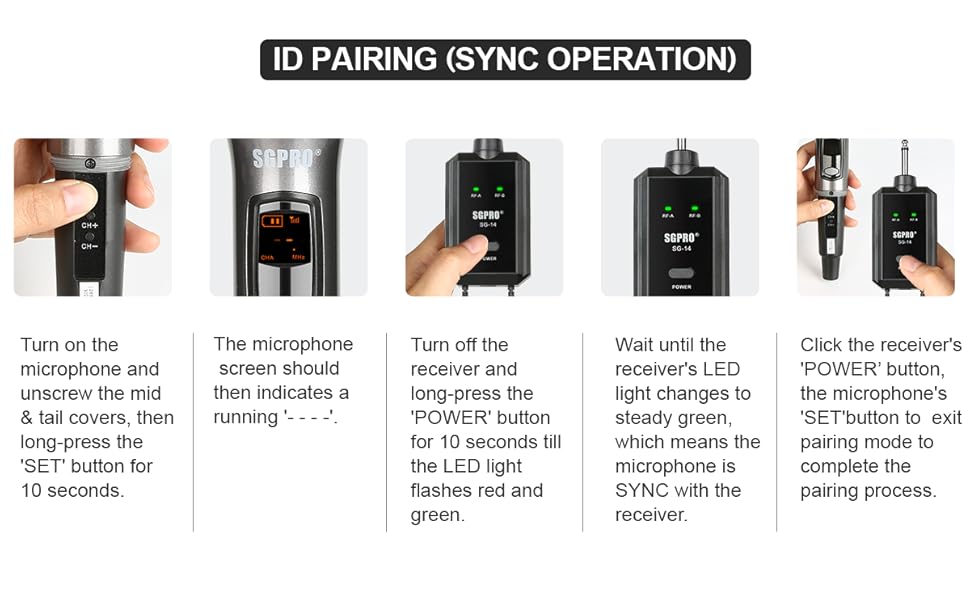
Image 6.1: Visual guide for the ID pairing process between the microphone and receiver.
7. Пријаве
The SGPRO SG-14 Dual Handheld Wireless Microphone Set is suitable for a variety of uses:
- Singing and Karaoke
- DJ Performances
- Public Speaking and Presentations
- Classroom Instruction
- Church Services
- Кућна забава

Image 7.1: Individuals using the handheld microphones in a social setting.
8. Одржавање
- Чишћење: Use a soft, dry cloth to clean the microphones and receiver. Do not use liquid cleaners or solvents.
- Одржавање батерије: Remove AA batteries from the microphones if they will not be used for an extended period to prevent leakage. Recharge the receiver regularly to maintain battery health.
- Складиштење: Store the set in a cool, dry place away from direct sunlight and extreme temperatures.
- Заштита: Use the provided anti-roll rings and foam covers to protect the microphones from damage and reduce plosive sounds.
КСНУМКС. Решавање проблема
| Проблем | Могући узрок | Решење |
|---|---|---|
| Нема звука из микрофона | Microphone or receiver not powered on; Low batteries; Microphone muted; Incorrect pairing; Receiver not connected to audio input. | Ensure both devices are on; Replace AA batteries in mic, charge receiver; Unmute microphone; Re-pair devices (Section 6); Verify receiver is plugged into correct audio input. |
| Interference or static noise | Other wireless devices operating on similar frequencies; Obstructions between mic and receiver; Distance too great. | Change microphone channel (Section 5.3); Ensure clear line of sight; Reduce distance between mic and receiver (max 196 ft / 60 meters). |
| Микрофон се не упарује | Incorrect pairing procedure; Receiver already paired with another device. | Follow pairing instructions carefully (Section 6); Ensure only one receiver is in pairing mode at a time. |
| Кратко трајање батерије | Old or low-quality AA batteries; Receiver not fully charged. | Use fresh, high-quality AA batteries; Fully charge receiver before use. |
10. Спецификације
| Феатуре | Детаљ |
|---|---|
| Број модела | SG-HM (Microphone), SG-14 (Set) |
| Фактор форме микрофона | Хандхелд |
| Технологија повезивања | УХФ (ултра висока фреквенција) |
| Број канала | 32 |
| Полар Паттерн | Једносмерни (кардиоидни) |
| Однос сигнала и шума | 120 дБ |
| Аудио Осетљивост | 95 децибела |
| Microphone Power Source | 2 к АА батерије (нису укључене) |
| Извор напајања пријемника | Пуњива литијум-полимерска батерија |
| Тип конектора | 6.35 мм прикључак |
| Компатибилни уређаји | Amplifiers, Mixers, Powered Speakers |
| Посебна карактеристика | Noise Reduction, Mute Function, Battery Indicator |
| Материјал | Acrylonitrile Butadiene Styrene, Alloy Steel |
| Димензије артикла (Д к Ш к В) | 0.94 x 0.2 x 0.2 inches (Microphone) |
| Тежина артикла | 0.635 ounces / 18 Grams (Microphone) |
| Ефективни домет | Up to 196 feet (60 meters) in optimal conditions |


Image 10.1: Illustrations of the high-quality dynamic mic capsule with cardioid polar pattern and the effective wireless range.
11. Безбедносне информације
- Не излажите производ води или прекомерној влази.
- Избегавајте испуштање или излагање производа јаким ударима.
- Do not attempt to disassemble or modify the product. This will void the warranty and may cause damage.
- Чувати ван домашаја деце.
- Батерије одложите у складу са локалним прописима.
12. Гаранција и подршка
For warranty information or technical support, please refer to the contact details provided with your purchase or visit the official SGPRO webсајт. Молимо вас да сачувате доказ о куповини за потребе гаранције.