
1. Увод
Thank you for choosing the Greadio MD-T26 Portable AM/FM/SW Radio. This manual provides detailed instructions for the proper setup, operation, and maintenance of your radio. Please read this manual thoroughly before use to ensure optimal performance and longevity of your device.
The Greadio MD-T26 is a versatile portable radio featuring AM, FM, and Shortwave (SW) bands, an LCD display for clear frequency and time viewing, and dual power options for both indoor and outdoor use. It is designed for ease of use with large, accessible controls and a built-in speaker for clear audio.

Слика 1: Предња страна view of the Greadio MD-T26 Portable AM/FM/SW Radio.
2. Карактеристике производа
- Вишепојасни пријем: Receives AM, FM, and Shortwave (SW) frequencies.
- ЛЦД екран: Clear digital display for frequency and time settings.
- Опције двоструког напајања: Operates via AC power or 4 x D cell batteries (not included).
- Висококвалитетни звучник: Integrated 2W speaker for clear sound output.
- Контрола тонова: Adjustable tone settings (Low/High) for personalized audio.
- Утичница за слушалице: 3.5mm stereo earphone jack for private listening.
- Преносиви дизајн: Equipped with a sturdy handle for easy transport.
3. Подешавање
3.1 Напајање радија
The Greadio MD-T26 radio offers two methods for power supply:
- АЦ напајање: For indoor use, connect the included AC power cable to the radio's AC input jack and then plug it into a standard wall outlet.
- Напајање батерије: For portable use, insert four (4) D cell batteries (not included) into the battery compartment located on the back of the radio. Ensure correct polarity (+/-) as indicated inside the compartment.
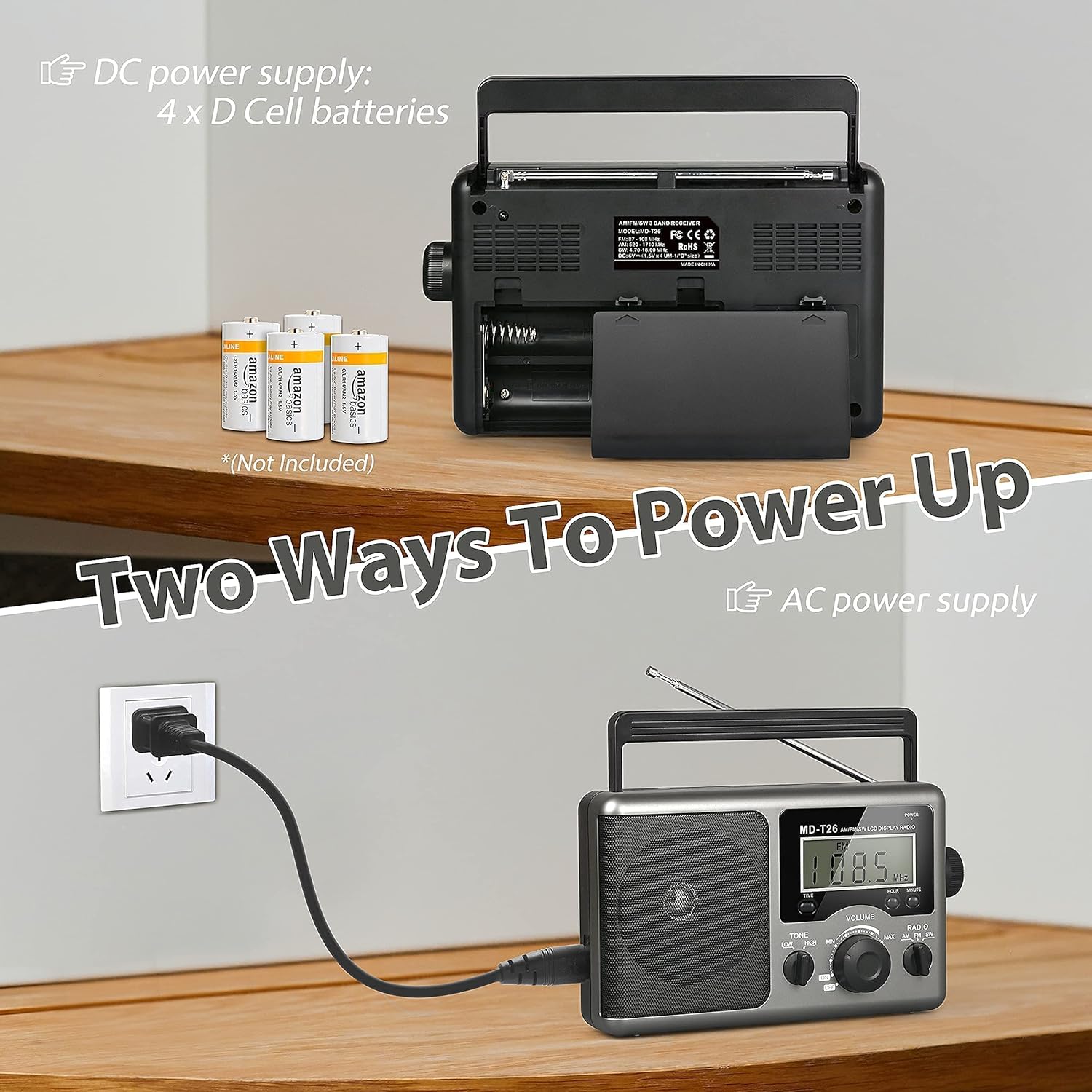
Figure 2: Illustration of AC power connection and battery compartment for D cell batteries.
3.2 Подешавање антене
For optimal reception, adjust the antenna as follows:
- FM/SW Reception: Extend the telescopic antenna fully and adjust its angle for the clearest signal.
- AM Reception: The radio uses a built-in ferrite rod antenna for AM. Rotate the entire radio unit to find the strongest signal.
4. Упутство за употребу
4.1 Контроле прекоview

Слика 3: Детаљно view of the radio's control panel.
- Дугме за укључивање: Located on the top right, press to turn the radio ON/OFF.
- Дугме за подешавање: Located on the right side, rotate to select radio stations.
- Дугме ВОЛУМЕ: Located on the front panel, rotate to adjust the sound level.
- RADIO Band Selector: Пребацивање између AM, FM и SW опсега.
- TONE Switch: Select between LOW and HIGH tone settings.
- TIME/HOUR/MINUTE Buttons: Used for setting the time on the LCD display.
4.2 Turning On and Selecting a Band
- Притисните тастер ПОВЕР button to turn on the radio. The LCD display will illuminate.
- Користите РАДИО band selector switch to choose your desired band: AM, FM, or SW.
4.3 Подешавање станице
Када је опсег изабран, полако ротирајте ТУНИНГ knob on the right side of the radio. Observe the frequency displayed on the LCD screen. Stop rotating when you hear your desired station clearly.
4.4 Подешавање јачине и тона
- Волумен: Ротирајте ВОЛУМЕ дугме на предњој плочи у смеру казаљке на сату да бисте повећали јачину звука и у смеру супротном од казаљке на сату да бисте је смањили.
- тон: Користите ТОНЕ switch to select between 'LOW' for a warmer sound or 'HIGH' for a brighter sound, according to your preference.
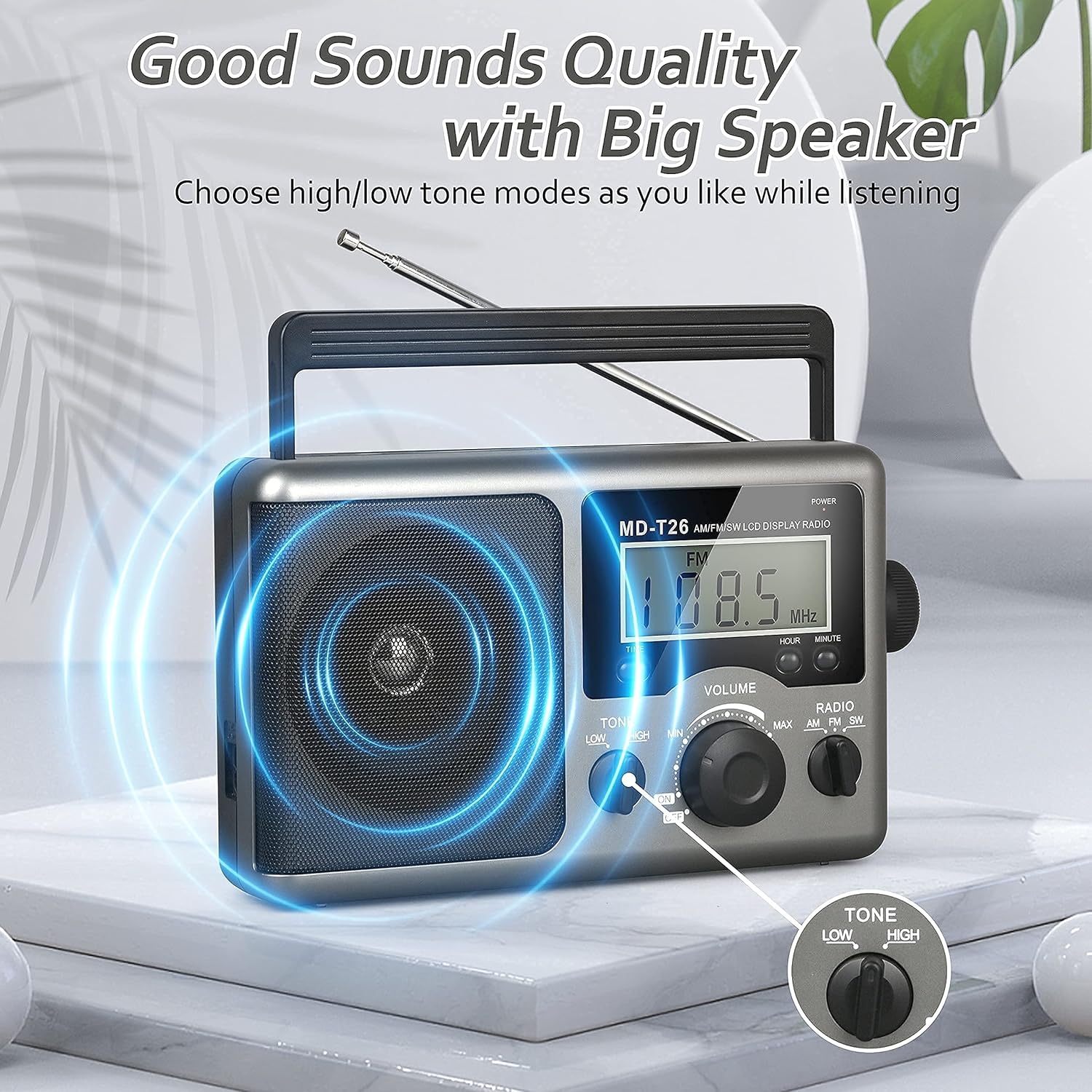
Figure 4: Speaker and Tone control detail.
4.5 Подешавање времена
The LCD display can also show the current time. To set the time:
- Притисните тастер ВРЕМЕ button once to enter time setting mode.
- Користите ХОУР dugme za podešavanje sata.
- Користите МИНУТЕ dugme za podešavanje minuta.
- The time system is 24-hour format.
4.6 Using the Earphone Jack
For private listening, plug any standard 3.5mm stereo earphones (not included) into the УТИЧНИЦА ЗА СЛУШАЛИЦЕ located on the side of the radio. The internal speaker will automatically mute when earphones are connected.
5. Одржавање
- Чишћење: Wipe the radio's exterior with a soft, dry cloth. Do not use abrasive cleaners or solvents.
- Одржавање батерије: If the radio will not be used for an extended period, remove the D cell batteries to prevent leakage and damage.
- Складиштење: Чувајте радио на хладном и сувом месту, даље од директне сунчеве светлости и екстремних температура.
- Отпорност на воду: Овај радио је није водоотпоран. Avoid exposure to rain, moisture, or splashing water.
КСНУМКС. Решавање проблема
| Проблем | Могући узрок | Решење |
|---|---|---|
| Нема струје | AC cable not connected, batteries depleted or incorrectly inserted. | Check AC cable connection. Replace batteries or ensure correct polarity. |
| Слаб пријем / Статични шум | Antenna not extended/adjusted, weak signal area, interference. | Extend and adjust telescopic antenna (FM/SW). Rotate radio for AM. Move to an area with better signal. Avoid sources of electronic interference. |
| Нема звука из звучника | Volume too low, earphones connected. | Increase volume. Disconnect earphones if not intended for private listening. |
| ЛЦД екран не ради | Проблем са напајањем, унутрашња грешка. | Проверите напајање. Ако проблем и даље постоји, контактирајте корисничку подршку. |
7. Спецификације
| Феатуре | Детаљ |
|---|---|
| Бранд | Греадио |
| Број модела | МД-Т26 |
| Технологија повезивања | Auxiliary (for earphone) |
| Технологија тјунера | AM, FM, SW |
| Извор напајања | AC Power, 4 x D Cell Batteries |
| Компатибилни уређаји | Слушалица |
| Дисплаи Типе | ЛЦД |
| Хардверски интерфејс | КСНУМКСмм Аудио Јацк |
| Ниво отпорности на воду | Није водоотпоран |
8. Гаранција и подршка
8.1 Информације о гаранцији
Greadio provides a 12-месечна гаранција for this product, covering manufacturing defects from the date of purchase. Additionally, a 30-дневна гаранција поврата новца се нуди.
This warranty does not cover damage caused by misuse, accident, unauthorized modification, or normal wear and tear.
8.2 Корисничка подршка
For any questions, technical assistance, or warranty claims, please contact Greadio customer service. We offer 24/7 корисничка служба да вам помогнем.
Молимо погледајте паковање производа или упутства продавца webсајт за најновије контакт информације.