
1. Увод
Thank you for choosing the A4tech FG1112 Fstyler Wireless Keyboard and Mouse Set. This compact and efficient combo provides a reliable 2.4GHz wireless connection, offering convenience and comfort for your daily computing needs. The keyboard features a Q Turkish layout with FN multimedia keys, while the mouse offers precise 1200 DPI optical tracking. This manual will guide you through the setup, operation, and maintenance of your new device.
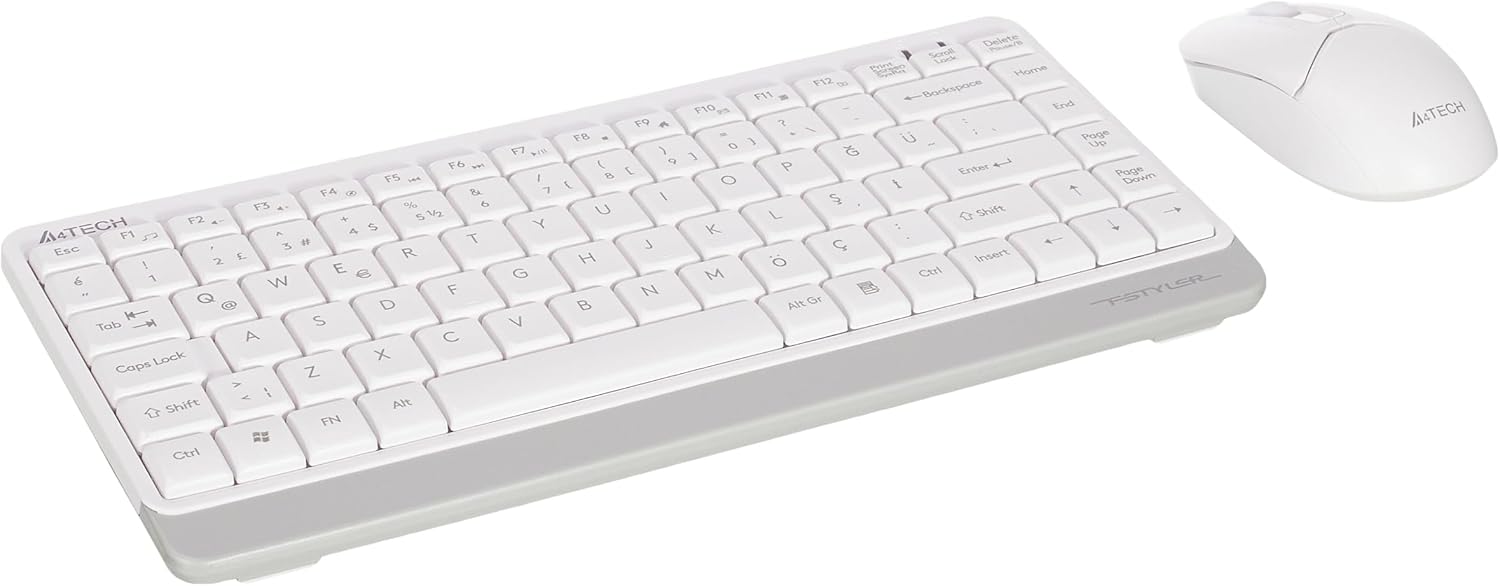
Image 1.1: A4tech FG1112 Fstyler Wireless Keyboard and Mouse Set (White)
2. Садржај пакета
Молимо вас да проверите садржај пакета како бисте били сигурни да су сви предмети присутни:
- 1 x A4tech FG1112 Wireless Keyboard
- 1 x A4tech Fstyler Wireless Mouse
- 1 к УСБ нано пријемник
- 2 x AAA батерије (за тастатуру)
- 1 x AA Battery (for mouse, typically included)
- 1 x Упутство за употребу (овај документ)
3. Упутства за подешавање
- Уметните батерије:
- For the keyboard: Open the battery compartment cover on the underside of the keyboard. Insert two AAA batteries, ensuring correct polarity (+/-). Close the cover.
- For the mouse: Open the battery compartment cover on the underside of the mouse. Insert one AA battery, ensuring correct polarity (+/-). Close the cover.

Image 3.1: Mouse bottom view showing battery compartment and power switch.
- Connect USB Nano Receiver: Locate the USB Nano Receiver, typically stored inside the mouse's battery compartment or packaged separately. Plug the receiver into an available USB port on your computer.
- Укључено:
- For the keyboard: Ensure the keyboard is powered on. There might be a power switch on the top right or underside.
- За миш: Померите прекидач за напајање на доњој страни миша у положај „УКЉУЧЕНО“.
- Аутоматско повезивање: Your computer should automatically detect and install the necessary drivers for the keyboard and mouse. This process may take a few moments. Once complete, your devices are ready for use.
Video 3.1: A short demonstration of the A4tech Fstyler Wireless Keyboard and Mouse Set, showing its compact design and wireless connectivity. This video illustrates the product's features and ease of use.
4. Упутство за употребу
4.1 Употреба тастатуре
The A4tech FG1112 keyboard features a compact design with a Q Turkish layout. It is designed for comfortable and quiet typing.

Слика 4.1: Врх view of the A4tech FG1112 Wireless Keyboard, highlighting its Q Turkish layout.
Multimedia and Function Keys:
The keyboard includes 12 multimedia and internet function keys integrated into the F1-F12 keys. To activate these functions, press the FN тастер истовремено са жељеним F-тастером.
- ФН + Ф1: Медиа Плаиер
- ФН + Ф2: Utišavanje zvuka
- ФН + Ф3: Појачавање звука
- ФН + Ф4: Муте
- ФН + Ф5: Претходна нумера
- ФН + Ф6: Нект Трацк
- ФН + Ф7: Пусти/пауза
- ФН + Ф8: Зауставити
- ФН + Ф9: Home Page
- ФН + Ф10: Емаил
- ФН + Ф11: Мој рачунар
- ФН + Ф12: Калкулатор

Image 4.2: Illustration of FN key functionality for multimedia controls.
4.2 Употреба миша
The A4tech Fstyler mouse provides precise 1200 DPI optical tracking for smooth and accurate cursor movement.

Слика 4.3: Врх view of the A4tech Fstyler Wireless Mouse.
Основне функције:
- Леви клик: Primary function, used for selecting items, opening fileс итд.
- Десни клик: Secondary function, typically opens context menus.
- Точак за померање: Користи се за скроловање докумената и web pages vertically. Can also function as a middle click button.
5. Одржавање
- Чишћење: Користите меку, суву крпу за чишћење тастатуре и миша. За тврдокорну прљавштину, благо дamp Може се користити крпа, али водите рачуна да течност не уђе у уређај.
- Замена батерије: When the keyboard or mouse becomes unresponsive or exhibits delayed input, it's time to replace the batteries. Follow the "Insert Batteries" steps in the Setup section.
- Складиштење: When not in use for extended periods, turn off the mouse to conserve battery life. Store the devices in a cool, dry place.
КСНУМКС. Решавање проблема
| Проблем | Могуће решење |
|---|---|
| Тастатура/миш не реагује |
|
| Delayed or intermittent response |
|
| Мултимедијални тастери не раде |
|
7. Спецификације
| Феатуре | Детаљ |
|---|---|
| Бранд | A4tech |
| Модел | ФГ1112 |
| Технологија повезивања | КСНУМКСГХз Вирелесс |
| Распоред тастатуре | Q Turkish |
| Тип тастатуре | Multimedia Membrane |
| ДПИ миша | 1200 DPI Optical |
| Keyboard Power Source | 2 к ААА батерије |
| Mouse Power Source | 1 x AA Battery (typical) |
| Посебне карактеристике | Wireless, Mini, Multimedia Keys, Optical Mouse, Laser Printed Keys, Water-resistant design (with drainage channels) |
| Тежина производа | 0.62 Kilograms (Set) |
| Димензије (тастатура) | Approx. 315mm (Width) x 146mm (Depth) x 25mm (Height) |
| Димензије (миш) | Approx. 64mm (Width) x 108mm (Depth) x 35mm (Height) |

Image 7.1: Dimensions of the A4tech FG1112 Keyboard and Mouse.
8. Гаранција и подршка
This A4tech FG1112 Fstyler Wireless Keyboard and Mouse Set comes with a 2 година гаранције од датума куповине. Молимо вас да сачувате доказ о куповини за потребе гаранције.
For technical support, troubleshooting assistance, or warranty inquiries, please contact A4tech customer service through their official webсајту или вашем локалном дистрибутеру.
Више информација и ресурса за подршку можете пронаћи на A4tech Store on Amazon.