
1. Увод
The UNIWA V909T 4G Flip Phone is designed for ease of use, particularly for seniors. It features large buttons, a clear display, and essential functions to ensure reliable communication. This manual provides detailed instructions for setting up, operating, and maintaining your device.
2. Шта је у кутији
Молимо вас да проверите садржај вашег пакета како бисте били сигурни да су сви предмети присутни:
- UNIWA V909T 4G Flip Phone
- Доцк за пуњење
- Адаптер
- УСБ кабл
- Батерија (унапред инсталирана или засебна)
3. Производ је готовview
The UNIWA V909T is equipped with features designed for convenience and accessibility.
Кључне карактеристике:
- Двоструки екрани: A 2.8-inch QVGA main screen and a 1.77-inch QVGA outer screen for quick information display.
- Large Buttons & Display: Oversized buttons and a large font for easy dialing and menu navigation.
- СОС дугме за хитне случајеве: A dedicated button on the back for quick access to emergency contacts.
- Компатибилност са слушним апаратима (HAC): Designed to work seamlessly with hearing aid devices (M4/T4 compatibility).
- Loud Speaker & Ringtones: High-quality speaker and loud ringtones to prevent missed calls.
- Доцк за пуњење: Convenient charging solution, eliminating the need to plug in cables directly.
- ФМ радио: Enjoy listening to news and music.
- 4Г повезивање: Supports 2G(GSM)/3G(WCDMA)/4G(FDD-LTE) global network bands.

The phone features a dual-screen design, with a 2.8-inch main screen and a 1.77-inch outer screen for checking time, date, calls, and messages without opening the phone.

Large, easy-to-press buttons with clear numbering and big font for improved readability and navigation.

A dedicated SOS button on the back of the phone allows for quick contact with pre-set emergency numbers.

The phone is Hearing Aid Compatible (HAC), ensuring clear call quality for users with hearing aids.
Производ је завршенview Видео
Овај видео пружа општи прегледview of the UNIWA 4G Unlocked Flip Phone, highlighting its key features and benefits for elderly users.
4. Подешавање
4.1. Инсталација СИМ картице
To use your phone for calls and messages, you must install a SIM card. Ensure the phone is powered off before installation.
- Уклоните задњу маску телефона.
- Пронађите слот за СИМ картицу.
- Unlock the SIM card clip by sliding it to the left or lifting it, depending on the mechanism.
- Carefully insert your SIM card into the slot, ensuring the gold contacts face downwards and the cut corner aligns correctly.
- Close the SIM card clip and slide it to the right to lock it in place.
- Вратите задњи поклопац.
SIM Card Installation Video
This video demonstrates the correct procedure for installing the SIM card slot cover on the UNIWA V909T 4G Flip Senior Phone.
4.2. Пуњење телефона
The phone comes with a convenient charging dock. To charge:
- Connect the USB cable to the adapter, then plug the adapter into a power outlet.
- Connect the other end of the USB cable to the charging dock.
- Place the UNIWA V909T phone into the charging dock. Ensure it is seated correctly and the charging indicator light illuminates.
- Потпуно пуњење обично траје отприлике 8 сата.

The UNIWA V909T phone placed in its charging dock, indicating a convenient way to recharge the device.
5. Операција
5.1. Укључивање/искључивање
- To power on: Press and hold the red power button until the screen lights up.
- To power off: Press and hold the red power button, then confirm power off on the screen.
5.2. Упућивање и примање позива
- Да бисте упутили позив: Open the phone, dial the number using the large keypad, and press the green call button.
- Да одговорите на позив: Open the phone when it rings, or press the green call button.
- Да бисте завршили позив: Close the phone or press the red hang-up button.
- Брзо бирање: Numbers 2-9 can be set as speed dial buttons. Refer to the phone's menu for speed dial setup.
5.3. Слање и примање порука
- Navigate to the 'Messages' menu using the navigation buttons.
- Select 'Write message' to compose a new text.
- Enter the recipient's number and your message.
- Притисните „Пошаљи“.
5.4. Функција SOS хитних случајева
The SOS button provides a quick way to contact emergency numbers.
- Setting up SOS contacts: Access the SOS settings in the phone's menu. You can preset up to 5 contacts to be called or sent a text message during an emergency.
- Using the SOS button: In an emergency, press and hold the SOS button on the back of the phone. The phone will automatically call and/or send a pre-written text message to your designated emergency contacts.
5.5. ФМ радио
Да бисте користили ФМ радио:
- Navigate to the 'FM Radio' icon in the menu.
- Select to open the radio application.
- Use the navigation buttons to scan for stations or adjust the volume.
6. Компатибилност мреже
The UNIWA V909T is an unlocked 4G phone supporting 2G(GSM)/3G(WCDMA)/4G(FDD-LTE) global network bands. Please verify your carrier's compatibility before use.
Подржани оператери:
- T-Mobile & T-Mobile MVNOs (Mint, Metro, Ultra, Boost, Tello)
Not Supported Carriers:
- АТ&Т
- Веризон
- Спринт
- УС Целлулар
- GCI Wireless
- Google Project Fi
- FreedomPop
- Ц Спире
- Cricket Network
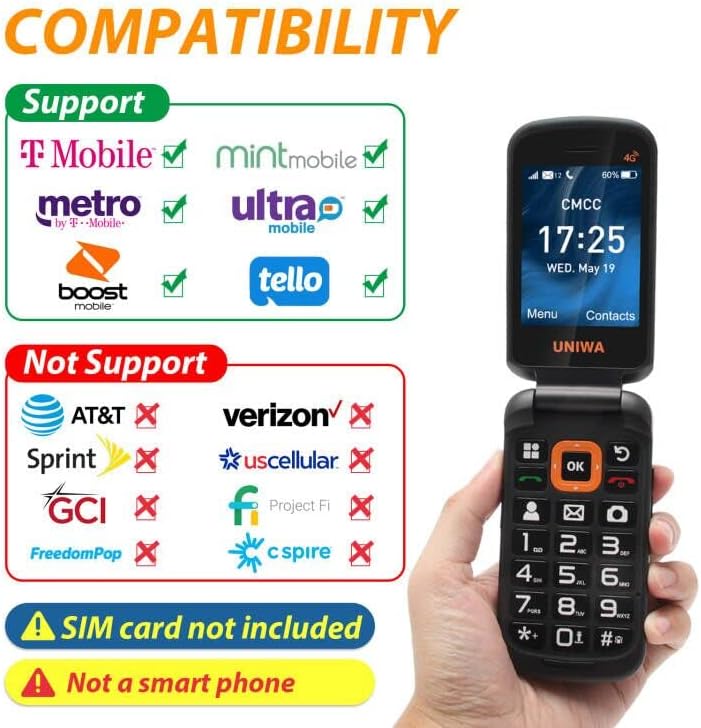
A visual guide to network compatibility for the UNIWA V909T phone, showing supported and unsupported carriers.
7. Спецификације
| Феатуре | Спецификација |
|---|---|
| Димензије производа | 2.2 к 0.88 к 4.33 инча |
| Тежина артикла | 9.9 унци |
| Број модела ставке | В909Т |
| Батерије | 1 литијум-јонска батерија (укључена) |
| Оперативни систем | РТОС |
| РАМ | 48 МБ |
| Бежичне комуникационе технологије | Целлулар |
| Цоннецтивити Тецхнологиес | Ви-Фи |
| Посебне карактеристике | Basic Phone, Camera, LTE |
| Унос људског интерфејса | Buttons, Microphone |
| Аудио Јацк | Нема прикључка за слушалице |
| Форм Фацтор | Склопиви екран |
| Оцена снаге батерије | 2250 Милиamp Сати |
| Време разговора телефоном | 6 сата |
| Капацитет меморије | 48 МБ |
| Величина екрана на стојећем екрану | 2.8 инча |
| Време пуњења | 8 сата |
| Целлулар Тецхнологи | ЛТЕ |
КСНУМКС. Решавање проблема
If you encounter issues with your UNIWA V909T phone, try the following basic troubleshooting steps:
- Телефон се не укључује: Ensure the battery is charged. Connect the phone to the charging dock and wait a few minutes before attempting to power on again.
- Нема мрежног сигнала: Check if the SIM card is correctly inserted and locked. Ensure you are within your carrier's service area.
- Cannot make/receive calls: Verify that your SIM card is active and has sufficient credit/plan. Check network signal strength.
- Проблеми са звуком: Ensure the volume is adjusted correctly. If using a hearing aid, confirm HAC settings are enabled if available.
- SOS button not working: Confirm that emergency contacts are correctly set up in the SOS settings menu.
For more complex issues, please refer to the manufacturer's support resources or contact customer service.
9. Одржавање
To ensure the longevity and optimal performance of your UNIWA V909T phone, follow these maintenance guidelines:
- Чишћење: Use a soft, dry cloth to clean the phone's exterior. Avoid using liquid cleaners or abrasive materials.
- Одржавање батерије: Avoid extreme temperatures. Do not leave the phone fully discharged for extended periods. Use only the provided charger and battery.
- Складиштење: Store the phone in a cool, dry place away from direct sunlight and moisture when not in use.
- Заштита: Consider using a protective case to prevent scratches and damage from accidental drops.
10. Гаранција и подршка
For information regarding warranty coverage, technical support, or service, please refer to the warranty card included with your product or visit the official UNIWA webсајт. Сачувајте рачун као доказ о куповини.