
T-Dagger Advance Force T-TGS005 Gaming Keyboard and Mouse Kit User Manual
Model: T-TGS005 | Brand: T-DAGGER
1. Производ је готовview
The T-Dagger Advance Force T-TGS005 is a comprehensive gaming kit designed to provide both performance and practicality. It includes a compact TKL mechanical keyboard with vibrant rainbow illumination and a high-performance gaming mouse with adjustable DPI settings.

Figure 1.1: T-Dagger Advance Force T-TGS005 Gaming Keyboard and Mouse Kit, showcasinг обе компоненте.
Кључне карактеристике:
- Compact TKL (Tenkeyless) keyboard design.
- Rainbow illumination for the keyboard.
- Outemu Blue mechanical switches for tactile and audible feedback.
- High-performance gaming mouse with up to 7200 DPI.
- Durable ABS plastic construction for both devices.
2. Водич за подешавање
Follow these steps to set up your T-Dagger Advance Force T-TGS005 Gaming Kit:
- Распакујте комплет: Пажљиво извадите тастатуру и миш из њиховог паковања.
- Повежите тастатуру: Locate the USB 2.0 cable attached to the keyboard. Insert the USB connector into an available USB port on your computer.
- Повежите миш: Locate the USB 2.0 cable attached to the mouse. Insert the USB connector into another available USB port on your computer.
- Инсталација драјвера: The T-Dagger Advance Force T-TGS005 kit is plug-and-play. Your operating system should automatically detect and install the necessary drivers. This process may take a few moments.
- Потврдите везу: Once drivers are installed, the keyboard's rainbow illumination should activate, and the mouse's single-color illumination should light up. Test both devices to ensure they are functioning correctly.

Слика 2.1: Одозго надоле view of the keyboard and mouse, illustrating their layout and design.
3. Упутство за употребу
3.1 Управљање тастатуром
The T-Dagger TKL keyboard features a compact design without a numeric keypad, optimizing desk space. It comes with Outemu Blue mechanical switches, providing a distinct tactile bump and audible click for each keypress.
- Rainbow Illumination: The keyboard features a fixed rainbow illumination pattern. There are no user-configurable RGB modes or colors.
- Анти-Гхостинг: Equipped with N-Key Rollover (NKRO), allowing multiple keys to be pressed simultaneously without conflict, ensuring all commands are registered during intense gaming sessions.
- Подесива висина: The keyboard has adjustable feet on the underside to change the typing angle for ergonomic comfort.

Слика 3.1: Крупни план view of the T-Dagger keyboard, highlighting the key layout and rainbow backlighting.
3.2 Рад мишем
The T-Dagger gaming mouse is designed for high performance with an ambidextrous shape, though its side buttons are located only on the left side. It features single-color illumination.
- ДПИ подешавање: The mouse supports multiple DPI levels: 1000, 1600, 2400, 3200, and 7200. Use the dedicated DPI button (usually located behind the scroll wheel) to cycle through these settings and adjust cursor sensitivity.
- Дугмад: The mouse features 7 programmable buttons. Refer to any accompanying software (if available, not included in this kit's description) for advanced customization.
- Осветљење: The mouse features a single-color illumination that activates when connected. This illumination is not user-configurable.
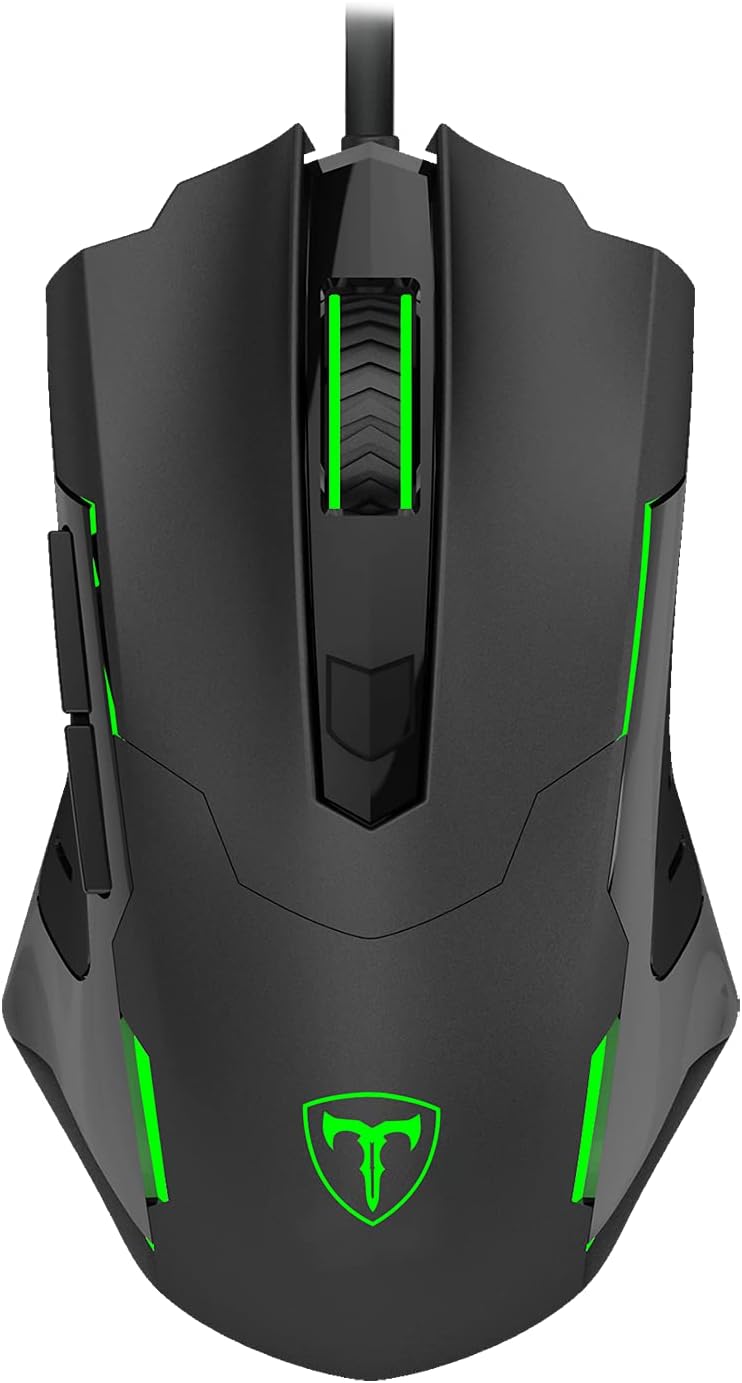
Слика 3.2: Врх view of the T-Dagger gaming mouse, showing its ergonomic shape and button layout.
4. Одржавање
Proper maintenance ensures the longevity and optimal performance of your T-Dagger gaming kit.
- Чишћење тастатуре: Regularly use a soft, dry cloth to wipe down the keycaps and chassis. For deeper cleaning, use compressed air to remove dust and debris from between the keys. Avoid using harsh chemicals or abrasive materials.
- Чишћење миша: Обришите површину миша меком, благо длакомamp cloth. Ensure no liquid enters the internal components. Clean the optical sensor area on the underside with a cotton swab if tracking issues occur.
- Нега каблова: Avoid sharp bends or kinks in the USB cables. Do not pull the cables forcefully when disconnecting the devices; always grasp the USB connector.
- Складиштење: Када се комплет не користи дуже време, чувајте га на хладном и сувом месту, даље од директне сунчеве светлости и екстремних температура.
КСНУМКС. Решавање проблема
If you encounter issues with your T-Dagger Advance Force T-TGS005 kit, refer to the following common troubleshooting steps:
- Уређај није препознат:
- Уверите се да су USB каблови безбедно прикључени у USB портове рачунара.
- Try connecting the devices to different USB ports on your computer.
- Поново покрените рачунар.
- Check Device Manager (Windows) or System Information (macOS) to see if the devices are listed.
- Keyboard Illumination Not Working:
- Verify the keyboard is properly connected to a powered USB port.
- Ensure your computer's power settings are not disabling USB devices.
- Mouse Cursor Not Moving/Erratic:
- Очистите оптички сензор на доњој страни миша.
- Уверите се да користите миш на одговарајућој површини (нпр. подлога за миш, а не рефлектујућа или провидна површина).
- Покушајте да подесите DPI поставке помоћу дугмета DPI на мишу.
- Тастери не реагују:
- Ensure the keyboard cable is firmly connected.
- Тестирајте тастатуру на другом рачунару да бисте искључили проблем специфичан за систем.
- For individual keys, check for any physical obstructions or debris.
If these steps do not resolve the issue, please contact T-DAGGER customer support for further assistance.
6. Спецификације
Detailed technical specifications for the T-Dagger Advance Force T-TGS005 Gaming Kit:
6.1 Спецификације тастатуре
| Феатуре | Детаљ |
|---|---|
| Прекидачи | Outemu Blue Mechanical |
| Активирање | Механички |
| Боја | Црно |
| Формат | TKL (Tenkeyless) |
| Дизајн | Floating Keys |
| Лаиоут | ABNT2 |
| Повезивање | УСБ 2.0 |
| Подесива висина | Да |
| Цасе Материалс | АБС пластика |
| Осветљење | Раинбов |
| Анти-Гхостинг | Н-Кеи Ролловер (НКРО) |
| Цабле Ленгтх | 1.5м |
| Ремовабле Цабле | Да |
| Кеицапс | Doubleshot ABS |
6.2 Mouse Specifications
| Феатуре | Детаљ |
|---|---|
| ДПИ подешавања | 1000 / 1600 / 2400 / 3200 / 7200 |
| Дугмад | 7 |
| Облик | Ambidextrous (buttons on left side only) |
| Осветљење | Сингле Цолор |
| Повезивање | УСБ 2.0 |
| Цабле Ленгтх | 1.8м |
7. Гаранција и подршка
T-DAGGER products are manufactured to high quality standards. For information regarding warranty coverage, terms, and conditions, please refer to the warranty card included with your product or visit the official T-DAGGER webсајту.
For technical support, product inquiries, or assistance with troubleshooting beyond the scope of this manual, please contact T-DAGGER customer service through their official support channels. Contact information can typically be found on the product packaging or the manufacturer's webсајту.