
Увод
The Keychron Q2 is a fully customizable wired mechanical keyboard featuring a compact 65% layout. Constructed with a solid full aluminum frame, the Q2 is designed for easy assembly and offers a premium typing experience. It supports full QMK and VIA programming for extensive customization and features hot-swappable switches for personalized tactile feedback.

Image: The Keychron Q2 Wired Custom Mechanical Keyboard, showcasing its compact 65% layout and blue color scheme.
Водич за подешавање
1. Садржај пакета
Пре него што почнете, уверите се да су све компоненте присутне:
- Keychron Q2 Keyboard Kit (Aluminum Case, PCB, Steel Plate, Sound Absorbing Foam, Case Foam, Gaskets)
- УСБ кабл типа Ц на тип Ц
- УСБ адаптер типа А на тип Ц
- Свитцх Пуллер
- Кеицап Пуллер
- Шрафцигер
- Хексадекадни кључ
- Stabilizers (4 sets)
Note: All tools are typically located at the bottom of the packaging.

Image: Diagram illustrating the contents of the Keychron Q2 package, including the keyboard, cables, and tools.
2. Повезивање тастатуре
- Locate the USB Type-C port on the back of the Keychron Q2 keyboard.
- Connect one end of the provided USB Type-C to Type-C cable to the keyboard.
- Connect the other end of the cable to your computer's USB Type-C port. If your computer only has USB Type-A ports, use the included USB Type-A to Type-C adapter.
- Ensure the operating system switch (located on the back edge of the keyboard) is set to the correct position for your system (Mac or Windows).
- Ваш оперативни систем ће аутоматски препознати тастатуру.

Слика: Крупни план view of the Keychron Q2 keyboard with a USB-C cable connected, showing the Mac/Win switch.
Упутство за употребу
1. Прилагођавање QMK/VIA
The Keychron Q2 supports full QMK and VIA programming, allowing you to remap keys, create macros, and customize lighting effects. To use VIA software:
- Download the VIA software from the official Keychron webсајт (keychron.com/pages/qmk-via).
- Connect your Q2 keyboard to your computer via the USB cable.
- Launch the VIA software. The software should automatically detect your Q2 keyboard. If not, you may need to import the Q2 keymap JSON file, also available on the Keychron webсајту.
- Use the graphical interface to drag and drop functions, assign macros, and configure lighting for each key. Changes are applied in real-time.

Image: Screenshot of the VIA software interface, demonstrating how to remap keys on the Keychron Q2 keyboard.
2. Прекидачи са могућношћу брзе замене
The Q2's PCB supports both 3-pin and 5-pin MX style mechanical switches, allowing for easy switch replacement without soldering.
- Using the provided keycap puller, carefully remove the keycap from the switch you wish to replace.
- Use the provided switch puller to gently grip the top and bottom clips of the switch. Pull the switch straight up to remove it from the PCB.
- Поравнајте пинове новог прекидача са отворима на штампаној плочи. Уверите се да су пинови прави како бисте избегли савијање.
- Чврсто притисните нови прекидач на место док не кликне.
- Поново причврстите поклопац тастера.

Слика: Крупни план view of the Keychron Q2's PCB with several switches removed, demonstrating the hot-swappable feature.
3. Keycaps and RGB Lighting
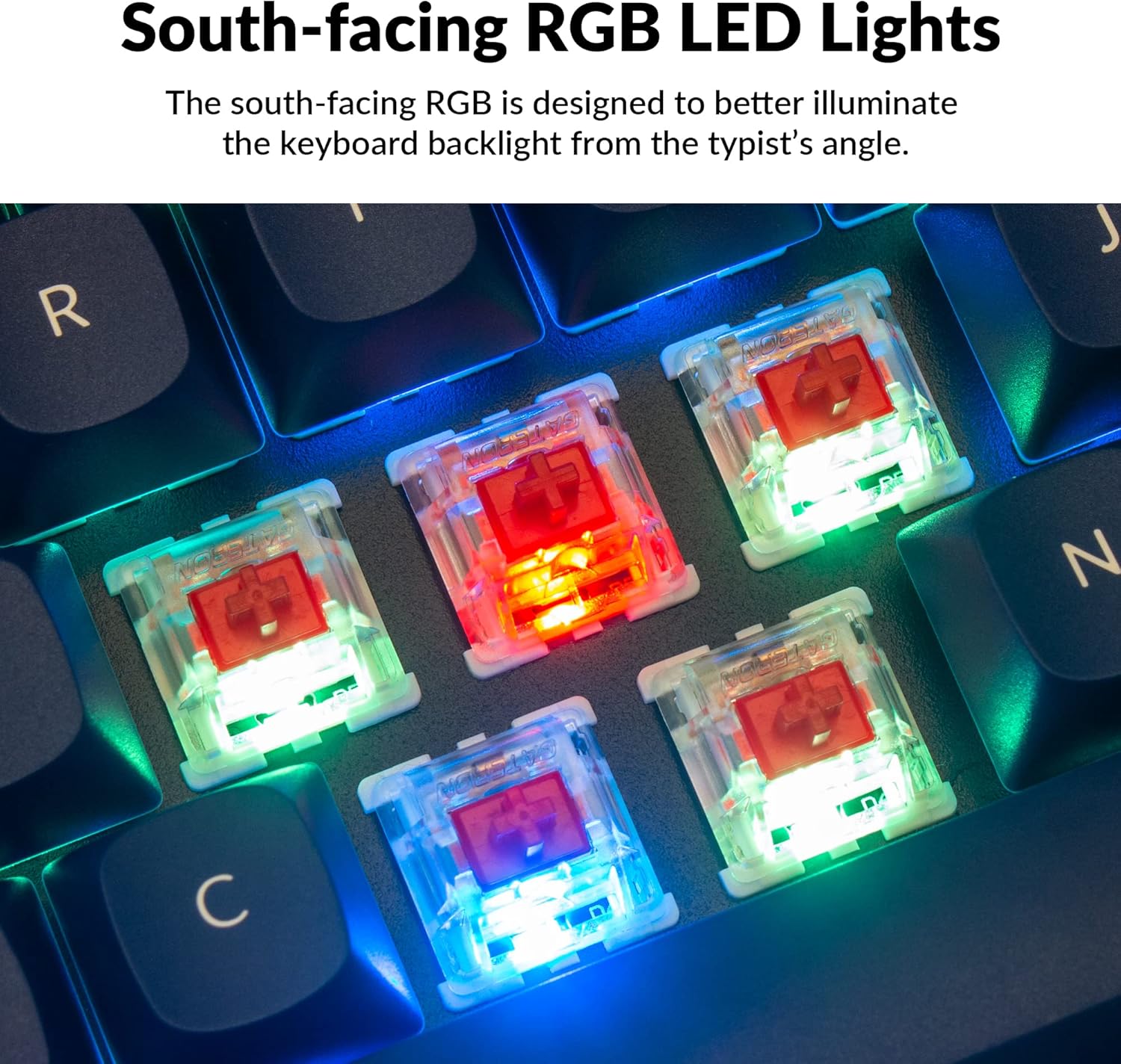
The Q2 comes with premium non-shine-through PBT keycaps, known for their durability and oil resistance. The keyboard features south-facing RGB LEDs, designed to provide better illumination of the backlight from the typist's perspective.
Слика: Детаљна view of the Keychron Q2's double-shot PBT keycaps, highlighting their texture and legends.

Image: A close-up of the Keychron Q2's south-facing RGB LEDs illuminating the switches from below.
Одржавање
1. Чишћење тастатуре
Редовно чишћење помаже у одржавању перформанси и изгледа тастатуре.
- Уклањање прашине: Користите лименку компримованог ваздуха да бисте одували прашину и остатке између тастера.
- Чишћење капица тастера: For deeper cleaning, remove the keycaps using the provided keycap puller. Wash them with mild soap and water, then ensure they are completely dry before reattaching.
- Чишћење кућишта: Обришите алуминијумско кућиште меком крпомamp тканина. Избегавајте јаке хемикалије које могу оштетити завршни слој.
2. Switch and Stabilizer Maintenance
The hot-swappable design allows for easy maintenance of switches and stabilizers.
- Замена прекидача: If a switch becomes faulty, replace it using the hot-swapping procedure described in the Operating Instructions.
- Stabilizer Lubrication: For optimal performance and reduced wobbliness on larger keys (space bar, shift, enter), the PCB-mounted screw-in stabilizers can be lubricated. This typically involves disassembling the keyboard to access the stabilizers.

Image: An exploded diagram of the Keychron Q2, showing its various components like keycaps, switches, top case, gaskets, plate, PCB, sound absorbing foam, case foam, bottom case, and silicone gaskets, illustrating ease of disassembly.
Решавање проблема
Уобичајени проблеми и решења:
- Тастатура не реагује:
- Уверите се да је USB кабл безбедно повезан и са тастатуром и са рачунаром.
- Verify the Mac/Windows switch on the back of the keyboard is set to the correct operating system.
- Try connecting the keyboard to a different USB port or a different computer to rule out port issues.
- Поново покрените рачунар.
- Одређени тастери не раде:
- Remove the keycap and switch for the non-functional key. Inspect the switch pins for bends or damage. Straighten bent pins carefully or replace the switch if damaged.
- Уверите се да је прекидач потпуно постављен на штампану плочу.
- Check VIA software to ensure the key has not been accidentally remapped or disabled.
- Проблеми са RGB осветљењем:
- Уверите се да је тастатура правилно повезана.
- Use the VIA software to check and adjust lighting settings.
- Perform a factory reset if lighting issues persist (refer to Keychron's official support for specific reset procedures).
- Keyboard Disconnecting Randomly:
- Покушајте са другим УСБ каблом.
- Ensure the USB port on your computer is stable and providing sufficient power.
- Ажурирајте УСБ драјвере вашег рачунара.
If you encounter issues not covered here, please refer to the official Keychron support resources.
Спецификације
| Феатуре | Детаљ |
|---|---|
| Бранд | Кеицхрон |
| Назив модела | Q2 |
| Број модела | Q2-J1 |
| Распоред тастатуре | 65% (68 Keys), QWERTY |
| Технологија повезивања | Wired (USB-A, USB-C) |
| Компатибилни уређаји | PC (Linux, MacOS, Windows) |
| Тип прекидача | Gateron G Pro Red (Linear), Hot-swappable |
| Позадинско осветљење | RGB (окренут ка југу) |
| Материјал | Full Aluminum Frame, PBT Keycaps |
| Димензије производа | 12.89 cm D x 4.76 cm Š x 1.33 cm V |
| Посебне карактеристике | QMK/VIA Programmable, Double Gasket Design |
Информације о гаранцији
Keychron products typically come with a standard manufacturer's warranty. For detailed information regarding the warranty period, coverage, and terms and conditions for your Keychron Q2 keyboard, please refer to the official Keychron webсајт или гарантни лист који сте добили уз производ. Сачувајте доказ о куповини за потребе подношења захтева за гаранцију.
Подршка и ресурси
For further assistance, software downloads (VIA), firmware updates, and frequently asked questions, please visit the official Keychron support page:
- Keychron Official Webсајт: ввв.кеицһрон.цом
- QMK/VIA Software & Firmware: www.keychron.com/pages/qmk-via
- Keychron Store: Visit the Keychron Store on Amazon
You can also find community forums and additional user guides online for advanced customization and troubleshooting tips.