
1. Увод
This manual provides instructions for the Keychron K14 mechanical keyboard. The K14 is a 70% layout, 72-key keyboard designed for both Mac and Windows operating systems, offering both Bluetooth wireless and USB wired connectivity. It features an RGB backlight, an aluminum frame, and Gateron G Pro Brown mechanical switches.

Слика: Прекоview of the Keychron K14 mechanical keyboard highlighting its 70% layout, wireless/wired modes, multi-device connectivity, Gateron G Pro switches, RGB lighting, Mac/Windows compatibility, and USB-C plug.
2. Садржај пакета
Verify that all items are present in your Keychron K14 package:
- Keychron K14 Mechanical Keyboard
- УСБ Типе-Ц кабл
- Кеицап Пуллер
- Switch Puller (if hot-swappable version)
- Extra Keycaps for Windows/Mac operating systems
- Упутство за употребу
3. Карактеристике производа
3.1. 70% Layout and Key Cluster
The K14 features a compact 70% layout with 72 keys, providing a smaller footprint while retaining essential navigation keys such as Home, End, and Arrow keys, similar to a tenkeyless keyboard.

Слика: Крупни план view of the Keychron K14 keyboard, illustrating its 70% layout which includes dedicated navigation keys such as Insert, Home, End, Delete, Page Up, Page Down, and arrow keys.
3.2. Gateron G Pro Brown Switches
The keyboard is equipped with Gateron G Pro Brown mechanical switches, known for their tactile feedback. These switches offer a durable lifespan of up to 50 million keystrokes.

Image: Specifications for the Gateron G Pro mechanical Brown Switch, detailing operating force (55±15gf), pre-travel (2±0.6mm), tactile behavior, gentle sound level, pre-lubed status (Yes), and a lifespan of up to 50 million keystrokes.
3.3. Ергономски дизајн
The K14 features two-level adjustable feet, allowing for typing angles of 6º and 9º. This design, combined with an inclined bottom frame, provides ergonomic support for extended typing comfort.

Слика: Страна А view of the Keychron K14 keyboard, illustrating its two-level adjustable feet that allow for typing angles of 6 and 9 degrees, enhancing ergonomic support.
4. Подешавање
4.1. Повезивање тастатуре
The Keychron K14 supports both Bluetooth wireless and USB Type-C wired connections.
4.1.1. Блуетоотх веза
- Ensure the keyboard's mode switch (located on the side) is set to "BT" (Bluetooth).
- Press and hold the "Fn" + "1" (or "2" or "3") keys for 4 seconds to enter pairing mode. The backlight will flash rapidly.
- On your device (smartphone, laptop, iPad), enable Bluetooth and search for "Keychron K14".
- Select the keyboard to pair. The backlight will stop flashing upon successful connection.
- The keyboard can connect to up to 3 devices. Use "Fn" + "1", "Fn" + "2", or "Fn" + "3" to switch between paired devices.
4.1.2. Жична веза
- Ensure the keyboard's mode switch is set to "Cable".
- Повежите приложени USB Type-C кабл са тастатуре на USB порт рачунара.
- The keyboard will automatically be recognized and function as a wired keyboard.

Image: The Keychron K14 keyboard shown connecting wirelessly to a desktop computer, laptop, and smartphone, indicating compatibility with Mac and Windows operating systems.

Image: The Keychron K14 keyboard displayed with icons representing its dual connectivity options: wireless Bluetooth and wired USB-C.
4.2. Промена оперативног система
The K14 includes a switch to toggle between Mac and Windows layouts. Locate the OS switch on the side of the keyboard and set it to the appropriate operating system for optimal key functionality.
4.3. Подешавање угла тастатуре
The keyboard features two-level adjustable feet. Flip out the feet to select between 6º and 9º typing angles to suit your ergonomic preference.
5. Операција
5.1. Контрола позадинског осветљења
The Keychron K14 features RGB backlighting with 19 different types of lighting effects. Use the dedicated backlight key (often marked with a lightbulb icon) or function key combinations to cycle through effects, adjust brightness, and change colors.
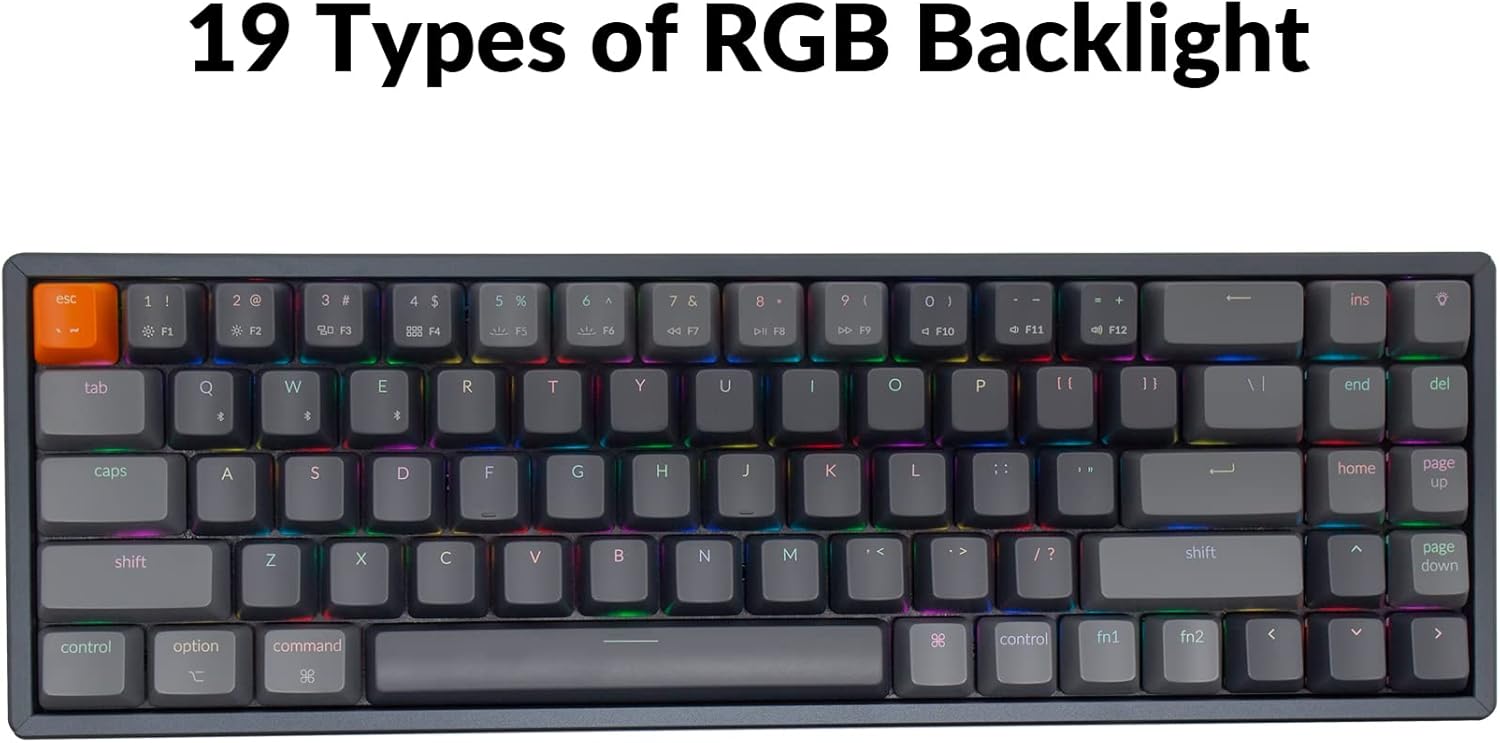
Image: The Keychron K14 keyboard illuminated with a multi-color RGB backlight, demonstrating its various lighting capabilities.
5.2. Мултимедијални тастери
Access multimedia functions (e.g., volume control, play/pause) using the Fn key in combination with the designated function row keys. Refer to the keycap legends for specific functions.
5.3. N-Key Rollover (NKRO)
The K14 supports N-key rollover (NKRO) in wired mode, allowing all keys to be registered simultaneously. In wireless mode, it supports 6-key rollover (6KRO).
6. Управљање батеријом
The Keychron K14 is equipped with a 4000 mAh battery, providing up to 240 hours of usage with the backlight off. Connect the keyboard via the USB Type-C cable to charge the battery. The charging indicator will show the charging status.

Image: A close-up of the Keychron K14 keyboard with a prominent overlay indicating its 4000 mAh battery capacity.
7. Одржавање
To ensure the longevity and optimal performance of your Keychron K14 keyboard, follow these maintenance guidelines:
- Чишћење тастера: Користите алат за извлачење капица тастера да бисте их уклонили. Очистите их благим раствором сапуна и меком крпом. Уверите се да су потпуно суви пре него што их поново поставите.
- Чишћење тела тастатуре: Use a soft, dry, lint-free cloth to wipe the aluminum frame and other surfaces. For stubborn dirt, a slightly damp Може се користити тканина, али избегавајте прекомерну влагу.
- Уклањање прашине: Користите компримовани ваздух да уклоните прашину и остатке између тастера и прекидача.
- Складиштење: Када се тастатура не користи дуже време, чувајте је на сувом и хладном месту, даље од директне сунчеве светлости и екстремних температура.
- Избегавајте течности: The keyboard is not water-resistant. Keep liquids away to prevent damage.
КСНУМКС. Решавање проблема
If you encounter issues with your Keychron K14 keyboard, refer to the following common solutions:
8.1. Тастатура не реагује
- Проверите везу: Ensure the USB cable is securely connected or that Bluetooth is properly paired.
- Ниво батерије: If using Bluetooth, check if the battery is charged. Connect the USB cable to charge.
- Прекидач режима: Verify the keyboard's mode switch is set correctly (BT for Bluetooth, Cable for wired).
- Поново покрени: Try restarting your computer or device and the keyboard.
8.2. Bluetooth Disconnection Issues
- сметње: Приближите тастатуру свом уређају и даље од других бежичних уређаја који могу изазвати сметње.
- Поново упарите: Unpair the keyboard from your device's Bluetooth settings and then re-pair it.
- Фирмвер: Check the official Keychron website for any available firmware updates for your K14 model.
8.3. Keys Not Registering or Double Typing
- Clean Switches: Dust or debris under the keycap or switch can cause issues. Use compressed air.
- Замена прекидача: If you have a hot-swappable version, try replacing the problematic switch with a spare one.
8.4. Позадинско осветљење не ради
- Осветљеност: Ensure the backlight brightness is not set to the lowest level.
- Функцијски тастери: Try cycling through backlight modes and brightness levels using the designated function key combinations.
9. Спецификације
| Феатуре | Детаљ |
|---|---|
| Бранд | Кеицхрон |
| Број модела | К14Ц3 |
| Лаиоут | 70% (72 кључ) |
| Повезивање | Bluetooth 5.1 & USB Type-C Wired |
| Прекидачи | Gateron G Pro Brown Mechanical |
| Позадинско осветљење | RGB (19 types) |
| Материјал оквира | Алуминијум |
| Капацитет батерије | 4000 мАх |
| Трајање батерије | Up to 240 hours (backlight off) |
| Подесиве ноге | Yes (6º and 9º) |
| Н-Кеи Ролловер | NKRO (Wired), 6KRO (Wireless) |
| Компатибилни уређаји | Лаптоп, паметни телефон, таблет |
| Оперативни системи | Мац, Виндовс |
10. Гаранција и подршка
Keychron products are covered by a limited warranty. For specific warranty terms, duration, and support inquiries, please refer to the official Keychron webсајт или директно контактирајте њихову корисничку службу. Сачувајте доказ о куповини за потребе гаранције.
Службено Webсајт: ввв.кеицһрон.цом