
Увод
This manual provides detailed instructions for the setup, operation, and maintenance of your ABKO Hacker KN01 Electro-Capacitive RGB PBT Keyboard. Please read this manual thoroughly before using the product to ensure proper functionality and longevity.
The ABKO Hacker KN01 is a high-performance gaming keyboard featuring electro-capacitive non-contact switches, full RGB LED effects, and durable PBT dual-injection keycaps. It is designed for optimal gaming experience with features like full N-key rollover and a 1000Hz polling rate.

Image: The ABKO Hacker KN01 keyboard in white, showcasing its RGB lighting capabilities.
Сетуп
- Распакивање: Carefully remove the keyboard and all accessories from the packaging. Ensure all components are present.
- веза: Повежите приложени USB Type-C кабл са портом тастатуре, а други крај са доступним USB портом на рачунару.
- Инсталација драјвера: The keyboard is typically plug-and-play. For advanced customization and software features, download the official software from the ABKO webсајту.
- Почетни тест: After connecting, the keyboard's RGB lighting should illuminate. Test basic key functions to ensure proper operation.
Упутство за употребу
The KN01 keyboard offers various functions and customization options. Below are key operating instructions:
Кеи Феатурес Оверview
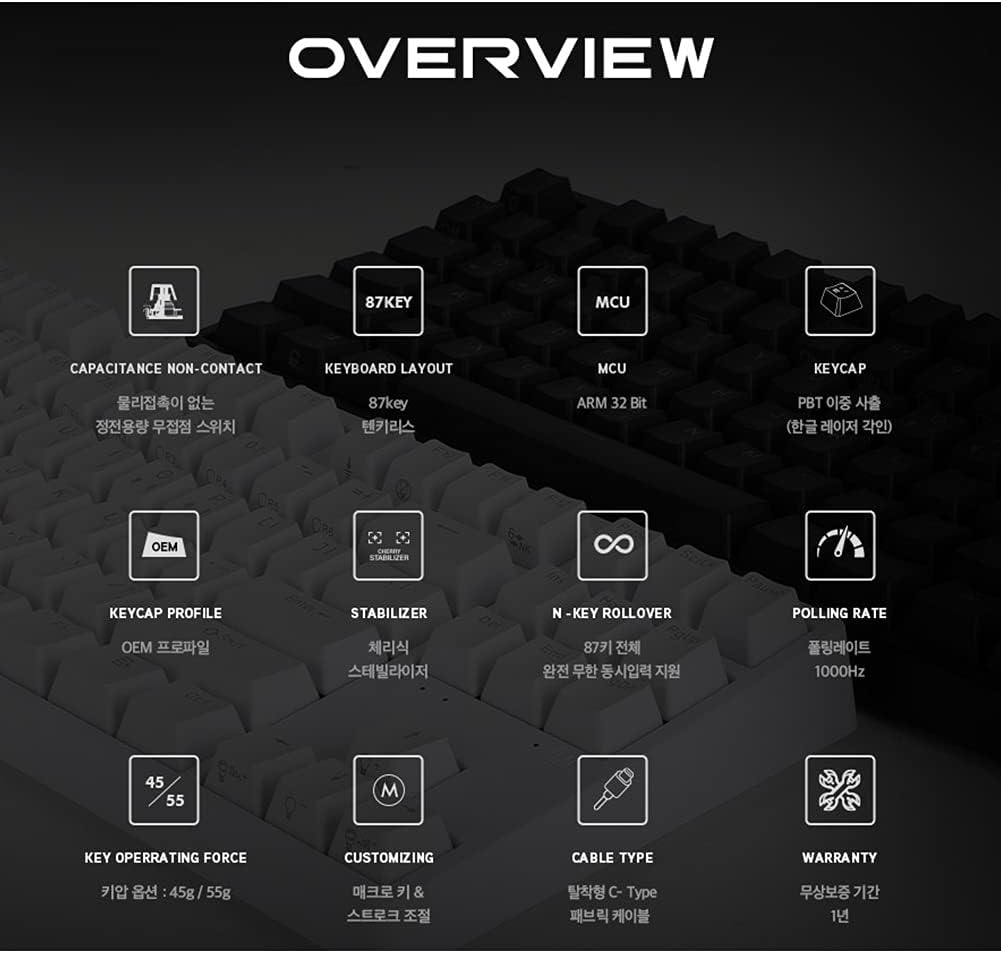
Слика: Оверview diagram detailing the technical specifications and features of the ABKO Hacker KN01 keyboard.
- Capacitance Non-Contact Switches: Provides a responsive and durable typing experience.
- Распоред са 87 тастера: A compact layout without a numeric keypad.
- МЦУ: Equipped with an ARM 32-bit Microcontroller Unit for efficient processing.
- PBT Dual Injection Keycaps: Durable keycaps with legends that won't fade.
- Н-Кеи Ролловер: Supports full N-key rollover, allowing all keys to be registered simultaneously.
- Брзина анкетирања од 1000Hz: Ensures rapid response times for gaming.
- Одвојиви USB Type-C кабл: За лако повезивање и преносивост.
RGB LED Effects
The keyboard features full RGB LED effects. Specific lighting modes and customization options can be accessed through the dedicated software or by using FN key combinations. Refer to the software interface for detailed control over lighting patterns, brightness, and speed.
Adjusting Key Stroke
The key stroke length can be adjusted to suit your preference. Press ФН + Ф9 to cycle through different key stroke settings. This feature allows for fine-tuning the actuation point of the electro-capacitive switches.
Кључна функција закључавања
The keyboard includes a key lock function to prevent accidental presses during critical moments, especially in gaming. Consult the software or specific FN key combinations for activating and deactivating this feature.
Индикаторска светла

Слика: Крупни план view of the keyboard highlighting the Caps Lock, Scroll Lock, and Win Lock indicator lights, which are simple white LEDs.
The indicator lights for Цапс Лоцк, Сцролл Лоцк, и Вин Лоцк are located above the arrow keys. These indicators use simple white LEDs for a clean and minimalist design.
Одржавање
- Чишћење: The ABKO Hacker KN01 keyboard is IP68 certified for full waterproofing. To clean, you can gently rinse the keyboard under running water (ensure USB cable is disconnected) or wipe it with a damp cloth. Allow it to dry completely before reconnecting.
- Општа нега: Avoid exposing the keyboard to extreme temperatures, direct sunlight, or harsh chemicals. Do not attempt to disassemble the keyboard, as this may void the warranty.
- Управљање кабловима: Ensure the USB cable is not bent or kinked excessively to prevent damage.
Решавање проблема
- Тастатура не реагује:
- Уверите се да је USB кабл безбедно повезан и са тастатуром и са рачунаром.
- Покушајте да повежете тастатуру са другим УСБ портом.
- Поново покрените рачунар.
- Ако користите УСБ чвориште, покушајте да га директно повежете са рачунаром.
- LED Lights Not Working/Incorrect:
- Check the keyboard software for lighting settings.
- Ensure no FN key combinations have turned off or changed the lighting.
- Reinstall the keyboard software if necessary.
- Кључеви се не региструју:
- Clean the affected key area, as debris might be interfering with the switch.
- Ensure the key lock function is not active.
- Test the keyboard on another computer to rule out software or system issues.
If you continue to experience issues, please refer to the Warranty & Support section for further assistance.
Спецификације
| Феатуре | Опис |
|---|---|
| Модел | КН01 |
| Тип тастатуре | Гаминг |
| Тип прекидача | Electro-Capacitive Non-Contact (45g actuation force) |
| Кеи Цоунт | 104 |
| Кеицапс | PBT Dual Injection |
| Поллинг Рате | 1000Хз |
| МЦУ | АРМ 32-бит |
| Повезивање | Одвојиви УСБ Типе-Ц |
| Водоотпорна оцена | ИПКСНУМКС сертификован |
| Боја | Бела |
| Оријентација руке | Амбидектроус |
| Компатибилност | CherryMX compatible (switches) |
Гаранција и подршка
The ABKO Hacker KN01 keyboard comes with a 1 година гаранције од датума куповине, покривајући производне недостатке. Молимо вас да сачувате доказ о куповини за потребе гаранције.
For technical support, warranty inquiries, or further assistance, please contact ABKO customer service through their official website or the retailer where the product was purchased. Provide your product model (KN01) and a detailed description of the issue when seeking support.
For the latest drivers and software, please visit the official ABKO webсајту.