
1. Увод
This manual provides detailed instructions for the setup, operation, maintenance, and troubleshooting of your uRage Exodus 700 Semi-Mechanical Gaming Keyboard. Please read this manual thoroughly before using the product to ensure optimal performance and longevity.
2. Садржај пакета
Проверите да ли су све ставке присутне у пакету:
- uRage Exodus 700 Semi-Mechanical Gaming Keyboard
- User's Guide (this document)
- Гарантни лист
3. Подешавање
3.1 Повезивање тастатуре
The uRage Exodus 700 keyboard connects via a wired USB-A connection. Follow these steps to connect your keyboard:
- Пронађите слободан УСБ-А порт на рачунару.
- Plug the USB-A connector of the keyboard cable into the USB-A port on your computer.
- The operating system (Windows 11/10/8/7) will automatically detect and install the necessary drivers.
3.2 Инсталација софтвера (опционо)
For advanced customization, including macro programming and lighting effects, dedicated gaming software is available. Refer to the official uRage webсајт за упутства за преузимање и инсталацију најновијег софтвера.

Image 1: uRage Exodus 700 Semi-Mechanical Gaming Keyboard connected and ready for use.
4. Управљање тастатуром
4.1 Кључне карактеристике
- Полумеханички тастери: Provides a tactile typing experience with fast response times (1 ms) and a key travel of 2.5 mm.
- Анти-Гхостинг: Ensures that multiple key presses are registered simultaneously, crucial for gaming. Up to 24 keys can be registered at once.
- РГБ осветљење: Customizable backlighting with various effects and colors.
- WIN Lock-Function: Disables the Windows key to prevent accidental interruptions during gameplay.
- Интегрисани ослонац за зглоб: Designed for enhanced comfort during extended use.
4.2 RGB контрола осветљења
The keyboard features integrated RGB lighting. Specific key combinations (often involving the 'Fn' key) or the dedicated gaming software can be used to:
- Укључите или искључите осветљење.
- Cycle through different lighting modes and effects.
- Подесите нивое осветљености.
Refer to the keyboard's function key legends for specific lighting control shortcuts.

Image 2: Keyboard in use, demonstrating RGB lighting.
4.3 Macro and Multimedia Functions
The keyboard includes 4 dedicated macro buttons (G1-G4) and additional multimedia functions. These can be programmed and controlled:
- Макро програмирање: Use the dedicated gaming software to record and assign complex key sequences to the macro buttons.
- Мултимедијалне контроле: Access functions like volume control, play/pause, and track skipping via function key combinations.
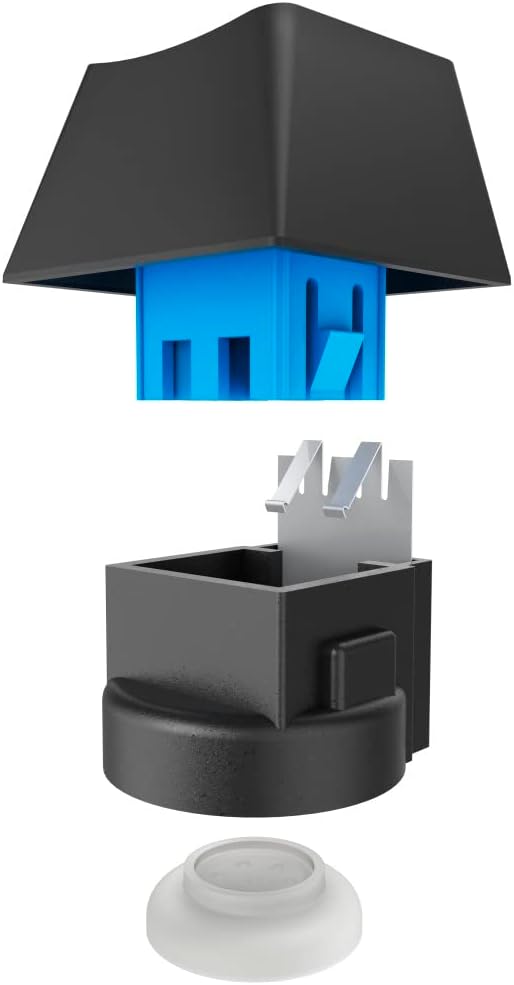
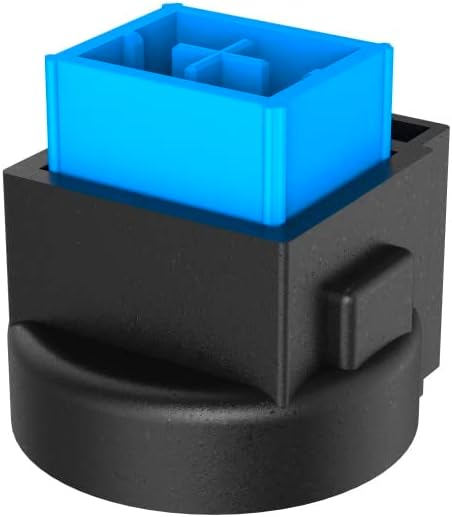
Image 3: Exploded and assembled views of the semi-mechanical key structure.
5. Одржавање
Правилно одржавање осигурава дуготрајност и перформансе ваше тастатуре.
5.1 Чишћење
- Искључите тастатуру из рачунара пре чишћења.
- Користите меку, суву крпу да обришете површину тастатуре.
- За прашину и остатке између тастера користите компримовани ваздух.
- Избегавајте употребу јаких хемикалија, абразивних средстава за чишћење или прекомерну влагу.
5.2 Складиштење
Када се не користи, чувајте тастатуру на чистом и сувом месту, даље од директне сунчеве светлости и екстремних температура.
КСНУМКС. Решавање проблема
If you encounter issues with your uRage Exodus 700 keyboard, refer to the following common solutions:
- Тастатура не реагује:
- Уверите се да је УСБ кабл безбедно прикључен и на тастатуру и на рачунар.
- Покушајте да прикључите тастатуру на други УСБ порт.
- Поново покрените рачунар.
- Кључеви се не региструју:
- Проверите да ли има физичких препрека испод тастера.
- Ensure the keyboard drivers are correctly installed (check Device Manager on Windows).
- RGB осветљење не ради:
- Verify that the lighting is not turned off via keyboard shortcuts.
- Check the gaming software settings if installed.
- Макро функције не раде:
- Ensure the gaming software is running and macros are correctly configured.
- Update the gaming software to the latest version.
If problems persist, contact uRage customer support for further assistance.
7. Спецификације
| Феатуре | Спецификација |
|---|---|
| Назив модела | Излазак 700 |
| Број модела | ham_n8_U8186011 |
| Распоред тастатуре | QWERTY (енглески) |
| Кључна технологија | Semi-Mechanical |
| Број кључева | 114 |
| Rollover Buttons | До 24 |
| Време одговора | 1 мс |
| Кеи Лифетиме | 10 Million Attacks |
| Work Travel | 2.5 мм |
| Повезивање | Жичани УСБ-А |
| Осветљење | РГБ боје |
| Компатибилан ОС | Виндовс 11/10/8/7 |
| Number of Macro Buttons | 4 |
| Боја | Црно |
| Материјал | Пластика |
| Цабле Ленгтх | 180 цм |
| Димензије (Ш к В к Д) | 47 цм к 3.5 цм к 19 цм |
| Тежина | 885 г |
8. Гаранција и подршка
8.1 Гаранција произвођача
The uRage Exodus 700 Semi-Mechanical Gaming Keyboard comes with a 5-годишња гаранција произвођачаМолимо вас да сачувате доказ о куповини за потребе гаранције. Гаранција покрива недостатке у материјалу и изради при нормалној употреби.
8.2 Корисничка подршка
For technical support, warranty claims, or further inquiries, please visit the official uRage website or contact their customer service department. Contact information can typically be found on the warranty card included in your package or on the brand's official webсајту.