
1. Компатибилност производа
This keyboard case is designed for specific iPad models. Please verify your iPad's model number, typically found on the back of your device, to ensure compatibility.
- iPad 9th Generation (2021) 10.2 inch: Models A2602, A2603, A2604, A2605
- iPad 8th Generation (2020) 10.2 inch: Models A2270, A2428, A2429
- iPad 7th Generation (2019) 10.2 inch: Models A2197, A2198, A2200
- iPad Air 3rd Generation (2019): Models A2152, A2123, A2153
- iPad Pro 10.5 inch (2017): Models A1701, A1709
This product is not compatible with any other iPad models.
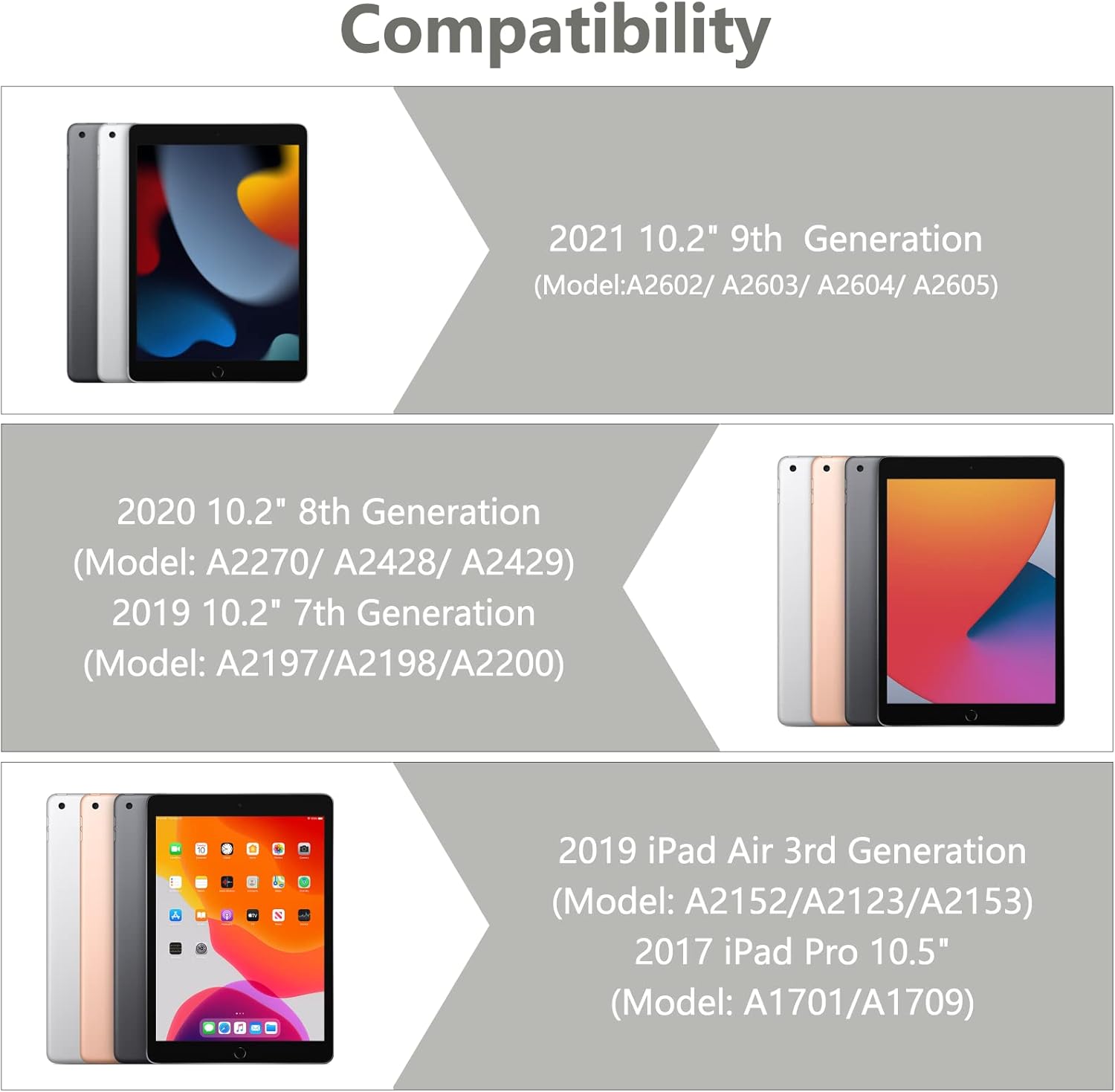
Image 1.1: Visual guide illustrating the compatible iPad models for this keyboard case.
2. Садржај пакета
Please ensure all items are present in the package upon unboxing:
- 1 x iPad Case with Keyboard (integrated)
- 1 x Wireless Bluetooth Keyboard (detachable)
- 1 x Transparent Keyboard Protector
- 1 к УСБ кабл за пуњење
- 1 к Упутство за употребу

Слика 2.1: Готовоview of all components included in the product package.
3. Упутства за подешавање
3.1 Инсталирање вашег iPad-а
- Пажљиво поравнајте свој iPad са оквиром футроле.
- Press the iPad firmly into the case, ensuring all edges are securely seated. The precise cutouts will align with your iPad's ports and buttons.
3.2 Connecting the Wireless Bluetooth Keyboard
The keyboard connects to your iPad via Bluetooth. Follow these steps to pair the devices:
- Уверите се да је тастатура потпуно напуњена.
- Turn on the keyboard by sliding the power switch to the 'ON' position. The indicator light will illuminate.
- Press the 'Connect' button on the keyboard. The Bluetooth indicator light will begin to flash, indicating it is in pairing mode.
- На вашем iPad-у идите на Подешавања > Блуетоотх.
- Укључите Bluetooth. Ваш iPad ће тражити доступне уређаје.
- Select 'Bluetooth Keyboard' (or a similar name) from the list of devices.
- If prompted, enter the pairing code displayed on your iPad onto the keyboard and press 'Enter'.
- Once paired, the Bluetooth indicator light on the keyboard will stop flashing and remain solid or turn off, and your iPad will show the keyboard as 'Connected'.

Image 3.1: The BAIBAO keyboard case with an iPad inserted and the detachable keyboard positioned for typing.
4. Упутство за употребу
4.1 Функционалност одвојиве тастатуре
The keyboard is magnetically attached to the case, allowing for easy detachment and repositioning. This provides flexibility for various usage scenarios.

Image 4.1: Illustration of the magnetic adsorption mechanism that secures the keyboard to the case.
4.2 Вишеструко Viewинг Англес
The case features a thoughtful design that allows you to adjust your iPad to various comfortable viewing angles. This is ideal for typing, watching videos, or making presentations.

Image 4.2: Diagram demonstrating the adjustable viewing angles of the iPad when placed in the case.
4.3 Функција аутоматског спавања/буђења
The smart cover automatically puts your iPad to sleep when closed and wakes it up when opened, helping to conserve battery life.

Image 4.3: Visual representation of the automatic sleep and wake functionality when opening and closing the case.
4.4 Интегрисани држач за оловке
The case includes a dedicated slot for your Apple Pencil, preventing it from being lost and keeping it readily accessible.
4.5 Карактеристике тастатуре
- Tactile Response: Each key features a spring mechanism for a responsive typing experience.
- Hotkeys and Media Keys: The keyboard includes special function keys for quick access to common iPad features.
- Multi-System Support: The keyboard supports Android, iOS, and Windows systems, enhancing its versatility.
5. Одржавање
5.1 Пуњење тастатуре
The keyboard is powered by a built-in Li-ion battery. Use the provided USB charging cable to charge it.
- Connect the small end of the USB cable to the charging port on the keyboard.
- Повежите већи крај USB кабла са USB адаптером за напајање (није укључен) или USB портом рачунара.
- The keyboard power indicator will flash red when charging is required.
- Пуно пуњење обично траје 2-3 сата.
- The keyboard can operate for at least 80 hours on a full charge and has a standby time of 130 days.
5.2 Чишћење кућишта и тастатуре
To maintain the appearance and functionality of your product:
- Обришите кућиште меком крпомamp крпу. Избегавајте јаке хемикалије или абразивна средства за чишћење.
- For the keyboard, use a soft, dry cloth. A transparent keyboard protector is included to help keep the keys clean.
- Уверите се да је тастатура искључена пре чишћења.
КСНУМКС. Решавање проблема
6.1 Keyboard Not Connecting to iPad
- Уверите се да је тастатура укључена и потпуно напуњена.
- Проверите да ли је Bluetooth омогућен на вашем iPad-у.
- Make sure the keyboard is in pairing mode (Bluetooth indicator flashing).
- Forget the device on your iPad's Bluetooth settings and attempt to re-pair.
- Поново покрените и iPad и тастатуру.
6.2 Тастери не реагују
- Проверите ниво напуњености батерије тастатуре и по потреби је напуните.
- Уверите се да је тастатура правилно повезана путем Блутут-а.
- Remove the keyboard protector to ensure it is not interfering with key presses.
6.3 Auto Sleep/Wake Not Functioning
- Ensure your iPad is correctly seated within the case.
- Check your iPad's settings to ensure 'Lock/Unlock' is enabled under 'Display & Brightness' (or similar, depending on iOS version).
7. Спецификације
| Димензије производа | 11.38 к 8.15 к 1.18 инча |
| Тежина артикла | 1.9 фунти |
| Технологија повезивања | Блуетоотх |
| Опис тастатуре | Вишенаменски |
| Посебна карактеристика | Hotkeys, Media Keys, Ergonomic |
| Материјал | акрилонитрил бутадиен стирен (АБС) |
| Тип батерије | 1 литијум-јонска батерија (укључена) |
| Трајање батерије (у раду) | До 80 сати |
| Трајање батерије (приправност) | До 130 дана |
8. Гаранција и подршка
This product is designed for durability and performance. While specific warranty details are not provided in this manual, BAIBAO is committed to customer satisfaction.
If you encounter any issues with your product, have questions regarding its model or function, or require assistance, please contact BAIBAO customer service. We are eager to resolve any problems you may experience.
Please refer to the contact information provided with your purchase or visit the official BAIBAO webсајт за подршку.