
Увод
Thank you for choosing the VETEK AF6 4K Video Camera Camcorder. This manual provides comprehensive instructions for the proper setup, operation, and maintenance of your device. Please read this manual thoroughly before using the camcorder to ensure optimal performance and longevity.
Садржај пакета
Проверите да ли су све ставке наведене у наставку укључене у ваш пакет:
- 1x VETEK AF6 4K Camcorder
- 1к УСБ кабл
- 1к ХДМИ кабл
- 1x Lens Hood
- 1x Fill Light (External LED Light)
- 1к УСБ пуњач
- 1к даљински управљач
- 1к 32ГБ СД картица
- 1x Microphone Cable
- 1x Спољни микрофон
- 1x Reusable Camera Bag
- 2x Rechargeable Lithium Batteries
- 1x Dual External Battery Charger
- 1x Camera Instruction Manual
- 1x Microphone Instruction Manual
- 1x Handheld Stabilizer

Производ је завршенview
Familiarize yourself with the main components of your VETEK AF6 camcorder.

Кључне карактеристике:
- 4K видео резолуција: Records videos at 3840*2160.
- 48.0 MP Image Resolution: Captures still images at 7920*5940.
- 3.0-inch 270° Rotatable Touch Screen: Пружа флексибилност viewing angles and intuitive control.
- 18Кс дигитални зум: Allows for closer shots of distant subjects.
- Ви-Фи повезивање: Enables remote control and file transfer via a smartphone app.
- Функција ПЦ камере: Can be used as a webcam for live streaming and video calls.
- Подршка за екстерни микрофон: Enhances audio quality.
- External Fill Light Support: Improves illumination in low-light conditions.
- Handheld Stabilizer Compatibility: Смањује подрхтавање камере за глађе фотографијеtage.
- Special Shooting Modes: Includes Slow Motion and Time-Lapse.
Сетуп
1. Инсталација и пуњење батерије
- Отворите поклопац одељка за батерију на камкордеру.
- Insert a rechargeable lithium battery, ensuring correct polarity.
- Затворите поклопац одељка за батерије.
- To charge, insert the batteries into the dual external battery charger. Connect the charger to a power source using the provided USB cable and charger. The indicator lights will show charging status.
Напомена: Ensure batteries are fully charged before first use for optimal performance. If indicator lights flicker or do not show a stable charging status, ensure the batteries are correctly seated in the charger and the power connection is stable.
2. Инсталација СД картице
- Locate the SD card slot on the camcorder.
- Insert the 32GB SD card (included) into the slot with the metal contacts facing the correct direction, until it clicks into place.
- Да бисте је уклонили, нежно притисните SD картицу док не искочи.
Важно: Format the SD card in the camcorder's menu before initial use to ensure compatibility and prevent data corruption.
3. Причвршћивање додатне опреме
- Спољни микрофон: Slide the external microphone onto the hot shoe mount on top of the camcorder. Connect the microphone cable to the MIC input port.
- Сјенило: Attach the lens hood to the front of the camcorder lens by twisting it clockwise until secure. The lens hood helps reduce glare and protects the lens.
- External LED Light: Slide the external fill light onto the hot shoe mount. Ensure it is securely fastened. This light provides additional illumination.
- Handheld Stabilizer: Attach the camcorder to the handheld stabilizer using the screw mount at the bottom of the camcorder. The stabilizer helps maintain steady footage.



Упутство за употребу
1. Укључивање/искључивање
Open the LCD screen to power on the camcorder. Close the LCD screen to power off. Alternatively, use the power button located on the device.
2. Basic Recording (Video/Photo)
- Пребаците режиме: Use the Mode button to switch between video recording mode and photo capture mode.
- Започни/Заустави снимање: In video mode, press the Record button to start recording. Press it again to stop.
- Сними фотографију: In photo mode, press the Photo button to capture a still image.

3. Функција зумирања
Use the T (Telephoto) and W (Wide) buttons on the camcorder or the zoom controls on the remote control to adjust the 18X digital zoom.
4. Рад са екраном осетљивим на додир
The 3.0-inch LCD screen is rotatable up to 270 degrees and supports touch input. Navigate menus, adjust settings, and review фооtage by tapping or swiping on the screen.
5. Wi-Fi Connection & App
Download the specified app (refer to the camera's manual for the app name) on your smartphone or tablet. Enable Wi-Fi on the camcorder and connect your mobile device to the camcorder's Wi-Fi network (SSID: 4K_WIFI1079, Password: 12345678). This allows for remote viewing, image capture, video shooting, and sharing to social media.

6. PC Camera Mode (Webcam Function)
Connect the camcorder to your PC using the USB cable. Select "PC CAM" mode on the camcorder. Your computer will recognize the camcorder as a webcam, enabling its use for video chatting and live streaming on platforms like YouTube or Facebook.

7. Посебне карактеристике
- Успорени снимак: Access this mode through the camcorder's menu to record videos at a higher frame rate, allowing for slow-motion playback.
- Тиме-Лапсе фотографија: Select this option in the menu to capture a series of still images at set intervals, which can then be compiled into a time-lapse video.
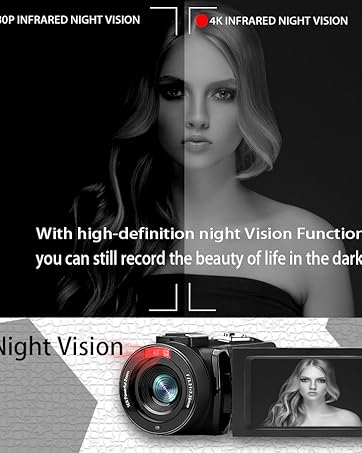
- Ноћни вид: The camcorder features an infrared night vision function, enabling recording in low-light or dark environments. Activate this feature via the menu.


8. Даљински управљач
The included remote control allows you to operate the camcorder from a distance, controlling functions such as recording, photo capture, and zoom without touching the device.

Одржавање
- Чишћење: Use a soft, dry cloth to clean the camcorder body. For the lens, use a specialized lens cleaning cloth and solution. Avoid abrasive materials or harsh chemicals.
- Складиштење: Store the camcorder in a cool, dry place away from direct sunlight and extreme temperatures. Remove batteries if storing for extended periods.
- Отпорност на воду: This camcorder is није водоотпоранИзбегавајте излагање води или високој влажности.
Решавање проблема
| Проблем | Могући узрок | Решење |
|---|---|---|
| Камкордер се не укључује. | Батерија је испражњена или неправилно инсталирана. | Уверите се да су батерије потпуно напуњене и правилно уметнуте. |
| Battery charger indicator lights flicker. | Poor contact between battery and charger, or unstable power supply. | Re-seat batteries firmly in the charger. Check USB cable and power adapter connection. Try a different USB port or power source. |
| Не може се снимати видео или фотографисати. | SD card is full, not inserted, or corrupted. Incorrect mode selected. | Check SD card status, ensure it's inserted and has free space. Format the SD card if necessary (this will erase all data). Verify camcorder is in the correct mode. |
| Лош квалитет видеа/фотографија. | Lens is dirty. Insufficient lighting. Incorrect settings. | Clean the lens. Use the external fill light or shoot in better-lit conditions. Adjust resolution and other settings in the menu. |
| Проблеми са Wi-Fi везом. | Incorrect Wi-Fi password or app not installed. | Ensure correct SSID (4K_WIFI1079) and password (12345678). Download and install the correct app. |
Спецификације
- Бренд: ВЕТЕК
- Број модела: АФ6
- Резолуција снимања видео записа: 4К (3840*2160)
- Ефективна резолуција мировања: 48.0 МП (7920*5940)
- Дигитални зум: 18Кс
- Величина екрана: 3.0 инча
- Тип приказа: 270° Rotatable Touch Screen
- Тип флеш меморије: SD (supports up to 128GB, 32GB included)
- Формат видео снимања: МП4
- Подржани аудио формат: МП4
- Технологија повезивања: УСБ, ХДМИ, Ви-Фи
- Компатибилност са оперативним системом: Windows XP/7/8/10, MAC
- Стабилизација слике: Дигитал
- Ниво водоотпорности: Није водоотпоран
- Број батерија: 2 литијум-полимерска батерија (укључена)
- Димензије артикла (Д к Ш к В): 3.9"Д к 6.2"Ш к 7.8"В
Гаранција и подршка
For warranty information and technical support, please refer to the contact details provided in the separate warranty card or visit the official VETEK webсајт. Ако наиђете на било какве проблеме који нису обухваћени овим упутством, обратите се корисничкој служби за помоћ.