
CAME-TV P-1200R
CAME-TV Boltzen Perseus RGBDT 55W Lighting Screen User Manual
Model: P-1200R
1. Увод
Хвала вам на куповиниasing the CAME-TV Boltzen Perseus RGBDT 55W Lighting Screen. This professional-grade LED light is designed for various photography and videography applications, offering versatile color control and powerful illumination. Please read this manual thoroughly before operating the device to ensure proper use and maintenance.
This manual provides essential information on setting up, operating, maintaining, and troubleshooting your lighting screen. Keep this manual for future reference.
2. Мере предострожности
- Не излажите уређај киши или влази како бисте спречили струјни удар или пожар.
- Do not disassemble or modify the device. Repairs should only be performed by qualified personnel.
- Ensure the power source matches the device's requirements (Electric, 55W).
- Избегавајте директно излагање очију извору светлости, јер може изазвати оштећење ока.
- Keep the device away from flammable materials and ensure proper ventilation during operation.
- Пажљиво рукујте уређајем како бисте спречили физичко оштећење.
3. Садржај пакета
Након отварања паковања, проверите да ли су све компоненте присутне и у добром стању:
- CAME-TV Boltzen Perseus RGBDT 55W Lighting Screen (Model: P-1200R)
- Адаптер/кабл за напајање
- Торба за ношење
- Кориснички приручник (овај документ)

Image: The CAME-TV Boltzen Perseus RGBDT 55W Lighting Screen (displaying blue light) shown alongside its dedicated carrying bag, illustrating the main product and its portable storage solution.
4. Водич за подешавање
4.1 Монтирање светла
The Boltzen Perseus P-1200R is designed to be mounted on a standard light stand. Locate the mounting bracket on the light and attach it securely to your light stand's spigot.
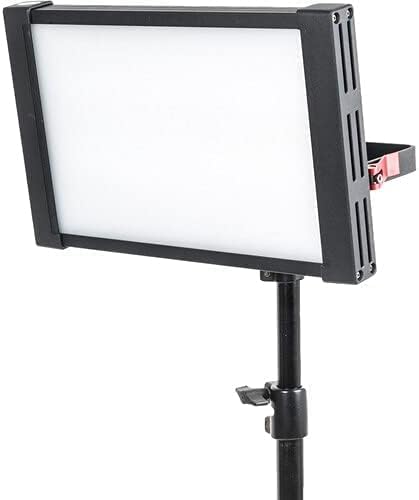
Image: The CAME-TV Boltzen Perseus RGBDT 55W Lighting Screen, emitting a white light, securely mounted on a professional light stand, demonstrating its typical setup for studio or location use.
4.2 Прикључак за напајање
- Connect the power adapter to the DC input port on the back of the light panel.
- Укључите адаптер за напајање у одговарајућу електричну утичницу.
- Alternatively, if using a compatible battery (not included), attach it to the battery plate on the rear of the unit.

Слика: Детаљна view of the rear panel of the CAME-TV Boltzen Perseus RGBDT 55W Lighting Screen, highlighting the control knobs, buttons, and the battery mounting plate, essential for operation and power management.
5. Упутство за употребу
5.1 Укључивање/искључивање
Locate the power switch on the rear panel of the light. Flip the switch to the 'ON' position to power on the device. Flip it to the 'OFF' position to power off.
5.2 Adjusting Brightness (Dimmer)
Користите ДИММЕР knob on the control panel to adjust the light's intensity. Rotate clockwise to increase brightness and counter-clockwise to decrease it.
5.3 Color Temperature and Hue Control
The Boltzen Perseus P-1200R features RGBDT color space control, allowing for a wide range of color temperatures and hues.
- ЦЦТ режим: Користите ЦЦТ knob to adjust the color temperature from 2000K to 10000K.
- РГБ режим: Притисните тастер ЦОЛОР button to switch to RGB mode. Use the corresponding knobs or buttons to adjust Red, Green, and Blue values to achieve desired colors.
- Специјални ефекти: The light may include pre-programmed special effects. Refer to the on-screen display and control buttons for navigation and selection of these effects.
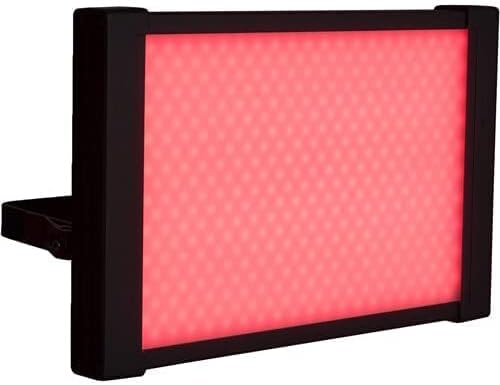
Image: The CAME-TV Boltzen Perseus RGBDT 55W Lighting Screen illuminated with a vibrant red light, showcasing its ability to produce various colors for creative lighting setups.
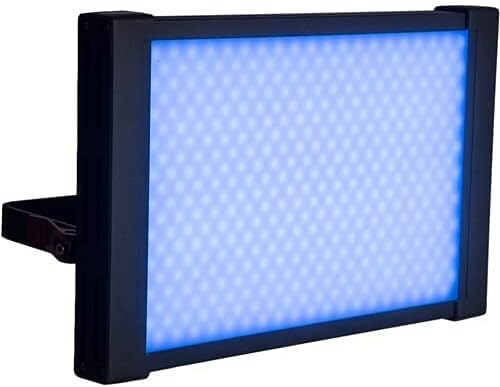
Image: The CAME-TV Boltzen Perseus RGBDT 55W Lighting Screen illuminated with a bright blue light, demonstrating another color option available through its RGBDT color control system.

Image: The CAME-TV Boltzen Perseus RGBDT 55W Lighting Screen illuminated with a rich purple light, further illustrating the extensive color palette achievable with this versatile lighting unit.
6. Одржавање
- Чишћење: Use a soft, dry cloth to clean the light panel and housing. Do not use abrasive cleaners or solvents.
- Складиштење: When not in use, store the light in its carrying bag in a cool, dry place, away from direct sunlight and extreme temperatures.
- инспекција: Regularly inspect the power cable and connections for any signs of damage. If damage is found, discontinue use and contact customer support.
КСНУМКС. Решавање проблема
| Проблем | Могући узрок | Решење |
|---|---|---|
| Светлост се не пали. | No power supply; loose connection; faulty power adapter. | Check power cable connection; ensure outlet is working; try a different power adapter if available. |
| Светло неочекивано трепери или се гаси. | Unstable power supply; overheating; faulty internal component. | Ensure stable power source; allow light to cool down; contact customer support if problem persists. |
| Color or brightness controls are unresponsive. | Software glitch; control panel issue. | Power cycle the device (turn off, wait 10 seconds, turn on); contact customer support. |
8. Спецификације
| Феатуре | Детаљ |
|---|---|
| Модел | П-1200Р |
| Бранд | ЦАМЕ-ТВ |
| Излазна снага | 55W (Note: Some specifications may list 9W, but the primary output is 55W) |
| Опсег температуре боје | 2000K - 10000K (RGBDT) |
| Извор напајања | Електрични |
| Dimensions (Shipping) | 37.2 к 31.2 к 9.6 цм |
| Тежина (испорука) | 1 кг |
| Укључене компоненте | Lighting Screen, Power Adapter, Carrying Bag |
| Први доступан датум | 14. септембра 2021. године |
9. Гаранција и подршка
For warranty information and technical support, please refer to the official CAME-TV webсајт или контактирајте локалног дистрибутера. Сачувајте рачун као доказ о куповини за потребе гаранције.
Manufacturer: CAME-TV Boltzen Perseus RGBDT 55W - P-1200R-1
ASIN: B09G3JLCSQ