
1. Увод и крајview
This manual provides essential information for the installation, operation, and maintenance of your ZOTAC Gaming GeForce RTX 3070 Ti AMP Extreme Holo graphics card. Please read this manual thoroughly before installation and retain it for future reference.
The ZOTAC Gaming GeForce RTX 3070 Ti AMP Extreme Holo is built on the NVIDIA Ampere architecture, featuring enhanced RT Cores and Tensor Cores, new streaming multiprocessors, and superfast GDDR6X memory. It is designed to deliver high-fidelity gaming experiences.

Figure 1: ZOTAC Gaming GeForce RTX 3070 Ti AMP Extreme Holo Graphics Card, front view.
Кључне карактеристике:
- НВИДИА Ampere architecture, 2nd Gen Ray Tracing Cores, 3rd Gen Tensor Cores
- 8GB 256-bit GDDR6X memory, 19 Gbps, PCIE 4.0
- HoloBlack Design with SPECTRA 2.0 RGB Lighting
- IceStorm 2.0 Advanced Cooling with 3x 100mm fans, FREEZE Fan Stop, and Active Fan Control
- PowerBoost and Dual BIOS
- Metal RGB Lighted Backplate
- 8K Ready, 4 Display Ready, HDCP 2.3, VR Ready
- Boost Clock 1890 MHz
2. Подешавање и инсталација
Системски захтеви:
- PCI Express 4.0 compliant motherboard with one x16 graphics slot.
- 750-watt power supply recommended.
- Minimum of 2 x 8-pin and 1 x 6-pin power connectors from the power supply.
- Windows 10 64-bit (build 2004 or later) operating system.
- Minimum 6.56 pounds of available space in your PC case.
- Dimensions: 355.9mm (Length) x 145.7mm (Height) x 59.7mm (Width, 3 slot).
Кораци инсталације:
- Припремите свој систем: Искључите рачунар и искључите све каблове. Отворите кућиште рачунара.
- Пронађите PCIe слот: Пронађите слободан PCI Express x16 слот на матичној плочи.
- Remove existing graphics card (if any): Carefully remove any existing graphics card and its power connectors.
- Install the ZOTAC Gaming GeForce RTX 3070 Ti: Align the graphics card with the PCIe slot and press down firmly until it is securely seated. Ensure the retention clip on the motherboard clicks into place.
- Обезбедите картицу: Use screws to secure the graphics card to the PC case's expansion slot brackets.
- Повежите напајање: Connect the 2 x 8-pin and 1 x 6-pin power connectors from your power supply to the corresponding ports on the graphics card.
- Close the case and connect peripherals: Затворите кућиште рачунара, поново повежите све каблове и укључите систем.
- Инсталирајте драјвере: Once your operating system loads, install the latest NVIDIA Game Ready Drivers or NVIDIA Studio Drivers from the official NVIDIA webсајту.

Слика 2: Предња страна view of the graphics card, highlighting the triple fan cooling system.
Повезивање екрана:
The graphics card supports up to four simultaneous displays. It features:
- 3 x DisplayPort 1.4a (up to 7680x4320@60Hz)
- 1 x HDMI 2.1 (up to 7680x4320@60Hz)
Ensure you use compatible cables for your desired resolution and refresh rate. HDCP 2.3 is supported.

Figure 3: Display output ports on the graphics card, including DisplayPort and HDMI.
3. Руковање графичком картицом
Компатибилност софтвера:
- Драјвери спремни за игру и НВИДИА Студио драјвери
- Мицрософт ДирецтКс 12 Ултимате, Вулкан РТ АПИ
- ОпенГЛ 4.6
Regularly update your graphics drivers to ensure optimal performance and compatibility with the latest games and applications.
RGB Lighting (SPECTRA 2.0):
The card features SPECTRA 2.0 RGB Lighting, which can be customized to match your system's aesthetic. This includes the HoloBlack design elements and the Metal RGB Lighted Backplate. An external LED strip can also be connected for synchronized lighting effects.

Слика 4: Под углом view of the graphics card showcasinг његово прилагодљиво РГБ осветљење.
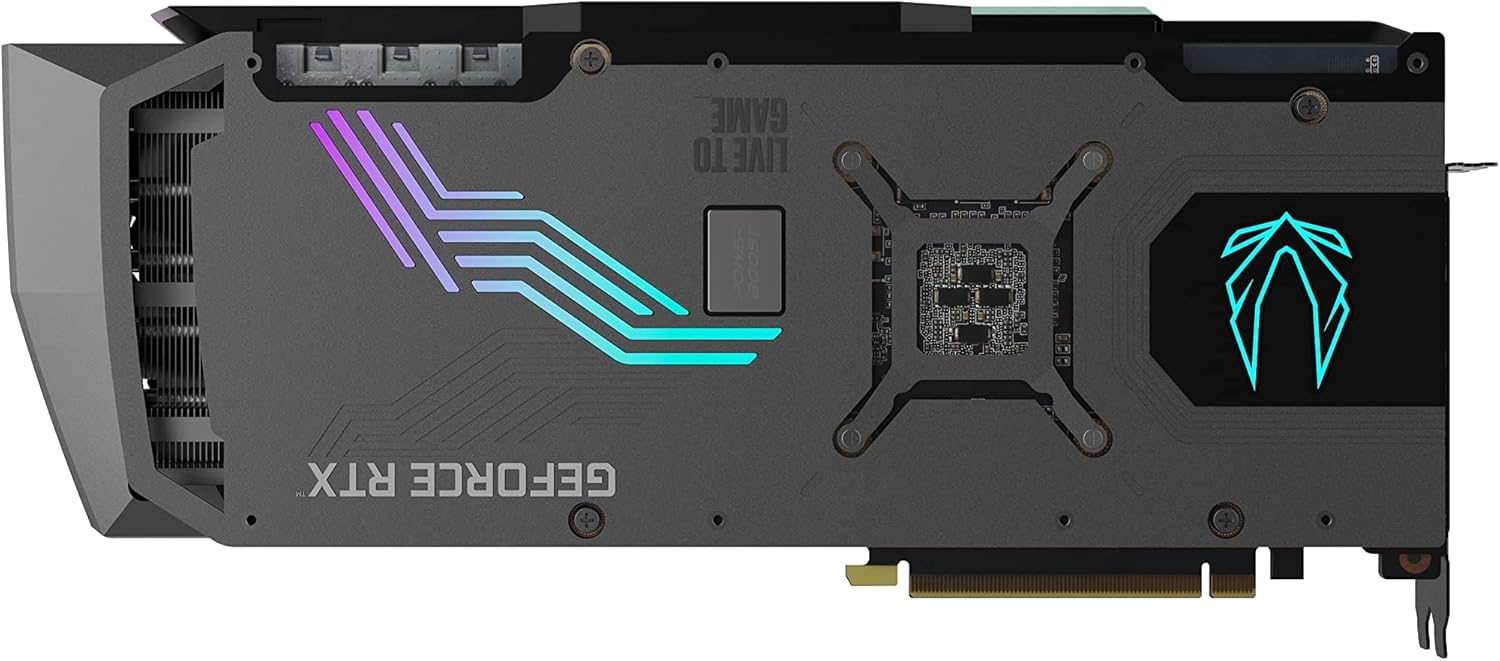
Слика 5: Задња страна view of the graphics card, highlighting the RGB lighted backplate.
4. Одржавање
To ensure the longevity and optimal performance of your graphics card, regular maintenance is recommended.
Систем за хлађење:
The IceStorm 2.0 Advanced Cooling system features three 100mm fans. Key cooling features include:
- Active Fan Control: Dynamically adjusts fan speeds based on GPU temperature.
- FREEZE Fan Stop: Fans will stop completely during low-load conditions to reduce noise and conserve power.
Periodically inspect the fans and heatsink for dust buildup. Use compressed air to gently clean any accumulated dust to maintain efficient cooling. Ensure adequate airflow within your PC case.
КСНУМКС. Решавање проблема
If you encounter issues with your graphics card, consider the following general troubleshooting steps:
- Нема приказа или црни екран: Ensure all power cables are securely connected to the graphics card and the power supply. Verify that the display cable is properly connected to both the graphics card and the monitor. Try a different display output port or cable.
- Проблеми са драјверима: Uninstall existing graphics drivers using a driver uninstaller utility, then download and install the latest drivers from the NVIDIA webсајту.
- Проблеми са перформансама: Check GPU temperatures using monitoring software. Ensure your PC case has good airflow. Verify that your power supply meets the recommended wattage.
- System instability: Ensure your operating system is up to date. Check for any conflicting software or background processes.
For more detailed troubleshooting or persistent issues, please refer to the ZOTAC support webсајту.
6. Спецификације
| Спецификација | Валуе |
|---|---|
| ГПУ | НВИДИА ГеФорце РТКС 3070 Ти |
| ЦУДА Цорес | 6144 |
| Видео меморија | 8ГБ ГДДР6Кс |
| Меморијска магистрала | 256-битни |
| Engine Boost Clock | 1890 МХз |
| Мемори Цлоцк | 19.0 Гбпс |
| ПЦИ Екпресс | 4.0 |
| Максимална резолуција екрана | 7680к4320 |
| Повер Цоннецторс | 2 x 8-пински, 1 x 6-пински |
| Препоручена ПСУ | 750-ватт |
| Максимална потрошња енергије | 310-ватт |
| Димензије (дужина) | 355.9мм (14ин) |
| Димензије (висина) | 145.7мм (5.7ин) |
| Димензије (ширина) | 3 slot (59.7mm / 2.4in) |
| Тежина артикла | 6.56 фунти |
7. Шта је у кутији
The following items are included with your ZOTAC Gaming GeForce RTX 3070 Ti AMP Extreme Holo graphics card:
- ЗОТАЦ ГАМИНГ ГеФорце РТКС 3070 Ти AMP Extreme Holo graphics card
- ZOTAC GAMING RGB GPU Support Bracket
- 3-пински РГБ хеадер кабл
- Кориснички приручник (овај документ)

Figure 6: Contents of the ZOTAC Gaming GeForce RTX 3070 Ti AMP Extreme Holo retail box.

Figure 7: The included ZOTAC Gaming RGB GPU Support Bracket.
8. Гаранција и подршка
For customer service, technical support, or general inquiries regarding your ZOTAC Gaming GeForce RTX 3070 Ti AMP Extreme Holo graphics card, please visit the dedicated support page on the official ZOTAC webсајту.
Званична подршка Webсајт: www.zotac.com/support
Please retain your proof of purchase for warranty claims. Warranty terms and conditions are available on the ZOTAC support webсајту.