
Увод
This manual provides detailed instructions for the installation, operation, and maintenance of your Hama 00118498 Monitor Desk Mount. Designed to enhance your ergonomic workspace, this monitor arm allows for flexible positioning of your display, promoting a comfortable and productive environment. Please read these instructions carefully before beginning installation.
Упутства за подешавање
Follow these steps to correctly install your Hama 00118498 Monitor Desk Mount.
1. Attaching the Desk Clamp
- Поставите сто цлamp assembly onto the edge of your desk. Ensure the desk surface is sturdy and can support the weight of the mount and your monitor.
- Затегните цлamp screw firmly until the mount is securely fastened to the desk. Do not overtighten.
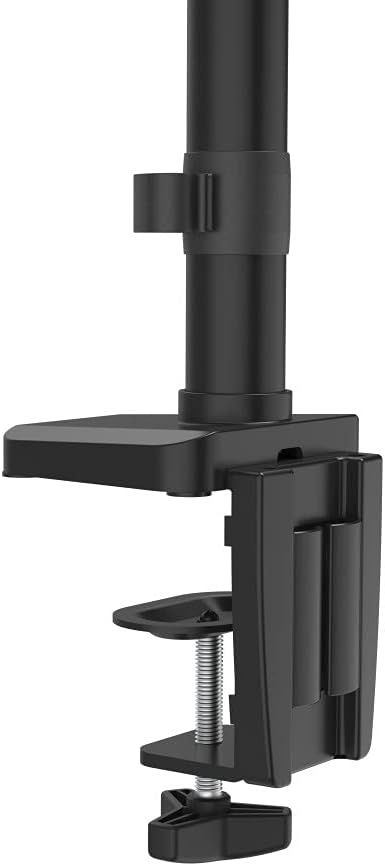
Image: The desk clamp mechanism, showing how it attaches to the desk edge for secure mounting.
2. Причвршћивање монитора
- Ensure your monitor is VESA compatible (100x100mm or 75x75mm).
- Carefully attach the VESA plate from the monitor arm to the back of your monitor using the provided screws. Make sure the screws are tightened securely.
- Slide the monitor (with the attached VESA plate) onto the arm's mounting head. Ensure it clicks into place or is secured with any locking mechanism provided.

Image: The monitor arm's VESA plate and adjustable joint, ready for monitor attachment.

Слика: Страна А view of the assembled monitor arm, highlighting the VESA mount and integrated cable management channels.
3. Менаџмент каблова
Utilize the integrated cable management system to route your monitor cables neatly along the arm. This helps maintain a tidy workspace and prevents cable clutter.
Упутство за употребу
The Hama 00118498 Monitor Desk Mount offers various adjustment options for optimal viewин удобност.
- Подешавање висине: The integrated pneumatic spring allows for smooth and effortless vertical height adjustment. Gently push or pull the monitor to your desired height.
- Окретни: The arm can swivel horizontally, allowing you to rotate your monitor to share your screen or change your viewугао уласка.
- Нагиб: Adjust the monitor's tilt angle (up or down) to reduce glare and find the most comfortable viewинг положај.
- ротација: Rotate your monitor from landscape to portrait orientation as needed for different tasks.
Adjustments should be smooth. If the monitor does not hold its position, refer to the troubleshooting section for tension adjustments.
Одржавање
Редовно одржавање осигурава дуготрајност и оптималне перформансе вашег држача за монитор.
- Чишћење: Обришите површину држача монитора меком,amp тканина. Избегавајте употребу абразивних средстава за чишћење или растварача.
- Проверите везе: Периодично проверавајте све завртње и спојеве како бисте били сигурни да су чврсто затегнути. По потреби поново затегните.
- подмазивање: The pneumatic spring is maintenance-free. Do not attempt to lubricate internal components.
Решавање проблема
If you encounter issues with your Hama 00118498 Monitor Desk Mount, refer to the following common problems and solutions:
- Монитор се увија или не држи положај: The tension of the pneumatic spring may need adjustment. Locate the tension adjustment screw (usually found on the arm joint) and turn it clockwise to increase tension for heavier monitors, or counter-clockwise for lighter monitors. Adjust gradually until the monitor holds its position.
- Монитор је тешко померати: If the arm is too stiff, the tension may be too high. Turn the tension adjustment screw counter-clockwise to decrease tension.
- Arm Feels Loose on Desk: Осигурајте радни сто клamp is fully tightened. If the desk surface is too thin or fragile, consider adding a protective pad between the clamp and the desk.
- Monitor Wobbles: Check all mounting screws on the VESA plate and the arm joints to ensure they are securely fastened.
Спецификације
| Феатуре | Детаљ |
|---|---|
| Број модела | 00118498 |
| Тип монтаже | Деск Цлamp |
| Мовемент Типе | Rotating, Swivel, Tilt, Height Adjustable (Pneumatic Spring) |
| Бранд | Хама |
| Материјал | Алуминијум |
| Боја | Црно |
| Компатибилни уређаји | Монитор |
| Минимална компатибилна величина | 10 инча |
| Максимална компатибилна величина | 32 инча |
| Тежина артикла | 2.2 килограма |
| Земља порекла | Кина |
Гаранција и подршка
For warranty information or technical support, please refer to the documentation included with your purchase or visit the official Hama website. You can typically find support contact details, FAQs, and additional resources there.
Званична Хама Webсајт: ввв.хама.цом