
1. Увод
This manual provides essential information for the proper use and care of your Rollei Actioncam 7S Plus. Please read it thoroughly before operating the device to ensure optimal performance and longevity. The Rollei Actioncam 7S Plus is a versatile 4K action camera designed for capturing high-quality video and photos in various environments, including underwater, thanks to its robust waterproof housing.

Figure 1.1: Rollei Actioncam 7S Plus. This image shows the front view of the camera, highlighting its compact design and lens.
2. Садржај пакета
Проверите да ли су све ставке наведене у наставку укључене у ваш пакет. Ако неке ставке недостају или су оштећене, обратите се корисничкој подршци.
- Rollei Actioncam 7S Plus Camera
- Подводно кућиште
- Ремоте Цонтрол
- Replaceable Lithium-Ion Battery (850 mAh)
- Монтажни оквир
- Tripod Thread Adapter
- Моунт за бицикл
- Моунт Хелмет
- Велцро траке
- Стицкерс
- Цабле Тиес
- УСБ кабл
- Крпа за чишћење сочива

Figure 2.1: Included accessories for the Rollei Actioncam 7S Plus. This image displays the camera along with various mounts, straps, cables, and the remote control.
3. Подешавање
3.1. Инсталација и пуњење батерије
- Отворите поклопац одељка за батерију на дну камере.
- Insert the provided 850 mAh Lithium-Ion battery, ensuring the contacts align correctly.
- Добро затворите поклопац одељка за батерије.
- Connect the camera to a USB power source using the supplied USB cable to charge the battery. The charging indicator light will illuminate.
- Потпуно пуњење обично траје отприлике 2-3 сата.
3.2. Инсталација MicroSD картице
The camera requires a MicroSD card (Class 10 or U3 recommended) for storing recordings.
- Пронађите слот за MicroSD картицу са стране камере.
- Уметните MicroSD картицу са златним контактима окренутим ка предњој страни камере док не кликне на своје место.
- Да бисте је уклонили, нежно гурните картицу док не искочи.
3.3. Укључивање/искључивање
- To power on: Press and hold the Power/Mode button for a few seconds.
- To power off: Press and hold the Power/Mode button again until the camera shuts down.
3.4. Почетна подешавања
Upon first use, or after a factory reset, you may need to set the language, date, and time via the touchscreen menu.
4. Руковање камером
4.1. Цамера Оверview и контроле

Слика 4.1: Задња страна view of the Rollei Actioncam 7S Plus in its waterproof housing, showing the 2-inch touchscreen display.
The Rollei Actioncam 7S Plus features a 2-inch touchscreen for intuitive navigation and settings adjustment. Physical buttons are typically for power/mode and shutter/OK functions.
4.2. Видео снимање
The camera supports various video resolutions and frame rates:
- 4K at 30 frames per second (fps)
- Full HD (1080p) at 120 fps for smooth slow-motion playback
- Other resolutions and frame rates available via settings.
Available video modes include: Normal, Time-Lapse, Idle, and Loop Recording.
4.3. Снимање фотографија
Capture high-resolution still images up to 16 Megapixels (4608 x 3456 pixels).
Photo modes include: Single Shot, Burst, Delay, Time-Lapse, and Long Exposure.
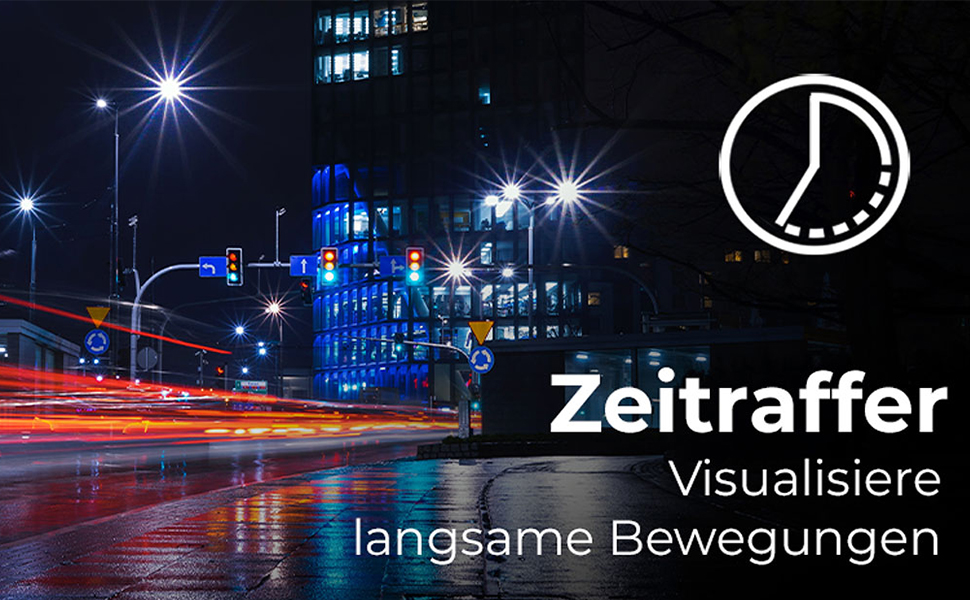
Figure 4.2: Illustration of the Time-Lapse feature. This image depicts a city night scene with light trails, demonstrating the camera's ability to capture time-lapse videos.

Figure 4.3: Illustration of the Slow Motion feature. This image shows colorful powder being thrown, emphasizing the camera's capability to capture detailed slow-motion footage.
4.4. Electronic Image Stabilization (EIS)
The camera features electronic image stabilization to reduce blur and shake in your recordings, especially during active use.
4.5. Wi-Fi Connectivity and Webцам Фунцтион
Connect your Actioncam to a smartphone or tablet via Wi-Fi using the dedicated app for remote control and file transfer. The camera also supports a webcam function for live streaming or video calls when connected to a computer.
4.6. Подводна употреба
The included waterproof housing allows the Actioncam 7S Plus to be used at depths of up to 30 meters (approximately 98 feet).

Figure 4.4: The camera in its waterproof housing being used underwater. This image shows a diver interacting with a shark, demonstrating the camera's waterproof capability up to 30m.
4.7. Даљински управљач
Use the included remote control to start/stop recording or take photos from a distance, enhancing convenience during various activities.
5. Одржавање
5.1. Чишћење камере и објектива
- Use the provided lens cleaning cloth to gently wipe the lens and display.
- For the camera body, use a soft, dry cloth. Do not use chemical cleaners.
- Ensure the waterproof housing is clean and free of debris before each underwater use to maintain its seal. Rinse with fresh water after saltwater exposure.
5.2. Брига о батерији
- Чувајте батерије на хладном и сувом месту.
- Избегавајте потпуно пражњење батерије током дужег временског периода.
- If storing for a long time, charge the battery to about 50% every few months.
5.3. Складиштење
When not in use, store the camera and accessories in a protective case in a dry environment, away from direct sunlight and extreme temperatures.
КСНУМКС. Решавање проблема
| Проблем | Могући узрок | Решење |
|---|---|---|
| Камера се не укључује. | Батерија је испражњена или није правилно уметнута. | Потпуно напуните батерију. Уверите се да је батерија уметнута са исправним поларитетом. |
| Не могу да снимам видео/фотографишем. | MicroSD card is full, corrupted, or not inserted. | Insert a MicroSD card. Format the card (this will erase all data). Replace the card if corrupted. |
| Лош квалитет видеа/фотографија. | Lens is dirty, insufficient lighting, incorrect settings. | Clean the lens. Ensure adequate lighting. Adjust resolution and exposure settings. |
| Проблеми са Wi-Fi везом. | Incorrect Wi-Fi settings, app issues, distance from device. | Ensure Wi-Fi is enabled on camera and device. Reinstall the app. Reduce distance between camera and device. |
| Камера се замрзава или престаје да реагује. | Софтверски квар. | Press and hold the Power button for 10 seconds to force a shutdown. Restart the camera. |
7. Спецификације
| Феатуре | Детаљ |
|---|---|
| Бранд | Роллеи |
| Назив модела | Actioncam 7S Plus |
| Сензорна технологија | ЦМОС |
| Видео Ресолутион | 4K (3840x2160) at 30fps, Full HD (1080p) at 120fps |
| Пхото Ресолутион | 16 МП (4608 к 3456) |
| Мак Апертуре | Ф 2.8 |
| Ленс Типе | Wide Angle (120 degrees) |
| Тип флеш меморије | Micro SD (Class 10, U3 recommended) |
| Видео Формат | МП4 |
| Аудио формат | ААЦ |
| Величина екрана | 2 Inches (Touchscreen) |
| Повезивање | USB, Wi-Fi (802.11b/g) |
| Посебне карактеристике | Touchscreen, Time-Lapse, Slow Motion, Remote Control, Webцам Фунцтион |
| Водоотпорни ниво | Waterproof with housing up to 30 meters |
| Стабилизација слике | електронски (ЕИС) |
| Тежина | 61 грама |
| Трајање батерије | Up to 75 Minutes (850 mAh Li-ion battery) |
| Димензије (Д к Ш к В) | 3.2 к 6 к 4.2 цм |
| Оперативни систем | Proprietary operating system developed by Rollei |
8. Гаранција и подршка
8.1. Информације о гаранцији
The Rollei Actioncam 7S Plus comes with a 24-месечна гаранција from the date of purchase. This warranty covers manufacturing defects and material faults. It does not cover damage caused by improper use, accidents, unauthorized repairs, or normal wear and tear.
8.2. Корисничка подршка
For technical assistance, warranty claims, or further inquiries, please refer to the official Rollei webсајт или контактирајте њихову службу за кориснике. Држите доказ о куповини при руци када контактирате подршку.
Official Rollei Webсајт: ввв.роллеи.цом