
HTC HTC TWS3
HTC True Wireless Earbuds 2 User Manual
Model: HTC TWS3
Увод
The HTC True Wireless Earbuds 2 offer a seamless audio experience with advanced features designed for comfort and convenience. These earbuds utilize the latest Bluetooth 5.1 technology for instant pairing and stable connections across various devices. Enjoy extended listening times, intuitive touch controls, and a comfortable, ergonomic fit for all-day use.

Image: HTC True Wireless Earbuds 2 in their pink charging case, showcasinг компактни дизајн.

Image: A display of HTC True Wireless Earbuds 2 in three available colors: white, black, and pink.
Видео: Званичник прекоview of the HTC True Wireless Bluetooth Earbuds, highlighting key features and design.
Шта је у кутији
Your HTC True Wireless Earbuds 2 package includes the following items:
- HTC True Wireless Earbuds 2 (Left and Right)
- УСБ-Ц кабл за пуњење
- Rubber Eartips (Two pairs: Large and Small sizes, in addition to the pre-installed medium size)
- Футрола за пуњење
Video: An unboxing video for the HTC True Wireless Earbuds 2, showing the contents of the package.
Сетуп
1. Пуњење слушалица и футроле
Before first use, ensure both the earbuds and the charging case are fully charged. Connect the provided USB-C cable to the charging port on the case and plug the other end into a compatible USB power source. The indicator light on the case will show charging status. A full charge provides up to 8 hours of listening time for the earbuds and up to 32 hours total with the charging case.

Image: Pink HTC True Wireless Earbuds 2 and their charging case, illustrating the 30-hour combined battery life.
2. Упаривање са вашим уређајем
- Отворите кућиште за пуњење. Слушалице ће аутоматски ући у режим упаривања.
- На свом уређају (паметном телефону, таблету, лаптопу) идите на подешавања Блутут-а.
- Select "HTC True Wireless Earbuds 2" from the list of available devices.
- Када се повежу, чућете звучни сигнал, а индикаторска лампица на слушалицама ће се променити.
The earbuds utilize Bluetooth 5.1 for quick and stable connections. They are compatible with iOS, Android, and Windows devices.

Image: A diagram illustrating the quick pairing process and wide compatibility of the HTC True Wireless Earbuds 2 with various devices.
3. Achieving Optimal Comfort
The earbuds are ergonomically crafted for a secure and comfortable in-ear fit. Experiment with the included rubber eartips (small, medium, large) to find the size that provides the best seal and comfort for your ears. A proper fit enhances sound quality and noise isolation.

Image: A woman wearing pink HTC True Wireless Earbuds 2 while working on a laptop, emphasizing the ultra-lightweight comfort and ergonomic design.
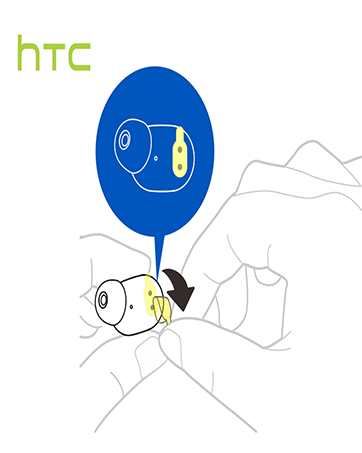
Image: A diagram illustrating the correct method for inserting an earbud to ensure a secure and comfortable fit.
Упутство за употребу
Додирните контроле
The HTC True Wireless Earbuds 2 feature intuitive touch controls on each earbud for easy management of your audio and calls:
- Пусти/паузирај: Једном додирните леву/десну слушалицу.
- Одговори на позив: Једном додирните леву слушалицу.
- Прекини позив: Додирните десну слушалицу једном.
- Одбиј позив: Tap and hold left/right earbud for 2 seconds.
- Претходни запис: Tap and hold left earbud for 2 seconds.
- Следећа нумера: Tap and hold right earbud for 2 seconds.
- Појачавање звука: Tap left earbud twice.
- Смањивање јачине звука: Tap right earbud twice.
- Активирање гласовног помоћника: Tap left/right earbud three times.

Image: A visual guide detailing the simple touch controls for the pink HTC True Wireless Earbuds 2.

Image: A visual guide detailing the simple touch controls for the black HTC True Wireless Earbuds 2.
Употреба једне слушалице
You can use either earbud independently for mono audio or calls. Simply take one earbud out of the case, and it will automatically connect to your device. This feature allows for versatility depending on your listening needs.

Image: Two smartphones connected to individual pink HTC True Wireless Earbuds 2, showcasing the versatility of using one or both earbuds.

Image: A diagram illustrating the versatility of using one or both black HTC True Wireless Earbuds 2 with different devices.
Одржавање
Чишћење и њега
- Редовно чистите слушалице и кућиште за пуњење меком, сувом крпом.
- Remove eartips and clean them with mild soap and water if necessary, ensuring they are completely dry before reattaching.
- Избегавајте употребу абразивних материјала или јаких хемикалија.
Отпорност на воду
The HTC True Wireless Earbuds 2 are IPX5 waterproof, meaning they are protected against low-pressure water jets from any direction. This makes them suitable for workouts and light rain. However, they are not designed for submersion in water.
Решавање проблема
If you encounter any issues with your HTC True Wireless Earbuds 2, please refer to the following common solutions:
| Проблем | Решење |
|---|---|
| Слушалице се не упарују | Ensure earbuds are charged. Place them back in the case, close, then reopen to re-enter pairing mode. Check your device's Bluetooth settings and forget/remove previous connections if necessary. |
| Нема звука из једне слушалице | Уверите се да су обе слушалице напуњене. Покушајте да их вратите у футролу и поново извадите. Поново их упарите са својим уређајем. |
| Контроле на додир не реагују | Ensure earbuds are clean and dry. Restart your device and re-pair the earbuds. |
| Лош квалитет звука | Adjust the eartips for a better seal. Ensure your device is within the 10m Bluetooth range. Check for interference from other wireless devices. |
Спецификације
| Феатуре | Детаљ |
|---|---|
| Назив модела | ХТЦ праве бежичне слушалице 2 |
| Број модела ставке | HTC TWS3 |
| Технологија повезивања | Бежично (Bluetooth 5.1) |
| Трајање батерије (слушалице) | До 8 сати са једним пуњењем |
| Трајање батерије (са кућиштем за пуњење) | До 32 сати |
| Капацитет батерије кућишта за пуњење | 500 мАх |
| Ниво отпорности на воду | ИПКС5 (отпоран на воду) |
| Тип контроле | Touch Control (Volume, Play/Pause, Call Management, Voice Assistant) |
| Постављање уха | Ин Еар |
| Фреквенцијски опсег | 20-20,000 Хз |
| Тежина артикла | 2.82 унци |
| Димензије производа | 1.71 к 1.71 к 1.36 инча |
Гаранција и подршка
HTC provides a 12-month warranty for the True Wireless Earbuds 2. For any support inquiries or warranty claims, please contact HTC customer service through their official webсајт или продавницу где је производ купљен.
За више информација посетите званичник HTC продавница на Амазону.
Ask a question about this manual
Ask about setup, troubleshooting, compatibility, parts, safety, or missing instructions. Manuals+ will review the question and use this page’s manual context to help answer it.